Easy Screen Rotation Manager
Quick & easy to control screen orientation from notification panel.
- Installs
- 792K
- Measured
- Rating
- 3.47
- Ratings
- 1.8K
- 76 reviews
- Version
- 1.22
- Updated 12 Oct 2026
- Released
- 18 Jun 2020
- Tracked since 13 May 2026
- Size
- 5 MB
- Needs 5.0
Screenshots



About Easy Screen Rotation Manager
The description on the store listing
Easy Screen Rotation Manager helps to control phone screen orientation using Notification panel.
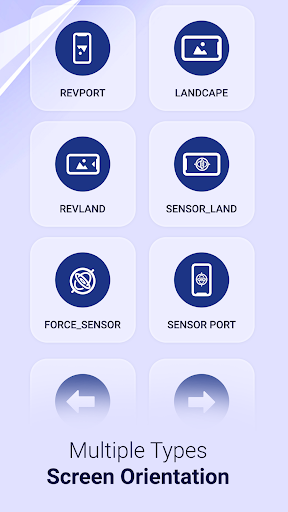
There are multiple types of screen orientation you can set with your choices.
Orientation like Permanent Portrait, Permanent Landscape, Reverse portrait and landscape, sensor based and many more..
Start Rotation Service to enable notification panel.
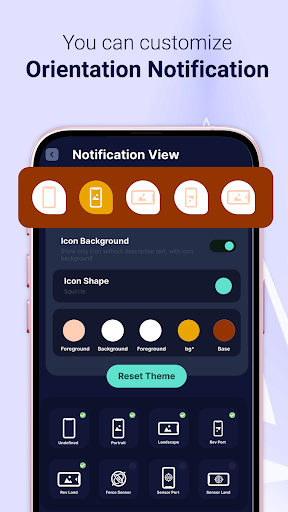
You can customize your notification panel by changing their colors easily.
Also you can put maximum 5 rotation control to notification panel.
Select your custom screen control to notification panel.
Reset default theme and default orientation option also available for notification panel.
Set App Orientation:
You have to enable app …
Read the full description
Easy Screen Rotation Manager helps to control phone screen orientation using Notification panel. There are multiple types of screen orientation you can set with your choices. Orientation like Permanent Portrait, Permanent Landscape, Reverse portrait and landscape, sensor based and many more.. Start Rotation Service to enable notification panel. You can customize your notification panel by changing their colors easily. Also you can put maximum 5 rotation control to notification panel. Select your custom screen control to notification panel. Reset default theme and default orientation option also available for notification panel. Set App Orientation: You have to enable app orientation service to set orientation to app. You can set individual orientation to individual app like one app i want to open in portrait then i will set permanent portrait and other app i want to open landscape then i will set to permanent landscape. Notification Permission Settings: System Setting Warning: Shows warning if system setting is not auto rotate. Notification Privacy: If you want to enable notification panel lock screen using this app. Also enable or disable system notification setting within the app. If you want enable or disable rotation service after phone restarting can be done in the app only. So Install app now and manage your screen orientation anywhere and anytime in your phone easily. Required Permission List: android.permission.RECEIVE_BOOT_COMPLETED : to start service gain after phone rebooted android.permission.SYSTEM_ALERT_WINDOW : to display over other apps android.permission.FOREGROUND_SERVICE : To service working in background above oreo version android.permission.PACKAGE_USAGE_STATS : to set orientation to individual app
Installs, last 30 days Measured
Exact Google Play install counts, collected daily
Ratings
1,822 ratings, 76 reviews
- 5 ★48%
- 4 ★12%
- 3 ★9.9%
- 2 ★7.7%
- 1 ★23%
Recent reviews
Latest public reviews from the store
- 20 Sep 2024
I'm giving it 3 stars coz in some instances it came out best for me and I guess only if people knew how to use apps like this they would find it relevant enough. The down side is, it's not editable after the vid is saved. Can u also add more templates even South African themes.
- 28 Apr 2021
It was far a way nice experience with this application. But there is no edit option. So to fix a mistake one needs to create the card again from starting.
- 1 Nov 2020
The app is good but i wish there was an option to go back and edit the video if you made a mistake or something. And also im failing to upload a pic it just doesn't appear.. Otherwise your app is great
What reviewers bring up
Topics mentioned in the latest 10 reviews, by how many reviews mention them
Liked in good reviews (1 reviews)
No topic comes up twice.
Raised in bad reviews (7 reviews)
- video 5
- share 3
- ads 3
- experience 2
- creating 2
- making 2
- create 2
- save 2
Top chart positions
Latest Google Play chart ranks by country, last 10 days
Not in any tracked top chart in the last 10 days.
Easy Screen Rotation Manager history
Release, install milestones, listing and store changes
- Reached 500,000+ installs 11 Jul 2025
- Reached 100,000+ installs 1 Apr 2021
- Reached 50,000+ installs 12 Nov 2020
- Reached 10,000+ installs 27 Aug 2020
- Reached 5,000+ installs 29 Jul 2020
- Reached 1,000+ installs 3 Jul 2020
- Reached 500+ installs 1 Jul 2020
- Reached 100+ installs 29 Jun 2020
Update frequency
How often Easy Screen Rotation Manager ships a new version, month by month
4 updates in the last 12 months. More often than most similar apps: they shipped a median of 1 updates in the same year.
Recent versions
Current version 1.22
- Version 1.2212 Oct 2026
- Improved App Performance. - Latest Android Version. - Solved Crashes.
- Version 1.2124 Aug 2026
- Improved App Performance. - Latest Android Version. - Solved Crashes.
- Version 1.2019 Mar 2026
- Improved Performance. - Solved Crashes.
- Version 1.1910 Mar 2026
Listing keywords
Words and phrases Easy Screen Rotation Manager repeats most in its store listing
Top phrases: notification panel (8), android permission (4), screen orientation (4), control to notification (2), enable notification panel (2).
Highlighted words also appear in the title. Counts cover the title, short description and description.
Business model and tech
From the store listing, the SDKs in the app package and its declared permissions
- Business model
- Free to downloadIn-app purchasesShows ads
- Built with
- No cross-platform framework or game engine detected
- Ad networks (1)
- AdMob
- Subscriptions and payments
- Google Play billing
- Analytics and crash reports
- Firebase
- Sensitive access
- Phone and callsDraws over other appsAdvertising ID
2 ad, attribution and analytics SDKs detected. SDKs are read from the app package and permissions from the store listing, so code that loads later is not seen.
Technology
20 SDKs found in the app package
Ad networks
Advertising and install-attribution SDKs found in the app package
- AdMob
20 permissions
2 special access, 2 sensitive, 16 standard
- Draw over other appsSpecial access
- See which apps are usedPACKAGE_USAGE_STATSSpecial access
- Show notificationsPOST_NOTIFICATIONSSensitive
- Read phone status and identitySensitive
- Ad attribution (Privacy Sandbox)ACCESS_ADSERVICES_ATTRIBUTIONStandard
- Ad topics (Privacy Sandbox)ACCESS_ADSERVICES_TOPICSStandard
- Read how it was installed (install referrer)BIND_GET_INSTALL_REFERRER_SERVICEStandard
- Read the advertising IDAD_IDStandard
- Read the advertising ID (Privacy Sandbox)ACCESS_ADSERVICES_AD_IDStandard
- Foreground service (special use)FOREGROUND_SERVICE_SPECIAL_USEStandard
- Keep the phone awakeStandard
- Run a foreground serviceFOREGROUND_SERVICEStandard
Compliance
What the listing and the app package show
- Store status
- Live
- Upkeep
- Updated 12 Oct 2026
- Registered in
- India
- Privacy policy
- Linked on the listing
- Advertising
- Shows ads
- In-app purchases
- Offered
- Age rating
- Everyone
- Sensitive permissions
- 2 sensitive, 2 special access of 20
- Location access
- No
- Camera and microphone
- Neither
Apps like Easy Screen Rotation Manager
Day & Date Calendar Widgetoxdb.net439K installs★ 3.95
Calculator Volt/Amp/Watt/OhmAktham Ahmed486K installs★ 4.5
AI Poem GeneratorAllMath73.7K installs★ 4.62
Pixolor - Live Color PickerHanping293K installs★ 4.14
DNS Changer Pro (No Root)GreatStuffApps172K installs★ 4.24
Safe Clean Browsermusicchamsmobile111K installs★ 4.33
Megaphone & Voice AmplifierJan Augustyniak110K installs★ 4.0
Multi Timer with AdsCatfantom232K installs★ 4.28
SmartCleaner--Photo&FileWH1546HHMM2.7M installs★ 3.98
Easy Screen Rotation Manager: questions and answers
How many downloads does Easy Screen Rotation Manager have?
Easy Screen Rotation Manager has 791,906 installs on Google Play, measured from the store's own count on 20 Nov 2026.
Who makes Easy Screen Rotation Manager?
Easy Screen Rotation Manager is published by JVR Developers, a developer based in IN.
When was Easy Screen Rotation Manager last updated?
The latest version (1.22) was released on 12 Oct 2026.
Is Easy Screen Rotation Manager free?
Yes. Easy Screen Rotation Manager is free to download and offers in-app purchases, and it shows ads.
Is Easy Screen Rotation Manager still available?
Yes. Easy Screen Rotation Manager is live on Google Play as of 20 Nov 2026.
Track Easy Screen Rotation Manager and its competitors
Watch any app for new versions, rating drops, chart moves and removals. Free plan, no card.