EasyCanvas -Graphic tablet App
You can use your tablet as a liquid crystal tablet or dual monitor.
- Installs
- 90.27K
- Measured
- Rating
- 2.73
- Ratings
- 196
- 19 reviews
- Version
- 4.8.10
- Updated 1 Dec 2025
- Released
- 18 Jan 2022
- Tracked since 12 May 2026
- Size
- —
Also on App Store: EasyCanvas -Graphic tablet App (772 ratings)
Screenshots





About EasyCanvas -Graphic tablet App
The description on the store listing
EasyCanvas, Turn your tablet into a liquid crystal tablet!
EasyCanvas is an app that lets you use your tablet as a liquid crystal tablet.
Draw directly in PC programs such as Photoshop and Clip Studio through your tablet.
▶ Excellent performance of Galaxy Tab and S Pen
Now, if you have a Galaxy Tab and S Pen, you don't need to buy an expensive LCD tablet.
The excellent hardware of the Galaxy Tab is combined with the technology of EasyCanvas to make the perfect LCD tablet.
▶ Familiarize yourself with drawing on paper
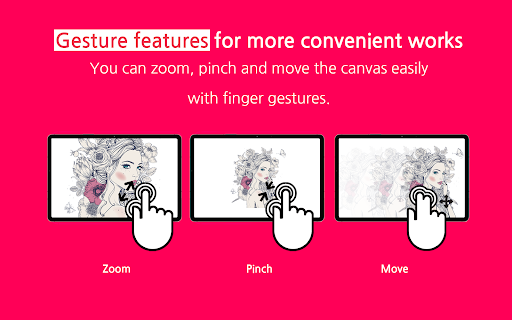
It fully supports "Palm Rejection", which allows you to draw with your palm on the screen, and "Pen Pressure" and "Tilt" of the S Pen.
Also, the 120Hz refresh …
Read the full description
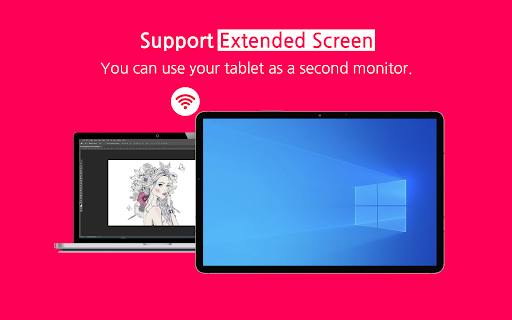
EasyCanvas, Turn your tablet into a liquid crystal tablet! EasyCanvas is an app that lets you use your tablet as a liquid crystal tablet. Draw directly in PC programs such as Photoshop and Clip Studio through your tablet. ▶ Excellent performance of Galaxy Tab and S Pen Now, if you have a Galaxy Tab and S Pen, you don't need to buy an expensive LCD tablet. The excellent hardware of the Galaxy Tab is combined with the technology of EasyCanvas to make the perfect LCD tablet. ▶ Familiarize yourself with drawing on paper It fully supports "Palm Rejection", which allows you to draw with your palm on the screen, and "Pen Pressure" and "Tilt" of the S Pen. Also, the 120Hz refresh rate makes the screen and stylus movement smoother. ▶ Independent Virtual Display Solution Easy&Light's virtual display solution provides extended display. It can be used as an extended monitor in triple or higher environments as well as a dual monitor. ▶ Simultaneous wired/wireless connection support It supports both stable USB connection and convenient wireless connection via Wi-Fi. Now work anywhere, anytime, any way you want. Pay after you experience it for yourself! We provide a trial function that you can use for free for 3 days. [Support Environment] PC: Windows 10 or later (WDDM version 2.0 or later) Tablet: Galaxy Tab S3, S4, S6, S6 Lite, S7, S7+, S7 FE Support : https://easynlight.oqupie.com/portal/2247/request Privacy policy : http://www.easynlight.com/easycanvaspolicy/
Installs since 29 Aug 2026 Measured
Exact Google Play install counts, collected daily
Ratings
196 ratings, 19 reviews
- 5 ★23%
- 4 ★13%
- 3 ★17%
- 2 ★6.6%
- 1 ★40%
Recent reviews
Latest public reviews from the store
- 2 Apr 2026
got it working after a lot of fiddling. using galaxy tab s8 and mac Tahoe. need to enable dev mode on android with USB debugging. on mac install the computer app. i will give more stars if developers get stylus with eraser working such as the staedtler jumbo, currently the stylus eraser doesn't work. haven't gotten wifi connection to work at all.
- 15 Jan 2026
great app
- 3 Dec 2025
Easy canvas working on macos tahoe. easy canvas 2025 is another app that does not work in Mac. this app works. I use it as a graphic tablet. extend display is not in this app. only duplicates the screen but very high response and stylus sensitivity. waiting for more improvements later. please do not remove this apps even it has low ratings. this app is my day-to-day working partner. much love ❤️
- 13 Mar 2025
My fault gang its pretty good just glitches out for a bit
What reviewers bring up
Topics mentioned in the latest 50 reviews, by how many reviews mention them
Liked in good reviews (18 reviews)
- tablet 5
- graphic 3
- bit 3
- sensitivity 2
- properly 2
- features 2
- pressure 2
- hope 2
Raised in bad reviews (27 reviews)
- connection 3
- trial 3
- both 3
- pay 3
- pen 3
- credit card 2
- developer 2
- multiple 2
Top chart positions
Latest Google Play chart ranks by country, last 10 days
Not in any tracked top chart in the last 10 days.
EasyCanvas -Graphic tablet App history
Release, install milestones, listing and store changes
- Reached 50,000+ installs 2 May 2025
- Reached 10,000+ installs 19 Dec 2022
- Reached 5,000+ installs 2 Jul 2022
- Reached 1,000+ installs 12 Mar 2022
- Reached 500+ installs 26 Feb 2022
- Reached 100+ installs 31 Jan 2022
- First released on the store 18 Jan 2022
Update frequency
How often EasyCanvas -Graphic tablet App ships a new version, month by month
0 updates in the last 12 months. Less often than most similar apps: they shipped a median of 1 updates in the same year.
Recent versions
Current version 4.8.10
- Version 4.8.1018 Nov 2025
Minor bug fixes and stability improvements
- Version 4.8.915 Oct 2025
- Version 4.8.35 Sep 2024
- Version 4.7.817 Jul 2024
Listing keywords
Words and phrases EasyCanvas -Graphic tablet App repeats most in its store listing
Top phrases: galaxy tab (4), liquid crystal tablet (3), crystal tablet (3), liquid crystal (3), tab and pen (2).
Highlighted words also appear in the title. Counts cover the title, short description and description.
Business model and tech
From the store listing, the SDKs in the app package and its declared permissions
- Business model
- Free to downloadIn-app purchases
- Built with
- No cross-platform framework or game engine detected
- Ad networks (0)
- None detected
- Subscriptions and payments
- Google Play billing
- Analytics and crash reports
- FirebaseGoogle Analytics
- Sensitive access
- Photos, videos and filesAdvertising ID
2 ad, attribution and analytics SDKs detected. SDKs are read from the app package and permissions from the store listing, so code that loads later is not seen.
Technology
19 SDKs found in the app package
11 permissions
0 special access, 1 sensitive, 10 standard
- Read shared storageSensitive
- Read how it was installed (install referrer)BIND_GET_INSTALL_REFERRER_SERVICEStandard
- Read the advertising IDAD_IDStandard
- Foreground service (data sync)FOREGROUND_SERVICE_DATA_SYNCStandard
- Keep the phone awakeStandard
- Run a foreground serviceFOREGROUND_SERVICEStandard
- Full internet accessStandard
- See network connectionsStandard
- Receive push messagesStandard
- Google Play license checkStandard
- In-app purchases with Google PlayStandard
Compliance
What the listing and the app package show
- Store status
- Live
- Upkeep
- Updated 1 Dec 2025
- Privacy policy
- Linked on the listing
- Advertising
- No ads declared
- In-app purchases
- Offered
- Age rating
- Everyone
- Sensitive permissions
- 1 sensitive of 11
- Location access
- No
- Camera and microphone
- Neither
Apps like EasyCanvas -Graphic tablet App
PI mPowerPI Industries17K installs★ 4.5
Image to PDF Converter &EditorSmart Nextgen Studio25.7K installs★ 4.29
Speco GraySpeco Technologies10.9K installs★ 3.67
Meeting Summary - AI NotesGODHITECH JSC20.7K installs★ 2.4
Magnifying Glass with FlashligOne Music Player42.1K installs★ 3.34
Drift: Notification TickerLight Source Labs5.5K installs★ 4.52
BI LifeBI Digital16.4K installs★ 4.8
VPN Prime - Unlimited ProxyAVATARA LTD12.9K installs★ 4.06
AI Prompts: AI Image GeneratorPixel Crafts7.6K installs★ 4.33
EasyCanvas -Graphic tablet App: questions and answers
How many downloads does EasyCanvas -Graphic tablet App have?
EasyCanvas -Graphic tablet App has 90,272 installs on Google Play, measured from the store's own count on 21 Nov 2026.
Who makes EasyCanvas -Graphic tablet App?
EasyCanvas -Graphic tablet App is published by easynlight.
When was EasyCanvas -Graphic tablet App last updated?
The latest version (4.8.10) was released on 1 Dec 2025.
Is EasyCanvas -Graphic tablet App free?
Yes. EasyCanvas -Graphic tablet App is free to download and offers in-app purchases.
Is EasyCanvas -Graphic tablet App still available?
Yes. EasyCanvas -Graphic tablet App is live on Google Play as of 21 Nov 2026.
Track EasyCanvas -Graphic tablet App and its competitors
Watch any app for new versions, rating drops, chart moves and removals. Free plan, no card.