
ECU Connect
Companion app to EcuTek's Bluetooth Vehicle Interface
- Installs
- 141K
- Measured
- Rating
- 4.11
- Ratings
- 328
- 57 reviews
- Version
- 9.1.6
- Updated 27 Oct 2026
- Released
- 23 Mar 2017
- Tracked since 12 May 2026
- Size
- 37 MB
- Needs 5.0
Also on App Store: ECU Connect (88 ratings)
Screenshots



About ECU Connect
The description on the store listing
IMPORTANT
This app requires an EcuTek Bluetooth Vehicle Interface to connect to your car's ECU. These are available from EcuTek Tuners. Find your nearest one at www.ecutek.com/dealers. If you don't have an interface, run the demo mode within the app to see ECU Connect in action.
ECU Connect is the free companion app to the new pocket-size Bluetooth Vehicle Interface produced by specialist tuning firm EcuTek Technologies.
Once you have purchased your EcuTek Vehicle Interface, plug it into your car's OBD vehicle diagnostic socket, pair it with your phone in the app and you will open up a whole new world of enjoyment with your car.
With ECU Connect, you can receive and program in a …
Read the full description
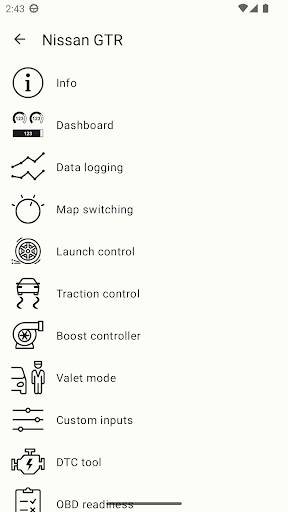
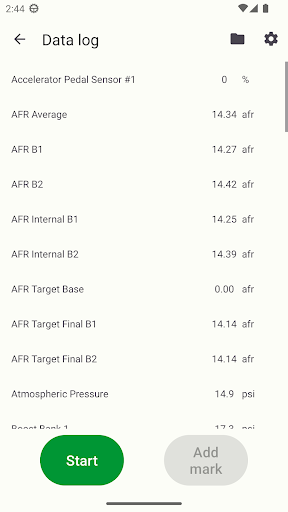
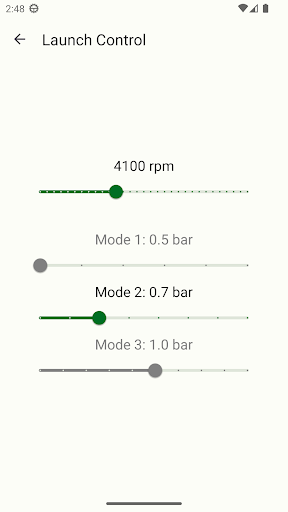
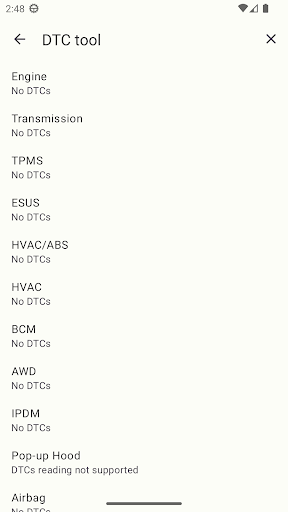
IMPORTANT This app requires an EcuTek Bluetooth Vehicle Interface to connect to your car's ECU. These are available from EcuTek Tuners. Find your nearest one at www.ecutek.com/dealers. If you don't have an interface, run the demo mode within the app to see ECU Connect in action. ECU Connect is the free companion app to the new pocket-size Bluetooth Vehicle Interface produced by specialist tuning firm EcuTek Technologies. Once you have purchased your EcuTek Vehicle Interface, plug it into your car's OBD vehicle diagnostic socket, pair it with your phone in the app and you will open up a whole new world of enjoyment with your car. With ECU Connect, you can receive and program in a tuned file from one of our EcuTek Master Tuners just with your phone. No laptop, no wires, no fuss. Just create an account in the app, select the tuner you want to work with, and you are ready to receive the tuned file. Discuss with your tuner what you want to achieve from the tune and once the file has been created, you will receive a notification that the file is ready. Go to Program ECU, select the file and follow the on-screen instructions. It's as easy as that. All that's left is for you to enjoy the car! For more details on programming your car’s ECU with ECU Connect go to www.ecutek.com/phone-flash Your EcuTek Tuner can also set up some unique RaceROM features which allows you to control and adjust some aspects of the tune with your phone: Launch RPM; Traction Control settings; boost and torque levels; switch between different set ups such as track mode, economy mode, fast road and flexfuel on the fly. These are just some of the example set ups. Speak to your EcuTek Master Tuner and discuss with them what you'd like. There are lots of options to choose from. For a list of supported models together with their ECU Connect Features go to www.ecutek.com/ecu-connect Whether your car is tuned on EcuTek or not, with ECU Connect you can instantly see how your engine is performing as you drive it (even if the car is not officially supported, ECU Connect provides basic support for most cars using generic OBD2 CAN communication protocol available on nearly all vehicles manufactured from 2008 onwards). You can view and log any parameter the ECU records and even create unlimited personalised dashboards if you want to monitor specific groups of parameters. Save and send these logs direct from the app to your tuner. You can also record GPS coordinates in the log files, so you can see what was happening at any given point on your logging run (very useful on track days).
Installs since 29 Aug 2026 Measured
Exact Google Play install counts, collected daily
Ratings
328 ratings, 57 reviews
- 5 ★60%
- 4 ★17%
- 3 ★8.8%
- 2 ★5.9%
- 1 ★8.8%
Recent reviews
Latest public reviews from the store
- 24 Jul 2024
Works very well. An exit app button would be useful and make closing it easier.
Top chart positions
Latest Google Play chart ranks by country, last 10 days
Not in any tracked top chart in the last 10 days.
ECU Connect history
Release, install milestones, listing and store changes
- Reached 100,000+ installs 24 Jul 2024
- First released on the store 23 Mar 2017
Update frequency
How often ECU Connect ships a new version, month by month
10 updates in the last 12 months. More often than most similar apps: they shipped a median of 1 updates in the same year.
Recent versions
Current version 9.1.6
- Version 9.1.627 Oct 2026
- Nissan RZ34: fixed VIN reading
- Version 9.0.510 Aug 2026
- Fixed UI in My files with long texts - Fixed matching Digital parameters from logging profiles
- Version 8.6.026 Jun 2026
- Data Logging: added Auto-logging - BMW: fixed recognition of some cars - Bug fixes
- Version 8.4.11 May 2026
- Toyota V35A Gen2 Hybrid/Facelift: added PhoneFlash support - Nissan Juke/Juke15: added ECM tool
Listing keywords
Words and phrases ECU Connect repeats most in its store listing
Top phrases: ecu connect (9), vehicle interface (4), bluetooth vehicle interface (3), www ecutek com (3), bluetooth vehicle (3).
Highlighted words also appear in the title. Counts cover the title, short description and description.
Business model and tech
From the store listing, the SDKs in the app package and its declared permissions
- Business model
- Free to download
- Built with
- Xamarin
- Ad networks (0)
- None detected
- Sensitive access
- LocationCameraPhotos, videos and filesNearby devices
0 ad, attribution and analytics SDKs detected. SDKs are read from the app package and permissions from the store listing, so code that loads later is not seen.
Technology
14 SDKs found in the app package
17 permissions
0 special access, 9 sensitive, 8 standard
- Take photos and videosSensitive
- Change or delete shared storageSensitive
- Read shared storageSensitive
- Approximate locationSensitive
- Precise locationSensitive
- Connect to paired Bluetooth devicesBLUETOOTH_CONNECTSensitive
- Find nearby Bluetooth devicesBLUETOOTH_SCANSensitive
- Show notificationsPOST_NOTIFICATIONSSensitive
- Mock location sources for testingSensitive
- Control vibrationStandard
- Foreground service (connected device)FOREGROUND_SERVICE_CONNECTED_DEVICEStandard
- Run a foreground serviceFOREGROUND_SERVICEStandard
Compliance
What the listing and the app package show
- Store status
- Live
- Upkeep
- Updated 27 Oct 2026
- Registered in
- United Kingdom
- Privacy policy
- Linked on the listing
- Advertising
- No ads declared
- In-app purchases
- None declared
- Age rating
- Everyone
- Sensitive permissions
- 9 sensitive of 17
- Location access
- Yes, while in use
- Camera and microphone
- Camera
Apps like ECU Connect
油價公告 油耗計算Declan16864.4K installs★ 4.7
Dashboard Warning LightsOBD High Tech175K installs★ 4.13
Fipe FacilDS Develop45.4K installs★ 4.0
Carbon DriveGates Corporation167K installs★ 2.16
Auto Catalyst Market appAUTOCATALYST MARKET122K installs★ 3.44
Car Security Alarm ProEast Software Coders323K installs★ 4.33
Check MX Car HistoryAutoIndex340K installs★ 3.29
- ChevroSys Scan FreeOBD High Tech117K installs★ 3.4
Valvoline EuropeAPPelit B.V.130K installs★ 2.71
ECU Connect: questions and answers
How many downloads does ECU Connect have?
ECU Connect has 140,812 installs on Google Play, measured from the store's own count on 14 Nov 2026.
Who makes ECU Connect?
ECU Connect is published by EcuTek Technologies Ltd., a developer based in GB.
When was ECU Connect last updated?
The latest version (9.1.6) was released on 27 Oct 2026.
Is ECU Connect free?
Yes. ECU Connect is free to download.
Is ECU Connect still available?
Yes. ECU Connect is live on Google Play as of 14 Nov 2026.
Track ECU Connect and its competitors
Watch any app for new versions, rating drops, chart moves and removals. Free plan, no card.