
Efficient Note
Fast note-taking that keeps ideas flowing. Instantly capture and organize freely
- Installs
- 98
- Measured
- Rating
- —
- Ratings
- —
- Version
- Varies with device
- Updated 9 Sep 2025
- Released
- 19 Jul 2025
- Tracked since 13 May 2026
- Size
- —
Screenshots
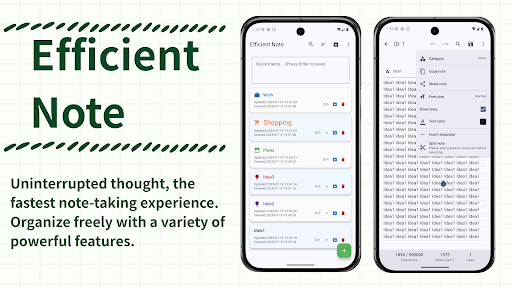


About Efficient Note
The description on the store listing
# Is Your Note-Taking Really "Efficient"?
Daily tasks, learning records, sudden moments of inspiration.
The act of taking notes is an important first step in organizing our thoughts and shaping our future.
But have you ever felt that this step is "troublesome"?
"Launch the app, press the new creation button..."
That slight inconvenience can sometimes make precious ideas disappear.
"Efficient Note" was created to bring such "thought time lag" as close to zero as possible.
# Why "Efficient Note"?
This is not just a memo app. Here are sophisticated features designed to become your "thinking partner."
## 1. "Speed Memo" That Never Stops Your Thoughts:
When you open the app, …
Read the full description
# Is Your Note-Taking Really "Efficient"? Daily tasks, learning records, sudden moments of inspiration. The act of taking notes is an important first step in organizing our thoughts and shaping our future. But have you ever felt that this step is "troublesome"? "Launch the app, press the new creation button..." That slight inconvenience can sometimes make precious ideas disappear. "Efficient Note" was created to bring such "thought time lag" as close to zero as possible. # Why "Efficient Note"? This is not just a memo app. Here are sophisticated features designed to become your "thinking partner." ## 1. "Speed Memo" That Never Stops Your Thoughts: When you open the app, you're already at the input screen. With the input field permanently located at the top of the list screen, you can immediately jot down whatever comes to mind. Just press "Done/Enter" on your keyboard for automatic saving. Important points from meetings, contact information heard over the phone, memos to prevent forgetting purchases... You'll never miss an idea again. ## 2. "Organization & Merging" of Scattered Information at Will: Information is meaningless if you only collect it. This app allows you to manipulate your memos freely. - Drag & Drop Reordering: Intuitive operation to rearrange memo order according to your flow of thought - Memo Splitting: Easily split lengthy memos using separator characters like "---" - Memo Merging: Select multiple related memos and combine them into one - 9 Category Classifications: Work, ideas, shopping... visually classify your memos with icons Gather fragments of ideas to compile into project proposals, or split diaries by month. Information restructuring has never been easier. ## 3. "Personalization Features" That Make Writing Enjoyable: Even in digital format, the writing experience should be pleasant. Customize according to your preferences. - Selectable Font Size & Text Color: Optimize appearance according to memo importance or mood - "Ruled Lines Display" for Enhanced Concentration: Feel like you're writing in a notebook, allowing you to focus on your thoughts - Eye-friendly Dark Mode: Won't strain your eyes even during long work sessions (Light mode is default) ## 4. "High-Speed Search" for Instant Access to Needed Information ### List Screen - Full-text Search: Simultaneously search titles and content - Category Filter: Instantly narrow down to only the memos you need ### Edit Screen - In-memo Search & Replace: Pinpoint specific locations within the edit screen - Search Position Display: Understand your current location with displays like "2/5" ## 5. Smart Functions - Archive function for organization - Preview display of each memo on the list screen (accordion format) - Character and line count display in edit screen # We Want YOU to Use This - Creators and planners with ideas constantly flowing - Business professionals and students who want to organize large amounts of information efficiently - Homemakers who want to smartly manage daily tasks and shopping - Those who found other feature-rich memo apps too complex to master - All "record keepers" who seek both simplicity and high functionality Install now and get the ultimate memo experience in your hands.
Installs since 2 Sep 2026 Measured
Exact Google Play install counts, collected daily
Daily history starts once this app is in our daily install sample.
Ratings
- 5 ★0.0%
- 4 ★0.0%
- 3 ★0.0%
- 2 ★0.0%
- 1 ★0.0%
Recent reviews
Latest public reviews from the store
No reviews in our sample for this app yet.
Top chart positions
Latest Google Play chart ranks by country, last 10 days
Not in any tracked top chart in the last 10 days.
Efficient Note history
Release, install milestones, listing and store changes
- Reached 50+ installs 9 Sep 2025
- Reached 10+ installs 25 Jul 2025
- First released on the store 19 Jul 2025
Listing keywords
Words and phrases Efficient Note repeats most in its store listing
Top phrases: edit screen (3), efficient note (3), list screen (3), daily tasks (2), note taking (2).
Highlighted words also appear in the title. Counts cover the title, short description and description.
Business model and tech
From the store listing and declared permissions
- Business model
- Free to downloadShows ads
- Sensitive access
- Advertising ID
7 permissions
0 special access, 0 sensitive, 7 standard
- Read the advertising IDAD_IDStandard
- Keep the phone awakeStandard
- Run a foreground serviceFOREGROUND_SERVICEStandard
- Full internet accessStandard
- See network connectionsStandard
- Internal app permissionDYNAMIC_RECEIVER_NOT_EXPORTED_PERMISSIONStandard
- Google Play license checkStandard
Compliance
What the listing and the app package show
- Store status
- Live
- Upkeep
- Updated 9 Sep 2025
- Registered in
- Japan
- Privacy policy
- Linked on the listing
- Advertising
- Shows ads
- In-app purchases
- None declared
- Age rating
- Everyone
- Sensitive permissions
- 0 sensitive of 7
- Location access
- No
- Camera and microphone
- Neither
Apps like Efficient Note
들어서 화면켜기Won3.5K installs★ 4.0
Height PredictionEcliptic App Ventures45.9K installs★ 2.4
Speicers`Pro VPNEldiablolucifer202021.2K installs★ 4.14
Lightning Tracker with AlertsYaksh Software4.3K installs★ 3.0
Mana Pathi (Unit Converter)Shirish Koirala2.2K installs★ 4.6
Multi-tab Calc - A simple app.Naoyuki Rikiji1.3K installs★ 5.0
Photo Recovery PlusBillApps7.1K installs★ 4.53
Just Silence. Scheduled.Akid Soft1.6K installs★ 5.0
- WoWp AssistantВиталий Робиновский2K installs★ 4.2
Efficient Note: questions and answers
How many downloads does Efficient Note have?
Efficient Note has 98 installs on Google Play, measured from the store's own count on 2 Sep 2026.
Who makes Efficient Note?
Efficient Note is published by karashidaimyojin, a developer based in JP.
When was Efficient Note last updated?
The latest version (Varies with device) was released on 9 Sep 2025.
Is Efficient Note free?
Yes. Efficient Note is free to download, and it shows ads.
Is Efficient Note still available?
Yes. Efficient Note is live on Google Play as of 2 Sep 2026.
Track Efficient Note and its competitors
Watch any app for new versions, rating drops, chart moves and removals. Free plan, no card.