
Encrypt Decrypt File
Protect your files. Encrypt photos, videos & documents with AES-256 security.
- Installs
- 91.66K
- Measured
- Rating
- 3.35
- Ratings
- 257
- 16 reviews
- Version
- 1.74
- Updated 17 Jul 2026
- Released
- 13 May 2021
- Tracked since 14 May 2026
- Size
- 8 MB
- Needs 6.0
Screenshots



About Encrypt Decrypt File
The description on the store listing
In a digital world, <b>your personal files deserve real security.</b> Whether you're archiving sensitive documents, protecting private videos, or creating a secure vault for your photos, you need a powerful tool you can trust.
Welcome to <b>Encrypt File</b>, the simple, modern, and secure way to encrypt and decrypt any file right on your device.
<b>Built on a Foundation of Real Security</b>
Your privacy is our top priority. After setting your master password, all encryption and decryption happens locally on your device. Your password and files never leave your phone, ensuring complete confidentiality.
<b>Key Security Features:</b>
• <b>Strong Encryption …
Read the full description
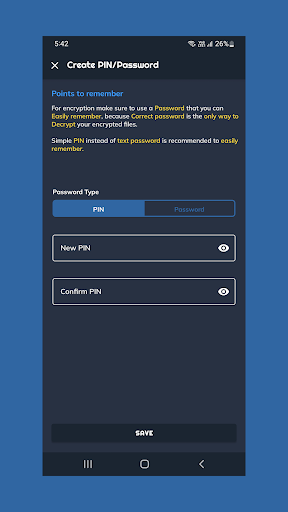
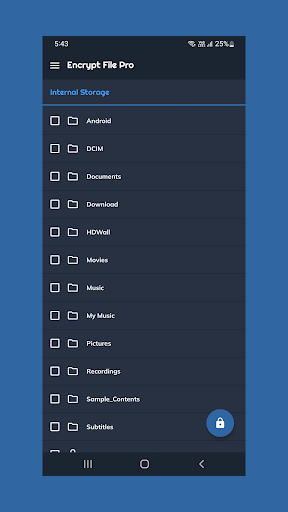
In a digital world, <b>your personal files deserve real security.</b> Whether you're archiving sensitive documents, protecting private videos, or creating a secure vault for your photos, you need a powerful tool you can trust. Welcome to <b>Encrypt File</b>, the simple, modern, and secure way to encrypt and decrypt any file right on your device. <b>Built on a Foundation of Real Security</b> Your privacy is our top priority. After setting your master password, all encryption and decryption happens locally on your device. Your password and files never leave your phone, ensuring complete confidentiality. <b>Key Security Features:</b> • <b>Strong Encryption Standard:</b> We use <b>AES-256</b>, the standard trusted by governments and security experts worldwide. <font color="#0077cc"><a href="https://www.google.com/url?q=https%3A%2F%2Fen.wikipedia.org%2Fwiki%2FAdvanced_Encryption_Standard&sa=D&sntz=1&usg=AOvVaw2S_OR-LSTf8PxaZ3hWbJg-">Learn more about AES</a></font>. • <b>Robust Key Derivation:</b> We derive a secure key from your password using the modern industry standard, <b>PBKDF2 with HMAC-SHA256</b>, to protect against brute-force attacks. • <b>Proper Cryptographic Implementation:</b> Every encrypted file uses a unique, cryptographically secure salt and initialization vector (IV), protecting your data from pattern analysis attacks. <b>A Universal File Encryption Tool</b> You can encrypt <b>any file type</b>, turning your device into a secure digital vault managed through our simple, built-in file manager. • <b>Photo & Video Vault:</b> Keep your personal memories, family photos and private videos. • <b>Secure Document Archive:</b> Protect tax forms, contracts, business plans, or any other sensitive PDF or document. • <b>Create Secure Backups:</b> Encrypt important files before uploading them to cloud storage or a backup drive for an extra layer of security. • <b>Universal Decryption Utility:</b> Our app is designed for compatibility, making it a great utility for decrypting standard AES-encrypted files from other tools that use the same password. <b>How It Works</b> Simple and Secure Workflow: 1. <b>Set Your Master Password:</b> The first time you launch the app, you will create a single, strong password or PIN. This will be your only key. 2. <b>Manage Your Files:</b> Use the in-app file browser to find the files you want to protect. 3. <b>Encrypt & Decrypt:</b> Simply select one or more files and tap "Encrypt." To decrypt, select an encrypted file (with a `.enc` extension) and tap "Decrypt." The app will use your master password for all operations. <b>Important Information</b> • <b>Your Password is Your Only Key:</b> Your files' security depends entirely on your master password. We recommend choosing a password that is difficult to guess but easy for you to remember. • <b>We Cannot Recover Your Password:</b> For your security, we never store or see your password. If you forget it, <b>your data cannot be recovered.</b> Please be careful and store your master password safely. • <b>Do Not Modify Encrypted Files:</b> Manually changing the filename or `.enc` extension of an encrypted file may corrupt it and make it permanently unrecoverable. <b>A Note on Ads & Pro Version</b> Free version is supported by ads to fund its ongoing development and security updates. <a href="https://play.google.com/store/apps/details?id=xyz.tipsbox.edf"><b>Click here to get the Free version</b></a> Pro version provides an uninterrupted, <b>ad-free</b> experience with <b>offline</b> access. <b>Say goodbye to subscriptions! Unlock Pro with a single payment and enjoy all Pro features forever.</b> <a href="https://play.google.com/store/apps/details?id=xyz.tipsbox.edfpro"><b>Click here to get the Pro version</b></a> If you have any questions or feedback, please feel free to contact us via the "Contact Us" option in the app menu. Download <b>Encrypt File</b> today and take control of your digital privacy!
Installs since 29 Aug 2026 Measured
Exact Google Play install counts, collected daily
Ratings
257 ratings, 16 reviews
- 5 ★46%
- 4 ★9.8%
- 3 ★7.3%
- 2 ★4.9%
- 1 ★32%
Recent reviews
Latest public reviews from the store
- 23 Nov 2024
Looks great but... "Failed to create Root Dir"
- 30 Sep 2024
As a app, seems no one has tried to understand how stupid their filters between images for different PNG, jpg converts from this Heic. Seems everything is backward Should be, add your Heic turns into a PNG, etc. But it says it's going to be a PNG, but it says it's a PNG Heic etc About time someone redesigned this stupid app Seems all other apps is simpler..... Ummmm have I changed the wrong app!
- 23 May 2024
Good
- 3 Apr 2024
Limit should be increased. Other than that everything is super good
What reviewers bring up
Topics mentioned in the latest 15 reviews, by how many reviews mention them
Liked in good reviews (8 reviews)
- other 2
Raised in bad reviews (5 reviews)
- create root 2
- heic file 2
- failed 2
- idea 2
Top chart positions
Latest Google Play chart ranks by country, last 10 days
Not in any tracked top chart in the last 10 days.
Encrypt Decrypt File history
Release, install milestones, listing and store changes
- Reached 50,000+ installs 27 Oct 2023
- Reached 10,000+ installs 4 Nov 2021
- Reached 5,000+ installs 9 Sep 2021
- Reached 1,000+ installs 15 Jul 2021
- Reached 100+ installs 3 Jun 2021
- First released on the store 13 May 2021
Update frequency
How often Encrypt Decrypt File ships a new version, month by month
3 updates in the last 12 months. More often than most similar apps: they shipped a median of 1 updates in the same year.
Recent versions
Current version 1.74
- Version 1.7417 Jul 2026
Ui changes - Material 3/Material YOU
- Version 1.7327 Nov 2025
This update includes a significant security enhancement to our encryption system, making your files even safer than before. We've also improved app stability and fixed several bugs to provide a smoother, more reliable experience. Thank you for your support!
- Version 1.7218 Nov 2025
- Version 1.702 Jul 2025
Listing keywords
Words and phrases Encrypt Decrypt File repeats most in its store listing
Top phrases: master password (5), encrypted file (3), pro version (3), enc extension (2), encrypt decrypt (2).
Highlighted words also appear in the title. Counts cover the title, short description and description.
Business model and tech
From the store listing and declared permissions
- Business model
- Free to downloadShows ads
- Sensitive access
- No sensitive permission declared
Compliance
What the listing and the app package show
- Store status
- Live
- Upkeep
- Updated 17 Jul 2026
- Registered in
- India
- Privacy policy
- Linked on the listing
- Advertising
- Shows ads
- In-app purchases
- None declared
- Age rating
- Teen
Apps like Encrypt Decrypt File
Remove Water From Your PhoneHomaVEO Studio125K installs★ 3.15
Metal Detector: Metal FinderSynosure Tech76.3K installs★ 4.5
ATOMSTACKShenzhen AtomStack Technologies Co., Ltd.50.4K installs★ 3.32
Language Translate -Translator3B Apps Technologies119K installs★ 4.13
B7 TUNNELXTreme Team57.2K installs★ 3.8
Elixir 2 - Donation KeyTamás Barta8.1K installs★ 4.07
BD Hishab CalculatorBD Land Surveyor72.6K installs★ 4.6
RifaYa Lite - Ticket bookBifrost Solutions39.4K installs★ 3.86
BITZER REFRIGERANT RULERBITZER Kühlmaschinenbau120K installs★ 3.97
Encrypt Decrypt File: questions and answers
How many downloads does Encrypt Decrypt File have?
Encrypt Decrypt File has 91,657 installs on Google Play, measured from the store's own count on 14 Nov 2026.
Who makes Encrypt Decrypt File?
Encrypt Decrypt File is published by Tips Box, a developer based in IN.
When was Encrypt Decrypt File last updated?
The latest version (1.74) was released on 17 Jul 2026.
Is Encrypt Decrypt File free?
Yes. Encrypt Decrypt File is free to download, and it shows ads.
Is Encrypt Decrypt File still available?
Yes. Encrypt Decrypt File is live on Google Play as of 14 Nov 2026.
Track Encrypt Decrypt File and its competitors
Watch any app for new versions, rating drops, chart moves and removals. Free plan, no card.