Encryption Manager Lite
File manager for confidential data using AES encryption.
- Installs
- 329K
- Measured
- Rating
- 3.0
- Ratings
- 603
- 32 reviews
- Version
- 4.5.4
- Updated 6 Feb 2018
- Released
- 21 Apr 2011
- Tracked since 12 May 2026
- Size
- 1 MB
- Needs 2.2
Screenshots


About Encryption Manager Lite
The description on the store listing
Encryption Manager is a file manager, that offers a comfortable and secure way to keep files with confidential data encrypted using AES or Twofish encryption.
A master password is both used to access the application and to encrypt the encryption keys, that are generated random for each file, that is managed by Encryption Manager. Confidential files are accessible directly after the login. With one click on the file, the file is decrypted to its original location and can be shown by the installed viewer or editor apps. When you are finished working with the decrypted copy, the file is re-encrypted with one click and the decrypted file is wiped from the SD card. This wipe process will …
Read the full description
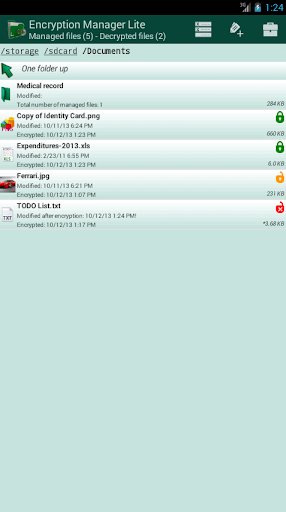
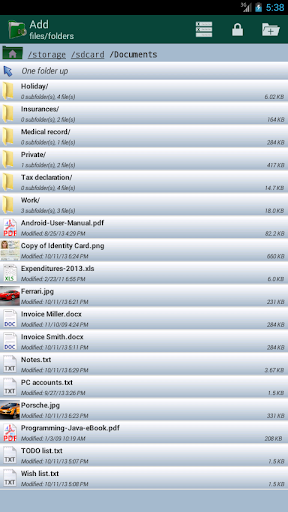
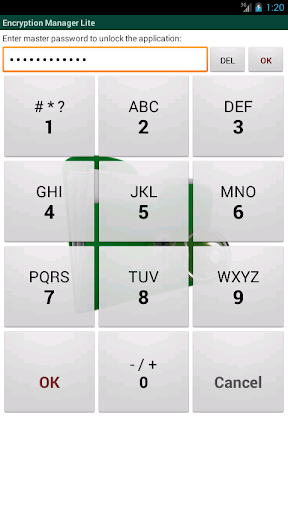
Encryption Manager is a file manager, that offers a comfortable and secure way to keep files with confidential data encrypted using AES or Twofish encryption. A master password is both used to access the application and to encrypt the encryption keys, that are generated random for each file, that is managed by Encryption Manager. Confidential files are accessible directly after the login. With one click on the file, the file is decrypted to its original location and can be shown by the installed viewer or editor apps. When you are finished working with the decrypted copy, the file is re-encrypted with one click and the decrypted file is wiped from the SD card. This wipe process will overwrite the data with random bytes before the file is deleted. So even if the device is lost or stolen, it is not possible to access your confidential data. Encrypting new files is very simple: they can be chosen either with the built-in file manager or by simply using "send/share" from another app. Features: * Access based on master pin or master text password. * Encrypts all kind of files. * Possibility to encrypt all files of a folder. * Provides a special handling for images, e.g. removal/creation of gallery thumbnail images. * Base functionality of a file manager (view on click, send/share menu), but with automatic decryption before the action. * Offers AES and Twofish encryption with 128 and 256 bit keys. * Displays icons to indicate whether a file is currently decrypted or was changed. * User setting for automatic re-encryption on exit. * Secure overwrite of the orginal file after the encryption. * An additional anti file recovery tool is included. * Two layout modes: flat list view or hierarchical folder view. * Filters can be defined to filter SD card files by file extensions or to excluded folders. * The master password can be changed for an existing database. * Provides a comfortable backup mechanism for using cloud storage (Dropbox, Google Drive, ...) to save the encrypted files * The app can be configured to delete all managed files after 7 unsuccessful attempts. * Has an "Exit" menu on all screens, that finishes the task completely. * App is locked (master password must be re-entered), when there is no user input for configurable period. * Includes english help pages. Languages: * English * German * French * Russian * Spanish Limitations: * The "lite" version is limited to 5 encrypted files! * The full version has no limitations.
Installs since 29 Aug 2026 Measured
Exact Google Play install counts, collected daily
Ratings
603 ratings, 32 reviews
- 5 ★34%
- 4 ★16%
- 3 ★7.3%
- 2 ★0.0%
- 1 ★43%
Recent reviews
Latest public reviews from the store
- 26 Aug 2025
I have used this app for a few years now and it is great. You can create a back up file with a password to encrypt it which I do before I switch to a new phone, email that file to myself and on the new phone open the app and import my saved file and boom, done, everything is there. Very user friendly and intuitive.
- 4 Apr 2025
I have loved this program functionally which I did purchase. however, I have been unable to back it up to my new phone. I have tried support with Verizon and Samsung and neither of them could help me. I can open the program on the new phone but I cannot get it to recognize the backup files, encrypted or even unencrypted! Pl can anyone help or is there any support for this program?? I did everything but I cannot get it into the new phone to recognize even though I go through all the steps.
- 8 Jan 2024
A fantastic & easy to use App- with the added confidence of security. I have been using the pro version for years now & has been one of the first that I recommended to some friends new to password Managers. I have several pwrd manager's as backup as well as this beeing my master user as it is pin coded which is becoming the replacement of passwords but is fast & easy to access & enables a multitude of details beeing entered. Highly recommend as a master or to run alongside other password man-s
- 26 Sep 2023
Love it!! Easy to swap to a new phone and quick response from developers when I sent a question.
What reviewers bring up
Topics mentioned in the latest 50 reviews, by how many reviews mention them
Liked in good reviews (43 reviews)
- passwords 6
- backup 5
- fantastic 4
- recommend 4
- keeping 4
- file 4
- data 4
- find 4
Raised in bad reviews (3 reviews)
- three 2
Top chart positions
Latest Google Play chart ranks by country, last 10 days
Not in any tracked top chart in the last 10 days.
Encryption Manager Lite history
Release, install milestones, listing and store changes
- Reached 100,000+ installs 6 Feb 2018
- Reached 50,000+ installs 15 Jun 2014
- Reached 10,000+ installs 28 Mar 2012
- Reached 5,000+ installs 14 Oct 2011
- Reached 1,000+ installs 30 May 2011
- Reached 500+ installs 10 May 2011
- Reached 100+ installs 28 Apr 2011
- First released on the store 21 Apr 2011
Update frequency
How often Encryption Manager Lite ships a new version, month by month
0 updates in the last 12 months. Less often than most similar apps: they shipped a median of 1 updates in the same year.
Recent versions
Current version 4.5.4
- Version 4.5.426 Sep 2017
Android 7 (Nougat): correction of incorrectly positioned context menus.
- Version 4.5.34 Oct 2016
- Version 4.5.217 Mar 2016
- Version 4.5.129 Oct 2015
Listing keywords
Words and phrases Encryption Manager Lite repeats most in its store listing
Top phrases: file manager (4), confidential data (3), encryption manager (3), master password (3), encrypted files (2).
Highlighted words also appear in the title. Counts cover the title, short description and description.
Business model and tech
From the store listing and declared permissions
- Business model
- Free to download
- Sensitive access
- No sensitive permission declared
Compliance
What the listing and the app package show
- Store status
- Live
- Upkeep
- No update since 6 Feb 2018
- Registered in
- Germany
- Privacy policy
- Linked on the listing
- Advertising
- No ads declared
- In-app purchases
- None declared
- Age rating
- Everyone
Apps like Encryption Manager Lite
MessagesTrackon Infotech114K installs★ 4.28
Multi Counter(with calculator)TAKAOS222K installs★ 4.1
Taj VPN - قدرتمند و سریعMilestone Tech Apps401K installs★ 4.4
qBitControllerBartu Özen81.1K installs★ 4.68
SuicaPASMO履歴管理kino2718174K installs★ 4.0
Super DimAlessandro Tasca140K installs★ 3.85
Pink Mod Princess Mansion Mapdeugeniogames675K installs★ 3.64
Bluetooth Explorer LiteFruitMobile LLC193K installs★ 4.12
Stopwatch and CountdownGame land484K installs★ 4.44
Encryption Manager Lite: questions and answers
How many downloads does Encryption Manager Lite have?
Encryption Manager Lite has 328,576 installs on Google Play, measured from the store's own count on 14 Nov 2026.
Who makes Encryption Manager Lite?
Encryption Manager Lite is published by giraone, a developer based in DE.
When was Encryption Manager Lite last updated?
The latest version (4.5.4) was released on 6 Feb 2018.
Is Encryption Manager Lite free?
Yes. Encryption Manager Lite is free to download.
Is Encryption Manager Lite still available?
Yes. Encryption Manager Lite is live on Google Play as of 14 Nov 2026.
Track Encryption Manager Lite and its competitors
Watch any app for new versions, rating drops, chart moves and removals. Free plan, no card.