
EXIF Viewer
EXIF Viewer | EXIF Editor - View, edit, and save EXIF data on your images.
- Installs
- 16.46K
- Measured
- Rating
- 1.71
- Ratings
- 42
- 7 reviews
- Version
- 2.4
- Updated 22 Jul 2026
- Released
- 23 Apr 2024
- Tracked since 13 May 2026
- Size
- —
Also on App Store: Exif Viewer (8 ratings), Exif Viewer (110 ratings)
Screenshots



About EXIF Viewer
The description on the store listing
What is EXIF data?
EXIF (Exchangeable Image File) is a standard format for storing metadata in digital photography. This metadata provides a comprehensive overview of various parameters and settings used in capturing your image.
EXIF Viewer is an application that allows users to access and interpret this metadata, providing insights into how the photo was captured. With such tool, photographers can analyze their work and explore the details of images taken by others, which is beneficial to them and enthusiasts alike to understand and gain enhanced knowledge of the technical aspects behind each photo.
EXIF Viewer provides users with a visible button for editing and removing …
Read the full description
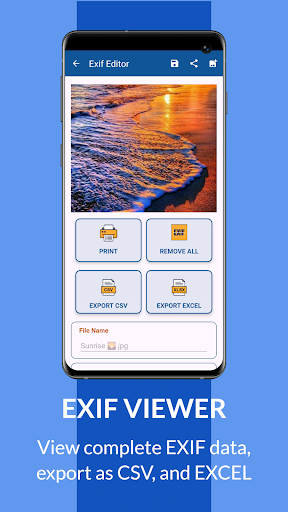
What is EXIF data? EXIF (Exchangeable Image File) is a standard format for storing metadata in digital photography. This metadata provides a comprehensive overview of various parameters and settings used in capturing your image. EXIF Viewer is an application that allows users to access and interpret this metadata, providing insights into how the photo was captured. With such tool, photographers can analyze their work and explore the details of images taken by others, which is beneficial to them and enthusiasts alike to understand and gain enhanced knowledge of the technical aspects behind each photo. EXIF Viewer provides users with a visible button for editing and removing metadata embedded within an image. Every image captured through a mobile device or camera lens has numerous EXIF tags/information, which includes details about the camera or phone used to capture the image, GPS coordinates indicating the location where the photo was taken, the date and time of capture, information about the operating system, and lot more. Users can now remove and modify all of the EXIF metadata provided, offering several advantages like allowing users to organize and categorize their photos more effectively, maintain consistency in metadata across multiple images, and even enhance privacy by removing or editing sensitive information before sharing images online. EXIF Editor gives significant value to its users, as users can easily print, and export the EXIF metadata in various formats such as PDF, CSV, and Excel without the need for additional software or tools. Printing or exporting EXIF metadata in the listed file format enables users to create comprehensive documentation of the technical details associated with their images for future reference. Our EXIF Viewer offers a tool set for enthusiasts by unlocking hidden photo data, users can delve into the diverse information contained in the images. This wealth of information allows a deeper understanding of how a particular photo was captured, enabling users to recreate similar shots by replicating the settings applied to the original image. Whether for professional users looking to maintain consistency in their work or amateur seeking to improve their skills, this EXIF Viewer provides invaluable insights and capabilities. Image Format Supported on EXIF Viewer JPEG, PNG, HEIC, WEBP, RAW Images (DNG, CR2, NEF, ARW, ORF, RAF, NRW, RW2, PEF, etc) EXIF Viewer Supported EXIF Metadata • Camera brand • File name • Image format • Image file size • Image width • Image height • Original date • Digitized Date • Last digitized date • GPS Latitude • GPS Longitude • Sharpness • Camera maker • Camera model • Focal length • Flash mode, • Lens maker • Lens model • Brightness • White balance • Color space • Image orientation • X- Resolution • Y- Resolution • Resolution unit • YCbCr Positioning • Image artist • Copyright • Software • Contrast • Shutter Speed • Exposure mode • Exposure time • Aperture • Metering mode • Sensitivity Type • Scene type • Scene Capture type • Sensing Mode • EXIF Version • Gain control • Saturation • And many more! EXIF Viewer Features: 1. View Metadata for a photo. 2. View EXIF metadata info like image resolution, device model 3. Print EXIF image data. 4. Select images from internal storage. 5. Export EXIF data as CSV, XLS, and PDF. 6. Has the option to save and share the EXIF metadata edited image. 7. Extract Depth Map information. 8. Modify/Edit EXIF 9. Change current metadata tags. 10. Change the GPS, location attached to the photo. 11. Wiping/Remove all metadata (EXIF) of the photo HOW TO USE EXIF Editor 1. Launch the app on your device 2. Click on the button select image file to select an image 3. Displays all available EXIF metadata on the image 4. Click the edit button to edit any EXIF tags 5. Save, share, and export Useful ideas or feature requests are welcome. Feel free to contact us via email. Thank you for using our EXIF Viewer app
Installs since 3 Sep 2026 Measured
Exact Google Play install counts, collected daily
Ratings
42 ratings, 7 reviews
- 5 ★17%
- 4 ★0.0%
- 3 ★0.0%
- 2 ★17%
- 1 ★67%
Recent reviews
Latest public reviews from the store
- 24 Mar 2026
did the job. no complaints
- 14 Dec 2025
Very helpful!
- 14 Jul 2025
gloss, room lighting, camera angle. these confuse this app. it's great for room paint but terrible if trying to match fabric color.
- 26 Jun 2025
achcha he par isme colour ko bana ne ki takniq hoti to achcha hota
What reviewers bring up
Topics mentioned in the latest 50 reviews, by how many reviews mention them
Liked in good reviews (38 reviews)
- color 8
- colour 4
- wonderful 3
- camera 3
- detecting 2
- perfectly 2
- accurate 2
- helpful 2
Raised in bad reviews (10 reviews)
- contacted 2
Top chart positions
Latest Google Play chart ranks by country, last 10 days
Not in any tracked top chart in the last 10 days.
EXIF Viewer history
Release, install milestones, listing and store changes
- Reached 5,000+ installs 20 Dec 2025
- Reached 1,000+ installs 13 Feb 2025
- Reached 100+ installs 14 May 2024
- Reached 50+ installs 2 May 2024
- Reached 10+ installs 28 Apr 2024
- First released on the store 23 Apr 2024
Update frequency
How often EXIF Viewer ships a new version, month by month
1 updates in the last 12 months. More often than most similar apps: they shipped a median of 0 updates in the same year.
Recent versions
Current version 2.4
- Version 2.222 Jul 2026
• Performance improvements and stability enhancements • General bug fixes and improvements, including several reported issues • Improved overall stability and reliability • Improved compatibility with newer Android devices • Thank you for using the app
- Version 2.119 Sep 2025
Fix Bugs
- Version 1.926 Feb 2025
- Version 1.113 May 2024
Listing keywords
Words and phrases EXIF Viewer repeats most in its store listing
Top phrases: exif viewer (10), exif metadata (7), exif data (3), exif editor (3), image file (3).
Highlighted words also appear in the title. Counts cover the title, short description and description.
Business model and tech
From the store listing and declared permissions
- Business model
- Free to downloadIn-app purchasesShows ads
- Subscriptions and payments
- Google Play billing
- Sensitive access
- LocationPhotos, videos and filesAdvertising ID
18 permissions
0 special access, 4 sensitive, 14 standard
- Change or delete shared storageSensitive
- Read shared storageSensitive
- Approximate locationSensitive
- Precise locationSensitive
- Ad attribution (Privacy Sandbox)ACCESS_ADSERVICES_ATTRIBUTIONStandard
- Ad topics (Privacy Sandbox)ACCESS_ADSERVICES_TOPICSStandard
- Read how it was installed (install referrer)BIND_GET_INSTALL_REFERRER_SERVICEStandard
- Read the advertising IDAD_IDStandard
- Read the advertising ID (Privacy Sandbox)ACCESS_ADSERVICES_AD_IDStandard
- Keep the phone awakeStandard
- Run a foreground serviceFOREGROUND_SERVICEStandard
- Start when the phone turns onStandard
Compliance
What the listing and the app package show
- Store status
- Live
- Upkeep
- Updated 22 Jul 2026
- Registered in
- Nigeria
- Privacy policy
- Linked on the listing
- Advertising
- Shows ads
- In-app purchases
- Offered
- Age rating
- Everyone
- Sensitive permissions
- 4 sensitive of 18
- Location access
- Yes, while in use
- Camera and microphone
- Neither
Apps like EXIF Viewer
PicsToMix, Print photo tilesScore Media28.6K installs★ 4.4
Hair Color & Style EditorNativeDev inc.45.9K installs★ 2.33
Christmas Photo FramesDearDotApps16.3K installs★ 4.0
Haru Camera - Spring and ValenFantiusen Software7.2K installs★ 5.0
Change hair color - HairstylePhucArts18.2K installs★ 3.5
CelebGen: Selfies with CelebsGrillz App Studio Inc.23.4K installs★ 1.67
Watch Control for Insta360DiF Aktuna9.6K installs★ 2.45
Remove Background - BG EraserAppverse Ltd46.6K installs★ 4.96
Telescope CameraSidra Tech.ol67.8K installs★ 3.13
EXIF Viewer: questions and answers
How many downloads does EXIF Viewer have?
EXIF Viewer has 16,463 installs on Google Play, measured from the store's own count on 12 Nov 2026.
Who makes EXIF Viewer?
EXIF Viewer is published by Ligrant Apps, a developer based in NG.
When was EXIF Viewer last updated?
The latest version (2.4) was released on 22 Jul 2026.
Is EXIF Viewer free?
Yes. EXIF Viewer is free to download and offers in-app purchases, and it shows ads.
Is EXIF Viewer still available?
Yes. EXIF Viewer is live on Google Play as of 12 Nov 2026.
Track EXIF Viewer and its competitors
Watch any app for new versions, rating drops, chart moves and removals. Free plan, no card.