
Expense Tracker Recorder
Expense Tracker Recorder - track and record expenses & income in your voice
- Installs
- 133K
- Measured
- Rating
- 3.67
- Ratings
- 474
- 38 reviews
- Version
- Varies with device
- Updated 26 Sep 2019
- Released
- 12 Aug 2012
- Tracked since 12 May 2026
- Size
- 0 MB
- Needs 2.2
Screenshots
About Expense Tracker Recorder
The description on the store listing
Expense Tracker Recorder is a small free app that helps you record your expense using your own voice and track them later in HandWallet.
In order to use this app you should install first HandWallet - a free professional expense manager that helps you to control your expense, accounts, bills and budget.
How to record an expense (after you define your bank account, credit card or cash account)? Very simple – in just 3 steps:
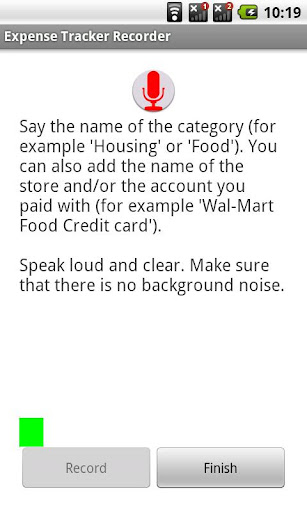
A. Press the record button.
B. Say the name of the category (for example 'Housing' of 'Food'). You can also add the name of the store and/or the account you paid with if you used them before (for example 'Wal-Mart Food Credit-card').
Speak loud and clear. Make …
Read the full description
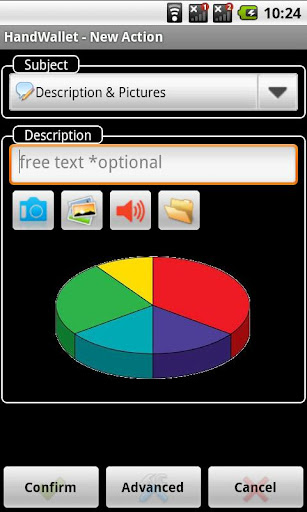
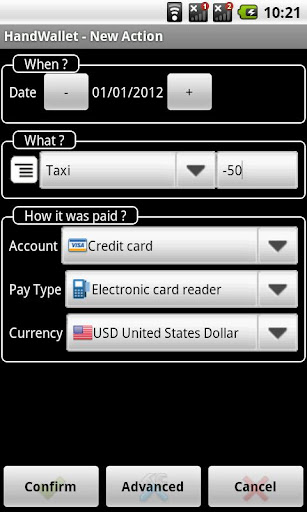
Expense Tracker Recorder is a small free app that helps you record your expense using your own voice and track them later in HandWallet. In order to use this app you should install first HandWallet - a free professional expense manager that helps you to control your expense, accounts, bills and budget. How to record an expense (after you define your bank account, credit card or cash account)? Very simple – in just 3 steps: A. Press the record button. B. Say the name of the category (for example 'Housing' of 'Food'). You can also add the name of the store and/or the account you paid with if you used them before (for example 'Wal-Mart Food Credit-card'). Speak loud and clear. Make sure that there is no background noise. Make a little gap between words. C. Press the "Finish" button. A popup window will appear where you can add/modify 3 questions: 1) When? (the date of the expense). 2) What? (the category of the expense you have just recorded. If the 'Expense Tracker Recorder' failed to identify the expense this is the place to fix it). Near the category you should type the amount of the expense. In most cases this is the only thing you will need to type. 3) How it was paid? (the account, pay type and currency of the expense). These will usually be filled automatically. Press the 'Confirm' button and your expense is now tracked forever! Extra features: • Advanced search and filter options to find a saved transaction • Multiple currencies. Automatically download exchange rates • Add information on your expense: pictures, video, voice memos or even a document. Then share this information on social networks. • Track your cash, credit cards & checking records. View all your recorded expense in an "account statement" view. • Plan budget • Personal finance manager: Personal / family cashflow • Fast, Reliable & Secured. Password protection • Backup & restore. Send your financial recorded data to your mail in one click! • Multi languages (including French, Spanish, Russian, Portuguese and many more) • Online help within the app. Why to use an expense tracker? Because an expense tracker will help you be organized, give you control of your financial behaviour, save you money and give you a better chance to discover your full financial potential. Why to use "Expense Tracker Recorder" add-on? Because "Expense Tracker Recorder" the easiest and most intuitive expense recorder. And because we are creating expense trackers and accounting software for ten years and know exactly why most people want to track expense but only few succeed. How to get started? Download the "Hand Wallet Tracker Recorder" and "Hand Wallet Expense Manager" apps for free. Verify that your language, country and currency are correct. Hand Wallet will create 3 default accounts: cash, bank account and credit card. You can later change the names of these accounts by pressing the "Data" tab and then "Accounts", for example JP Morgan Chase Bank, American Express credit card or "my cash". Then press the actions button and record your first expense using your own voice! How to build budget? After you record some expense select the "data" button and then categories. Select a category, for example "vehicle expense". Press the "advanced" button and select the type of budget: summarized budget, fixed budget etc.. You can build a different budget for each period. How to see a pie or a bar graph of your expense? After you track more expense press the "analyst" tab. Then select the period and the category for example "vehicle expense". You can switch from expense to budget by using the icon at the left.
Installs since 29 Aug 2026 Measured
Exact Google Play install counts, collected daily
Ratings
474 ratings, 38 reviews
- 5 ★51%
- 4 ★25%
- 3 ★0.0%
- 2 ★0.0%
- 1 ★25%
Recent reviews
Latest public reviews from the store
- 10 Feb 2022
Oke
- 24 Dec 2015
Very easy to use app! Helps you keep track of your expenses and income. Recommended for everyone!
- 16 Dec 2015
Nexus 5 (Android 6.0.1). App perfectly fulfils its function!
- 22 Jun 2015
great to record your expenses when you travel
What reviewers bring up
Topics mentioned in the latest 50 reviews, by how many reviews mention them
Liked in good reviews (47 reviews)
- expenses 16
- record 11
- voice 10
- handwallet 9
- saves 7
- expense manager 6
- say 6
- application 5
Raised in bad reviews (3 reviews)
No topic comes up twice.
Top chart positions
Latest Google Play chart ranks by country, last 10 days
Not in any tracked top chart in the last 10 days.
Expense Tracker Recorder history
Release, install milestones, listing and store changes
- Reached 100,000+ installs 1 Jul 2015
- Reached 50,000+ installs 19 Jul 2013
- Reached 10,000+ installs 14 Oct 2012
- Reached 5,000+ installs 13 Sep 2012
- Reached 1,000+ installs 23 Aug 2012
- Reached 500+ installs 19 Aug 2012
- Reached 100+ installs 14 Aug 2012
- First released on the store 12 Aug 2012
Update frequency
How often Expense Tracker Recorder ships a new version, month by month
0 updates in the last 12 months. Less often than most similar apps: they shipped a median of 3 updates in the same year.
Recent versions
Current version Varies with device
- Version 1.425 Sep 2019
Listing keywords
Words and phrases Expense Tracker Recorder repeats most in its store listing
Top phrases: expense tracker (8), tracker recorder (7), expense tracker recorder (6), credit card (4), category for example (3).
Highlighted words also appear in the title. Counts cover the title, short description and description.
Business model and tech
From the store listing and declared permissions
- Business model
- Free to download
- Sensitive access
- No sensitive permission declared
Compliance
What the listing and the app package show
- Store status
- Live
- Upkeep
- No update since 26 Sep 2019
- Privacy policy
- Linked on the listing
- Advertising
- No ads declared
- In-app purchases
- None declared
- Age rating
- Everyone
Apps like Expense Tracker Recorder
Achieva Credit UnionAchieva Credit Union114K installs★ 3.85
Forex Trading BrokerEZ Trade - Online Brokers, Trading Experts142K installs★ 4.24
Stockbot - Saham & TradingStockbot.id63.3K installs★ 4.0
Money9 - Learn, Earn & GrowAssociated Broadcasting Company Private Limited293K installs★ 3.83
Powerlight: Buy Power UnitPowerlight Nigeria62.6K installs★ 3.83
Jardín Azuayo PagosCooperativa Jardín Azuayo279K installs★ 3.59
PocketsFull - Earn MoneyCatalyse Research100K installs★ 4.19
BHIM Aadhaar Pay-Canara BankCANARA BANK292K installs★ 3.6
CoopMAIMÓN MóvilTEKHSOFT128K installs★ 3.81
Expense Tracker Recorder: questions and answers
How many downloads does Expense Tracker Recorder have?
Expense Tracker Recorder has 133,075 installs on Google Play, measured from the store's own count on 14 Nov 2026.
Who makes Expense Tracker Recorder?
Expense Tracker Recorder is published by HandWallet Expense Manager.
When was Expense Tracker Recorder last updated?
The latest version (Varies with device) was released on 26 Sep 2019.
Is Expense Tracker Recorder free?
Yes. Expense Tracker Recorder is free to download.
Is Expense Tracker Recorder still available?
Yes. Expense Tracker Recorder is live on Google Play as of 14 Nov 2026.
Track Expense Tracker Recorder and its competitors
Watch any app for new versions, rating drops, chart moves and removals. Free plan, no card.