Extract PDF Pages
Extract PDF Pages offline and free
- Installs
- 42.68K
- Measured
- Rating
- 3.67
- Ratings
- 163
- 3 reviews
- Version
- Varies with device
- Updated 6 Nov 2023
- Released
- 1 Oct 2020
- Tracked since 13 May 2026
- Size
- 6 MB
- Needs 5.0
Screenshots
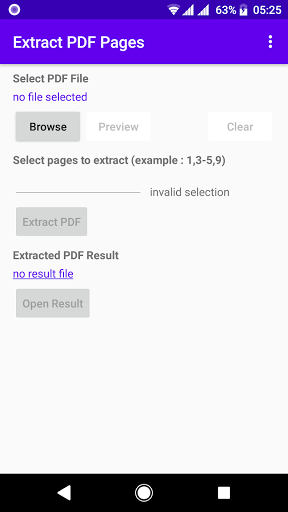
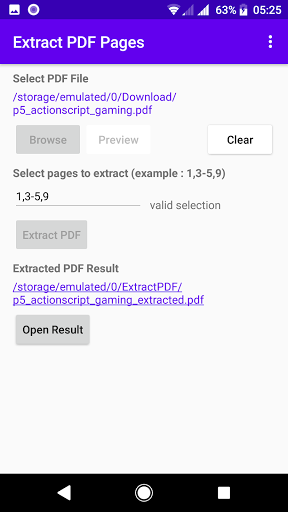
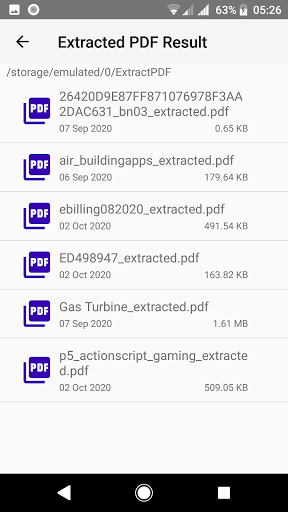

About Extract PDF Pages
The description on the store listing
this Extract PDF Application is the Best PDF pages Extractor
this Extract PDF App is free and easy to extract pages from pdf file.
you can extract pages only in seconds.
unlike extract pdf online service app that needs internet connection,this pdf pages extractor app is offline no need internet connection.
this pdf pages extractor is 100% free,you wont be charged
to extract pages from a pdf file just select pdf file that you want to extract
just click extract pdf button this application will extract pages of a pdf to new extracted pdf file
this pdf pages extractor is extremly fast
dont use extract pdf online free service anymore because it is not save because your pdf file is …
Read the full description
this Extract PDF Application is the Best PDF pages Extractor this Extract PDF App is free and easy to extract pages from pdf file. you can extract pages only in seconds. unlike extract pdf online service app that needs internet connection,this pdf pages extractor app is offline no need internet connection. this pdf pages extractor is 100% free,you wont be charged to extract pages from a pdf file just select pdf file that you want to extract just click extract pdf button this application will extract pages of a pdf to new extracted pdf file this pdf pages extractor is extremly fast dont use extract pdf online free service anymore because it is not save because your pdf file is uploaded to their website how to extract pages from pdf file ? let me show you how to extract pages from pdf file first of all,select pdf document file in your android device that you want to extract pages pdf this extract pdf app not only free download on playstore,this extract pdf application also only 5 Mb in size and also extract pdf file in fast speed our app will extract pdf pages into extracted pdf file and also rename file automatically this app extract pdf is free to use forever to extract pages from pdf file this is the best pdf pages extractor application/software Choose the PDF file that you want to extract. Select the pages you want to extract from the PDF by clicking on them individually, or by typing the page numbers into the page selection input box. Choose to extract a set of specific pages as one PDF or as separate PDFs. Wait a few moments for our PDF splitter to split your PDF pages. How to extract pdf pages? follow this step 1. Open this Extract PDF Android Application. 2. Select your protected PDF file from your device.you will be asked password for loading the file 3. Select the pages you want to extract from the PDF by clicking on them individually, or by typing the page numbers into the page selection box. 4. Click Extract PDF Button. 5. wait for the extraction process in seconds 5. now you can open your extracted pdf version
Installs since 27 Aug 2026 Measured
Exact Google Play install counts, collected daily
Ratings
163 ratings, 3 reviews
- 5 ★67%
- 4 ★0.0%
- 3 ★0.0%
- 2 ★0.0%
- 1 ★33%
Recent reviews
Latest public reviews from the store
- 26 Sep 2024
Nice apps but Need to upgrade, No pushbutton, No 3 position Selector switch,No tagging and minimal I/O. but the simulation is good.
- 2 Dec 2022
The app is very good and everything working but the problem is the number of addresses I can besides each other in the same rung is limited
- 1 Dec 2022
Really worth for beginners But altlast only can make coil, timer. Initial or middle can't make coil, latch, timer. May I know the reason
- 5 Aug 2022
Simple and easy to use. For beginners, I recommend this app. Would be nice if we can write label on coils and inputs, (on off auto manual lamp 1, lamp 2 and so on).
What reviewers bring up
Topics mentioned in the latest 10 reviews, by how many reviews mention them
Liked in good reviews (7 reviews)
- ladder 3
- coil latch 2
- beginners 2
- first 2
- logic 2
Raised in bad reviews (1 reviews)
No topic comes up twice.
Top chart positions
Latest Google Play chart ranks by country, last 10 days
Not in any tracked top chart in the last 10 days.
Extract PDF Pages history
Release, install milestones, listing and store changes
- Reached 10,000+ installs 2 Jun 2022
- Reached 5,000+ installs 3 Jan 2022
- First released on the store 1 Oct 2020
Recent versions
Current version Varies with device
- Version 1.46 Nov 2023
- Version 1.313 Sep 2021
Listing keywords
Words and phrases Extract PDF Pages repeats most in its store listing
Top phrases: extract pdf (15), pdf file (12), pdf pages (10), extract pages (8), pages from pdf (5).
Highlighted words also appear in the title. Counts cover the title, short description and description.
Business model and tech
From the store listing, the SDKs in the app package and its declared permissions
- Business model
- Free to downloadIn-app purchasesShows ads
- Built with
- No cross-platform framework or game engine detected
- Ad networks (1)
- AdMob
- Subscriptions and payments
- Google Play billing
- Sensitive access
- Advertising ID
1 ad, attribution and analytics SDKs detected. SDKs are read from the app package and permissions from the store listing, so code that loads later is not seen.
Technology
10 SDKs found in the app package
Ad networks
Advertising and install-attribution SDKs found in the app package
- AdMob
7 permissions
0 special access, 0 sensitive, 7 standard
- Read the advertising IDAD_IDStandard
- Keep the phone awakeStandard
- Run a foreground serviceFOREGROUND_SERVICEStandard
- Full internet accessStandard
- See network connectionsStandard
- Internal app permissionDYNAMIC_RECEIVER_NOT_EXPORTED_PERMISSIONStandard
- In-app purchases with Google PlayStandard
Compliance
What the listing and the app package show
- Store status
- Live
- Upkeep
- No update since 6 Nov 2023
- Registered in
- Indonesia
- Privacy policy
- Linked on the listing
- Advertising
- Shows ads
- In-app purchases
- Offered
- Age rating
- Everyone
- Sensitive permissions
- 0 sensitive of 7
- Location access
- No
- Camera and microphone
- Neither
Apps like Extract PDF Pages
My India VPNAppPulse Tech42.2K installs★ 4.42
Light Bulb Security CameraRockyTeach63.1K installs★ 2.88
TCL Smart TV Screen mirroringTech-Tools95.2K installs★ 3.85
Easy Schedule Notebookoxdb.net51.5K installs★ 5.0
Land Parcels Areas CalculatorGeoZidan46K installs★ 1.73
Gallery Vault - Hide PhotoMerryblue51K installs★ 4.2
Heat Index Calculator - How toVnMobileSolutions Inc.3.7K installs★ 4.24
2D OwnerTechnologyGateway46K installs★ 4.8
3D Print Cost CalculatorReme Le Hane38.5K installs★ 3.95
Extract PDF Pages: questions and answers
How many downloads does Extract PDF Pages have?
Extract PDF Pages has 42,677 installs on Google Play, measured from the store's own count on 19 Nov 2026.
Who makes Extract PDF Pages?
Extract PDF Pages is published by raincontinues, a developer based in ID.
When was Extract PDF Pages last updated?
The latest version (Varies with device) was released on 6 Nov 2023.
Is Extract PDF Pages free?
Yes. Extract PDF Pages is free to download and offers in-app purchases, and it shows ads.
Is Extract PDF Pages still available?
Yes. Extract PDF Pages is live on Google Play as of 19 Nov 2026.
Track Extract PDF Pages and its competitors
Watch any app for new versions, rating drops, chart moves and removals. Free plan, no card.