
File Manager Classic
A retro file manager with classic graphic user interface
- Installs
- 4.97K
- Measured
- Rating
- —
- Ratings
- —
- Version
- Varies with device
- Updated 25 Jul 2020
- Released
- 5 Jun 2020
- Tracked since 12 May 2026
- Size
- 3 MB
- Needs 4.2
Screenshots
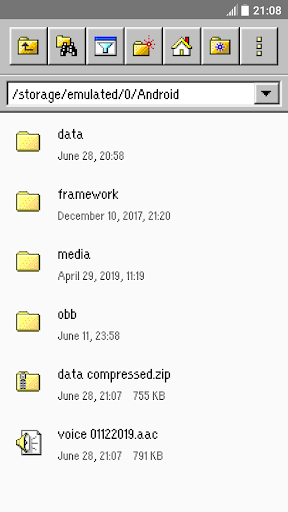

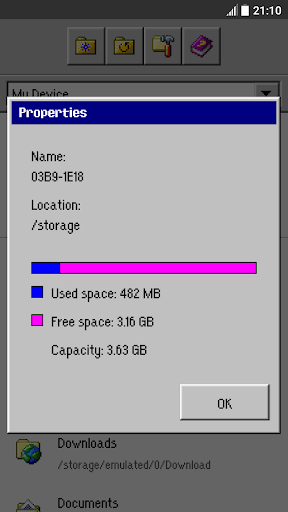


About File Manager Classic
The description on the store listing
Fast, easy-to-use and full-featured file manager app with classic graphic user interface
File Manager Classic is a free tool that helps you find file faster, manage files easily, and share them offline with others. It supports tons of cool features: quick search, moving, deleting, opening, and sharing files, as well as renaming, unzipping, and copy-paste. File Manager Classic also recognizes multiple file formats, including music, videos, images, documents, APKs, and zip-files.
Key features:
- Very small app size
- Simple and easy-to-use, with computer classic graphic user interface
- Basic features like cut, copy, delete, compress, extract etc. easily accessible
- Storage: View …
Read the full description
Fast, easy-to-use and full-featured file manager app with classic graphic user interface File Manager Classic is a free tool that helps you find file faster, manage files easily, and share them offline with others. It supports tons of cool features: quick search, moving, deleting, opening, and sharing files, as well as renaming, unzipping, and copy-paste. File Manager Classic also recognizes multiple file formats, including music, videos, images, documents, APKs, and zip-files. Key features: - Very small app size - Simple and easy-to-use, with computer classic graphic user interface - Basic features like cut, copy, delete, compress, extract etc. easily accessible - Storage: View your storage stats and manage all folders on your device. - Quickly access history, access bookmarks or search for any file - Multiple file formats support: Open videos, music, documents, APKs, and compressed files with one tap. - File compression: Compress and decompress archives. - Manage multiple files: Select multiple files for the same operation. lots more...
Installs since 15 Nov 2026 Measured
Exact Google Play install counts, collected daily
Daily history starts once this app is in our daily install sample.
Ratings
- 5 ★0.0%
- 4 ★0.0%
- 3 ★0.0%
- 2 ★0.0%
- 1 ★0.0%
Recent reviews
Latest public reviews from the store
- 7 May 2026
faster and easier
- 23 Apr 2026
very easy to use app
- 20 Apr 2026
Operationally good. I have not utilised all the functions yet. But the basic functionality is good. Having operator friendly use while retaining useful features. Only complaint at this stage is the programme is bogged down by advertisement loading and in some cases taking time for the advertisement to load itself. Then the advertisement can be full screen 'taking over' the flow of your work, as you work out in it is programme related or only a advertisement. For a 'trial', this is normal?:-)
- 16 Apr 2026
Excellent App, Very Impressive and Safe to Use.
What reviewers bring up
Topics mentioned in the latest 10 reviews, by how many reviews mention them
Liked in good reviews (8 reviews)
- people 2
Raised in bad reviews (2 reviews)
No topic comes up twice.
Top chart positions
Latest Google Play chart ranks by country, last 10 days
Not in any tracked top chart in the last 10 days.
File Manager Classic history
Release, install milestones, listing and store changes
- Reached 1,000+ installs 25 Jul 2020
- First released on the store 5 Jun 2020
Listing keywords
Words and phrases File Manager Classic repeats most in its store listing
Top phrases: file manager (5), classic graphic user (3), file manager classic (3), graphic user interface (3), classic graphic (3).
Highlighted words also appear in the title. Counts cover the title, short description and description.
Business model and tech
From the store listing and declared permissions
- Business model
- Free to downloadShows ads
- Sensitive access
- No sensitive permission declared
Compliance
What the listing and the app package show
- Store status
- Removed (15 Nov 2026)
- Upkeep
- No update since 25 Jul 2020
- Registered in
- Vietnam
- Privacy policy
- Linked on the listing
- Advertising
- Shows ads
- In-app purchases
- None declared
- Age rating
- Everyone
Apps like File Manager Classic
들어서 화면켜기Won3.5K installs★ 4.0
Height PredictionEcliptic App Ventures45.9K installs★ 2.4
Speicers`Pro VPNEldiablolucifer202021.2K installs★ 4.14
Lightning Tracker with AlertsYaksh Software4.3K installs★ 3.0
Mana Pathi (Unit Converter)Shirish Koirala2.2K installs★ 4.6
Multi-tab Calc - A simple app.Naoyuki Rikiji1.3K installs★ 5.0
Just Silence. Scheduled.Akid Soft1.6K installs★ 5.0
- WoWp AssistantВиталий Робиновский2K installs★ 4.2
LINKa: напишиLINKa7.9K installs★ 4.4
File Manager Classic: questions and answers
How many downloads does File Manager Classic have?
File Manager Classic has 4,973 installs on Google Play, measured from the store's own count on 15 Nov 2026.
Who makes File Manager Classic?
File Manager Classic is published by Gesture guy, a developer based in VN.
When was File Manager Classic last updated?
The latest version (Varies with device) was released on 25 Jul 2020.
Is File Manager Classic free?
Yes. File Manager Classic is free to download, and it shows ads.
Is File Manager Classic still available?
No. File Manager Classic is no longer listed on Google Play. We first saw it missing around 15 Nov 2026.
Track File Manager Classic and its competitors
Watch any app for new versions, rating drops, chart moves and removals. Free plan, no card.