File Manager - File explorer
File manager is a feature-packed file explorer that can help you manage files.
- Installs
- 2.61M
- Measured
- Rating
- 4.27
- Ratings
- 11.1K
- 78 reviews
- Version
- 2.0.12
- Updated 13 Sep 2026
- Released
- 12 Sep 2020
- Tracked since 13 May 2026
- Size
- 1 MB
- Needs 4.0
Screenshots


About File Manager - File explorer
The description on the store listing
File Manager is an easy, free, feature-packed file explorer. For its concise UI, it’s very easy to use. You can easily manage files on your android devices.
Key Features of the File Manager App
Basic functionalities: Search, copy, move, share, rename and delete files.
The main functions of the file manager:
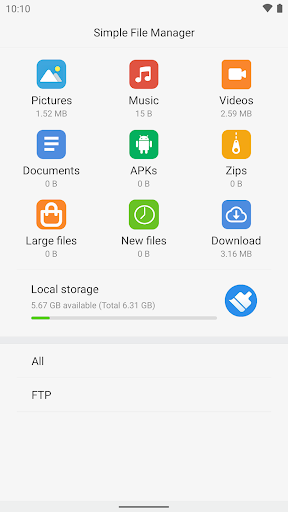
• View hidden files: View the files hidden by the system and observe the storage space more comprehensively.
• Categories: Files are organized into categories by their formats. View file in each categorization exactly and enjoy files browsing.
• Files: View your storage stats and manage all folders on your device.
• Search file: Quickly Search the files by their name.
• …
Read the full description
File Manager is an easy, free, feature-packed file explorer. For its concise UI, it’s very easy to use. You can easily manage files on your android devices. Key Features of the File Manager App Basic functionalities: Search, copy, move, share, rename and delete files. The main functions of the file manager: • View hidden files: View the files hidden by the system and observe the storage space more comprehensively. • Categories: Files are organized into categories by their formats. View file in each categorization exactly and enjoy files browsing. • Files: View your storage stats and manage all folders on your device. • Search file: Quickly Search the files by their name. • FTP: Using FTP you can access your android device storage from PC and manage files on it. You can preview files on the file list. It supports open, copy, cut, delete, rename file operations. It can show hidden files on your device. You can search files by names and you can share files to other applications by using this file manager.
Installs, last 30 days Measured
Exact Google Play install counts, collected daily
Ratings
11,142 ratings, 78 reviews
- 5 ★72%
- 4 ★6.7%
- 3 ★10%
- 2 ★1.0%
- 1 ★10%
Recent reviews
Latest public reviews from the store
- 3 Feb 2025
Very very good app
- 29 Jan 2025
Simple and easy to use. 💯
- 21 Jan 2024
Good.
What reviewers bring up
Topics mentioned in the latest 9 reviews, by how many reviews mention them
Liked in good reviews (3 reviews)
No topic comes up twice.
Raised in bad reviews (6 reviews)
- ads 4
- screen 2
- image 2
- see 2
- rid 2
Top chart positions
Latest Google Play chart ranks by country, last 10 days
Not in any tracked top chart in the last 10 days.
File Manager - File explorer history
Release, install milestones, listing and store changes
- Reached 1,000,000+ installs 20 Oct 2022
- Reached 500,000+ installs 13 Jan 2022
- Reached 100,000+ installs 23 Mar 2021
- Reached 50,000+ installs 26 Jan 2021
- Reached 10,000+ installs 1 Dec 2020
- Reached 5,000+ installs 17 Nov 2020
- Reached 1,000+ installs 3 Nov 2020
- Reached 500+ installs 20 Oct 2020
Update frequency
How often File Manager - File explorer ships a new version, month by month
6 updates in the last 12 months. More often than most similar apps: they shipped a median of 2 updates in the same year.
Recent versions
Current version 2.0.12
- Version 2.0.1213 Sep 2026
Compatible with more phones
- Version 2.0.1120 Jul 2026
Compatible with more phones
- Version 2.0.1019 Jun 2026
Compatible with more phones
- Version 2.0.0811 Apr 2026
Compatible with more phones
Listing keywords
Words and phrases File Manager - File explorer repeats most in its store listing
Top phrases: file manager (6), file explorer (3), manage files (3), feature packed file (2), packed file explorer (2).
Highlighted words also appear in the title. Counts cover the title, short description and description.
Business model and tech
From the store listing, the SDKs in the app package and its declared permissions
- Business model
- Free to downloadShows ads
- Built with
- No cross-platform framework or game engine detected
- Ad networks (1)
- AdMob
- Sensitive access
- Photos, videos and filesNearby devicesAdvertising ID
1 ad, attribution and analytics SDKs detected. SDKs are read from the app package and permissions from the store listing, so code that loads later is not seen.
Technology
17 SDKs found in the app package
Ad networks
Advertising and install-attribution SDKs found in the app package
- AdMob
20 permissions
2 special access, 4 sensitive, 14 standard
- Install other appsREQUEST_INSTALL_PACKAGESSpecial access
- Manage all filesMANAGE_EXTERNAL_STORAGESpecial access
- Change or delete shared storageSensitive
- Read shared storageSensitive
- Find nearby Wi-Fi devicesNEARBY_WIFI_DEVICESSensitive
- Show notificationsPOST_NOTIFICATIONSSensitive
- Ad attribution (Privacy Sandbox)ACCESS_ADSERVICES_ATTRIBUTIONStandard
- Ad topics (Privacy Sandbox)ACCESS_ADSERVICES_TOPICSStandard
- Read the advertising IDAD_IDStandard
- Read the advertising ID (Privacy Sandbox)ACCESS_ADSERVICES_AD_IDStandard
- Control vibrationStandard
- Keep the phone awakeStandard
Compliance
What the listing and the app package show
- Store status
- Live
- Upkeep
- Updated 13 Sep 2026
- Registered in
- China
- Privacy policy
- Linked on the listing
- Advertising
- Shows ads
- In-app purchases
- None declared
- Age rating
- Everyone
- Sensitive permissions
- 4 sensitive, 2 special access of 20
- Location access
- No
- Camera and microphone
- Neither
Apps like File Manager - File explorer
Tree Capitator ModMaps Mods Addons1M installs★ 3.46
Simple Clock - Alarm & TimerSimple Mobile Tool2M installs★ 4.22
Basic Web BrowserAPG Solutions, LLC12.6M installs★ 3.59
USB OTG CHECKERbubble shooter game2.2M installs★ 4.38
5G 4G FORCE LTE MODERK AppZia4.1M installs★ 3.84
ALFAISAL vpnALFAISALVPN2.1M installs★ 3.45
Simple Auto ClickerXIAOYANG3.7M installs★ 4.04
zFont Tool - Android Font ToolKhun Htetz Naing9.2M installs★ 3.04
analiti - Speed & WiFianaliti Networking Experts4.3M installs★ 4.27
File Manager - File explorer: questions and answers
How many downloads does File Manager - File explorer have?
File Manager - File explorer has 2,606,682 installs on Google Play, measured from the store's own count on 19 Nov 2026.
Who makes File Manager - File explorer?
File Manager - File explorer is published by Sniper.Tech2020, a developer based in CN.
When was File Manager - File explorer last updated?
The latest version (2.0.12) was released on 13 Sep 2026.
Is File Manager - File explorer free?
Yes. File Manager - File explorer is free to download, and it shows ads.
Is File Manager - File explorer still available?
Yes. File Manager - File explorer is live on Google Play as of 19 Nov 2026.
Track File Manager - File explorer and its competitors
Watch any app for new versions, rating drops, chart moves and removals. Free plan, no card.