File Manager Pro
File Manager Pro - No Ads & secure tool for easy and efficient file management.
- Installs
- 8.15K
- Measured
- Rating
- 3.94
- Ratings
- 178
- 11 reviews
- Version
- Varies with device
- Updated 13 Apr 2026
- Released
- 7 May 2022
- Tracked since 13 May 2026
- Size
- —
Screenshots



About File Manager Pro
The description on the store listing
<b>Privacy Friendly:</b>
This app doesn't collect any user data or connect to anything on the user's device (contacts etc.). It doesn't even need an internet connection. It is a wholly contained app using only the files contained within it.
<b>√ Easy access to local files:</b>
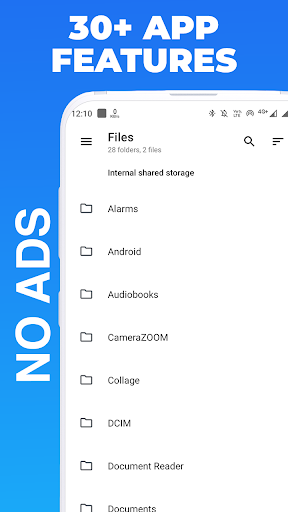
All files are no longer hidden in the mobile system. File manager will help you find file. It also supports tons of cool features: global search, moving, deleting, opening, and sharing files, as well as renaming, unzipping, and copy-paste.
<b>All features are packed in just less than 15MB (for less the download time and minimum use of phone storage memory)</b>
The File Manager app is a must-have tool for …
Read the full description
<b>Privacy Friendly:</b> This app doesn't collect any user data or connect to anything on the user's device (contacts etc.). It doesn't even need an internet connection. It is a wholly contained app using only the files contained within it. <b>√ Easy access to local files:</b> All files are no longer hidden in the mobile system. File manager will help you find file. It also supports tons of cool features: global search, moving, deleting, opening, and sharing files, as well as renaming, unzipping, and copy-paste. <b>All features are packed in just less than 15MB (for less the download time and minimum use of phone storage memory)</b> The File Manager app is a must-have tool for managing files and folders on your Android device. It offers a wide range of features that allow you to browse, organize, and manage your files and folders efficiently, making it easier to access and manage your data. One of the most significant features of the File Manager app is its ability to browse your device's internal storage and external SD card to locate and manage your files. You can move, copy, paste, and delete files and folders with just a few taps, making it easy to free up space on your device or transfer files to other devices. The app also supports a wide range of file types, including images, videos, music, documents, and archives. You can preview images and videos within the app, and open documents and archives with compatible apps installed on your device. The File Manager app includes a built-in search feature that allows you to quickly locate files and folders based on their names or contents. Additionally, you can create folders, rename files and folders, and view detailed information about files, including their size, date modified, and type. The app's interface is user-friendly, and you can easily navigate through the app's features with just a few taps. The app's design is sleek and modern, making it pleasant to use. Another significant feature of the File Manager app is its ability to create a recycle bin, which works similarly to the recycle bin on your computer. It stores deleted files and folders for a certain amount of time, giving you the ability to recover them if needed. In summary, the File Manager app is an essential tool for managing files and folders on your Android device. Its user-friendly interface, powerful features, and support for cloud storage services make it a must-have app for anyone who wants to manage their files efficiently. So if you're looking for a reliable and efficient file manager app, give File Manager a try.
Installs since 29 Aug 2026 Measured
Exact Google Play install counts, collected daily
Ratings
178 ratings, 11 reviews
- 5 ★56%
- 4 ★11%
- 3 ★17%
- 2 ★5.2%
- 1 ★11%
Recent reviews
Latest public reviews from the store
- 19 Jun 2025
It's so helpful if you truly want to change.
- 7 Aug 2024
Best recovery app
- 2 Jun 2022
Perfect
- 17 Mar 2022
Thanks for making this app ☺️
What reviewers bring up
Topics mentioned in the latest 16 reviews, by how many reviews mention them
Liked in good reviews (11 reviews)
- helpful 4
- informative 2
- exercises 2
- diary 2
Raised in bad reviews (5 reviews)
- gambling 2
Top chart positions
Latest Google Play chart ranks by country, last 10 days
Not in any tracked top chart in the last 10 days.
File Manager Pro history
Release, install milestones, listing and store changes
- Reached 5,000+ installs 16 Jun 2024
- Reached 1,000+ installs 13 May 2023
- Reached 500+ installs 29 Apr 2023
- Reached 100+ installs 17 May 2022
- First released on the store 7 May 2022
Update frequency
How often File Manager Pro ships a new version, month by month
1 updates in the last 12 months. More often than most similar apps: they shipped a median of 0 updates in the same year.
Recent versions
Current version Varies with device
- Version 3.9.013 Apr 2026
- Version 3.1.023 Aug 2023
- Version 2.1.08 May 2023
- Version 1.9.028 Sep 2022
Listing keywords
Words and phrases File Manager Pro repeats most in its store listing
Top phrases: file manager (10), files and folders (7), documents and archives (2), file manager pro (2), manage your files (2).
Highlighted words also appear in the title. Counts cover the title, short description and description.
Business model and tech
From the store listing, the SDKs in the app package and its declared permissions
- Business model
- Paid, $0.49
- Built with
- No cross-platform framework or game engine detected
- Ad networks (0)
- None detected
- Analytics and crash reports
- Firebase
- Sensitive access
- Photos, videos and files
1 ad, attribution and analytics SDKs detected. SDKs are read from the app package and permissions from the store listing, so code that loads later is not seen.
Technology
16 SDKs found in the app package
9 permissions
2 special access, 2 sensitive, 5 standard
- Install other appsREQUEST_INSTALL_PACKAGESSpecial access
- Manage all filesMANAGE_EXTERNAL_STORAGESpecial access
- Change or delete shared storageSensitive
- Read shared storageSensitive
- Add home screen shortcutsStandard
- Foreground service (data sync)FOREGROUND_SERVICE_DATA_SYNCStandard
- Keep the phone awakeStandard
- Run a foreground serviceFOREGROUND_SERVICEStandard
- Internal app permissionDYNAMIC_RECEIVER_NOT_EXPORTED_PERMISSIONStandard
Compliance
What the listing and the app package show
- Store status
- Live
- Upkeep
- Updated 13 Apr 2026
- Registered in
- India
- Privacy policy
- Linked on the listing
- Advertising
- No ads declared
- In-app purchases
- None declared
- Age rating
- Everyone
- Sensitive permissions
- 2 sensitive, 2 special access of 9
- Location access
- No
- Camera and microphone
- Neither
Apps like File Manager Pro
Easy Schedule Notebookoxdb.net51.5K installs★ 5.0
Land Parcels Areas CalculatorGeoZidan46K installs★ 1.73
Gallery Vault - Hide PhotoMerryblue51K installs★ 4.2
Heat Index Calculator - How toVnMobileSolutions Inc.3.7K installs★ 4.24
2D OwnerTechnologyGateway46K installs★ 4.8
3D Print Cost CalculatorReme Le Hane38.5K installs★ 3.95
Bluetooth ScannerThe Tree Team51.3K installs★ 3.87
HD wifi EndoskopCEI Conrad Electronic International (HK) Limited117K installs★ 2.41
WGS84 ConverterPilaBlu - Apps111K installs★ 4.29
File Manager Pro: questions and answers
How many downloads does File Manager Pro have?
File Manager Pro has 8,152 installs on Google Play, measured from the store's own count on 16 Nov 2026.
Who makes File Manager Pro?
File Manager Pro is published by Premium Quality Apps, a developer based in IN.
When was File Manager Pro last updated?
The latest version (Varies with device) was released on 13 Apr 2026.
Is File Manager Pro free?
No. File Manager Pro is a paid app priced at $0.49.
Is File Manager Pro still available?
Yes. File Manager Pro is live on Google Play as of 16 Nov 2026.
Track File Manager Pro and its competitors
Watch any app for new versions, rating drops, chart moves and removals. Free plan, no card.