FileCloud
App to use FileCloud's Enterprise Content Collaboration, File Sharing, and Sync
- Installs
- 76.47K
- Measured
- Rating
- 3.66
- Ratings
- 314
- 31 reviews
- Version
- 23.263.0
- Updated 8 Oct 2026
- Released
- 1 Jun 2013
- Tracked since 12 May 2026
- Size
- 64 MB
- Needs 5.0
Screenshots


About FileCloud
The description on the store listing
Need your own on-premises Dropbox or Box solution? Get FileCloud - the #1 content collaboration platform with secure file sharing, sync, and mobile access for small businesses, enterprises, schools, universities, and hosting providers.
FileCloud runs inside your own infrastructure and on-premises, so you control your data 100%. Install it on your server or with your trusted hosting partner. With FileCloud you never need to worry about security, privacy, and control of your company data and intellectual property.
FileCloud offers seamless mobile access to the existing network shares in your organization. Instantly make your organization’s existing file shares remotely accessible. …
Read the full description
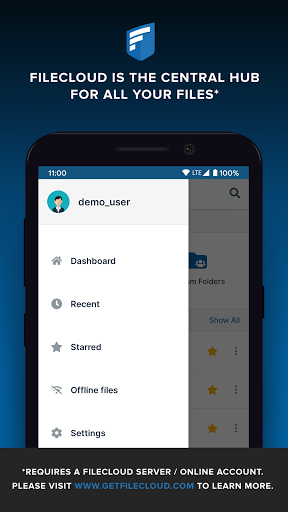
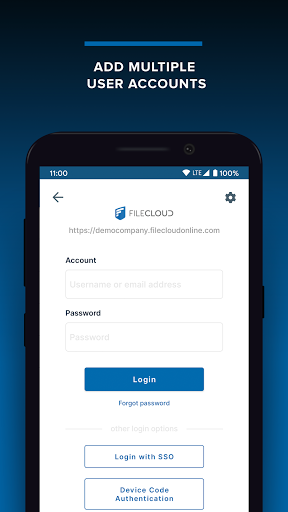
Need your own on-premises Dropbox or Box solution? Get FileCloud - the #1 content collaboration platform with secure file sharing, sync, and mobile access for small businesses, enterprises, schools, universities, and hosting providers. FileCloud runs inside your own infrastructure and on-premises, so you control your data 100%. Install it on your server or with your trusted hosting partner. With FileCloud you never need to worry about security, privacy, and control of your company data and intellectual property. FileCloud offers seamless mobile access to the existing network shares in your organization. Instantly make your organization’s existing file shares remotely accessible. Users can access their files anytime, anywhere. Immediately open documents, files, and folders that are stored on your Enterprise FileCloud. Experience fast, easy, and secure access and ability to share company files and documents with Android devices. Key Features : • Remote File Access - Browse files and documents, download them locally, edit them, and re-upload them. • File Management - Create new folders, delete files and folders, and explore your files from anywhere. • Sharing - Share selected files and documents with colleagues and business partners with one click. • Preview - Preview documents and PDFs. • Offline Access - Download files directly to your Android device and access it offline. • App support - Open your downloaded files using other installed applications. • File Versioning - Collaborate effectively using unlimited automatic file versioning. • Office Integration - Edit and save files directly using the Microsoft Office app. Note: This app requires a FileCloud server to function. Your company may have provided one to you. See the website (www.filecloud.com) for more information.
Installs since 29 Aug 2026 Measured
Exact Google Play install counts, collected daily
Ratings
314 ratings, 31 reviews
- 5 ★53%
- 4 ★11%
- 3 ★4.4%
- 2 ★14%
- 1 ★19%
Recent reviews
Latest public reviews from the store
No reviews in our sample for this app yet.
Top chart positions
Latest Google Play chart ranks by country, last 10 days
Not in any tracked top chart in the last 10 days.
FileCloud history
Release, install milestones, listing and store changes
- Reached 50,000+ installs 10 Sep 2023
- Reached 10,000+ installs 25 Jul 2017
- First released on the store 1 Jun 2013
Update frequency
How often FileCloud ships a new version, month by month
6 updates in the last 12 months. More often than most similar apps: they shipped a median of 1 updates in the same year.
Recent versions
Current version 23.263.0
- Version 23.263.08 Oct 2026
- Screenshot protection has been added to improve data privacy - Bug fixes and performance improvements
- Version 23.262.1019 Aug 2026
Enhanced Media Backup to deliver more reliable backups and a more transparent user experience.
- Version 23.261.1617 Jun 2026
Bug fixes and performance improvements
- Version 23.261.0117 Apr 2026
Bug fixes and performance improvements
Listing keywords
Words and phrases FileCloud repeats most in its store listing
Top phrases: files and documents (3), files and folders (2), content collaboration (2), file sharing (2), file versioning (2).
Highlighted words also appear in the title. Counts cover the title, short description and description.
Business model and tech
From the store listing and declared permissions
- Business model
- Free to download
- Sensitive access
- No sensitive permission declared
Compliance
What the listing and the app package show
- Store status
- Live
- Upkeep
- Updated 8 Oct 2026
- Registered in
- United States
- Privacy policy
- Linked on the listing
- Advertising
- No ads declared
- In-app purchases
- None declared
- Age rating
- Everyone
Apps like FileCloud
QR Scanner & Barcode ReaderAfex Digital242K installs★ 3.83
Resultivity - Work Gamifiedzababahano19.1K installs★ 4.39
Spanish English TranslatorTransl Apps93.6K installs★ 4.13
My Habit Tracker & PlannerMichael R. Stagge144K installs★ 4.83
Grackle AI: Now with Gen 4 xAINightly Nexus120K installs★ 2.24
ImgurViewerEnsoft43.6K installs★ 4.45
Supernotes – Notes & JournalSupernotes28.4K installs★ 4.19
Taxi CalculatorLeonardo Javier Russo65.1K installs★ 4.11
DAILY STAMP - My own routineyjteam33.2K installs★ 4.64
FileCloud: questions and answers
How many downloads does FileCloud have?
FileCloud has 76,470 installs on Google Play, measured from the store's own count on 14 Nov 2026.
Who makes FileCloud?
FileCloud is published by FileCloud, a developer based in US.
When was FileCloud last updated?
The latest version (23.263.0) was released on 8 Oct 2026.
Is FileCloud free?
Yes. FileCloud is free to download.
Is FileCloud still available?
Yes. FileCloud is live on Google Play as of 14 Nov 2026.
Track FileCloud and its competitors
Watch any app for new versions, rating drops, chart moves and removals. Free plan, no card.