
- Installs
- 60.96K
- Measured
- Rating
- 3.51
- Ratings
- 176
- 10 reviews
- Version
- Varies with device
- Updated 28 Sep 2025
- Released
- 18 Jan 2023
- Tracked since 13 May 2026
- Size
- —
Screenshots



About Flashlight
The description on the store listing
Features:
- Set the color;
- Set the circle size;
- Set the brightness;
- Set a timer (to turn the flashlight off);
- Show the time;
- Blink in SOS;
- Three tiles;
- Three complications.
Warnings and Alerts:
- This application is for Wear OS;
- The phone app only function is to help you to install the watch app;
- The app needs permission to change the watch settings in order to set the brightness;
- The basic tile is white at full brightness;
- The advanced tile imitates the app basic flashlight;
- Long use may cause problems to the screen!
- Long use may reduce the battery level!
Instructions:
= FIRST TIME RUNNING:
- Open the app;
- Grant the permission;
- …
Read the full description
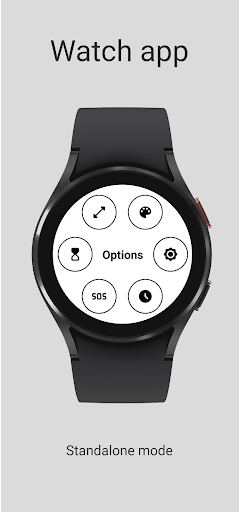
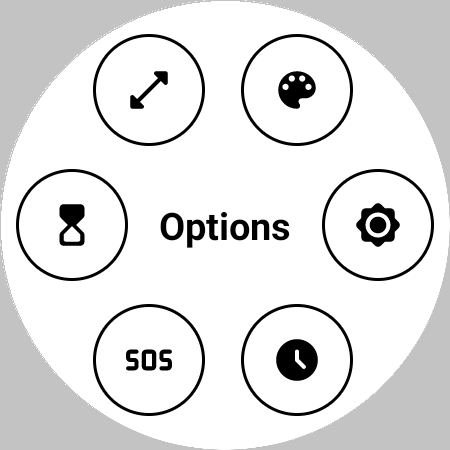
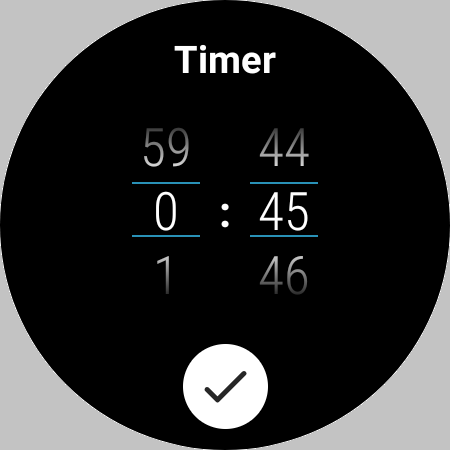
Features: - Set the color; - Set the circle size; - Set the brightness; - Set a timer (to turn the flashlight off); - Show the time; - Blink in SOS; - Three tiles; - Three complications. Warnings and Alerts: - This application is for Wear OS; - The phone app only function is to help you to install the watch app; - The app needs permission to change the watch settings in order to set the brightness; - The basic tile is white at full brightness; - The advanced tile imitates the app basic flashlight; - Long use may cause problems to the screen! - Long use may reduce the battery level! Instructions: = FIRST TIME RUNNING: - Open the app; - Grant the permission; - Relaunch the app. = SET THE SIZE: - Open the app; - Tap the screen to show the options' menu; - Click on the size icon; - Use the slide to change the size. = SET THE COLOR: - Open the app; - Tap the screen to show the options' menu; - Click on the color icon; - Use the slides to select the desired color. = SET THE BRIGHTNESS: - Open the app; - Tap the screen to show the options' menu; - Click on the brightness icon; - Use the slide to change the brightness. = SET THE TIMER: - Open the app; - Tap the screen to show the options' menu; - Click on the timer icon; - Set the minutes and seconds; - Click on the confirm button. = STOP THE TIMER: - Tap the screen* * After the timer started. = BLINK IN SOS: - Open the app; - Tap the screen to show the options' menu; - Click on the SOS icon. = STOP BLINKING IN SOS: - Tap the screen* * While blinking. = SHOW THE TIME: - Open the app; - Tap the screen to show the options' menu; - Click on the clock icon*. * First tap: Show the time in the top of the screen; * Second tap: Show the time in the center of the screen; * Thrid tap: Hide the time = RESET THE FLASHLIGHT SETTINGS: - Tap the screen to show the options' menu; - Tap and hold the "Option" text; - Confirm. = TO CLOSE A SCREEN (color, brightness, sos, ...) - Tap the screen name OR press the back button. Tested devices: - GW5.
Installs since 29 Aug 2026 Measured
Exact Google Play install counts, collected daily
Ratings
176 ratings, 10 reviews
- 5 ★45%
- 4 ★18%
- 3 ★2.4%
- 2 ★7.8%
- 1 ★27%
Recent reviews
Latest public reviews from the store
- 20 Dec 2025
🤯 I never knew that simple games could be THAT much fun!!
- 11 Jul 2023
The games are simplistic yet fun. However the instructions could be improved.
- 20 Feb 2023
I like playing it on my phone and watch. All I would say is add the game description for each game in the app. And with the direction game you have to swipe the opposite way of the given direction in the beginning. Other than that the game is worth the money. 👍🏾
Top chart positions
Latest Google Play chart ranks by country, last 10 days
Not in any tracked top chart in the last 10 days.
Flashlight history
Release, install milestones, listing and store changes
- Reached 50,000+ installs 28 Sep 2025
- Reached 10,000+ installs 7 Nov 2023
- Reached 5,000+ installs 8 Oct 2023
- Reached 1,000+ installs 11 May 2023
- Reached 500+ installs 10 Apr 2023
- Reached 100+ installs 11 Mar 2023
- Reached 50+ installs 9 Feb 2023
- First released on the store 18 Jan 2023
Recent versions
Current version Varies with device
- Version 1.1.229 Jul 2025
- Version 1.1.17 Aug 2024
- Version 1.1.022 Jul 2023
Listing keywords
Words and phrases Flashlight repeats most in its store listing
Top phrases: tap the screen (10), screen to show (7), show the options (7), options menu (7), options menu click (6).
Highlighted words also appear in the title. Counts cover the title, short description and description.
Business model and tech
From the store listing and declared permissions
- Business model
- Free to download
- Sensitive access
- No sensitive permission declared
Compliance
What the listing and the app package show
- Store status
- Live
- Upkeep
- Updated 28 Sep 2025
- Registered in
- Brazil
- Privacy policy
- Linked on the listing
- Advertising
- No ads declared
- In-app purchases
- None declared
- Age rating
- Everyone
Apps like Flashlight
QR Code & Barcode ScannerAuroid Labs12.1K installs★ 4.44
Call Log and sms managerSoft Labs India80K installs★ 3.67
Classic CalculatorKok Hong69.7K installs★ 4.27
App Info Shortcutdogfooder37.3K installs★ 4.43
BMI One CalculatorJoytify Inc.48.5K installs★ 3.0
Bluetooth Voice: Arduino Voiceyashx17.9K installs★ 4.43
Gods Unchained - Custom Card Gplaytoearn.com85.9K installs★ 2.56
Watch Series 7 GuideSmarterAppsDeveloper50.1K installs★ 3.67
Hack Safe - Mobile SecurityRepidex52.4K installs★ 3.88
Flashlight: questions and answers
How many downloads does Flashlight have?
Flashlight has 60,963 installs on Google Play, measured from the store's own count on 14 Nov 2026.
Who makes Flashlight?
Flashlight is published by Douglas Silva :: Dect, a developer based in BR.
When was Flashlight last updated?
The latest version (Varies with device) was released on 28 Sep 2025.
Is Flashlight free?
Yes. Flashlight is free to download.
Is Flashlight still available?
Yes. Flashlight is live on Google Play as of 14 Nov 2026.
Track Flashlight and its competitors
Watch any app for new versions, rating drops, chart moves and removals. Free plan, no card.