
Floatly: Assistive Touch Ball
Assistive touch quick ball & floating button. Navigate, record, adjust volume.
- Installs
- 25.05K
- Measured
- Rating
- —
- Ratings
- —
- Version
- Varies with device
- Released
- 2 Oct 2026
- Tracked since 10 Nov 2026
- Size
- —
Screenshots


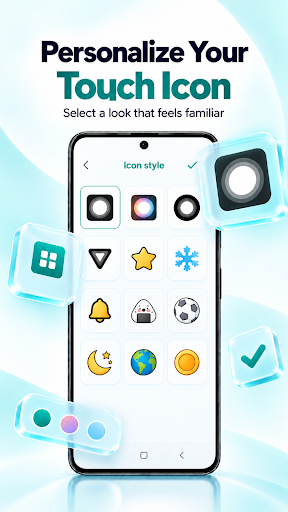
About Floatly: Assistive Touch Ball
The description on the store listing
Floatly is an assistive touch app for Android that gathers your everyday controls inside one quick ball. Place the floating button anywhere on the screen and reach Home, Back, Recent apps, screenshot, the screen recorder and a volume panel without pressing a physical key. It helps protect worn hardware buttons, makes one-handed use of a large phone easier and gives you an easy touch shortcut to the settings you open most.
⚪ QUICK BALL OVER EVERY APP
The Floatly ball floats above apps and games, so this floating panel of controls stays one tap away and gives you smart control of your phone. Drag it to the spot that suits your thumb and keep using your phone normally around it.
👆 TAP, …
Read the full description
Floatly is an assistive touch app for Android that gathers your everyday controls inside one quick ball. Place the floating button anywhere on the screen and reach Home, Back, Recent apps, screenshot, the screen recorder and a volume panel without pressing a physical key. It helps protect worn hardware buttons, makes one-handed use of a large phone easier and gives you an easy touch shortcut to the settings you open most. ⚪ QUICK BALL OVER EVERY APP The Floatly ball floats above apps and games, so this floating panel of controls stays one tap away and gives you smart control of your phone. Drag it to the spot that suits your thumb and keep using your phone normally around it. 👆 TAP, DOUBLE TAP AND LONG PRESS GESTURES Give each gesture its own job. A single tap can open the menu, a double tap can go Back and a long press can lock the screen. You pick the action for each one. 🧩 CUSTOM MENU WITH MORE THAN 20 ACTIONS Fill the menu slots with the shortcuts you need: virtual home button, Back, Recent apps, Notifications, Screenshot, Lock screen, Screen recorder, Flashlight, Camera, Rotation lock, Screen timeout, Brightness, Volume up and Volume down. Wi-Fi, Bluetooth, Airplane mode, Location, Power, device settings, favorite apps and All apps shortcuts are available too. 🔊 FLOATING VOLUME BUTTON Add a separate volume button to the screen when your hardware volume keys are loose or worn. Tap it to open sliders for media, ringtone, notification, alarm and call volume, and choose which sliders appear in the panel. ☀️ BRIGHTNESS AND SCREEN DARKNESS The same panel adjusts screen brightness, switches auto brightness on or off, and adds a darkness overlay that dims the screen further for comfortable reading at night. 🎬 SCREEN RECORDER Launch the screen recorder from the menu to capture a tutorial, a game session or a bug report. Android asks for screen capture permission before recording begins, and the video is saved as an MP4 file on your device. 📸 SCREENSHOT AND LOCK SCREEN Take a screenshot or lock your phone with one tap instead of a button combination. Both actions work on Android 9 or newer. 🎨 ICON, SIZE AND STYLE Change the icon of the floating button, set its size and transparency, and adjust the button colors and shape so the assistive touch ball matches your wallpaper. 📱 ALL APPS AND FAVORITES Open a list of every installed app or pin favorite apps inside the menu, turning Floatly into a small launcher that works over any screen. 🔒 PRIVACY No account and no sign-in are needed. Your menu layout, gestures and button settings are stored on your device, and screen recordings stay in your device storage. ♿ ACCESSIBILITY SERVICE USE Floatly uses the Android Accessibility Service API to perform the actions you choose: Back, Home, Recent apps, Notifications, Screenshot and Lock screen. These actions run only when you tap them in the menu or trigger them with a gesture. WHAT FLOATLY INCLUDES ✓ Assistive touch quick ball that stays above other apps ✓ Floating button gestures for tap, double tap and long press ✓ Virtual home button, Back and Recent apps in an easy touch menu ✓ Screen recorder that saves MP4 video on your device ✓ Volume button with media, ring, alarm and call sliders ✓ Brightness control and a screen darkness overlay ✓ Assistive touch icon, size, transparency and button style options IMPORTANT NOTE Some manufacturers stop overlay apps in the background to save battery. If the floating button disappears after the screen turns off, allow Floatly to run in the background and exclude it from battery optimization in your device settings. Screenshot and lock screen actions need the Accessibility Service enabled and Android 9 or newer.
Installs Measured
Exact Google Play install counts, collected daily
Daily history starts once this app is in our daily install sample.
Ratings
- 5 ★0.0%
- 4 ★0.0%
- 3 ★0.0%
- 2 ★0.0%
- 1 ★0.0%
Recent reviews
Latest public reviews from the store
No reviews in our sample for this app yet.
Top chart positions
Latest Google Play chart ranks by country, last 10 days
Not in any tracked top chart in the last 10 days.
Floatly: Assistive Touch Ball history
Release, install milestones, listing and store changes
- First released on the store 2 Oct 2026
Listing keywords
Words and phrases Floatly: Assistive Touch Ball repeats most in its store listing
Top phrases: assistive touch (6), floating button (5), lock screen (5), screen recorder (5), quick ball (4).
Highlighted words also appear in the title. Counts cover the title, short description and description.
Business model and tech
From the store listing and declared permissions
- Business model
- Free to downloadShows ads
- Sensitive access
- No sensitive permission declared
Compliance
What the listing and the app package show
- Store status
- Live
- Privacy policy
- Linked on the listing
- Advertising
- Shows ads
- In-app purchases
- None declared
- Age rating
- Everyone
Apps like Floatly: Assistive Touch Ball
들어서 화면켜기Won3.5K installs★ 4.0
Height PredictionEcliptic App Ventures45.9K installs★ 2.4
Speicers`Pro VPNEldiablolucifer202021.2K installs★ 4.14
Lightning Tracker with AlertsYaksh Software4.3K installs★ 3.0
Mana Pathi (Unit Converter)Shirish Koirala2.2K installs★ 4.6
Multi-tab Calc - A simple app.Naoyuki Rikiji1.3K installs★ 5.0
Photo Recovery PlusBillApps7.1K installs★ 4.53
Just Silence. Scheduled.Akid Soft1.6K installs★ 5.0
- WoWp AssistantВиталий Робиновский2K installs★ 4.2
Floatly: Assistive Touch Ball: questions and answers
How many downloads does Floatly: Assistive Touch Ball have?
Floatly: Assistive Touch Ball has 25,051 installs on Google Play, measured from the store's own count on 10 Nov 2026.
Who makes Floatly: Assistive Touch Ball?
Floatly: Assistive Touch Ball is published by David Sager.
Is Floatly: Assistive Touch Ball free?
Yes. Floatly: Assistive Touch Ball is free to download, and it shows ads.
Is Floatly: Assistive Touch Ball still available?
Yes. Floatly: Assistive Touch Ball is live on Google Play as of 10 Nov 2026.
Track Floatly: Assistive Touch Ball and its competitors
Watch any app for new versions, rating drops, chart moves and removals. Free plan, no card.