Franco Kernel Manager
Complete kernel toolbox with features to manage and tweak your rooted device
- Installs
- 270K
- Measured
- Rating
- 4.24
- Ratings
- 17.8K
- 2.9K reviews
- Version
- 7.0.48
- Updated 19 Dec 2025
- Released
- 1 Jan 2012
- Tracked since 12 May 2026
- Size
- 6 MB
- Needs 6.0
Screenshots



About Franco Kernel Manager
The description on the store listing
Franco Kernel Manager it's a complete toolbox for all devices with a <b>rich</b> feature set aimed for ease of use to supercharge your kernel! From the less knowledgeable, to the most expert user, it combines everything you need to manage, tweak and empower your device.
<b>You want more performance?</b> Check ✅
<b>You want to boost your battery life?</b> Check ✅
<b>You want to flash mods without having to use a custom recovery?</b> Check ✅
Compared to other apps Franco Kernel Manager provides a significantly better experience with features tailored just for you.
<b>Features:</b>
⭐️ Battery Monitor notification with detailed information about your power consumption during active …
Read the full description
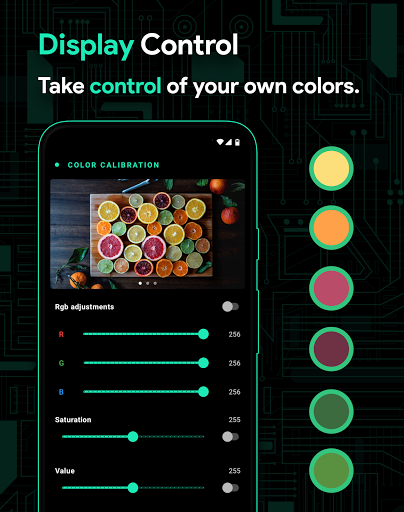
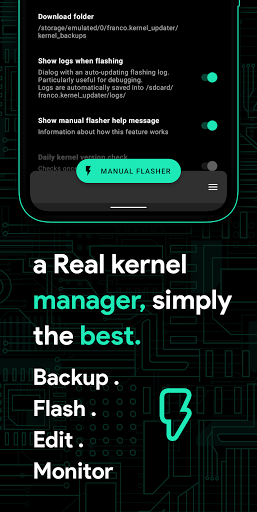
Franco Kernel Manager it's a complete toolbox for all devices with a <b>rich</b> feature set aimed for ease of use to supercharge your kernel! From the less knowledgeable, to the most expert user, it combines everything you need to manage, tweak and empower your device. <b>You want more performance?</b> Check ✅ <b>You want to boost your battery life?</b> Check ✅ <b>You want to flash mods without having to use a custom recovery?</b> Check ✅ Compared to other apps Franco Kernel Manager provides a significantly better experience with features tailored just for you. <b>Features:</b> ⭐️ Battery Monitor notification with detailed information about your power consumption during active and idle periods, charging time estimation, charging amps/watts & more; ⭐️ Detailed battery stats with information about power consumption in mAh of each component (WiFi, screen, signal, idle, etc) and tons more; ⭐️ Build.prop editor; ⭐️ Auto-flash kernels, Magisk modules and basically any flashable zips without having to visit a custom recovery; ⭐️ Powerful battery saving tips as simple as touching a button; ⭐️ Display color temperature presets and support for KLapse; ⭐️ Support for Adreno Idler, GPU boost, Adreno, Exynos and Kirin GPUs; ⭐️ High Brightness Mode (hbm) available for supported devices (Pixel 3 and 4 for example) & automatic toggle based on the ambient light sensor; ⭐️ CPU freqs, governor, support for multi-clusters, GPU freqs, stune, CPU-Boost, CPU Input-boost, governor profiles, governor tunables & more; ⭐️ Backup & Restore kernels on the fly with just a tap of a button; ⭐️ A kernel logger viewer for developers; ⭐️ Custom kernel settings such as: IO scheduler, IO scheduler tuning, wakelocks, lowmemorykiller minfree, KSM, ZRAM, memory stuff, entropy, flar2 wake gestures, scheduler and you can add your own custom tunables too; ⭐️ Create Per-app profiles and use different settings for your most used apps. For example you may want max CPU frequency when gaming, but low frequency when reading an e-book. You can also choose whether for Wi-Fi to be on/off, if you desire you toggle Android Battery Saver, specify what type of Location Mode you want to use for that specific app, etc; ⭐️ System Health with a beautiful UI, useful real-time CPU/GPU/RAM/ZRAM/DDR BUS/IO/THERMAL ZONES/WAKELOCKS usage and comprehensive CPU frequencies usage with support for clustered devices; ⭐️ Display and sound control ⭐️ Automatic Night Shift to tint your display in orange/red easing your eyes during the night; ⭐️ CPU temperature in the notification bar for devices that export the sensor data; ⭐️ Scripts manager allows you to create your own shell scripts within the app and pin as Quick Tiles; ⭐️ Light and Dark themes compatible with the latest Android™ version; ⭐️ Backup & restore application settings; Franco Kernel Manager works for ALL devices and kernels. You need to be <b>ROOTED</b> for all features besides Battery Monitor which works rootless. Franco Kernel Manager makes use of the AccessibilityService allowing us to detect the activity displayed in the window. As as example, when this service is enabled and running whenever you open an app we are alerted through the api the visible window state is changed, and we can infer the activity's package name and thus checking if we have a profile for said package and apply it. No data is collected/stored/logged through this process. <b>Have a question?</b> Feel free to reach out! Unlike most developers you will find, I'm more than happy to respond. Also feel free to check out the FAQ which shows every feature in detail: https://medium.com/@franciscofranco/faq-for-fk-kernel-manager-android-app-f5e7da0aad18 If you have a problem, before putting in that one star review, please reach out to @franciscof_1990 on Twitter, or send me an e-mail to [email protected]. I'm always happy to get back to you. <b>Disclaimer</b> I take no responsibility for any fault or damage caused by any misuse of this app.
Installs, last 30 days Measured
Exact Google Play install counts, collected daily
Ratings
17,801 ratings, 2,860 reviews
- 5 ★72%
- 4 ★9.0%
- 3 ★4.0%
- 2 ★1.0%
- 1 ★14%
Recent reviews
Latest public reviews from the store
No reviews in our sample for this app yet.
Top chart positions
Latest Google Play chart ranks by country, last 10 days
Not in any tracked top chart in the last 10 days.
Franco Kernel Manager history
Release, install milestones, listing and store changes
- First released on the store 1 Jan 2012
Update frequency
How often Franco Kernel Manager ships a new version, month by month
1 updates in the last 12 months. Less often than most similar apps: they shipped a median of 5 updates in the same year.
Recent versions
Current version 7.0.48
- Version 7.0.4819 Dec 2025
7.0.45 · Perfmon now shows the real fps · Added resolution and density options to Display Control · Faster Dashboard loading · More GPU fixes · When moving through menus shell commands are now canceled to prevent stale states which could lead to the app stuck 7.0.29 · Massive perf improvements · Added uclamp support · Support for init_boot backup · Improve perfmon · Improve per-app profiles · Lots of bug fixes 7.0.14 · Add more Mediatek options · Fix Per-app profiles · Fix battery life tips
- Version 6.2.327 Nov 2023
- Version 6.2.123 Nov 2023
- Version 6.1.132 May 2021
Listing keywords
Words and phrases Franco Kernel Manager repeats most in its store listing
Top phrases: franco kernel manager (5), franco kernel (5), kernel manager (5), check you want (2), backup restore (2).
Highlighted words also appear in the title. Counts cover the title, short description and description.
Business model and tech
From the store listing and declared permissions
- Business model
- Paid, $2.49
- Sensitive access
- No sensitive permission declared
Compliance
What the listing and the app package show
- Store status
- Live
- Upkeep
- Updated 19 Dec 2025
- Privacy policy
- Linked on the listing
- Advertising
- No ads declared
- In-app purchases
- None declared
- Age rating
- Everyone
Apps like Franco Kernel Manager
Fort Vpn: Super Fast Safe VPNCOIHUB TECHNOLOGY15.6M installs★ 4.7
Volume BoosterNuts Mobile Inc.1.7M installs★ 4.62
BreventJianyu Studio12.6M installs★ 4.12
Mano EŽYSTelia Lietuva, AB393K installs★ 4.09
Mynaportalデジタル庁(Digital Agency)26.4M installs★ 2.05
Clone Master- Multi Dual SpaceCM Division5.5M installs★ 4.23
Army Knife for AndroidDigital & Dreams3.4M installs★ 4.71
K7 Mobile SecurityK7Computing2.1M installs★ 3.79
Giftcard8-Sell Gift CardsWanglin technology Limited1.3M installs★ 4.45
Franco Kernel Manager: questions and answers
How many downloads does Franco Kernel Manager have?
Franco Kernel Manager has 269,818 installs on Google Play, measured from the store's own count on 19 Nov 2026.
Who makes Franco Kernel Manager?
Franco Kernel Manager is published by Francisco Franco.
When was Franco Kernel Manager last updated?
The latest version (7.0.48) was released on 19 Dec 2025.
Is Franco Kernel Manager free?
No. Franco Kernel Manager is a paid app priced at $2.49.
Is Franco Kernel Manager still available?
Yes. Franco Kernel Manager is live on Google Play as of 19 Nov 2026.
Track Franco Kernel Manager and its competitors
Watch any app for new versions, rating drops, chart moves and removals. Free plan, no card.