
- Installs
- 1.74M
- Measured
- Rating
- 4.13
- Ratings
- 8.9K
- 323 reviews
- Version
- 1.32
- Updated 7 Jun 2017
- Released
- 18 Dec 2011
- Tracked since 13 May 2026
- Size
- 3 MB
- Needs 2.1
Screenshots

About Ftp Server
The description on the store listing
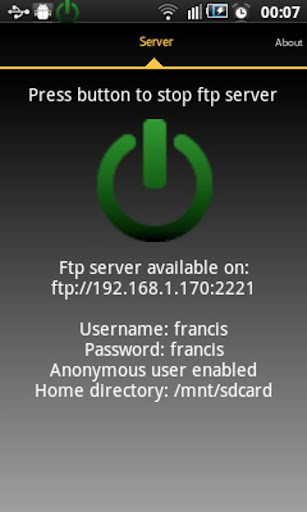
Read/write any folder, including sdcard, in your android device with this ftp server. You can backup your photos to your PC, copy music and movies to your device, etc.
If you still do not have a ftp client I recommend FileZilla client (you can download it on http://filezilla-project.org/) but you can also use file explorer on windows.
Free version does not allow landscape screen.
Features:
Use any network interface in your device including: WIFI, Ethernet, Mobile network, USB...
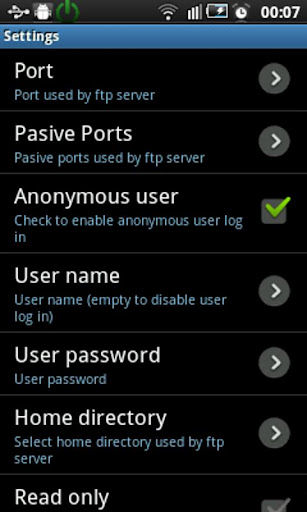
Anonymous user (can be disabled).
One Ftp user (can be disabled). Name and password can be changed.
Home directory can be root directory,
Read only mode.
Passive and active modes.
Show hidden …
Read the full description
Read/write any folder, including sdcard, in your android device with this ftp server. You can backup your photos to your PC, copy music and movies to your device, etc. If you still do not have a ftp client I recommend FileZilla client (you can download it on http://filezilla-project.org/) but you can also use file explorer on windows. Free version does not allow landscape screen. Features: Use any network interface in your device including: WIFI, Ethernet, Mobile network, USB... Anonymous user (can be disabled). One Ftp user (can be disabled). Name and password can be changed. Home directory can be root directory, Read only mode. Passive and active modes. Show hidden files. Custom home folder. Option to run server as a foreground service. Energy save mode. Languages supported: English, Spanish, Romanian, French, Italian, Hungarian, German, Chinese, Portuguese, Korean, Russian and Catalan. Intents: com.theolivetree.ftpserver.StartFtpServer com.theolivetree.ftpserver.StopFtpServer TODO: Run server as root user (only rooted devices). TLS/SSL support for secure connections. How to connect with Ftp server using USB cable: This can useful when you have USB cable and not network available. 1) On your phone go to Settings->Applications->Development and set option "USB debugging". 2) Connect your phone to your PC using USB cable. 3) Start adb server. On your PC run command "adb start-server". adb is a program that you can find on android sdk. Usually you will find it on android-sdk\platform-tools\adb. 4) Forward needed ports from your PC to your phone. On your PC run command "adb forward tcp:2221 tcp:2221" You will need to repeat this step for all ftp server and passive ports configured in your phone. It will be easier if you use a small range of passive ports. With this, any connection in your pc to 127.0.0.1:2221 will be forwarded to your phone in port 2221. 5) Run Ftp server in your phone, open settings and in "Network interfaces" select "Loopback (127.0.0.1)" or "All" 6) Start ftp server. 7) In your PC connect your ftp client to ftp://127.0.0.1:2221 (port might be different, it depends on your Ftp Server configuration). Connections in this mode need to be always started by PC so only passive mode is available when using USB connection. Permissions needed: INTERNET ACCESS_NETWORK_STATE ACCESS_WIFI_STATE Network permission to enable server to open network communication with ftp clients. WRITE_EXTERNAL_STORAGE Enables ftp server write received files from ftp clients on sdcard. WAKE_LOCK Keeps phone wake only while server is running. If phone is not wake connections to ftp server can fail. Libraries used by this program: Apache ftp server v1.0.6. Apache2 License. Android viewflow pakerfeldt (01/Nov/2011). Apache2 License: http://www.apache.org/licenses/LICENSE-2.0.html Special thanks to: Beatriz Vera, Surjit Panda, Alex Sovu, Balazs David Molnar, Damien Varvenne, Simone Balducci, Juanvi, Chengcheng Hu, Noelia, Noxa Tagakov, Joon Lim, Tomokazu Wakasugi and Paulino Feitio.
Installs, last 30 days Measured
Exact Google Play install counts, collected daily
Ratings
8,901 ratings, 323 reviews
- 5 ★72%
- 4 ★4.0%
- 3 ★5.0%
- 2 ★3.0%
- 1 ★16%
Recent reviews
Latest public reviews from the store
- 16 Apr 2023
Great App! They are beating their competitors on all fronts
- 18 Jun 2021
Fantastic, love the ojc fund, and the app is great. Glad I signed up with them
- 22 Aug 2019
👍
- 22 Aug 2018
Great app
Top chart positions
Latest Google Play chart ranks by country, last 10 days
Not in any tracked top chart in the last 10 days.
Ftp Server history
Release, install milestones, listing and store changes
- Reached 1,000,000+ installs 16 Nov 2016
- Reached 500,000+ installs 23 Aug 2014
- Reached 100,000+ installs 24 Jan 2013
- Reached 50,000+ installs 21 Oct 2012
- Reached 10,000+ installs 23 May 2012
- Reached 5,000+ installs 20 Mar 2012
- Reached 1,000+ installs 5 Jan 2012
- Reached 500+ installs 1 Jan 2012
Update frequency
How often Ftp Server ships a new version, month by month
0 updates in the last 12 months. Less often than most similar apps: they shipped a median of 2 updates in the same year.
Recent versions
Current version 1.32
- Version 1.3211 May 2017
Fix delete/rename files in external SDCard in Android 6
- Version 1.314 Nov 2016
- Version 1.3029 Sep 2016
- Version 1.2826 Apr 2016
Listing keywords
Words and phrases Ftp Server repeats most in its store listing
Top phrases: ftp server (10), usb cable (3), com theolivetree ftpserver (2), pc run command (2), run command adb (2).
Highlighted words also appear in the title. Counts cover the title, short description and description.
Business model and tech
From the store listing, the SDKs in the app package and its declared permissions
- Business model
- Free to downloadShows ads
- Built with
- No cross-platform framework or game engine detected
- Ad networks (1)
- AdMob
- Analytics and crash reports
- Google Analytics
- Sensitive access
- Photos, videos and files
2 ad, attribution and analytics SDKs detected. SDKs are read from the app package and permissions from the store listing, so code that loads later is not seen.
Technology
8 SDKs found in the app package
Ad network libraries
Ad networks
Advertising and install-attribution SDKs found in the app package
- AdMob
6 permissions
0 special access, 2 sensitive, 4 standard
- Change or delete shared storageSensitive
- Read shared storageSensitive
- Keep the phone awakeStandard
- Full internet accessStandard
- See network connectionsStandard
- See Wi-Fi connectionsStandard
Compliance
What the listing and the app package show
- Store status
- Live
- Upkeep
- No update since 7 Jun 2017
- Registered in
- Spain
- Privacy policy
- Linked on the listing
- Advertising
- Shows ads
- In-app purchases
- None declared
- Age rating
- Everyone
- Sensitive permissions
- 2 sensitive of 6
- Location access
- No
- Camera and microphone
- Neither
Apps like Ftp Server
Touch Macro Pro - Auto Clickerjake773M installs★ 2.84
MobileRecov - Data RecoveryStor Med Apps563K installs★ 4.69
Fibex Oficina MóvilSoluciones Medianet, C.A.631K installs★ 2.86
WeBackGrit Technology949K installs★ 1.2
LED Scroller - text LED BannerCristools Simple Apps607K installs★ 4.75
Find My Bluetooth DeviceByteBox Inc.939K installs★ 3.9
Blue Speed VPNhelalik1.4M installs★ 4.51
Lag remover Lower Gaming PingNoLag Australia708K installs★ 4.35
Electron: battery health infoMaher Safadi4M installs★ 3.81
Ftp Server: questions and answers
How many downloads does Ftp Server have?
Ftp Server has 1,736,310 installs on Google Play, measured from the store's own count on 19 Nov 2026.
Who makes Ftp Server?
Ftp Server is published by The Olive Tree, a developer based in ES.
When was Ftp Server last updated?
The latest version (1.32) was released on 7 Jun 2017.
Is Ftp Server free?
Yes. Ftp Server is free to download, and it shows ads.
Is Ftp Server still available?
Yes. Ftp Server is live on Google Play as of 19 Nov 2026.
Track Ftp Server and its competitors
Watch any app for new versions, rating drops, chart moves and removals. Free plan, no card.