
FTP Server - Multiple users
A powerful FTP Server to access files in your phone from everywhere on Earth
- Installs
- 419K
- Measured
- Rating
- 4.17
- Ratings
- 2.6K
- 92 reviews
- Version
- 0.16.3
- Updated 15 Oct 2026
- Released
- 18 Sep 2017
- Tracked since 13 May 2026
- Size
- 6 MB
- Needs 4.1
Screenshots



About FTP Server - Multiple users
The description on the store listing
A powerful application allows you to run FTP Server on your phone and help your friend or you to access/share files over the Internet.
It also helps you not to use USB port of device to increase the lifetime of it. It is also called WiFi file transfer or wireless file management.
<b>All features are totally free</b>
You can remove ads by opening the section <b>Remove Ads</b> in About screen.
<b>APPLICATION FEATURES</b>
√ <b>Use any network interfaces</b> in your device including: WiFi, Ethernet, Tethering...
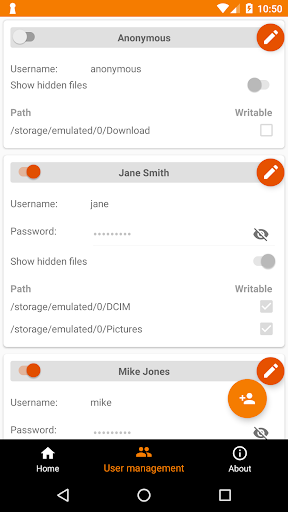
√ <b>Multiple FTP users</b> (anonymous user included)
• Allow each user to show hidden files or not
√ <b>Multiple access paths for each user</b>: Any folders in your …
Read the full description
A powerful application allows you to run FTP Server on your phone and help your friend or you to access/share files over the Internet. It also helps you not to use USB port of device to increase the lifetime of it. It is also called WiFi file transfer or wireless file management. <b>All features are totally free</b> You can remove ads by opening the section <b>Remove Ads</b> in About screen. <b>APPLICATION FEATURES</b> √ <b>Use any network interfaces</b> in your device including: WiFi, Ethernet, Tethering... √ <b>Multiple FTP users</b> (anonymous user included) • Allow each user to show hidden files or not √ <b>Multiple access paths for each user</b>: Any folders in your internal storage or external sdcard • Can set read-only or full write access on each path √ <b>Support simultaneous file transfer</b> √ <b>Automatically open port on your router</b>: Access files from everywhere on Earth √ <b>Automatically start FTP Server when certain WiFi is connected</b> √ <b>Automatically start FTP Server on boot</b> √ <b>Support scripting/Tasker</b> Tasker integration: Add new Task Action (choose System -> Send Intent) with the following information: • Package: net.xnano.android.ftpserver • Class: net.xnano.android.ftpserver.receivers.CustomBroadcastReceiver • Actions: either one of following actions: - net.xnano.android.ftpserver.START_SERVER - net.xnano.android.ftpserver.STOP_SERVER To enable or disable the feature to open the ports on router automatically, please use the following actions: - net.xnano.android.ftpserver.ENABLE_OPEN_PORT - net.xnano.android.ftpserver.DISABLE_OPEN_PORT <b>APPLICATION SCREENS</b> √ <b>Home</b>: Control the server configurations such as • Start/stop server • Monitor the connected clients • Enable automatically start on specific WiFi detected, on boot... • ... √ <b>User management</b> • Manage users and access paths for each user <b>What FTP Clients are supported?</b> √ You can use any FTP clients on Windows, Mac OS, Linux or even browser to access this FTP Server. • FileZilla • Windows Explorer: If user is not anonymous, please enter the address in format ftp://username@ip:port/ into Windows Explorer (username you created in User Management screen) • Finder (MAC OS) • File manager on Linux OS • Total Commander (Android) • Web browsers such as Chrome, Filefox, Edge... can be used in read-only mode <b>PASSIVE PORTS</b> The range of passive ports is from the initial port (default 50000) to the next 128 ports if UPnP enabled, or next 256 ports if UPnP disabled. In general: - 50000 - 50128 if UPnP enabled - 50000 - 50256 if UPnP disabled From 0.13.0, the initial port is 60000 <b>NOTICES</b> - Doze mode: Application may not work as expected if doze mode is activated. Please go to Settings -> Search for Doze mode and add this application to the white list. <b>PERMISSIONS NEEDED</b> √ <i>WRITE_EXTERNAL_STORAGE</i>: Mandatory permission for FTP Server to access files in your device. √ <i>INTERNET, ACCESS_NETWORK_STATE, ACCESS_WIFI_STATE</i>: Mandatory permissions to allow user to connect to FTP Server. √ <i>Location (Coarse/Fine location)</i>: Required for user who wants to automatically start server on Wi-Fi connected on Android P and above. * <b>Please read Android P restriction</b> about getting Wifi's connection info here: https://developer.android.com/about/versions/pie/android-9.0-changes-all#restricted_access_to_wi-fi_location_and_connection_information * <b>Android Q+</b>: Because getting WiFi connection info while application in the background requires "<b>Background location</b>", so that, to operate properly, please select "Allow all times" when enable this feature. <b>SUPPORT</b> If you're facing any problems, want new features or have feedback to improve this application, don't hesitate to send it to us via the support email: [email protected]. NEGATIVE COMMENTS can't help the developer to solve the problems! <b><u>Privacy Policy</u></b> https://xnano.net/privacy/ftpserver_privacy_policy.html
Installs since 19 Jul 2026 Measured
Exact Google Play install counts, collected daily
Ratings
2,608 ratings, 92 reviews
- 5 ★69%
- 4 ★9.7%
- 3 ★4.8%
- 2 ★2.9%
- 1 ★14%
Recent reviews
Latest public reviews from the store
- 9 May 2026
very good this app
- 3 May 2026
very good
- 10 Oct 2025
nice
- 24 Jun 2025
nice
What reviewers bring up
Topics mentioned in the latest 50 reviews, by how many reviews mention them
Liked in good reviews (19 reviews)
- network 2
Raised in bad reviews (30 reviews)
- root 5
- support 2
- android 2
- devices 2
- redmi 2
Top chart positions
Latest Google Play chart ranks by country, last 10 days
Not in any tracked top chart in the last 10 days.
FTP Server - Multiple users history
Release, install milestones, listing and store changes
- Reached 100,000+ installs 17 Aug 2019
- Reached 50,000+ installs 3 Jun 2018
- Reached 10,000+ installs 16 Nov 2017
- Reached 5,000+ installs 3 Nov 2017
- Reached 1,000+ installs 9 Oct 2017
- Reached 500+ installs 28 Sep 2017
- First released on the store 18 Sep 2017
Update frequency
How often FTP Server - Multiple users ships a new version, month by month
1 updates in the last 12 months. Less often than most similar apps: they shipped a median of 5 updates in the same year.
Recent versions
Current version 0.16.3
- Version 0.16.315 Oct 2026
• Support for Android 17 • Reduced battery usage while the server is running • On Android 17, allow the "Nearby devices" permission so that devices on your local network can connect to the server • Bug fixes and stability improvements
- Version 0.15.196 Jan 2024
• Bug fixes
- Version 0.15.1816 Oct 2023
- Version 0.15.1211 Sep 2023
Listing keywords
Words and phrases FTP Server - Multiple users repeats most in its store listing
Top phrases: ftp server (8), net xnano android (6), xnano android ftpserver (6), android ftpserver (6), net xnano (6).
Highlighted words also appear in the title. Counts cover the title, short description and description.
Business model and tech
From the store listing, the SDKs in the app package and its declared permissions
- Business model
- Free to downloadIn-app purchasesShows ads
- Built with
- No cross-platform framework or game engine detected
- Ad networks (1)
- AdMob
- Subscriptions and payments
- Google Play billing
- Analytics and crash reports
- Firebase
- Sensitive access
- LocationPhotos, videos and filesAdvertising ID
2 ad, attribution and analytics SDKs detected. SDKs are read from the app package and permissions from the store listing, so code that loads later is not seen.
Technology
18 SDKs found in the app package
Ad networks
Advertising and install-attribution SDKs found in the app package
- AdMob
21 permissions
1 special access, 5 sensitive, 15 standard
- Manage all filesMANAGE_EXTERNAL_STORAGESpecial access
- Change or delete shared storageSensitive
- Read shared storageSensitive
- Approximate locationSensitive
- Precise locationSensitive
- Show notificationsPOST_NOTIFICATIONSSensitive
- Read how it was installed (install referrer)BIND_GET_INSTALL_REFERRER_SERVICEStandard
- Read the advertising IDAD_IDStandard
- Ask to skip battery optimisationREQUEST_IGNORE_BATTERY_OPTIMIZATIONSStandard
- Foreground service (data sync)FOREGROUND_SERVICE_DATA_SYNCStandard
- Keep the phone awakeStandard
- Run a foreground serviceFOREGROUND_SERVICEStandard
Compliance
What the listing and the app package show
- Store status
- Live
- Upkeep
- Updated 15 Oct 2026
- Registered in
- Vietnam
- Privacy policy
- Linked on the listing
- Advertising
- Shows ads
- In-app purchases
- Offered
- Age rating
- Everyone
- Sensitive permissions
- 5 sensitive, 1 special access of 21
- Location access
- Yes, while in use
- Camera and microphone
- Neither
Apps like FTP Server - Multiple users
Projector Remote ControlFFTools2.6M installs★ 3.54
FileRecovery - Restore photosDovi Tools918K installs★ 3.59
South Korea VPN - KR VPNMASTERVNC281K installs★ 3.93
Zaal VPN – Secure ConnectionJoulTheDeveloper437K installs★ 4.1
BluSecure VPN - Fast & PrivateSpectrum Medical176K installs★ 4.52
myEnerwaveEnerwave S.A.251K installs★ 3.0
X Sexy Video Player DownloaderVideo downloader pro1.5M installs★ 4.28
All Router Admin Setup ControlDev Lab Studio28.1K installs★ 3.76
Smart Modern House MapMaps Mods Addons156K installs★ 4.41
FTP Server - Multiple users: questions and answers
How many downloads does FTP Server - Multiple users have?
FTP Server - Multiple users has 418,758 installs on Google Play, measured from the store's own count on 15 Nov 2026.
Who makes FTP Server - Multiple users?
FTP Server - Multiple users is published by Banana Studio, a developer based in VN.
When was FTP Server - Multiple users last updated?
The latest version (0.16.3) was released on 15 Oct 2026.
Is FTP Server - Multiple users free?
Yes. FTP Server - Multiple users is free to download and offers in-app purchases, and it shows ads.
Is FTP Server - Multiple users still available?
Yes. FTP Server - Multiple users is live on Google Play as of 15 Nov 2026.
Track FTP Server - Multiple users and its competitors
Watch any app for new versions, rating drops, chart moves and removals. Free plan, no card.