
Gesture Lock Screen
Draw password to unlock your phone.
- Installs
- 23.48M
- Measured
- Rating
- 3.86
- Ratings
- 93.3K
- 820 reviews
- Version
- 5.14
- Updated 3 Mar 2026
- Released
- 28 Aug 2015
- Tracked since 14 May 2026
- Size
- 5 MB
- Needs 4.1
Screenshots


About Gesture Lock Screen
The description on the store listing
Draw password to unlock your phone.
<b>Gesture</b>
Add/change/delete gesture
Invisible/custom gesture colors
Single (one touch drawing) and multiple gesture strokes
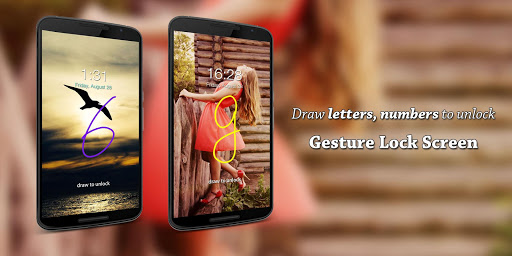
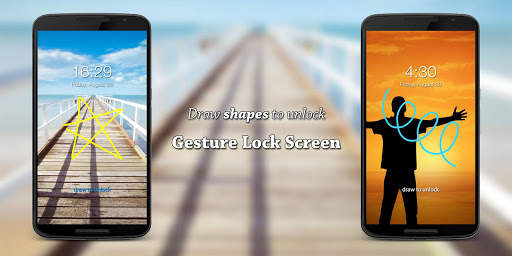
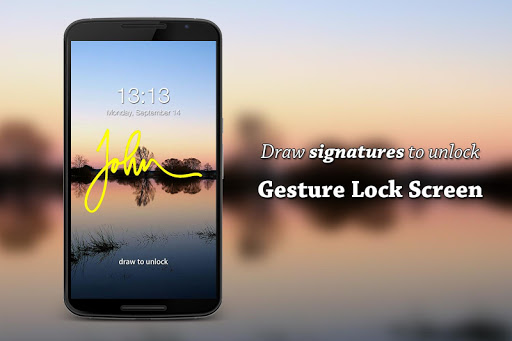
Set letters, numbers, symbols, signatures, anything as gesture password
<i>Gesture Lock Screen is a unique signature lock screen</i>
<b>Intruder Selfie</b>
Snaps a photo of intruder who entered wrong gestures or PINs
Send intruder alert and photo to your email address
Show intruder notification on unlock
Custom intruder wrong attempts
<i>Gesture Lock Screen is a intruder selfie alert lock screen</i>
<b>Time password</b>
Time = Password, 🕤 = 🔢
Use your phone’s current time as lock screen password.
If it’s …
Read the full description
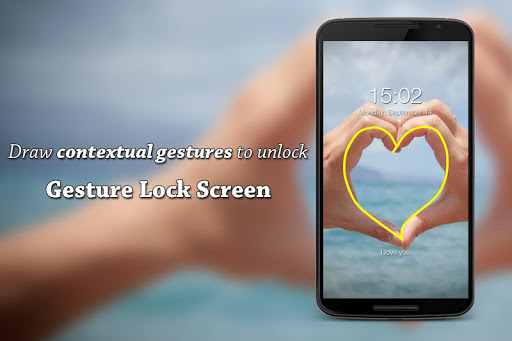
Draw password to unlock your phone. <b>Gesture</b> Add/change/delete gesture Invisible/custom gesture colors Single (one touch drawing) and multiple gesture strokes Set letters, numbers, symbols, signatures, anything as gesture password <i>Gesture Lock Screen is a unique signature lock screen</i> <b>Intruder Selfie</b> Snaps a photo of intruder who entered wrong gestures or PINs Send intruder alert and photo to your email address Show intruder notification on unlock Custom intruder wrong attempts <i>Gesture Lock Screen is a intruder selfie alert lock screen</i> <b>Time password</b> Time = Password, 🕤 = 🔢 Use your phone’s current time as lock screen password. If it’s 9:35pm, your password will be 0935. Swap hour and minute: 3509. Reverse hour(9035), minute(0953) or all(5390). Use 24-hour format: 2135. Create time password manually: custom password length, time component order, number padding. (09888835) Set current time as lock screen password and never forget the password. <b>Security+</b> Enter recovery password to unlock in case you forgot the gesture 4~8-digit recovery passwords <i>Gesture Lock Screen is a secure keypad lock screen</i> <b>Customization</b> Wallpaper Pick wallpaper from local gallery Online Unsplash wallpapers Rich date & time settings Custom lock/unlock/error sounds Unlock animations <i>Gesture Lock Screen is a highly customizable DIY lock screen</i> Please download Gesture Lock Screen, set letters, numbers, symbols, signatures or contextual gestures as password, and draw to unlock your phone. This app uses Accessibility API to keep the lock screen secure during phone calls. No data is collected or shared.
Installs, last 30 days Measured
Exact Google Play install counts, collected daily
Ratings
93,331 ratings, 820 reviews
- 5 ★57%
- 4 ★14%
- 3 ★9.1%
- 2 ★4.5%
- 1 ★15%
Recent reviews
Latest public reviews from the store
- 2 Nov 2025
After months of not being able to link to my phone because there is no visible button on the screen to press, I've just found the button!!! It's at the bottom of the screen and invisible. So now it works 👍🙄🙂 The device and the app are great and now enable me to monitor ambient and internal meat temperatures from inside my home, especially when smoking meat long and slow - instead of having to sit outside in cold weather. I'm happy now 😁
- 29 Sep 2025
This app has worked perfectly on multiple phones and tablets, but you can't use it with multiple Inkbird devices at the same time - your phone can only pair with one device at a time, and you have to delete the existing device in the app before you can connect to another. But then the connection is simple and fast - you just touch the hidden "button " on the bottom of the BBQ thermometer screen (see your instructions) and it immediately finds the new unit.
- 16 Feb 2023
This app works really good. It could be slightly more intuitive. I'm not sure how to delete custom cooking ranges after creating them. Not a huge deal and I'm sure there's a way. One other thing I'd like the developers to add is a dark mode. I use my phone in dark mode all the time and I like when my apps can match that. Other than that this works great.
- 24 Jul 2022
The app works pretty good. I do have a couple suggestions. I would love to see a long tap to set temperatures. It's unnecessarily complicated now. Also, the running app shows up in my notification bar, as does the alarms, but I can't open the app from there. Crazy, and again, unnecessary. Just let me open the app with a swipe down and a tap, super simple! Thanks.
What reviewers bring up
Topics mentioned in the latest 10 reviews, by how many reviews mention them
Liked in good reviews (4 reviews)
- device 3
- especially 2
- connection 2
- button 2
- screen 2
- bottom 2
- delete 2
Raised in bad reviews (4 reviews)
- thermometer 2
- turn off 2
- alarms 2
- other 2
- graph 2
- right 2
- temp 2
- unit 2
Top chart positions
Latest Google Play chart ranks by country, last 10 days
- Countries ranked
- 1
- Best rank
- #159
- Top 10 placements
- 0
- of 1 chart placements
- Average rank
- #159
Best countries on Google Play
- 🇮🇳 India · Top free, Lifestyle#159
| Country | Chart | Category | Rank | Best (10 days) | Date |
|---|---|---|---|---|---|
| 🇮🇳 India | Top free | Lifestyle | #159 | #100 | 19 Nov 2026 |
Gesture Lock Screen history
Release, install milestones, listing and store changes
- First released on the store 28 Aug 2015
Update frequency
How often Gesture Lock Screen ships a new version, month by month
12 updates in the last 12 months. More often than most similar apps: they shipped a median of 10 updates in the same year.
Recent versions
Current version 5.14
- Version 5.142 Mar 2026
We're always working on new features, bug fixes and performance improvements. Make sure you stay updated with the latest version for the best experience. + Glanceables, better time & date: - Added more curated glanceable themes - Added tons of settings + Added gradient wallpapers + Added landscape mode
- Version 5.13.410 Feb 2026
- Version 5.134 Feb 2026
- Version 5.1226 Jan 2026
Listing keywords
Words and phrases Gesture Lock Screen repeats most in its store listing
Top phrases: lock screen (13), gesture lock screen (6), gesture lock (6), password to unlock (3), unlock your phone (3).
Highlighted words also appear in the title. Counts cover the title, short description and description.
Business model and tech
From the store listing and declared permissions
- Business model
- Free to downloadShows ads
- Sensitive access
- No sensitive permission declared
Compliance
What the listing and the app package show
- Store status
- Live
- Upkeep
- Updated 3 Mar 2026
- Registered in
- China
- Privacy policy
- Linked on the listing
- Advertising
- Shows ads
- In-app purchases
- None declared
- Age rating
- Everyone
Apps like Gesture Lock Screen
Journey: Diary, JournalTwo App Studio Pte. Ltd.5.1M installs★ 4.26
Make Money - Earn Cash TreeMobile Media Labs FZ-LLC1M installs★ 4.26
EarnStar: Play for RewardsEarn Star AB1.7M installs★ 4.36
myGMCGeneral Motors (GM)2.6M installs★ 4.67
Muezzin | Quran , Prayer timesWEB STORE10.2M installs★ 4.6
Holy BibleEP Soft Group1.9M installs★ 4.95
Clarity: Feel Happy AgainClarity App17.9M installs★ 4.35
Obtén MásPagaTodo4M installs★ 4.21
Co–Star Personalized AstrologyCo–Star Astrology Society8.7M installs★ 4.49
Gesture Lock Screen: questions and answers
How many downloads does Gesture Lock Screen have?
Gesture Lock Screen has 23,481,448 installs on Google Play, measured from the store's own count on 19 Nov 2026.
Who makes Gesture Lock Screen?
Gesture Lock Screen is published by Q Locker, a developer based in CN.
When was Gesture Lock Screen last updated?
The latest version (5.14) was released on 3 Mar 2026.
Is Gesture Lock Screen free?
Yes. Gesture Lock Screen is free to download, and it shows ads.
Is Gesture Lock Screen still available?
Yes. Gesture Lock Screen is live on Google Play as of 19 Nov 2026.
Track Gesture Lock Screen and its competitors
Watch any app for new versions, rating drops, chart moves and removals. Free plan, no card.