
Gesture Lock Screen: Draw Lock
Lock screen drawing app for security with gesture lock and pin lock screen!
- Installs
- 707K
- Measured
- Rating
- —
- Ratings
- —
- Version
- Varies with device
- Updated 7 Sep 2025
- Released
- 8 Jan 2026
- Tracked since 13 May 2026
- Size
- —
Screenshots

About Gesture Lock Screen: Draw Lock
The description on the store listing
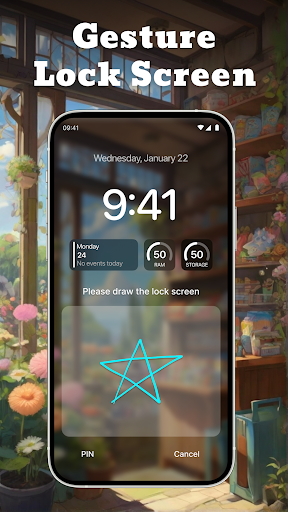
Gesture Lock Screen: Draw Lock is a screen lock app that allows you to unlock your phone using a unique gesture. Instead of using a PIN or pattern, you can draw a shape, letter, or symbol as your password. This provides a simple and personalized way to secure your device.
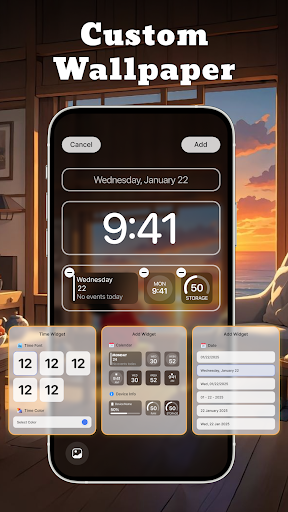
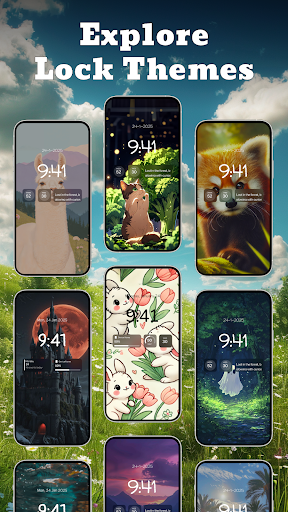
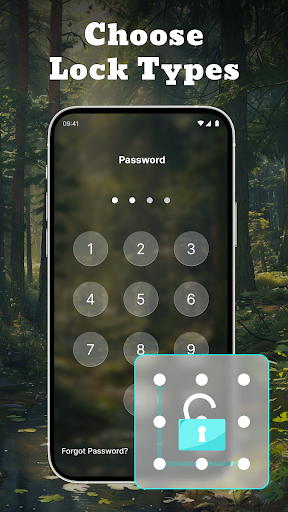
The app offers different lock options, including gesture, PIN, and pattern, so you can choose what works best for you. It also comes with customization features, allowing you to change gesture colors, set wallpapers, and add widgets to the lock screen.
Keyfeature of the lock screen drawing app:
🔒 Create a gesture lock by drawing any shape, letter, or signature to secure your phone. This makes unlocking quick and …
Read the full description
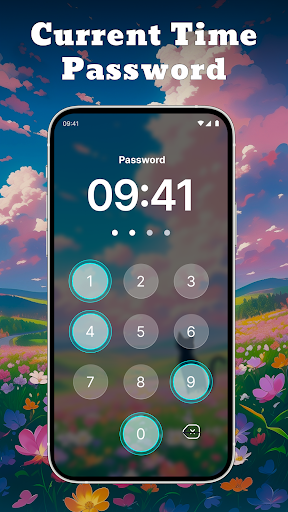
Gesture Lock Screen: Draw Lock is a screen lock app that allows you to unlock your phone using a unique gesture. Instead of using a PIN or pattern, you can draw a shape, letter, or symbol as your password. This provides a simple and personalized way to secure your device. The app offers different lock options, including gesture, PIN, and pattern, so you can choose what works best for you. It also comes with customization features, allowing you to change gesture colors, set wallpapers, and add widgets to the lock screen. Keyfeature of the lock screen drawing app: 🔒 Create a gesture lock by drawing any shape, letter, or signature to secure your phone. This makes unlocking quick and personalized. 📌 Use a PIN or pattern as an alternative lock method. If you prefer a numeric or dot-based password, these options are available. 🎨 Customize your gesture lock with different colors. Choose a color that matches your style. 🕒 Use the current time password feature. Your lock screen password changes automatically based on the current time for added security. 🎭 Apply themes and wallpapers to personalize your lock screen. Pick from a variety of backgrounds to make your phone unique. 📅 Add widgets for quick access to useful information like time, date, and calendar. Gesture Lock Screen: Draw Lock provides a simple and flexible way to protect your phone. With different lock options and customization features, you can choose what suits you best. Download now and set up a gesture lock for a secure and personalized unlocking experience.
Installs since 27 Aug 2026 Measured
Exact Google Play install counts, collected daily
Ratings
- 5 ★0.0%
- 4 ★0.0%
- 3 ★0.0%
- 2 ★0.0%
- 1 ★0.0%
Recent reviews
Latest public reviews from the store
- 23 Jul 2025
all are blurr I want neat pic of bts together
- 5 May 2025
kpop lock screen rate this app
- 18 Oct 2023
Thank you
- 10 May 2023
Lov
What reviewers bring up
Topics mentioned in the latest 50 reviews, by how many reviews mention them
Liked in good reviews (35 reviews)
- lock 4
- screen 2
- kpop 2
- bts 2
Raised in bad reviews (13 reviews)
- change 2
Top chart positions
Latest Google Play chart ranks by country, last 10 days
Not in any tracked top chart in the last 10 days.
Gesture Lock Screen: Draw Lock history
Release, install milestones, listing and store changes
- Removed from the store 27 Aug 2026
- First released on the store 8 Jan 2026
- Reached 500,000+ installs 7 Sep 2025
Recent versions
Current version Varies with device
- Version 1.0.731 Jul 2025
- Version 1.0.627 Jun 2025
- Version 1.0.518 Jun 2025
- Version 1.0.412 Jun 2025
Listing keywords
Words and phrases Gesture Lock Screen: Draw Lock repeats most in its store listing
Top phrases: lock screen (9), gesture lock (7), gesture lock screen (3), lock screen draw (3), screen draw lock (3).
Highlighted words also appear in the title. Counts cover the title, short description and description.
Business model and tech
From the store listing and declared permissions
- Business model
- Free to downloadIn-app purchasesShows ads
- Subscriptions and payments
- Google Play billing
- Sensitive access
- Photos, videos and filesDraws over other appsAdvertising ID
24 permissions
1 special access, 4 sensitive, 19 standard
- Draw over other appsSpecial access
- Change or delete shared storageSensitive
- Read photosREAD_MEDIA_IMAGESSensitive
- Read shared storageSensitive
- Show notificationsPOST_NOTIFICATIONSSensitive
- Ad attribution (Privacy Sandbox)ACCESS_ADSERVICES_ATTRIBUTIONStandard
- Ad topics (Privacy Sandbox)ACCESS_ADSERVICES_TOPICSStandard
- Privacy Sandbox ads (custom audience)ACCESS_ADSERVICES_CUSTOM_AUDIENCEStandard
- Read how it was installed (install referrer)BIND_GET_INSTALL_REFERRER_SERVICEStandard
- Read the advertising IDAD_IDStandard
- Read the advertising ID (Privacy Sandbox)ACCESS_ADSERVICES_AD_IDStandard
- Control vibrationStandard
Compliance
What the listing and the app package show
- Store status
- Removed (27 Aug 2026)
- Upkeep
- Updated 7 Sep 2025
- Registered in
- Vietnam
- Privacy policy
- Linked on the listing
- Advertising
- Shows ads
- In-app purchases
- None declared
- Age rating
- Everyone
- Sensitive permissions
- 4 sensitive, 1 special access of 24
- Location access
- No
- Camera and microphone
- Neither
Apps like Gesture Lock Screen: Draw Lock
Shani Dev Cube Live WallpaperNext Live Wallpapers29K installs★ 4.6
タクト キーボード - 日本語入力takt.keyboard23.9K installs★ 4.0
Star Photo IdentificationW.T21.1K installs★ 3.33
Digital Clock Live WallpaperXoxoi6.9K installs★ 3.57
Realme C71 Video WallpapersYes Themes50.8K installs★ 3.8
3D Valentine Hearts WatchFaceFilmmotion Studio7.7K installs★ 4.54
10000+ Nature WallpaperVariable Expression9K installs★ 4.17
Wayfinder - Analog Watch FaceLuka Kilic - Watch Faces1.9K installs★ 5.0
SXZ Sport Lum Watch FaceSXZ Universe2.7K installs★ 4.2
Gesture Lock Screen: Draw Lock: questions and answers
How many downloads does Gesture Lock Screen: Draw Lock have?
Gesture Lock Screen: Draw Lock has 707,185 installs on Google Play, measured from the store's own count on 19 Nov 2026.
Who makes Gesture Lock Screen: Draw Lock?
Gesture Lock Screen: Draw Lock is published by YakinGlobal, a developer based in VN.
When was Gesture Lock Screen: Draw Lock last updated?
The latest version (Varies with device) was released on 7 Sep 2025.
Is Gesture Lock Screen: Draw Lock free?
Yes. Gesture Lock Screen: Draw Lock is free to download, and it shows ads.
Is Gesture Lock Screen: Draw Lock still available?
No. Gesture Lock Screen: Draw Lock is no longer listed on Google Play. We first saw it missing around 27 Aug 2026.
Track Gesture Lock Screen: Draw Lock and its competitors
Watch any app for new versions, rating drops, chart moves and removals. Free plan, no card.