
GlycoX 10 Graphic Equalizer
Easy-to-use equalizer with effects added to music and video sounds!
- Installs
- 845K
- Measured
- Rating
- 4.33
- Ratings
- 5.7K
- 501 reviews
- Version
- 1.13.17
- Updated 1 Nov 2026
- Released
- 11 Mar 2020
- Tracked since 13 May 2026
- Size
- 4 MB
- Needs 5.0
Screenshots


About GlycoX 10 Graphic Equalizer
The description on the store listing
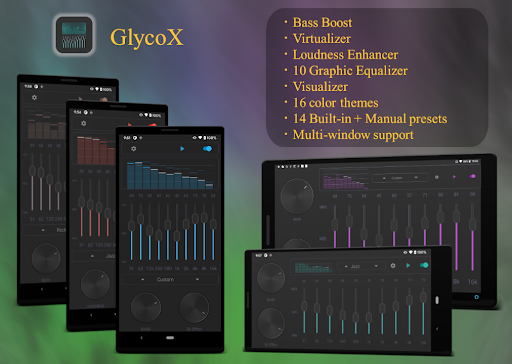
You can get the sound quality you want just by starting the music player from the playback button of this app and changing the settings of bass boost, virtualizer, and equalizer. You can change the sound quality of music players, audio players, videos, music streaming apps, radio apps, etc. (*1)
Feature:
- Bass boost
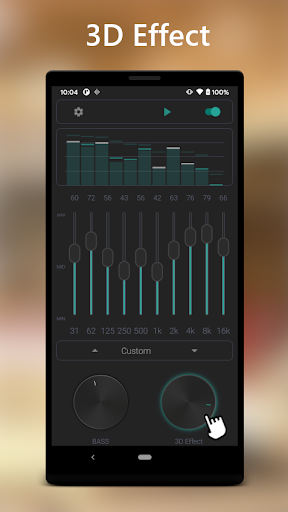
- 3D Effect(Virtualizer)(*2)
- OpenGL Graphics with Visualizer (*3)
- Loudness Enhancer and Volume Knob(*4)
- 14 Buit-In + 1 custom equalizer preset
- 16 different color themes
- Operation via notification
- Supports Multi-Window Mode(Android 7 or later)
(*1) Not supported on some models.
(*2) Stereo widening effect can be used. By using a headset, you can get …
Read the full description
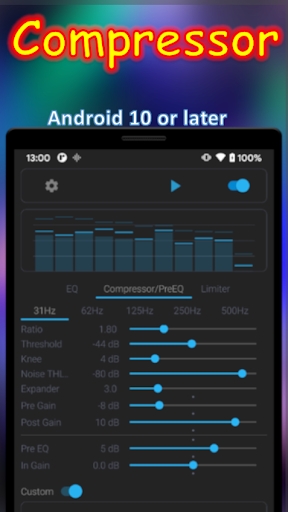
You can get the sound quality you want just by starting the music player from the playback button of this app and changing the settings of bass boost, virtualizer, and equalizer. You can change the sound quality of music players, audio players, videos, music streaming apps, radio apps, etc. (*1) Feature: - Bass boost - 3D Effect(Virtualizer)(*2) - OpenGL Graphics with Visualizer (*3) - Loudness Enhancer and Volume Knob(*4) - 14 Buit-In + 1 custom equalizer preset - 16 different color themes - Operation via notification - Supports Multi-Window Mode(Android 7 or later) (*1) Not supported on some models. (*2) Stereo widening effect can be used. By using a headset, you can get the best sound effect. (*3) This app uses the output sound to visualize the FFT data, so user permission is required when launching the app. (*4) Swipe between knobs to bring up the next screen In portrait screen: Swipe vertically In landscape screen: Swipe horizontally This equalizer app will not work if you start it while other equalizers are running, so you need to start it according to the following procedure. 1. Completely stop both the GlycoX app and other equalizer apps. 1.1 For apps that cannot be terminated from notifications (some apps do not issue notifications) Press and hold the icon to "force stop" on the "App information" screen. 2. Launch the GlycoX app. ===== For users with Android 10 or later ===== On Android 10 or later, you can enjoy music with the best sound by adjusting the Compressor. The effector consists of Pre EQ --> Compressor --> Post EQ --> Limiter in this order. 1. How to easily increase the bass using Compressor (first try it at 62Hz, which is easy to hear) - Lower the value of Pre Gain. - Increase the value of Post Gain. - Slightly lower the Ratio value. - Increase Threshold a little. (First of all, try moving the Seek Bar of these four parameters slowly left and right to feel the change in sound.) 2. The following is an example of how to adjust Post EQ at the end. Step1. Set the Post EQ preset to FLAT. Step2. Set all Compressor and Limiter presets to Default. (Don't set In Gain and Out Gain too high, just set them to about 0. Step3. change Pre EQ, Pre Gain, and Post Gain to your favorite values for each frequency. Adjust the Ratio and Threshold as necessary. Step4. increase the volume to the desired level with Out Gain. If necessary, adjust the In Gain. Step5. Adjust Post EQ if necessary. 3. Operation mode From v1.6.6, the following two operation modes are selectable. - Standard This mode was used until v1.5.6. - Deep This mode is for deep bass. It is effective to adjust the volume by lowering the In Gain and moderately increasing the Out Gain, Loudness, and Volume. If you increase the In Gain too much, the bass effect will be reduced. First, try adjusting the Pre Gain, Post Gain, and Pre EQ up or down at the default setting of 31Hz to feel the effect that could not be created with Standard. (Note: The Bass Boost knob cannot be used in this mode.) If you use Android 10 or later, you may not want to use Bass Boost as much as possible. ============================================== Notes: To exit the app completely, you need to exit from notifications. Loudness, In Gain, and Out Gain values will not be saved after quitting the app. Extreme settings may cause sound crack. Please enjoy this app with moderate settings and volume at your own risk.
Installs, last 30 days Measured
Exact Google Play install counts, collected daily
Ratings
5,682 ratings, 501 reviews
- 5 ★69%
- 4 ★13%
- 3 ★6.9%
- 2 ★3.9%
- 1 ★7.8%
Recent reviews
Latest public reviews from the store
- 21 Nov 2025
From looking at your app To its the sounds that matter and they certainly do in this app I've been around many with reviews for each one and to me this is the greatest of them all . It has the most outstanding sound the bass strong no problem cracking any disorder what's so ever. 3d for any problems in that corner equalizer the presets alot choice to.my movie's I play just like being in cinema. I no problems whatsoever in this app it is my choice is the very best app since reviews I have had
- 4 Oct 2025
trying out a few that are left with varying ongoing results,.... some sound better than the last one,... which is still on,... depending on the scrutiny yeah oh yeah,... some seem to make it sound better when they are off and then that changes and you have to turn off the equalizer at the change of each song to hear anything,...got a couple of these related apps we are going to test as well,...⚓🛝♟️🎭
- 23 Sep 2025
Yes!!😭 Finally a sound booster that let's you adjust the middle and Treble!🌟 I'm sick of only having bass boosters 🤮 For people like myself who prefer higher Treble and lower bass this is a life saver! For those who like high bass, this app lets you do that too, but I'm weird and like it lower. Enjoy! Thank you for this amazing app!
- 26 Jan 2025
Best app. Just like using your antique stereo amplifier to control the bass and treble. For me I tend to listen to classic oldies music which needs more bass as compared to today's music. I use Spotify with high audio quality settings, connected to multiple speakers via Bluetooth. This app is easy to use. Like the extra middle.
What reviewers bring up
Topics mentioned in the latest 10 reviews, by how many reviews mention them
Liked in good reviews (7 reviews)
- bass 7
- treble 4
- sound 4
- music 3
- equalizer 2
- bluetooth 2
- listening 2
- different 2
Raised in bad reviews (1 reviews)
No topic comes up twice.
Top chart positions
Latest Google Play chart ranks by country, last 10 days
Not in any tracked top chart in the last 10 days.
GlycoX 10 Graphic Equalizer history
Release, install milestones, listing and store changes
- Reached 500,000+ installs 21 Jul 2024
- Reached 100,000+ installs 13 Sep 2021
- Reached 50,000+ installs 24 May 2021
- Reached 10,000+ installs 4 Jan 2021
- Reached 5,000+ installs 7 Dec 2020
- Reached 1,000+ installs 9 Nov 2020
- Reached 500+ installs 26 Oct 2020
- First released on the store 11 Mar 2020
Update frequency
How often GlycoX 10 Graphic Equalizer ships a new version, month by month
2 updates in the last 12 months. About as often as similar apps, which shipped a median of 2 updates in the same year.
Recent versions
Current version 1.13.17
- Version 1.13.171 Nov 2026
- Library updates - Bug fixes - Changed from 3D Effect to Reverb (Android 15+) (Please avoid extreme settings and enjoy at a moderate volume.)
- Version 1.11.1531 Mar 2026
- Library updates - Bug fixes (Please avoid extreme settings and enjoy at a moderate volume.)
- Version 1.10.1426 May 2025
- Version 1.10.138 May 2025
Listing keywords
Words and phrases GlycoX 10 Graphic Equalizer repeats most in its store listing
Top phrases: android or later (4), bass boost (4), post eq (4), post gain (3), pre eq (3).
Highlighted words also appear in the title. Counts cover the title, short description and description.
Business model and tech
From the store listing and declared permissions
- Business model
- Free to downloadShows ads
- Sensitive access
- MicrophoneAdvertising ID
15 permissions
0 special access, 2 sensitive, 13 standard
- Record audioSensitive
- Show notificationsPOST_NOTIFICATIONSSensitive
- Ad attribution (Privacy Sandbox)ACCESS_ADSERVICES_ATTRIBUTIONStandard
- Ad topics (Privacy Sandbox)ACCESS_ADSERVICES_TOPICSStandard
- Read the advertising IDAD_IDStandard
- Read the advertising ID (Privacy Sandbox)ACCESS_ADSERVICES_AD_IDStandard
- Change audio settingsStandard
- Control vibrationStandard
- Foreground service (media playback)FOREGROUND_SERVICE_MEDIA_PLAYBACKStandard
- Keep the phone awakeStandard
- Run a foreground serviceFOREGROUND_SERVICEStandard
- Full internet accessStandard
Compliance
What the listing and the app package show
- Store status
- Live
- Upkeep
- Updated 1 Nov 2026
- Registered in
- Japan
- Privacy policy
- Linked on the listing
- Advertising
- Shows ads
- In-app purchases
- None declared
- Age rating
- Everyone
- Sensitive permissions
- 2 sensitive of 15
- Location access
- No
- Camera and microphone
- Microphone
Apps like GlycoX 10 Graphic Equalizer
Audio+ (Formerly Hot FM)Synchrosound Studio Sdn. Bhd.937K installs★ 3.11
Radio Salvador FM LiveOnline Radios & Podcasts129K installs★ 4.88
Lamhaa - Connects With Heart.PlusSmileA1.5M installs★ 3.0
مهرجانات 2026 بدون نت الذهبيGolden Music Apps1.7M installs★ 4.33
TELMORE MusikTELMORE349K installs★ 3.5
Piano Keyboard: Piano PracticeTahsan_Ornob1.9M installs★ 3.73
Nhạc tổng hợp trên tik tokCafe sách1.4M installs★ 4.0
Emisoras de Puerto RicoRadio FM Online Free236K installs★ 4.84
SplitHit Vocal RemoverAI Robots263K installs★ 4.42
GlycoX 10 Graphic Equalizer: questions and answers
How many downloads does GlycoX 10 Graphic Equalizer have?
GlycoX 10 Graphic Equalizer has 845,194 installs on Google Play, measured from the store's own count on 21 Nov 2026.
Who makes GlycoX 10 Graphic Equalizer?
GlycoX 10 Graphic Equalizer is published by Kushiheim, a developer based in JP.
When was GlycoX 10 Graphic Equalizer last updated?
The latest version (1.13.17) was released on 1 Nov 2026.
Is GlycoX 10 Graphic Equalizer free?
Yes. GlycoX 10 Graphic Equalizer is free to download, and it shows ads.
Is GlycoX 10 Graphic Equalizer still available?
Yes. GlycoX 10 Graphic Equalizer is live on Google Play as of 21 Nov 2026.
Track GlycoX 10 Graphic Equalizer and its competitors
Watch any app for new versions, rating drops, chart moves and removals. Free plan, no card.