Gurmukhi Keyboard
Keyboard to type in Gurmukhi.
- Installs
- 1.81M
- Measured
- Rating
- 4.5
- Ratings
- 14.3K
- 578 reviews
- Version
- 1.7.3
- Updated 18 Dec 2018
- Released
- 1 Feb 2011
- Tracked since 13 May 2026
- Size
- 5 MB
- Needs 4.0
Screenshots
About Gurmukhi Keyboard
The description on the store listing
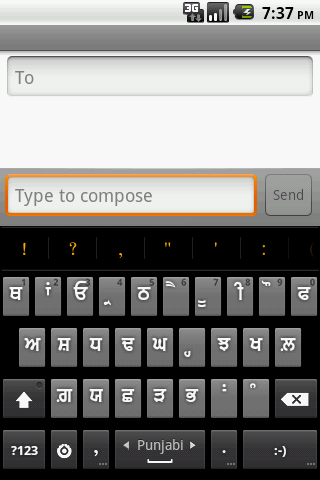
Provides input method (Keyboard) in Gurmukhi and Hindi Locale with dictionary support. Automatically toggles to Gurmukhi mode with my application called "Gurbani Searcher".
Please follow following steps to enable the keyboard:-
Android version < 4.0
1. Settings-->click Language & Keyboard on phone
2. Select Gurbani keyboard from the list.
3. Go to Gurbani Searcher application(or any text field)
4. Long click on the text field.
5. Select Inputmethod
6. Select Gurmukhi keyboard.
7. System will display warning, press "OK"
8. Go to settings of Gurmukhi Keyboard and enable Punjabi in "Input Languages".
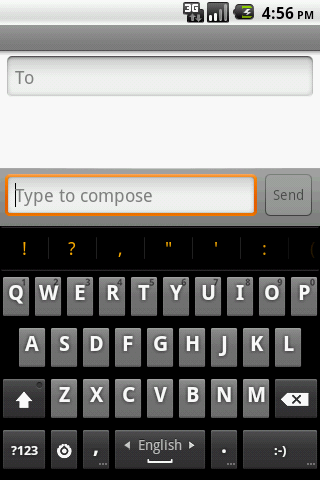
9. Go back to the application and swipe on "spacebar" to toggle between …
Read the full description
Provides input method (Keyboard) in Gurmukhi and Hindi Locale with dictionary support. Automatically toggles to Gurmukhi mode with my application called "Gurbani Searcher". Please follow following steps to enable the keyboard:- Android version < 4.0 1. Settings-->click Language & Keyboard on phone 2. Select Gurbani keyboard from the list. 3. Go to Gurbani Searcher application(or any text field) 4. Long click on the text field. 5. Select Inputmethod 6. Select Gurmukhi keyboard. 7. System will display warning, press "OK" 8. Go to settings of Gurmukhi Keyboard and enable Punjabi in "Input Languages". 9. Go back to the application and swipe on "spacebar" to toggle between Punjabi and English. One can also enable other locales by going to settings of Gurmukhi Keyboard. Android version 4.0 (ICS) 1. Settings-->click Language & Keyboard on phone 2. Select Gurbani keyboard from the list. 3. System will display warning, press "OK" 4. Enable Gurmukhi keyboard as default keyboard in settings. 5. Go to settings of Gurmukhi Keyboard and enable Punjabi in "Input Languages". 6. Go back to the application and swipe on "spacebar" to toggle between Punjabi and English. One can also enable other locales by going to settings of Gurmukhi Keyboard. HTC Sense UI users OS version 4.0 and greater (ICS)(Thanks to Harkamal Singh Sandhu for the instructions below:-) 1. Once the keyboard is installed, do a hot reboot. 2. You cannot long press or swipe through the keyboards to find Gurmukhi keyboard. 3. When the keyboard is activated, you will get an icon on the top, which is of a keyboard. Drag this down and you can change the input method from HTC Sense Input to Gurmukhi. 4. Go to settings of Gurmukhi Keyboard and enable Punjabi in "Input Languages". 5. Go back to the application and swipe on "spacebar" to toggle between Punjabi and English. One can also enable other locales by going to settings of Gurmukhi Keyboard. Please note that without the above steps, the keyboard will not show and by design(android feature), the keyboard will not get listed in application. Please do not rate the application in ignorance, I would suggest to read the instructions and enable it correctly and after doing due diligence and rate it. A bad rating out of ignorance may prevent others genuine users to take advantage. BTW, the above set of steps are applicable for any android keyboard and that's how android allows to plugin other keyboard. Also I would like to impress upon the fact that Android by default has no support for Punjabi fonts and this keyboard doesn't provide any magic to enable non-cooperating application to start supporting Punjabi fonts. This keyboard helps cooperating application (like Gurbani Searcher) to type in Punjabi fonts. I would like to re stress that the participating application should provide support for Punjabi fonts for this keyboard to work in harmony with it. The keyboard supports following types of keyboards. Punjabi Keyboard, Gurmukhi Keyboard, Gurbani Keyboard, Gingerbread keyboard, Hindi Keyboard. Regards, -Surinder Pal Singh
Installs, last 30 days Measured
Exact Google Play install counts, collected daily
Ratings
14,306 ratings, 578 reviews
- 5 ★76%
- 4 ★8.1%
- 3 ★5.4%
- 2 ★2.7%
- 1 ★8.1%
Recent reviews
Latest public reviews from the store
- 14 Feb 2026
It's beautiful!
- 14 Jul 2024
Great, the only problem is that i cant read Glagolitic. Please add the letter translation near the letters.
- 3 Oct 2023
Можете ли да заоблите буквите, по-голямата част е квадратна. Кръга, не квадрата, трябва да преобладава. А също и има букви, дадени тук, които почти нямат общо с оригиналния замисъл.
- 13 Jul 2023
She's great. Not ancient mongolian script, but excellent glagolitic. Janaçek would be pleased.
What reviewers bring up
Topics mentioned in the latest 11 reviews, by how many reviews mention them
Liked in good reviews (7 reviews)
- glagolitic 2
- script 2
- switch 2
- add 2
Raised in bad reviews (3 reviews)
- cannot enable 2
- keyboard 2
- title 2
Top chart positions
Latest Google Play chart ranks by country, last 10 days
Not in any tracked top chart in the last 10 days.
Gurmukhi Keyboard history
Release, install milestones, listing and store changes
- Reached 1,000,000+ installs 13 Jul 2016
- Reached 500,000+ installs 13 Jan 2015
- Reached 100,000+ installs 16 Apr 2013
- Reached 50,000+ installs 25 Nov 2012
- Reached 10,000+ installs 12 Dec 2011
- Reached 5,000+ installs 30 Sep 2011
- Reached 1,000+ installs 4 Apr 2011
- Reached 500+ installs 6 Mar 2011
Update frequency
How often Gurmukhi Keyboard ships a new version, month by month
0 updates in the last 12 months. Less often than most similar apps: they shipped a median of 7 updates in the same year.
Recent versions
Current version 1.7.3
- Version 1.7.318 Dec 2018
-Removed Call Log permission. -Added native support for contextual permissions.
- Version 1.7.22 Dec 2014
- Version 1.7.130 Nov 2014
- Version 1.7.014 Dec 2013
Listing keywords
Words and phrases Gurmukhi Keyboard repeats most in its store listing
Top phrases: gurmukhi keyboard (11), settings of gurmukhi (6), punjabi fonts (4), application and swipe (3), enable other locales (3).
Highlighted words also appear in the title. Counts cover the title, short description and description.
Business model and tech
From the store listing, the SDKs in the app package and its declared permissions
- Business model
- Free to download
- Built with
- No cross-platform framework or game engine detected
- Ad networks (0)
- None detected
- Sensitive access
- MicrophoneContacts
0 ad, attribution and analytics SDKs detected. SDKs are read from the app package and permissions from the store listing, so code that loads later is not seen.
Technology
5 SDKs found in the app package
Development tools
5 permissions
0 special access, 2 sensitive, 3 standard
- Record audioSensitive
- Read contactsSensitive
- Control vibrationStandard
- Read terms you added to the dictionaryStandard
- Write to user-defined dictionaryStandard
Compliance
What the listing and the app package show
- Store status
- Live
- Upkeep
- No update since 18 Dec 2018
- Registered in
- India
- Privacy policy
- Linked on the listing
- Advertising
- No ads declared
- In-app purchases
- None declared
- Age rating
- Everyone
- Sensitive permissions
- 2 sensitive of 5
- Location access
- No
- Camera and microphone
- Microphone
Apps like Gurmukhi Keyboard
Table Notes - Mobile ExcelSolution Developers4.5M installs★ 4.33
Porn Block PlusPixster Studio430K installs★ 4.46
Alarm Clock LauncherAtomApplications2M installs★ 4.27
My OptimumCSC Holdings, LLC.656K installs★ 4.11
File Manager - Expert ViewerSMARTWHO3.8M installs★ 4.1
Roubit: Daily Habit TrackerTsurutan2M installs★ 4.21
Najm | نجمNajm for Insurance Services3.6M installs★ 2.81
OmaPostiPosti2.1M installs★ 3.0
Win-X LauncherInternity Labs1.5M installs★ 4.5
Gurmukhi Keyboard: questions and answers
How many downloads does Gurmukhi Keyboard have?
Gurmukhi Keyboard has 1,814,785 installs on Google Play, measured from the store's own count on 20 Nov 2026.
Who makes Gurmukhi Keyboard?
Gurmukhi Keyboard is published by Surinder Pal Singh, a developer based in IN.
When was Gurmukhi Keyboard last updated?
The latest version (1.7.3) was released on 18 Dec 2018.
Is Gurmukhi Keyboard free?
Yes. Gurmukhi Keyboard is free to download.
Is Gurmukhi Keyboard still available?
Yes. Gurmukhi Keyboard is live on Google Play as of 20 Nov 2026.
Track Gurmukhi Keyboard and its competitors
Watch any app for new versions, rating drops, chart moves and removals. Free plan, no card.