HDD Audio Remote
You can operate your Sony HDD Audio Player using this app.
- Installs
- 242K
- Measured
- Rating
- 3.31
- Ratings
- 932
- 41 reviews
- Version
- 4.3.1
- Updated 12 Dec 2022
- Released
- 20 Oct 2013
- Tracked since 13 May 2026
- Size
- 13 MB
- Needs 4.0
Also on App Store: HDD Audio Remote (46 ratings)
Screenshots
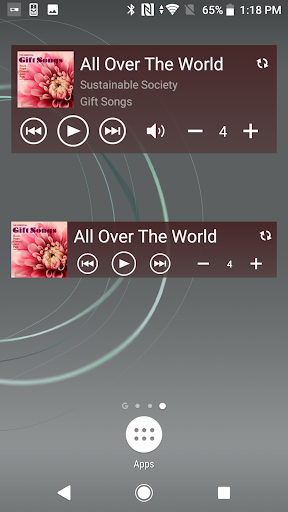

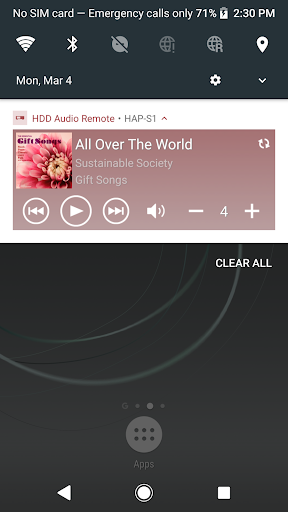
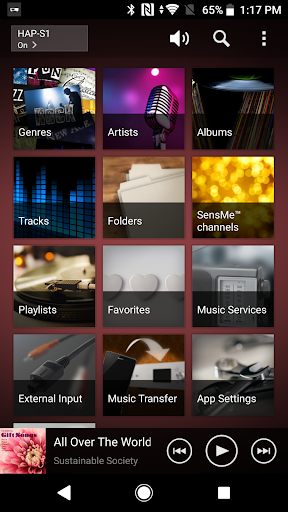
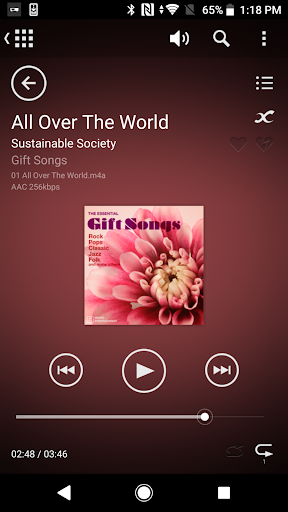
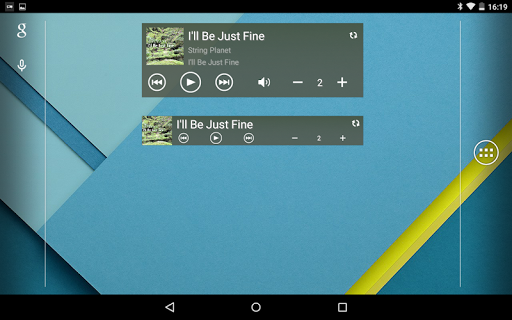
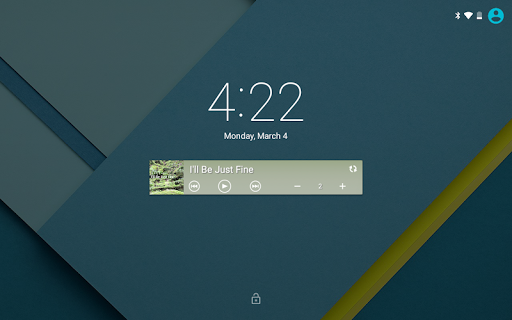
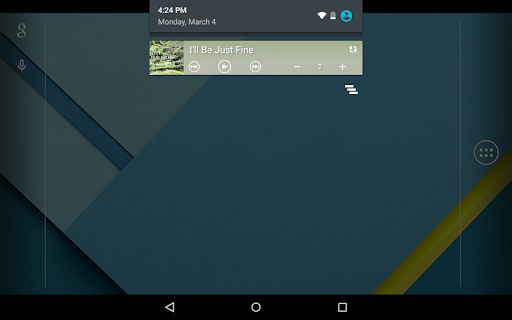
About HDD Audio Remote
The description on the store listing
Starting from the version 4.3.1, HDD Audio Remote can only be used on devices with Android 7.0 or a later version installed. On any devices with Android 6 or an earlier version, you cannot use HDD Audio Remote Version 4.3.1 or later versions.
HDD Audio Remote is a mobile application that allows you to operate compatible HDD AUDIO PLAYER models using your smartphone or tablet.
The application allows you to operate HDD AUDIO PLAYER easily using specialized functions that are only possible in a mobile application, such as the “Full Browser” function (tablets only).
This application has the following features:
- Easy operation of HDD AUDIO PLAYER using your mobile device
By installing …
Read the full description
Starting from the version 4.3.1, HDD Audio Remote can only be used on devices with Android 7.0 or a later version installed. On any devices with Android 6 or an earlier version, you cannot use HDD Audio Remote Version 4.3.1 or later versions. HDD Audio Remote is a mobile application that allows you to operate compatible HDD AUDIO PLAYER models using your smartphone or tablet. The application allows you to operate HDD AUDIO PLAYER easily using specialized functions that are only possible in a mobile application, such as the “Full Browser” function (tablets only). This application has the following features: - Easy operation of HDD AUDIO PLAYER using your mobile device By installing HDD Audio Remote on your smartphone or tablet, you can remotely select and play tracks, change playback volume, stop playback and more, instead of operating the HDD AUDIO PLAYER directly. You can also select music services. - Creating and editing playlists You can create and edit playlists with your favorite tracks. - Editing the music information of a track You can edit the details of tracks. Compatible models: HDD Audio Remote supports the following HDD AUDIO PLAYER models. (as of Dec., 2022) - HAP-Z1ES - HAP-S1 Note: The functions of HDD Audio Remote may vary depending on the HDD AUDIO PLAYER model. Version 4.3.0 - Added support for specification changes in Spotify service. - The player's volume can now be adjusted using the mobile device volume buttons. - The player's power can now be turned on by widgets. - Mini-player can now be displayed on the lock screen and in the notification area. - Operability improved. Version 4.2.0 - Added support for specification changes in Spotify service. "Favorites" for Spotify is changed to "Presets". - Operability improved. Version 4.1.0 - Search from the search history is now available. - Track list sorting by playback count (max./min.) is now available. - The "Play same SensMe™ channels" option is now included in the track/file context menu and the option menu on the playback screen. (You can immediately play tracks in the SensMe™ channels to which the selected track/file belongs.) - Operability improved. Version 4.0.0 - Spotify Connect is now supported. Start the Spotify application and log in with the Premium account. (Only available in the service coverage areas.) - Widgets are now supported. - Playlists can now be created easier. You can add content to a playlist while browsing or add the entire play queue to a playlist. - Playlists can now be sorted (by Name, by Creation Date, or by No. of Tracks). - Detailed track information can now be displayed on the playback screen. You can tap an album name or an artist name to go to the relevant list. - During playback of one of the SensMe™ channels, its channel name can now be displayed on the playback screen. - Operability improved. Version 3.3.0 - "DSEE HX" was added to the Options menu. (HAP-S1 only) - "Recently played" was added to automatically generated playlists. - Music info can now be re-acquired for DSD format content also. - Descending order was added to sorting (by name, by album track, by year). - Operability improved. Version 3.2.0 - "Divide Album" is now supported. - Format display was added to the Album list of the tablet (when all tracks on the album are the same format). - "Go to album" (go directly from the track or file to the album to which the track or file belongs) is now supported. - The track list can now be sorted in the screen used to add tracks to the playlist. - Operability improved. Version 3.1.0 - "TuneIn" Internet radio is now supported. - "Help" was added to the Home menu. - "Re-acquire database from the player" was added to the App Settings. - Images saved on the mobile device can now be selected when editing album art. (OS 4.0.3 or later) - Operability improved. Version 3.0.1 - Operability improved.
Installs since 29 Aug 2026 Measured
Exact Google Play install counts, collected daily
Ratings
932 ratings, 41 reviews
- 5 ★44%
- 4 ★10%
- 3 ★10%
- 2 ★6.3%
- 1 ★29%
Recent reviews
Latest public reviews from the store
- 8 Apr 2025
Nice App
Top chart positions
Latest Google Play chart ranks by country, last 10 days
Not in any tracked top chart in the last 10 days.
HDD Audio Remote history
Release, install milestones, listing and store changes
- Reached 100,000+ installs 10 Oct 2017
- Reached 50,000+ installs 6 Aug 2015
- Reached 10,000+ installs 18 Feb 2014
- Reached 5,000+ installs 13 Jan 2014
- Reached 1,000+ installs 9 Nov 2013
- Reached 500+ installs 31 Oct 2013
- Reached 100+ installs 26 Oct 2013
- First released on the store 20 Oct 2013
Update frequency
How often HDD Audio Remote ships a new version, month by month
0 updates in the last 12 months. Less often than most similar apps: they shipped a median of 1 updates in the same year.
Recent versions
Current version 4.3.1
- Version 4.3.112 Dec 2022
Version 4.3.1 - Operability improved.
- Version 4.3.013 Mar 2019
- Version 4.2.015 Oct 2018
- Version 4.1.029 Nov 2016
Listing keywords
Words and phrases HDD Audio Remote repeats most in its store listing
Top phrases: hdd audio (14), operability improved (8), hdd audio player (7), hdd audio remote (7), operability improved version (7).
Highlighted words also appear in the title. Counts cover the title, short description and description.
Business model and tech
From the store listing, the SDKs in the app package and its declared permissions
- Business model
- Free to download
- Built with
- No cross-platform framework or game engine detected
- Ad networks (0)
- None detected
- Sensitive access
- Photos, videos and files
0 ad, attribution and analytics SDKs detected. SDKs are read from the app package and permissions from the store listing, so code that loads later is not seen.
Technology
6 SDKs found in the app package
10 permissions
0 special access, 5 sensitive, 5 standard
- Read music and audioREAD_MEDIA_AUDIOSensitive
- Read photosREAD_MEDIA_IMAGESSensitive
- Read shared storageSensitive
- Read videosREAD_MEDIA_VIDEOSensitive
- Show notificationsPOST_NOTIFICATIONSSensitive
- Connect to and disconnect from Wi-FiStandard
- Full internet accessStandard
- See network connectionsStandard
- See Wi-Fi connectionsStandard
- Allow Wi-Fi Multicast receptionStandard
Compliance
What the listing and the app package show
- Store status
- Live
- Upkeep
- No update since 12 Dec 2022
- Registered in
- Japan
- Privacy policy
- Linked on the listing
- Advertising
- No ads declared
- In-app purchases
- None declared
- Age rating
- Everyone
- Sensitive permissions
- 5 sensitive of 10
- Location access
- No
- Camera and microphone
- Neither
Apps like HDD Audio Remote
Electro Dj beat mixerMunggosApps175K installs★ 4.33
جميع اغاني الشامي 2026 بدون نتLR Media148K installs★ 4.33
Radio USAWorld Radio App - Radio FM, Radio AM, Radio online23.9K installs★ 4.75
Sheikh Sa'ud Ash-Shuraim - FulLafz Apps125K installs★ 5.0
Chorus - Music & SongsTeam - Falcon139K installs★ 3.83
Euforia Radio en EspañolRadios Tech23.9K installs★ 4.74
أغاني ريمكس - Remix 8DMCQ MOBILE233K installs★ 4.09
Lagu India enak di dengarAsyifa Studio203K installs★ 4.64
VL-Tone SynthSkrivarna Software206K installs★ 4.41
HDD Audio Remote: questions and answers
How many downloads does HDD Audio Remote have?
HDD Audio Remote has 242,210 installs on Google Play, measured from the store's own count on 14 Nov 2026.
Who makes HDD Audio Remote?
HDD Audio Remote is published by Sony Corporation, a developer based in JP.
When was HDD Audio Remote last updated?
The latest version (4.3.1) was released on 12 Dec 2022.
Is HDD Audio Remote free?
Yes. HDD Audio Remote is free to download.
Is HDD Audio Remote still available?
Yes. HDD Audio Remote is live on Google Play as of 14 Nov 2026.
Track HDD Audio Remote and its competitors
Watch any app for new versions, rating drops, chart moves and removals. Free plan, no card.