
Image Measure
Draw lines to the image and measure length
- Installs
- 11.84K
- Measured
- Rating
- 4.17
- Ratings
- 35
- 4 reviews
- Version
- 1.6
- Updated 18 Mar 2026
- Released
- 17 Apr 2022
- Tracked since 13 May 2026
- Size
- —
Screenshots
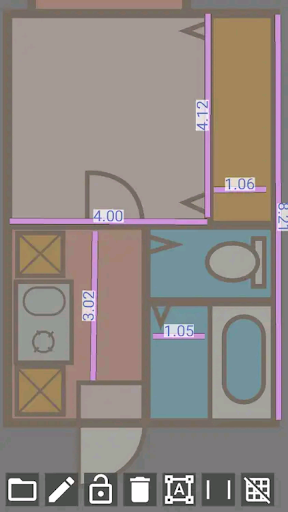
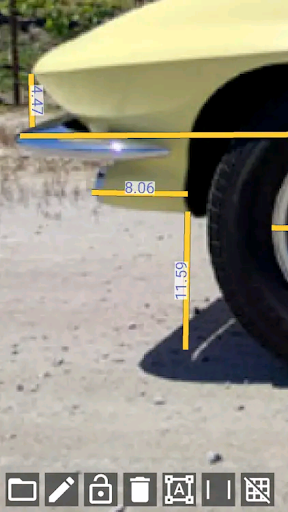
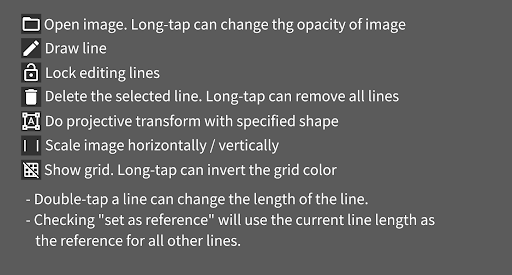


About Image Measure
The description on the store listing
*Use with the understanding of "set as reference" in the explanation below. It is a wrong usage that the length value changes when scaling up/down the image.
Draw a line as a reference length on the image. Once the reference is set you can measure any place on the image as relative length based on the reference.
Usage examples)
- Measuring arbitrary part of neighbour's car from blueprint
- Measuring the bath room size from floor plan
- Measuring the height of a celebrity who falsely claiming to be taller than he/she is.
How to use
1. Load an image, tap the pen icon to enable it, and draw a straight line.
2. Disable the pen icon and double-tap the straight line.
3. Enter the …
Read the full description
*Use with the understanding of "set as reference" in the explanation below. It is a wrong usage that the length value changes when scaling up/down the image. Draw a line as a reference length on the image. Once the reference is set you can measure any place on the image as relative length based on the reference. Usage examples) - Measuring arbitrary part of neighbour's car from blueprint - Measuring the bath room size from floor plan - Measuring the height of a celebrity who falsely claiming to be taller than he/she is. How to use 1. Load an image, tap the pen icon to enable it, and draw a straight line. 2. Disable the pen icon and double-tap the straight line. 3. Enter the actual length of the straight line on the image. At this time, check the “Set as reference” checkbox. You can decide the unit of length by yourself; enter 1 for 1 meter, 100 for 100 cm, etc. 4. Touch the pen icon and draw another straight line to display the length relative to the reference line. The app is for 2D image, but you can transform perspective image into a plane so you can measure them (in that case you need to have TWO known lengths as vertical and horizontal as the reference) FAQ Q: Line length changes on scaling A: Before setting a reference the line length is the same as screen pixel size. Please set the reference. Q: I can't specify unit!! A: You should know the unit because you type the reference. You can convert the length as centi-meter or percec whatever you want. Q: After transforming the image flew away from the screen A: It is because of the calcutation. Please try tweaking the transform shape. Q: After transforming the lines shifted from the image A: Transforming doesnot effect to lines. Draw lines after transforming.
Installs since 31 Aug 2026 Measured
Exact Google Play install counts, collected daily
Ratings
35 ratings, 4 reviews
- 5 ★82%
- 4 ★18%
- 3 ★0.0%
- 2 ★0.0%
- 1 ★0.0%
Recent reviews
Latest public reviews from the store
No reviews in our sample for this app yet.
Top chart positions
Latest Google Play chart ranks by country, last 10 days
Not in any tracked top chart in the last 10 days.
Image Measure history
Release, install milestones, listing and store changes
- First released on the store 17 Apr 2022
Update frequency
How often Image Measure ships a new version, month by month
2 updates in the last 12 months. More often than most similar apps: they shipped a median of 0 updates in the same year.
Recent versions
Current version 1.6
- Version 1.618 Mar 2026
v1.6 Added "Save" button to toolbar. Saved image is the same as screenshot (the image out of the screen will not be saved). v1.5 - Supported rotating images using multi-touch (to avoid unexpected rotation, the touch needs some degree of rotation) - Drawn grid is now a square rather than a rectangle v1.4 Fixed crash after opening an image. Please do the following: hold the app icon→App Info→Storage & cache→Clear storage v1.3 Supported "Share Image" from other apps)
- Version 1.56 Mar 2026
Listing keywords
Words and phrases Image Measure repeats most in its store listing
Top phrases: straight line (4), after transforming (3), pen icon (3), set as reference (2), draw lines (2).
Highlighted words also appear in the title. Counts cover the title, short description and description.
Business model and tech
From the store listing and declared permissions
- Business model
- Free to download
- Sensitive access
- Photos, videos and files
2 permissions
0 special access, 2 sensitive, 0 standard
- Change or delete shared storageSensitive
- Read shared storageSensitive
Compliance
What the listing and the app package show
- Store status
- Live
- Upkeep
- Updated 18 Mar 2026
- Registered in
- Japan
- Privacy policy
- Linked on the listing
- Advertising
- No ads declared
- In-app purchases
- None declared
- Age rating
- Everyone
- Sensitive permissions
- 2 sensitive of 2
- Location access
- No
- Camera and microphone
- Neither
Apps like Image Measure
영산강 안심 알림eICT융합소프트 & 스마트오더18.3K installs★ 4.0
JBLETRADOC Mobile10.3K installs★ 4.5
Two Point HeightOmega Centauri Software15.3K installs★ 2.22
Sheridan RecyclesCity of Sheridan636 installs★ 4.67
NAFNorges Automobil-Forbund200K installs★ 3.9
Ipsos Adria CAPIIpsos Serbia7.4K installs★ 3.9
Clock: Alarm Clock & TimerIntratech so36.1K installs★ 3.79
Süzme Sayaç HesaplamaNotsup30.4K installs★ 3.6
Cattle & Goat Record KeepingVetzKin10.3K installs★ 2.5
Image Measure: questions and answers
How many downloads does Image Measure have?
Image Measure has 11,841 installs on Google Play, measured from the store's own count on 9 Nov 2026.
Who makes Image Measure?
Image Measure is published by BackCasey Software, a developer based in JP.
When was Image Measure last updated?
The latest version (1.6) was released on 18 Mar 2026.
Is Image Measure free?
Yes. Image Measure is free to download.
Is Image Measure still available?
Yes. Image Measure is live on Google Play as of 9 Nov 2026.
Track Image Measure and its competitors
Watch any app for new versions, rating drops, chart moves and removals. Free plan, no card.