Image to PDF - PDF Maker
Convert JPG, PNG, and other images to PDF using an image to PDF converter
- Installs
- 805
- Measured
- Rating
- —
- Ratings
- —
- Version
- Varies with device
- Updated 12 May 2024
- Released
- 6 Jul 2023
- Tracked since 13 May 2026
- Size
- —
Screenshots




About Image to PDF - PDF Maker
The description on the store listing
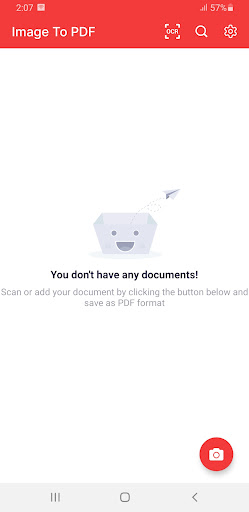
Looking for an application that converts the image to PDF?
No need to buy expensive PDF tools. Get the free Image to PDF Converter app. Photo to PDF conversion has never been simple. The app allows you to convert your images (JPG, JPEG, PNG, etc.) files to PDF quickly and safely. PDF Maker made easy!
With Image to PDF - PDF Maker, you can:
►1. Convert all kinds of images to PDF:
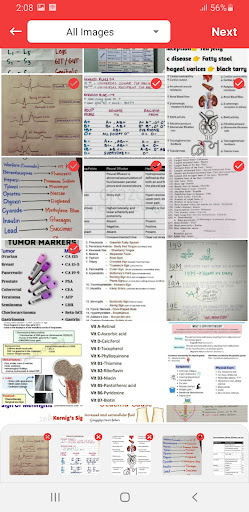
Import images or scan paper files with your camera and convert them to PDFs - notes, receipts, invoices, forms, business cards, certificates, whiteboards, ID cards, etc., all supported.
►2. Resize images:
Resize, crop, doodle, and rotate the images as you like. Optimize images for better PDF output. …
Read the full description
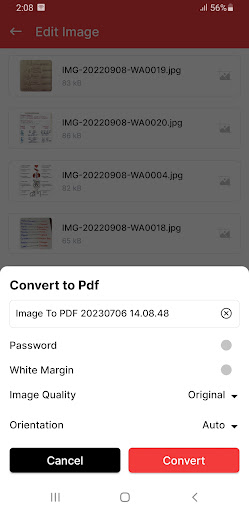
Looking for an application that converts the image to PDF? No need to buy expensive PDF tools. Get the free Image to PDF Converter app. Photo to PDF conversion has never been simple. The app allows you to convert your images (JPG, JPEG, PNG, etc.) files to PDF quickly and safely. PDF Maker made easy! With Image to PDF - PDF Maker, you can: ►1. Convert all kinds of images to PDF: Import images or scan paper files with your camera and convert them to PDFs - notes, receipts, invoices, forms, business cards, certificates, whiteboards, ID cards, etc., all supported. ►2. Resize images: Resize, crop, doodle, and rotate the images as you like. Optimize images for better PDF output. ►3. Compress PDF files: Support to reduce PDF size through compression. Set the image quality - low, medium, high, and original as needed. ►4. Set password: You can set passwords to protect your PDF files and encrypt confidential files to be shared to prevent others from peeking at them. Safeguard your PDF documents and control access to confidential content. ►5. Work offline: No need to send data to the cloud, easily convert your images to PDF offline. ►6. Easy Sharing and Printing: Share your PDF documents effortlessly via email or through various social media platforms. Print your PDFs directly from the app, providing quick and convenient access to your converted documents. Image to PDF - PDF Cam Scanner can convert images (jpg, jpeg, png, etc.) to PDF files. Easy to use and 100% free. Try it now! Steps to Use Image to PDF Creator • Open the Photo to PDF converter and PDF file maker. • Select any Image from Gallery. Also, you can take a photo from the camera. • Tab the "Convert to PDF" button and then choose image quality as needed. • Get Results related to the PNG to free PDF Maker. It only takes a few seconds to convert the JPG to PDF files. ►Advanced PDF Creator Easily and safely convert images to PDF with this advanced PDF creator, which also functions as a PDF editor. Protect your PDFs with password encryption and merge multiple pictures into a single PDF file. The user-friendly interface makes it a breeze to convert, edit, and share your files. ►100% Free PDF Converter App Why settle for anything less than the ultimate PDF maker? Convert images to PDF in any format with no limitations, absolutely free. Give this incredible app a try and experience the convenience of converting, editing, and sharing your photos in PDF format. ►All-in-One Convert to PDF App Introducing the most convenient Convert to PDF app for all your conversion needs. Simply select the document you wish to convert, and watch the app transform it into a PDF in seconds! Enjoy additional features like grayscale images, auto-sorting, and password-protected PDFs all in one amazing app! ►Image to PDF Converter Looking to convert images to PDF? This all-in-one PDF creator app is the ultimate solution for your device. Convert JPG to PDF with ease, from your gallery or directly from your camera, and transform your photos into PDFs in no time! Download Image to PDF today and unlock a world of possibilities in document conversion. Streamline your workflow, save time, and enhance your productivity with our feature-rich app. Convert your images to PDFs effortlessly and enjoy the freedom of digitizing your documents with ease. We will keep working hard to optimize the app and improve the user experience. Please feel free to contact us if you have any suggestions.
Installs since 29 Aug 2026 Measured
Exact Google Play install counts, collected daily
Ratings
- 5 ★0.0%
- 4 ★0.0%
- 3 ★0.0%
- 2 ★0.0%
- 1 ★0.0%
Recent reviews
Latest public reviews from the store
- 2 Sep 2025
/storage/4159-141E/
Top chart positions
Latest Google Play chart ranks by country, last 10 days
Not in any tracked top chart in the last 10 days.
Image to PDF - PDF Maker history
Release, install milestones, listing and store changes
- Removed from the store 29 Aug 2026
- Reached 500+ installs 12 May 2024
- First released on the store 6 Jul 2023
Listing keywords
Words and phrases Image to PDF - PDF Maker repeats most in its store listing
Top phrases: image to pdf (9), images to pdf (6), pdf converter (5), pdf maker (5), convert images (4).
Highlighted words also appear in the title. Counts cover the title, short description and description.
Business model and tech
From the store listing and declared permissions
- Business model
- Free to downloadShows ads
- Sensitive access
- Photos, videos and filesAdvertising ID
12 permissions
0 special access, 3 sensitive, 9 standard
- Change or delete shared storageSensitive
- Read photosREAD_MEDIA_IMAGESSensitive
- Read shared storageSensitive
- Read the advertising IDAD_IDStandard
- Control vibrationStandard
- Keep the phone awakeStandard
- Run a foreground serviceFOREGROUND_SERVICEStandard
- Start when the phone turns onStandard
- Full internet accessStandard
- See network connectionsStandard
- See Wi-Fi connectionsStandard
- Receive push messagesStandard
Compliance
What the listing and the app package show
- Store status
- Removed (29 Aug 2026)
- Upkeep
- No update since 12 May 2024
- Registered in
- Nigeria
- Privacy policy
- Linked on the listing
- Advertising
- Shows ads
- In-app purchases
- None declared
- Age rating
- Everyone
- Sensitive permissions
- 3 sensitive of 12
- Location access
- No
- Camera and microphone
- Neither
Apps like Image to PDF - PDF Maker
들어서 화면켜기Won3.5K installs★ 4.0
Height PredictionEcliptic App Ventures45.9K installs★ 2.4
Speicers`Pro VPNEldiablolucifer202021.2K installs★ 4.14
Lightning Tracker with AlertsYaksh Software4.3K installs★ 3.0
Mana Pathi (Unit Converter)Shirish Koirala2.2K installs★ 4.6
Multi-tab Calc - A simple app.Naoyuki Rikiji1.3K installs★ 5.0
Photo Recovery PlusBillApps7.1K installs★ 4.53
Just Silence. Scheduled.Akid Soft1.6K installs★ 5.0
- WoWp AssistantВиталий Робиновский2K installs★ 4.2
Image to PDF - PDF Maker: questions and answers
How many downloads does Image to PDF - PDF Maker have?
Image to PDF - PDF Maker has 805 installs on Google Play, measured from the store's own count on 7 Nov 2026.
Who makes Image to PDF - PDF Maker?
Image to PDF - PDF Maker is published by Willypeng Tech, a developer based in NG.
When was Image to PDF - PDF Maker last updated?
The latest version (Varies with device) was released on 12 May 2024.
Is Image to PDF - PDF Maker free?
Yes. Image to PDF - PDF Maker is free to download, and it shows ads.
Is Image to PDF - PDF Maker still available?
No. Image to PDF - PDF Maker is no longer listed on Google Play. We first saw it missing around 29 Aug 2026.
Track Image to PDF - PDF Maker and its competitors
Watch any app for new versions, rating drops, chart moves and removals. Free plan, no card.