Internet Speed Meter
<b>Internet Speed Meter</b>displays your <b>Internet Speed</b> in status bar.
- Installs
- 9.04K
- Measured
- Rating
- —
- Ratings
- —
- Version
- Varies with device
- Updated 10 May 2025
- Released
- 13 May 2021
- Tracked since 13 May 2026
- Size
- 4 MB
- Needs 4.1
Screenshots

About Internet Speed Meter
The description on the store listing
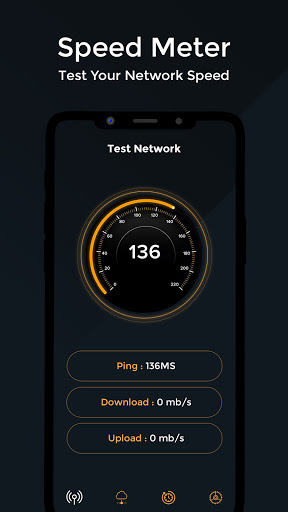
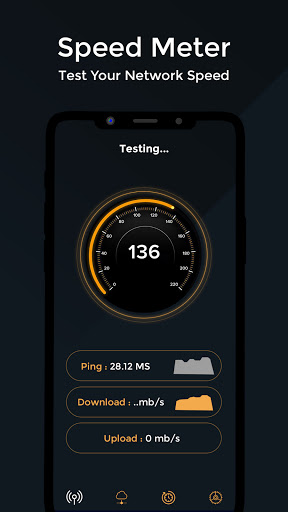
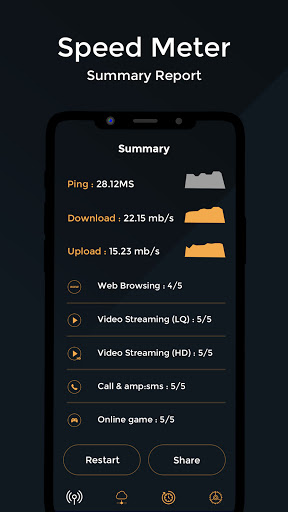
<b>Internet Speed Meter</b> (internet speed indicator) displays your <b>Internet Speed</b> in status bar. This helps you to monitor network connection anytime while using your device. It adds an indicator in your status bar that shows mobile data or WiFi speed. The <b>Internet Speed Meter</b> shows the current speed at which your internet is being used by other apps. The indicator updates in real-time showing the current speed at all time.
<b>If you like the <b>Internet Speed Meter</b> (internet speed indicator) App, please rate us.</b>
Features
► Real time speed update in status bar and notification.
► Real time speed of running applications.
► Real time <b>Internet Speed</b> in …
Read the full description
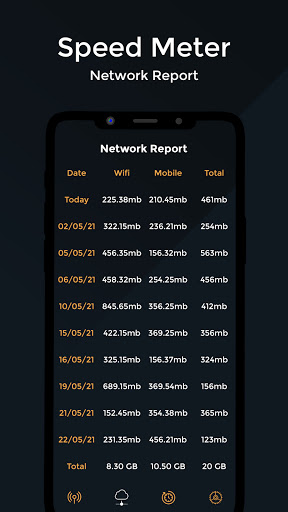
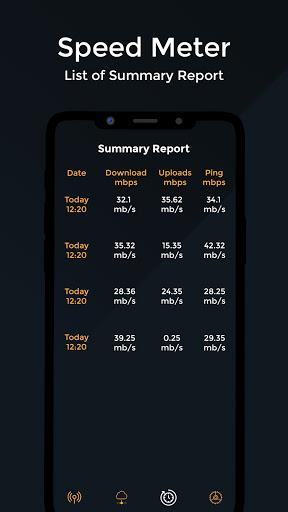
<b>Internet Speed Meter</b> (internet speed indicator) displays your <b>Internet Speed</b> in status bar. This helps you to monitor network connection anytime while using your device. It adds an indicator in your status bar that shows mobile data or WiFi speed. The <b>Internet Speed Meter</b> shows the current speed at which your internet is being used by other apps. The indicator updates in real-time showing the current speed at all time. <b>If you like the <b>Internet Speed Meter</b> (internet speed indicator) App, please rate us.</b> Features ► Real time speed update in status bar and notification. ► Real time speed of running applications. ► Real time <b>Internet Speed</b> in status bar. ► Separate stats for Mobile network and WiFi network. ► Battery efficient. ► Smarter notifications. ► Graph to monitor last minute internet activity. ► Real time upload and download speed in notification. ► Track and monitor daily data and WiFi usage from notification. ► Hide when not connected to any network "<b>Internet Speed Meter</b> & Speed Test" Display <b>Internet Speed</b> Test And Status bar 2G, 3G, 4G & WIFI <b>Internet Speed Meter</b> & Speed Test Is Data Monitor Or Bandwidth Monitor Or <b>Speed Test Live Download & Upload Speed</b> This <b>Internet Speed Meter</b> & Speed Test The Use Of <b>Internet And Wi-Fi</b> Daily-used Data Report And Show Date In Right-side <b>"Internet Speed Meter & Speed Test" Application Features :-</b> ► StatusBar Widget Without Root or Xposed. Just Simple And Easy. ► Notification Monitor Tool. ► Daily and Monthly Basis Internet Usage Record. ► Desing with Metarial Design Principals. ► Many Customization For Widget And Notification. <b>Reset Data-used Mobile and WI-Fi internet 30 Days Total Traffic.</b> ► Live <b>Internet Speed</b> Monitors Your Traffic Data For The Last 30 days ► Consumer Reports Mobile and WI-Fi internet 30 Days To Resolution Pictures And See The Total Traffic. ► No need to open your browser or questionable apps. ► Install this great Android tool and always know how fast is your internet connection. ► On top of that the app saves your <b>Internet Speed</b> data every week, day and month and you can easily analyze the changes. <b>Notification Dialog</b> ► Graph to monitor last minute internet activity ► Time and usage of current session ► The notification area shows a clean and unobtrusive notification displaying upload/download speed and/or daily data/WiFi usage. ► Monitor upload & download speed separably or combine on your status bar. Track record of usage. ► <b>Internet Speed Meter</b> /Data Usage Monitor(speed test & monitor internet) is check your wifi, 3G, 4G, and Mobile data used by per app. ► Speed Test for Mobile helps to measure and verify the download speed and upload speed in a short span of time. <b>Daily data usage</b> Track your daily 4G/3G/2G data or WiFi usage right from notification bar. When enabled the notification shows daily mobile data and WiFi usage. No need of a separate app just to keep track of your daily data usage. <b>Highly Customisable</b> You can customise almost everything you want. Easily show and hide the indicator if needed. Decide for you where you want to show the indicator in the status bar, whether it should be shown on lockscreen or whether you want to use bytes per second (e.g. kBps) or bits per second (e.g. kbps) to show the speed. <b>Battery and memory efficient</b> The indicator is designed keeping in mind that we don't have unlimited battery backup, and our experiments shows that it consumes significantly less memory compared to other popular <b>Internet Speed Meter</b> Apps.
Installs since 31 Aug 2026 Measured
Exact Google Play install counts, collected daily
Ratings
- 5 ★0.0%
- 4 ★0.0%
- 3 ★0.0%
- 2 ★0.0%
- 1 ★0.0%
Recent reviews
Latest public reviews from the store
- 11 Apr 2026
goood but hard
- 1 Jan 2026
till now it's safe and secure
- 11 Dec 2025
it didn't work the way I expected it to
- 4 Aug 2024
I love this app it makes me to close apps that I don't want to use data in
What reviewers bring up
Topics mentioned in the latest 10 reviews, by how many reviews mention them
Liked in good reviews (3 reviews)
No topic comes up twice.
Raised in bad reviews (5 reviews)
- data 3
- shows 2
- wifi 2
Top chart positions
Latest Google Play chart ranks by country, last 10 days
Not in any tracked top chart in the last 10 days.
Internet Speed Meter history
Release, install milestones, listing and store changes
- Reached 5,000+ installs 10 May 2025
- Reached 1,000+ installs 19 Jan 2022
- Reached 500+ installs 15 Sep 2021
- Reached 100+ installs 9 Jun 2021
- Reached 50+ installs 26 May 2021
- First released on the store 13 May 2021
Listing keywords
Words and phrases Internet Speed Meter repeats most in its store listing
Top phrases: internet speed (19), internet speed meter (11), speed meter (11), speed test (8), status bar (8).
Highlighted words also appear in the title. Counts cover the title, short description and description.
Business model and tech
From the store listing and declared permissions
- Business model
- Free to download
- Sensitive access
- Phone and callsPhotos, videos and files
10 permissions
1 special access, 3 sensitive, 6 standard
- See which apps are usedPACKAGE_USAGE_STATSSpecial access
- Change or delete shared storageSensitive
- Read shared storageSensitive
- Read phone status and identitySensitive
- Start when the phone turns onStandard
- Connect to and disconnect from Wi-FiStandard
- Full internet accessStandard
- See network connectionsStandard
- See Wi-Fi connectionsStandard
- Manage network policyMANAGE_NETWORK_POLICYStandard
Compliance
What the listing and the app package show
- Store status
- Live
- Upkeep
- Updated 10 May 2025
- Registered in
- India
- Privacy policy
- Linked on the listing
- Advertising
- No ads declared
- In-app purchases
- None declared
- Age rating
- Everyone
- Sensitive permissions
- 3 sensitive, 1 special access of 10
- Location access
- No
- Camera and microphone
- Neither
Apps like Internet Speed Meter
들어서 화면켜기Won3.5K installs★ 4.0
Height PredictionEcliptic App Ventures45.9K installs★ 2.4
Speicers`Pro VPNEldiablolucifer202021.2K installs★ 4.14
Lightning Tracker with AlertsYaksh Software4.3K installs★ 3.0
Mana Pathi (Unit Converter)Shirish Koirala2.2K installs★ 4.6
Multi-tab Calc - A simple app.Naoyuki Rikiji1.3K installs★ 5.0
Photo Recovery PlusBillApps7.1K installs★ 4.53
Just Silence. Scheduled.Akid Soft1.6K installs★ 5.0
- WoWp AssistantВиталий Робиновский2K installs★ 4.2
Internet Speed Meter: questions and answers
How many downloads does Internet Speed Meter have?
Internet Speed Meter has 9,040 installs on Google Play, measured from the store's own count on 9 Nov 2026.
Who makes Internet Speed Meter?
Internet Speed Meter is published by Trackon Infotech, a developer based in IN.
When was Internet Speed Meter last updated?
The latest version (Varies with device) was released on 10 May 2025.
Is Internet Speed Meter free?
Yes. Internet Speed Meter is free to download.
Is Internet Speed Meter still available?
Yes. Internet Speed Meter is live on Google Play as of 9 Nov 2026.
Track Internet Speed Meter and its competitors
Watch any app for new versions, rating drops, chart moves and removals. Free plan, no card.