
ISL Light Remote Desktop
Pro Remote Desktop. Access & Control a Remote Computer from Your Android Device
- Installs
- 659K
- Measured
- Rating
- 2.97
- Ratings
- 995
- 40 reviews
- Version
- Varies with device
- Updated 30 Jul 2026
- Released
- 14 Apr 2014
- Tracked since 13 May 2026
- Size
- —
Screenshots




About ISL Light Remote Desktop
The description on the store listing
Connect to any Windows, Mac, or Linux computer to provide efficient technical assistance from your Android device. Access your computers even behind a firewall and control the keyboard and mouse remotely. Or vice-versa, connect to a remote Android mobile device* to see its screen and have full control of it from your computer running on Windows, Mac or Linux.
Remote Support:
- Provide efficient technical assistance over the Internet.
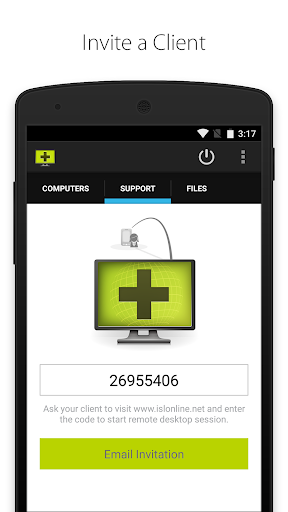
- Connect with your client by using a unique session code. To start a new session, you need a valid ISL Online account.
- Join an existing remote desktop session. You don't need an ISL Online account to do it.
- Chat with your client during the …
Read the full description
Connect to any Windows, Mac, or Linux computer to provide efficient technical assistance from your Android device. Access your computers even behind a firewall and control the keyboard and mouse remotely. Or vice-versa, connect to a remote Android mobile device* to see its screen and have full control of it from your computer running on Windows, Mac or Linux. Remote Support: - Provide efficient technical assistance over the Internet. - Connect with your client by using a unique session code. To start a new session, you need a valid ISL Online account. - Join an existing remote desktop session. You don't need an ISL Online account to do it. - Chat with your client during the session. - Email an invitation with a link for a fast remote session start. - Connect to an Android-powered mobile device* from your computer to troubleshoot problems, setup the device or manage the data. Remote Access: - Access remote computers even if unattended. - Add access to your computer by installing the ISL AlwaysOn application and configuring remote access to that computer. In order to access your remote computers, you need a valid ISL Online account. - Share files on your computer with ISL AlwaysOn and access them from your Android phone or tablet without accessing the remote desktop. No need to upload your files to the cloud! - Tick the box “Remember the password” and get faster access to your remote computers. Features (Remote Support & Access): - Access remote desktop from Android device. - Connect to a remote computer even behind a firewall. No need for configuration. - View a remote screen. - Support multiple monitors. - Screen resolution adjusted automatically. - Choose between high speed and best quality desktop sharing. - Remotely control keyboard and mouse. - Use special keys such as Ctrl, Alt, Windows and function keys. - Send Ctrl+Alt+Del to a remote computer. - Switch between the left and right mouse click. - Reboot a remote computer and resume the session. - ISSC Turbo Desktop Sharing. - Secure remote desktop encrypted by symmetrical AES 256 Bit SSL. *Mobile Remote Support: - It is possible to view the screen of ANY Android mobile phone or tablet through automated real-time screenshot sharing. - Live screen sharing is available for all Android devices running version 5.0 and up (using Android's MediaProjection API). - Full remote control is available on Samsung devices running Android 4.2.2 or newer and all rooted Android devices. Important notice for Samsung device users: - “This app uses the Device Administrator permission.” - Samsung KNOX needs to be enabled to allow a remote control of your Samsung mobile device. We will use administrative permission (BIND_DEVICE_ADMIN) to enable Samsung KNOX and it will be used during the remote support session only. You will be able to revoke the administrative permission once the remote support session ends. - If you do not enable Samsung KNOX you will still be able to share your screen using Android's MediaProjection API but a remote user will not be able to control your mobile device during the support session. - You can revoke administrative permission anytime in Android device settings (Settings->More->Security->Device Administrators). - Make sure to revoke administrative permission before uninstalling this app. Important notice for unattended access functionality: Application uses USE_FULL_SCREEN_INTENT permission which is required to run the service which enables the users the use of the new core functionality - unattended access. The permission is crucial for the intended functionality to operate and allow unattended remote access to the device.
Installs since 27 Aug 2026 Measured
Exact Google Play install counts, collected daily
Ratings
995 ratings, 40 reviews
- 5 ★41%
- 4 ★0.0%
- 3 ★7.8%
- 2 ★5.6%
- 1 ★46%
Recent reviews
Latest public reviews from the store
- 4 Dec 2019
Polno delujoca kontrola z uporabo LG android naprav :)
Top chart positions
Latest Google Play chart ranks by country, last 10 days
Not in any tracked top chart in the last 10 days.
ISL Light Remote Desktop history
Release, install milestones, listing and store changes
- Reached 500,000+ installs 12 Apr 2025
- Reached 100,000+ installs 15 Dec 2018
- Reached 50,000+ installs 21 Sep 2016
- Reached 10,000+ installs 9 Mar 2015
- Reached 5,000+ installs 25 Nov 2014
- Reached 1,000+ installs 10 May 2014
- Reached 500+ installs 29 Apr 2014
- Reached 100+ installs 24 Apr 2014
Update frequency
How often ISL Light Remote Desktop ships a new version, month by month
0 updates in the last 12 months. Less often than most similar apps: they shipped a median of 2 updates in the same year.
Recent versions
Current version Varies with device
- Version 4.4.2447.6128 May 2025
- Version 4.4.2447.4620 Mar 2025
- Version 4.4.2332.9225 Oct 2024
- Version 4.4.2332.914 Sep 2023
Listing keywords
Words and phrases ISL Light Remote Desktop repeats most in its store listing
Top phrases: remote desktop (6), remote support (5), administrative permission (4), android device (4), mobile device (4).
Highlighted words also appear in the title. Counts cover the title, short description and description.
Business model and tech
From the store listing, the SDKs in the app package and its declared permissions
- Business model
- Free to download
- Built with
- No cross-platform framework or game engine detected
- Ad networks (0)
- None detected
- Sensitive access
- CameraMicrophonePhotos, videos and filesDraws over other apps
0 ad, attribution and analytics SDKs detected. SDKs are read from the app package and permissions from the store listing, so code that loads later is not seen.
Technology
26 SDKs found in the app package
24 permissions
3 special access, 5 sensitive, 16 standard
- Draw over other appsSpecial access
- Read sensitive log dataSpecial access
- Show full-screen alertsUSE_FULL_SCREEN_INTENTSpecial access
- Record audioSensitive
- Take photos and videosSensitive
- Change or delete shared storageSensitive
- Read shared storageSensitive
- Show notificationsPOST_NOTIFICATIONSSensitive
- Control vibrationStandard
- Foreground service (connected device)FOREGROUND_SERVICE_CONNECTED_DEVICEStandard
- Foreground service (media projection)FOREGROUND_SERVICE_MEDIA_PROJECTIONStandard
- Keep the phone awakeStandard
Compliance
What the listing and the app package show
- Store status
- Live
- Upkeep
- Updated 30 Jul 2026
- Registered in
- Slovenia
- Privacy policy
- Linked on the listing
- Advertising
- No ads declared
- In-app purchases
- None declared
- Age rating
- Everyone
- Sensitive permissions
- 5 sensitive, 3 special access of 24
- Location access
- No
- Camera and microphone
- Both
Apps like ISL Light Remote Desktop
Barcode & QR Scanner KeyboardNikola Antonov405K installs★ 3.65
Megashift Shift Work CalendarNammon97.3K installs★ 3.83
Embroidery Design ViewerCore Labs252K installs★ 2.9
WhitelinesWhitelines AB185K installs★ 2.68
Date Status Bar 2Wagwan Apps156K installs★ 2.28
Chaupai SahibWaheguruGurbani36.9K installs★ 4.89
Amharic Keyboard EthiopiaFirehawk528K installs★ 4.58
App Blocker: Block Sites, AppsPixster Studio66K installs★ 3.75
KickerAIKickerAI48.5K installs★ 3.79
ISL Light Remote Desktop: questions and answers
How many downloads does ISL Light Remote Desktop have?
ISL Light Remote Desktop has 659,210 installs on Google Play, measured from the store's own count on 19 Nov 2026.
Who makes ISL Light Remote Desktop?
ISL Light Remote Desktop is published by ISL Online, a developer based in SI.
When was ISL Light Remote Desktop last updated?
The latest version (Varies with device) was released on 30 Jul 2026.
Is ISL Light Remote Desktop free?
Yes. ISL Light Remote Desktop is free to download.
Is ISL Light Remote Desktop still available?
Yes. ISL Light Remote Desktop is live on Google Play as of 19 Nov 2026.
Track ISL Light Remote Desktop and its competitors
Watch any app for new versions, rating drops, chart moves and removals. Free plan, no card.