
Jammer Detector
The App detects jamming devices in foreground and background modes.
- Installs
- 461K
- Measured
- Rating
- 3.95
- Ratings
- 909
- 86 reviews
- Version
- Varies with device
- Updated 7 May 2018
- Released
- 30 May 2017
- Tracked since 13 May 2026
- Size
- 2 MB
- Needs 4.0.3
Screenshots


About Jammer Detector
The description on the store listing
<h2><b>Introduction.</b></h2>
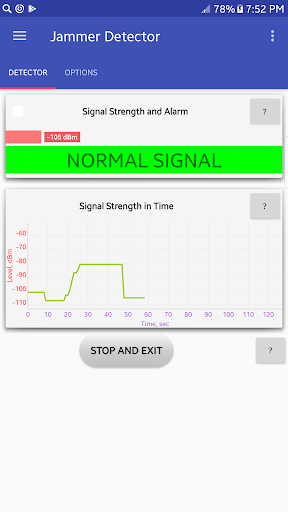
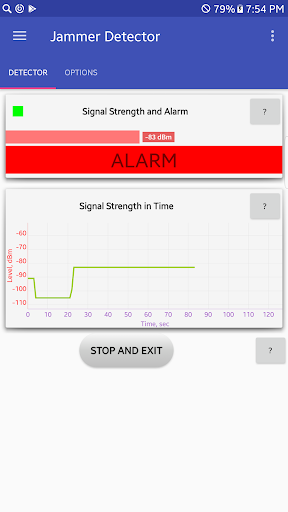
<b>Jammer Detector</b> is the App that allows you to detect presence of jamming devices around. In that situation your mobile phone loses the ability to make a phone call. If it happened, the App gives you a visual or sound message. The time for reaction on a working jammer depends on hardware communication part of your device and typically can be in 30-60 sec range.
<h2>Features</h2>.
<ul><li>
<u>Completely NO ads</u>.
</li><li>
The app records an event log and writes the location where a jamming device or 'out-of-service' state was detected.
</li><li>
<u>The signal strength indication</u>.
</li><li>
<u>Vibration indication of the alarm …
Read the full description
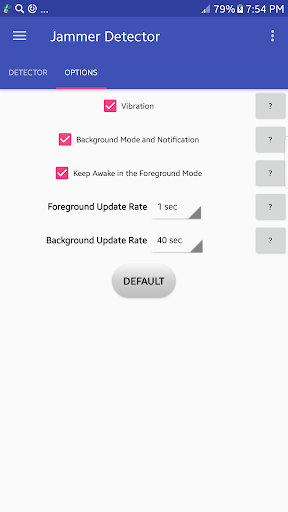
<h2><b>Introduction.</b></h2> <b>Jammer Detector</b> is the App that allows you to detect presence of jamming devices around. In that situation your mobile phone loses the ability to make a phone call. If it happened, the App gives you a visual or sound message. The time for reaction on a working jammer depends on hardware communication part of your device and typically can be in 30-60 sec range. <h2>Features</h2>. <ul><li> <u>Completely NO ads</u>. </li><li> The app records an event log and writes the location where a jamming device or 'out-of-service' state was detected. </li><li> <u>The signal strength indication</u>. </li><li> <u>Vibration indication of the alarm event</u>. </li><li> <u>Background mode with notifications</u>. Once this option starts, the App runs quietly in the background and requires no human interaction until the alarm event happens. It continues to run even after the device reboots. </li><li> <u>Adjustable battery consumption in the background mode</u>. The App is designed to conserve your device battery and allows to select the data update rate. The more update rate time, the less battery it takes. </li></ul> <h2><b>Frequently asked questions:</b></h2> <b>Q: Does the jammer app detect if someone or another device is intentionally trying to jam my signal so that I'm not able to use my phone?</b> A: Yes, That's exactly the app does. <b>Q: How do I stop my signal from being jammed?</b> A: If your phone has been jammed and you want to get your cellular service back, you have three options to do it: 1. Change your current location. Just make few steps aside. Depending on the power of a jamming device, the affected area can be between a meter and a hundred meters. 2. Change 'Network mode' in the 'Settings' of your phone (for example, Settings -> Connections -> Mobile networks ->Network mode). The 'Network mode' could be: LTE (4G), UMTS (3G), GSM (2G). In some cases jammer devices are not able to work in all type of frequency ranges (network modes). So, it's possible that one of the network mode will be working despite the jammer. 3. Find the jamming device and turn it off. In some cases it's possible to localize the spot where the jammer has been installed. You can use an additional device called the RF Detector for it OR just use your phone, but in the last case you need some skills to search the jammer. PS: Pay attention, if your cellular signal is very weak and the phone lose it, the app also will do alarm. <b>Q: I live out in the woods with no cell service and the alarm goes off like crazy.</b> A: That is exactly the purpose of this app: to inform when your phone out of service, no matter the reason of that. It could be the wood area, or a jammer device, or a deep underground. But if you launch the app with no cell service, the alarm will not go off until the switching between ‘in service’ and ‘out of service’. If you have any problems or any suggestions to improve this application, please feel free to contact <b>by e-mail: </b><a href="mailto:[email protected]">[email protected]</a> Thanks!
Installs since 29 Aug 2026 Measured
Exact Google Play install counts, collected daily
Ratings
909 ratings, 86 reviews
- 5 ★65%
- 4 ★5.9%
- 3 ★8.8%
- 2 ★2.8%
- 1 ★18%
Recent reviews
Latest public reviews from the store
No reviews in our sample for this app yet.
Top chart positions
Latest Google Play chart ranks by country, last 10 days
Not in any tracked top chart in the last 10 days.
Jammer Detector history
Release, install milestones, listing and store changes
- Reached 100,000+ installs 7 Jan 2018
- Reached 50,000+ installs 7 Oct 2017
- Reached 10,000+ installs 17 Jul 2017
- Reached 5,000+ installs 5 Jul 2017
- First released on the store 30 May 2017
Update frequency
How often Jammer Detector ships a new version, month by month
0 updates in the last 12 months. Less often than most similar apps: they shipped a median of 2 updates in the same year.
Recent versions
Current version Varies with device
- Version 1.646 May 2018
- Version 1.633 Apr 2018
- Version 1.621 Mar 2018
- Version 1.64 Feb 2018
Listing keywords
Words and phrases Jammer Detector repeats most in its store listing
Top phrases: li li (5), network mode (4), jamming device (3), info sergiosoft gmail (2), sergiosoft gmail com (2).
Highlighted words also appear in the title. Counts cover the title, short description and description.
Business model and tech
From the store listing, the SDKs in the app package and its declared permissions
- Business model
- Free to download
- Built with
- No cross-platform framework or game engine detected
- Ad networks (0)
- None detected
- Sensitive access
- Location
0 ad, attribution and analytics SDKs detected. SDKs are read from the app package and permissions from the store listing, so code that loads later is not seen.
Technology
2 SDKs found in the app package
Development tools
5 permissions
0 special access, 2 sensitive, 3 standard
- Approximate locationSensitive
- Precise locationSensitive
- Control vibrationStandard
- Keep the phone awakeStandard
- Start when the phone turns onStandard
Compliance
What the listing and the app package show
- Store status
- Live
- Upkeep
- No update since 7 May 2018
- Privacy policy
- Linked on the listing
- Advertising
- No ads declared
- In-app purchases
- None declared
- Age rating
- Everyone
- Sensitive permissions
- 2 sensitive of 5
- Location access
- Yes, while in use
- Camera and microphone
- Neither
Apps like Jammer Detector
TalonViewnxtec82.8K installs★ 2.25
YunGO Cheap International CallFortis Communications Inc273K installs★ 3.55
Contact FinderSYNECTIX LTD498K installs★ 2.0
ContactsDlight Soft270K installs★ 4.41
Secure Browser VPN Super ProxyNAM SON CONSTRUCTION ARCHITECTURE COMPANY LIMITED380K installs★ 4.11
TaahodQuranI355K installs★ 4.77
Spark VoicemailNORWOOD SYSTEMS (AUST) PTY LTD166K installs★ 3.38
WASticker Memes Animated FunnyDev Stickers Animated INC541K installs★ 4.3
Purity: Safe BrowserFamily First Technology158K installs★ 4.22
Jammer Detector: questions and answers
How many downloads does Jammer Detector have?
Jammer Detector has 460,790 installs on Google Play, measured from the store's own count on 17 Nov 2026.
Who makes Jammer Detector?
Jammer Detector is published by Sergio Gudkov.
When was Jammer Detector last updated?
The latest version (Varies with device) was released on 7 May 2018.
Is Jammer Detector free?
Yes. Jammer Detector is free to download.
Is Jammer Detector still available?
Yes. Jammer Detector is live on Google Play as of 17 Nov 2026.
Track Jammer Detector and its competitors
Watch any app for new versions, rating drops, chart moves and removals. Free plan, no card.