
JS USB OTG
Without rooting, enjoy multimedia contents with USB drive. (NTFS, exFAT, FAT32)
- Installs
- 14.90K
- Measured
- Rating
- 2.91
- Ratings
- 310
- 26 reviews
- Version
- Varies with device
- Updated 18 Oct 2026
- Released
- 3 Sep 2014
- Tracked since 13 May 2026
- Size
- 2 MB
Screenshots
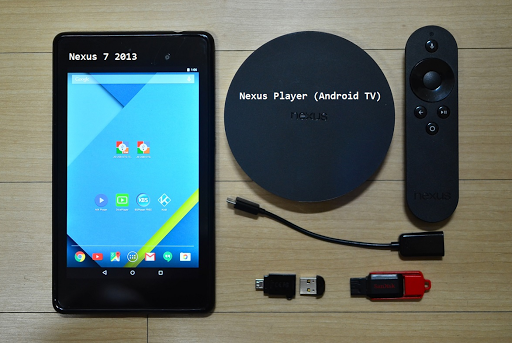




About JS USB OTG
The description on the store listing
● Does not need rooting.
● NTFS, ExFAT, FAT32 filesystem are supported. (Read-Only)
● USB drive, flash card should be formatted by NTFS or ExFAT or FAT32 filesystem. (Less than 2TB)
【 Video Streaming 】
ㆍ Without the need to save video files in the mobile device, you can directly watch a video by streaming. (http streaming)
ㆍ mp4, mkv, avi, mov, wmv, mpg, mpeg, flv, m4v, webm, 3gp, ts, mts, m2ts, iso streaming.
ㆍ Internal streaming. Does not need to turn on the Wifi or LTE / 5G network.
ㆍ By streaming, Play, Pause, Jump, Resume are possible for a video file which is over 4GB size.
ㆍ Recommend JS Player(from jsolwindlabs. mobile only), KODI(XBMC) as a video player that support …
Read the full description
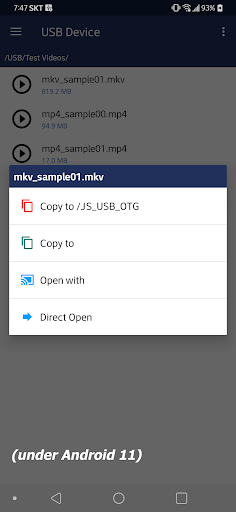
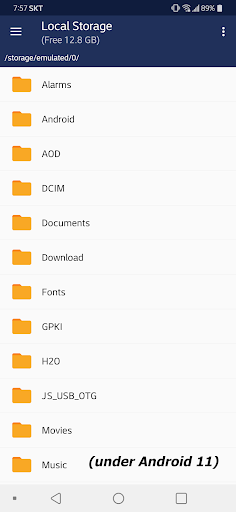
● Does not need rooting. ● NTFS, ExFAT, FAT32 filesystem are supported. (Read-Only) ● USB drive, flash card should be formatted by NTFS or ExFAT or FAT32 filesystem. (Less than 2TB) 【 Video Streaming 】 ㆍ Without the need to save video files in the mobile device, you can directly watch a video by streaming. (http streaming) ㆍ mp4, mkv, avi, mov, wmv, mpg, mpeg, flv, m4v, webm, 3gp, ts, mts, m2ts, iso streaming. ㆍ Internal streaming. Does not need to turn on the Wifi or LTE / 5G network. ㆍ By streaming, Play, Pause, Jump, Resume are possible for a video file which is over 4GB size. ㆍ Recommend JS Player(from jsolwindlabs. mobile only), KODI(XBMC) as a video player that support http streaming. ㆍ Click video file and select ‘Open With’. 【 Built-in Video Player 】 ㆍ In addition to the 3rd party video player mentioned above, you can also use the built-in video player. ㆍ No need to save the video file to your mobile device. ㆍ Based on Google ExoPlayer. ㆍ Supported container extensions: mp4, mkv, mov, ts, mpg, mpeg, webm. ㆍ Supports Fast Rewind and Fast Forward with left and right double tap (Left and Right buttons for Android TV). ㆍ Supports selection of multi-audio and multi-subtitles embedded in video file. ㆍ External subtitle file is automatically read when saved with the same file name in the ‘Download’ folder of the local storage. Subrip (srt) format encoded by UTF8. ㆍ Android 11 or higher - After copying a srt subtitle from USB to Downloads collection, the actual local file path of srt is 'Movies' directory. Please refer to it when using a 3rd party video player. ㆍ Click video file and select ‘Direct Open’. 【 Built-in Image Viewer 】 ㆍ No need to save the image file to your mobile device. ㆍ Supported image formats : png, jpg/jpeg, bmp, gif ㆍ Full screen slideshow through the swiping right/left (for image files in the same folder) ㆍ Pinch to zoom in/out ㆍ Fit an image to screen by double tap. ㆍ Click image file and select ‘Direct Open’. 【 Built-in Music Player 】 ㆍ No need to save audio files in the mobile device. ㆍ Supported audio formats : mp3, flac, ogg ㆍ Audio files in the same folder. ㆍ Play, Pause, Stop, Prev, Next, Shuffle, Repeat. ㆍ Background play by Home Button. ㆍ Click audio file and select ‘Direct Open’. 【 Android TV version 】 ㆍ Functions are same with mobile version. UI is different. ㆍ Built-in music player : click left or right button on the list for moving focus to the control panel. 【 Changes on Android 11 or higher devices related to local storage 】 ㆍFrom Android 11 or higher devices, the local storage security has been strengthened, and the app function has been changed to show media files (Video, Audio, Image) in the local storage. - When you copy a file from USB to your mobile device, video file is added to the video collection in local storage, audio file is added to the audio collection, and image file is added to the image collection (Shared concept) - If you copy a file other than the media file type, it is added to the download collection. Only files copied from JS USB OTG are visible (Private concept) - Devices under Android 11 are the same as before without the above restrictions. (Multi-copy with Long Click / Copy to the selected folder in local storage / Local storage file manager functions)
Installs since 29 Aug 2026 Measured
Exact Google Play install counts, collected daily
Ratings
310 ratings, 26 reviews
- 5 ★33%
- 4 ★18%
- 3 ★7.4%
- 2 ★0.0%
- 1 ★41%
Recent reviews
Latest public reviews from the store
No reviews in our sample for this app yet.
Top chart positions
Latest Google Play chart ranks by country, last 10 days
Not in any tracked top chart in the last 10 days.
JS USB OTG history
Release, install milestones, listing and store changes
- Reached 10,000+ installs 10 Feb 2022
- Reached 5,000+ installs 16 Feb 2019
- First released on the store 3 Sep 2014
Recent versions
Current version Varies with device
- Version 6.5.121 Oct 2025
- Version 6.5.027 Jul 2025
- Version 6.3.316 Mar 2025
- Version 6.3.26 Jan 2025
Listing keywords
Words and phrases JS USB OTG repeats most in its store listing
Top phrases: local storage (7), video file (6), mobile device (5), video player (5), file and select (4).
Highlighted words also appear in the title. Counts cover the title, short description and description.
Business model and tech
From the store listing, the SDKs in the app package and its declared permissions
- Business model
- Paid, $3.99
- Built with
- No cross-platform framework or game engine detected
- Ad networks (0)
- None detected
- Sensitive access
- Photos, videos and files
0 ad, attribution and analytics SDKs detected. SDKs are read from the app package and permissions from the store listing, so code that loads later is not seen.
Technology
13 SDKs found in the app package
13 permissions
0 special access, 7 sensitive, 6 standard
- Change or delete shared storageSensitive
- Read music and audioREAD_MEDIA_AUDIOSensitive
- Read photosREAD_MEDIA_IMAGESSensitive
- Read photos and videos the user picksREAD_MEDIA_VISUAL_USER_SELECTEDSensitive
- Read shared storageSensitive
- Read videosREAD_MEDIA_VIDEOSensitive
- Show notificationsPOST_NOTIFICATIONSSensitive
- Foreground service (media playback)FOREGROUND_SERVICE_MEDIA_PLAYBACKStandard
- Keep the phone awakeStandard
- Run a foreground serviceFOREGROUND_SERVICEStandard
- Full internet accessStandard
- See network connectionsStandard
Compliance
What the listing and the app package show
- Store status
- Live
- Upkeep
- Updated 18 Oct 2026
- Registered in
- South Korea
- Privacy policy
- Linked on the listing
- Advertising
- No ads declared
- In-app purchases
- None declared
- Age rating
- Everyone
- Sensitive permissions
- 7 sensitive of 13
- Location access
- No
- Camera and microphone
- Neither
Apps like JS USB OTG
AI Photo Video Maker - SlidefyThe Pentagon Apps259K installs★ 4.2
Ibo Player SmarterIBOSMDEV330K installs★ 3.38
Video DownloaderAll Video Downloader - Video saver66K installs★ 4.29
Video ResizerPhoto Slideshow with Music92.8K installs★ 1.57
iMassAnchoright Productions27.2K installs★ 4.29
4U TVM.H.N37.7K installs★ 3.75
XBMC4Xbox RemoteDan Dar387.3K installs★ 3.78
Noise and Sweep GeneratorRadonSoft83.9K installs★ 1.29
Video Editor & Maker - FilmCutKX Camera Team89.7K installs★ 4.39
JS USB OTG: questions and answers
How many downloads does JS USB OTG have?
JS USB OTG has 14,896 installs on Google Play, measured from the store's own count on 14 Nov 2026.
Who makes JS USB OTG?
JS USB OTG is published by jsolwindlabs, a developer based in KR.
When was JS USB OTG last updated?
The latest version (Varies with device) was released on 18 Oct 2026.
Is JS USB OTG free?
No. JS USB OTG is a paid app priced at $3.99.
Is JS USB OTG still available?
Yes. JS USB OTG is live on Google Play as of 14 Nov 2026.
Track JS USB OTG and its competitors
Watch any app for new versions, rating drops, chart moves and removals. Free plan, no card.