
KeepFocus-Screen Time Tracker
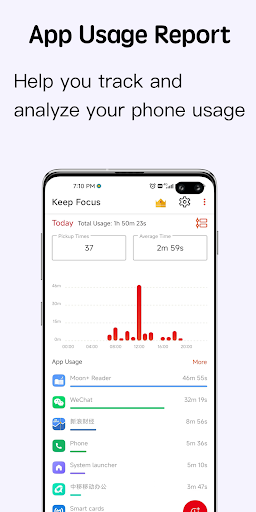
Help you analyze and manage your screen time, being more focused and efficient.
- Installs
- 627
- Measured
- Rating
- —
- Ratings
- —
- Version
- Varies with device
- Released
- 5 Nov 2023
- Tracked since 12 May 2026
- Size
- —
Screenshots




About KeepFocus-Screen Time Tracker
The description on the store listing
KeepFocus: Screen Time Tracker & Usage Manager
Description:
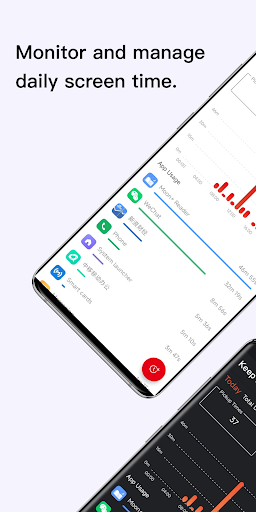
Take control of your screen time and make the most of your day with KeepFocus. Our app is designed to help you track and manage your phone usage effectively. Say goodbye to wasted hours and hello to a balanced digital lifestyle.
Key Features:
Track App Usage: KeepFocus records the usage time of each app on your device, giving you valuable insights into your daily app usage habits. Stay informed about which apps consume the most of your time.
Time Limit Setting: Set usage time limits for individual apps to prevent excessive usage. Once the set limit is reached, KeepFocus will alert you, reminding you to take a break and …
Read the full description
KeepFocus: Screen Time Tracker & Usage Manager Description: Take control of your screen time and make the most of your day with KeepFocus. Our app is designed to help you track and manage your phone usage effectively. Say goodbye to wasted hours and hello to a balanced digital lifestyle. Key Features: Track App Usage: KeepFocus records the usage time of each app on your device, giving you valuable insights into your daily app usage habits. Stay informed about which apps consume the most of your time. Time Limit Setting: Set usage time limits for individual apps to prevent excessive usage. Once the set limit is reached, KeepFocus will alert you, reminding you to take a break and avoid spending too much time on a particular app. Usage Analysis: Analyze your screen time patterns and understand how you allocate your time across different apps. Gain valuable insights into your digital habits and make informed decisions about your phone usage. Promote Productivity: KeepFocus aims to help you maintain a healthy balance between productivity and leisure. By monitoring your screen time and setting limits, you can focus on important tasks without getting distracted by excessive phone usage. Enhance Time Management: Take control of your day by effectively managing your screen time. Allocate your time wisely, ensuring that it aligns with your priorities and goals. Improve Digital Well-being: Use KeepFocus to foster a healthier relationship with your phone. By reducing excessive screen time, you can enjoy more meaningful interactions, engage in offline activities, and improve your overall well-being. User-Friendly Interface: KeepFocus features a clean and intuitive interface, making it easy to track, analyze, and manage your screen time. The app provides a seamless user experience for users of all ages. Download KeepFocus now and unlock the potential of your time! Take charge of your screen time, optimize your productivity, and regain control of your digital life.
Installs since 31 Aug 2026 Measured
Exact Google Play install counts, collected daily
Ratings
- 5 ★0.0%
- 4 ★0.0%
- 3 ★0.0%
- 2 ★0.0%
- 1 ★0.0%
Recent reviews
Latest public reviews from the store
- 15 Mar 2026
Hello! Your app looks really interesting, but I couldn't open it. It keeps crashing. I tried clearing the cache and data and uninstalling then reinstalling. Nothing worked. If you could look into the issue I would really appreciate it. Thank you!
- 14 Mar 2024
Good
Top chart positions
Latest Google Play chart ranks by country, last 10 days
Not in any tracked top chart in the last 10 days.
KeepFocus-Screen Time Tracker history
Release, install milestones, listing and store changes
- First released on the store 5 Nov 2023
Listing keywords
Words and phrases KeepFocus-Screen Time Tracker repeats most in its store listing
Top phrases: phone usage (3), analyze and manage (2), manage your screen (2), screen time tracker (2), keepfocus screen (2).
Highlighted words also appear in the title. Counts cover the title, short description and description.
Business model and tech
From the store listing and declared permissions
- Business model
- Free to downloadIn-app purchases
- Sensitive access
- No sensitive permission declared
Compliance
What the listing and the app package show
- Store status
- Live
- Privacy policy
- Linked on the listing
- Advertising
- No ads declared
- In-app purchases
- Offered
- Age rating
- Everyone
Apps like KeepFocus-Screen Time Tracker
영산강 안심 알림eICT융합소프트 & 스마트오더18.3K installs★ 4.0
JBLETRADOC Mobile10.3K installs★ 4.5
Two Point HeightOmega Centauri Software15.3K installs★ 2.22
Sheridan RecyclesCity of Sheridan634 installs★ 4.67
NAFNorges Automobil-Forbund200K installs★ 3.9
Ipsos Adria CAPIIpsos Serbia7.4K installs★ 3.9
Clock: Alarm Clock & TimerIntratech so36.1K installs★ 3.79
Süzme Sayaç HesaplamaNotsup30.3K installs★ 3.6
Cattle & Goat Record KeepingVetzKin10.3K installs★ 2.5
KeepFocus-Screen Time Tracker: questions and answers
How many downloads does KeepFocus-Screen Time Tracker have?
KeepFocus-Screen Time Tracker has 627 installs on Google Play, measured from the store's own count on 9 Nov 2026.
Who makes KeepFocus-Screen Time Tracker?
KeepFocus-Screen Time Tracker is published by EverSince Studio.
Is KeepFocus-Screen Time Tracker free?
Yes. KeepFocus-Screen Time Tracker is free to download and offers in-app purchases.
Is KeepFocus-Screen Time Tracker still available?
Yes. KeepFocus-Screen Time Tracker is live on Google Play as of 9 Nov 2026.
Track KeepFocus-Screen Time Tracker and its competitors
Watch any app for new versions, rating drops, chart moves and removals. Free plan, no card.