KeyTrigger
Bluetooth keyboard becomes a remote launcher.
- Installs
- 186
- Measured
- Rating
- —
- Ratings
- —
- Version
- Varies with device
- Updated 5 Oct 2025
- Released
- 12 Dec 2013
- Tracked since 13 May 2026
- Size
- —
Screenshots




About KeyTrigger
The description on the store listing
Bluetooth Keyboard becomes a remote app launcher.
Assign apps to the keys on keyboard, to launch them by pressing a single or a pair of keys.
- Launch app / trigger shortcut / show sub launcher by each app-launch "Func" key
- Use Windows* key as browser Func key
- Set key assignment in sub launcher for second trigger
*Left-meta key will be replaced by bundled key map (layout)
<b>Usage Example</b>
- Launch memo app instantly, anytime you get ideas.
- Trigger voice recognition app on remote tablet.
- Trigger shortcut of automation tool such as FRep series remotely.
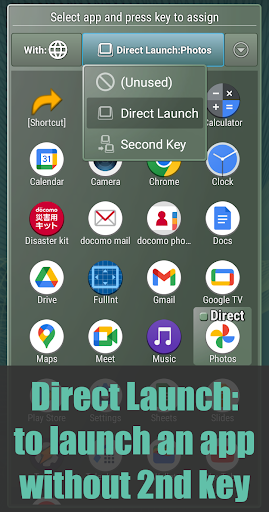
<b>Initial Settings</b> (see images)
1. Pair (connect) the Bluetooth keyboard to your Android.
2. Push …
Read the full description
Bluetooth Keyboard becomes a remote app launcher. Assign apps to the keys on keyboard, to launch them by pressing a single or a pair of keys. - Launch app / trigger shortcut / show sub launcher by each app-launch "Func" key - Use Windows* key as browser Func key - Set key assignment in sub launcher for second trigger *Left-meta key will be replaced by bundled key map (layout) <b>Usage Example</b> - Launch memo app instantly, anytime you get ideas. - Trigger voice recognition app on remote tablet. - Trigger shortcut of automation tool such as FRep series remotely. <b>Initial Settings</b> (see images) 1. Pair (connect) the Bluetooth keyboard to your Android. 2. Push either of app-launch Func keys; Browser, Calculator, Calendar, Contacts, Mail, Music. On Android 8~, combination with Meta key (Meta-B for browser, etc.) also available. 3. If "Complete action using" popup is shown, choose <b>KeyTrigger</b>. If any key does not show the popup, try setting below <b>(Win->Web) keyboard layout</b>. 4. In green frame dialog, push Enter or tap "Tap here and setup default app for trigger key" at the top. 5. Again, you will see "Complete action using" popup, and in this time, Select <b>KeyTrigger</b> with <b>Always</b>. Now you can launch KeyTrigger by pushing the app-launch Func key. <b>Features</b> - Selectable <b>Direct Launch</b>, <b>Second Key</b>, or <b>Unused</b> for each app-launch Func key. Direct Launch: start designated app/shortcut instantly when the app-launch Func key pushed. Second Key: register multiple apps and shortcuts for sub launcher palette, which popup when the app-launch Func key pushed. - Unused: disable KeyTrigger app for the app-launch Func key, to remove from app candidate list. - Color variation of frame. <b>(Win->Web) keyboard layout (Android 4.1 or later)</b> If your keyboard has Windows key (or Left-meta key), bundled key layout can replace it with Browser app-launch Func key by steps below. 1. Pair (connect) your Bluetooth keyboard to Android. 2. Open Android Settings screen and select <b>Language & input</b>. 3. In Physical Keyboard section of Language & input screen, tap <b>(your keyboard name)</b>. 4. In Choose keyboard layout popup, push <b>Set up keyboard layouts</b>. 5. In Keyboard layouts list, you can see <b>(Win->Web) **** with (KeyTrigger) Android keyboard</b>, and check one of them, then Back. 6. If the Choose keyboard layout popup says, "To switch, press Control-Spacebar" or such, do it to switch the keyboard layout to checked one. Then Back. 7. Now you can see the checked layout name under your keyboard name. 8. Try pushing your Windows (or Left-meta) key, which will popup browsers. Then go to step 4. in <b>Initial Settings</b> above. <b>Permissions</b> - Run at startup: availability setting of activity for UNUSED app-launch key. <b>Requirements</b> - Android 4.0.3 or later - Physical keyboard (Bluetooth, usb, built-in or other) If you have any question or request, please mail to us. The reply will be in English. == DISCLAIMER == THIS SOFTWARE AND THE ACCOMPANYING FILES ARE DISTRIBUTED and SOLD "AS IS" AND WITHOUT WARRANTIES AS TO PERFORMANCE OR MERCHANTABILITY OR ANY OTHER WARRANTIES WHETHER EXPRESSED OR IMPLIED. LICENSEE USES THE SOFTWARE AT HIS/HER OWN RISK. NO LIABILITY FOR CONSEQUENTIAL DAMAGES. ================
Installs since 15 Nov 2026 Measured
Exact Google Play install counts, collected daily
Daily history starts once this app is in our daily install sample.
Ratings
- 5 ★0.0%
- 4 ★0.0%
- 3 ★0.0%
- 2 ★0.0%
- 1 ★0.0%
Recent reviews
Latest public reviews from the store
- 10 Dec 2025
I have used previous version, now using this one to automate boring gacha chores. it's incredibly powerful and cheap if you're willing to dig in a bit.
- 6 Mar 2023
this tool is incredible. I've used the first version for years. This is a trusted group with really fast and great customer service. The unlock key is worth it as it really does unlock great features. Please support these guys so they can continue provided these awesome tools.
- 10 Mar 2022
i have purchased this, even after that it always gives message in app purchase unlock key and free version only allows 3 records
Top chart positions
Latest Google Play chart ranks by country, last 10 days
Not in any tracked top chart in the last 10 days.
KeyTrigger history
Release, install milestones, listing and store changes
- Reached 100+ installs 21 Jan 2019
- Reached 50+ installs 29 Jan 2017
- Reached 10+ installs 23 Jun 2014
- Reached 5+ installs 24 May 2014
- First released on the store 12 Dec 2013
Update frequency
How often KeyTrigger ships a new version, month by month
0 updates in the last 12 months. Less often than most similar apps: they shipped a median of 1 updates in the same year.
Recent versions
Current version Varies with device
- Version 1.45 Oct 2025
- Version 1.320 Jul 2023
- Version 1.210 Jun 2017
- Version 1.125 Jan 2015
Listing keywords
Words and phrases KeyTrigger repeats most in its store listing
Top phrases: func key (8), launch func (8), launch func key (7), keyboard layout (5), bluetooth keyboard (4).
Highlighted words also appear in the title. Counts cover the title, short description and description.
Business model and tech
From the store listing and declared permissions
- Business model
- Paid, $1.95
- Sensitive access
- No sensitive permission declared
2 permissions
0 special access, 0 sensitive, 2 standard
- Start when the phone turns onStandard
- Internal app permissionDYNAMIC_RECEIVER_NOT_EXPORTED_PERMISSIONStandard
Compliance
What the listing and the app package show
- Store status
- Live
- Upkeep
- Updated 5 Oct 2025
- Registered in
- Japan
- Privacy policy
- Linked on the listing
- Advertising
- No ads declared
- In-app purchases
- None declared
- Age rating
- Everyone
- Sensitive permissions
- 0 sensitive of 2
- Location access
- No
- Camera and microphone
- Neither
Apps like KeyTrigger
RedcoatRedcoat AI15.8K installs★ 4.47
Remy RemindersSam Beckman6.1K installs★ 2.33
Pop Proteção InteligentePOP Plataforma de Proteção inteligente29.6K installs★ 3.0
TabmediaClose-Up International8.7K installs★ 4.1
Future Life Goals PlannerFlivion Apps14.2K installs★ 3.5
Kits-Ai: Advice AppAdrigra Karya69.2K installs★ 3.0
Geez Calendar AppDesale F. Hdremariam31.7K installs★ 4.89
Q-AnywhereACF Technologies Inc.23.6K installs★ 2.35
AsphCalcProPoggi Carlo10.1K installs★ 4.6
KeyTrigger: questions and answers
How many downloads does KeyTrigger have?
KeyTrigger has 186 installs on Google Play, measured from the store's own count on 15 Nov 2026.
Who makes KeyTrigger?
KeyTrigger is published by StrAI, a developer based in JP.
When was KeyTrigger last updated?
The latest version (Varies with device) was released on 5 Oct 2025.
Is KeyTrigger free?
No. KeyTrigger is a paid app priced at $1.95.
Is KeyTrigger still available?
Yes. KeyTrigger is live on Google Play as of 15 Nov 2026.
Track KeyTrigger and its competitors
Watch any app for new versions, rating drops, chart moves and removals. Free plan, no card.