
KGM LINK
KGM LINK is an application for KG MOBILITY connected car service.
- Installs
- 160K
- Measured
- Rating
- —
- Ratings
- —
- Version
- Varies with device
- Updated 23 Apr 2026
- Released
- 23 Dec 2024
- Tracked since 13 May 2026
- Size
- —
Screenshots




About KGM LINK
The description on the store listing
[Basic information]
(1) App login
To use the app, you must register at the bottom of the app's first screen or on the KGM LINK website (https://kgmlink.kg-mobility.com).
When using it for the first time after logging in, you must go to the upper right menu of the app > Subscription vehicle information > Find service subscription vehicle > Mobile phone authentication > Vehicle registration to display KGM LINK subscription/opening vehicles.
(2) Other logins
The following login procedures are required to use the in-vehicle voice recognition home IoT service and music service (limited to customers who subscribe to the premium service).
⁃ Naver Clova login: Service information > …
Read the full description
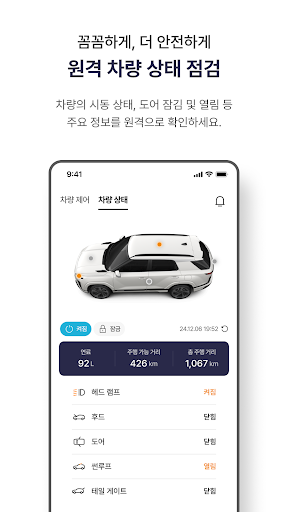
[Basic information] (1) App login To use the app, you must register at the bottom of the app's first screen or on the KGM LINK website (https://kgmlink.kg-mobility.com). When using it for the first time after logging in, you must go to the upper right menu of the app > Subscription vehicle information > Find service subscription vehicle > Mobile phone authentication > Vehicle registration to display KGM LINK subscription/opening vehicles. (2) Other logins The following login procedures are required to use the in-vehicle voice recognition home IoT service and music service (limited to customers who subscribe to the premium service). ⁃ Naver Clova login: Service information > Additional services > Naver Clova login ⁃ Music service login: Service information > Additional services > Music login ⁃ Home IoT login: Service information > Additional services > Smart home login (3) Select a vehicle to use the service If you own more than one KGM LINK vehicle under the same name, you can change the vehicle by pressing the vehicle number displayed on the first screen after logging in. [Features provided] 1. Vehicle remote control 1) Remote start/air conditioning service and remote air conditioning stop - Using your mobile phone, you can start the vehicle in advance and preheat the engine before boarding, and during remote starting, you can turn off the engine via your mobile phone. - You can operate the air conditioner or heater with remote start, and you can create a comfortable driving environment before boarding by removing moisture from the windshield and controlling the rear window heating. ※ Precautions (including notes and warnings): : Please be careful when using the vehicle as idling locations and idling times are regulated differently in each region according to local government ordinances. : The remote start and air conditioning control service will not start in the following cases: - Normal starting state (ignition switch ‘ACC’ and ‘ON’, engine idling and driving) - When the gear position is not P (Park) - If the vehicle door is not locked - When the vehicle door, hood, or tailgate is open - When a problem is detected with the vehicle power and steering system : In the following situations, remote start (including air conditioning) will automatically turn off for the user's safety. - If the smart key is not authenticated after opening the door (if the smart key is properly authenticated, it switches to normal ignition) - Detection of abnormal vehicle doors, hoods, and tailgate openings - Vehicle movement detected during remote start - During remote starting, if the driver's presence is detected inside the vehicle, such as pressing the brake pedal, pressing the ignition switch, changing gear position (leaving gear position P), etc. 2) Remote horn/hazard light control When you don't remember the exact location of your car in the parking lot, you can use your cell phone to check the location by honking the horn and flashing the emergency lights. This function operates for 30 seconds and can be stopped within 30 seconds through the automatic app. ※ Precautions (including notes and warnings) : Be sure to use the service while parked. : The service does not operate in normal ignition mode instead of remote ignition (smart key ignition or remote ignition switched to regular ignition) and while driving. 3) Remote door opening/locking - If you do not have a smart key, are unsure about the open/locked status of the vehicle door, or need to open the vehicle door for someone else from a remote location, you can unlock or lock the vehicle door using your mobile phone. ※ Precautions (including notes and warnings) : Be sure to use the service when the car is parked in a safe place where there is no threat of theft. : In the following cases, the remote door opening/locking service does not work. - Normal ignition, not remote ignition (smart key ignition and remote ignition switched to regular ignition) and driving - Burglar alarm in operation : The remote door lock service does not work when the door is not completely closed or the hood or tailgate is open. : When the smart door is set to auto close, after successful remote door opening (unlocking), the door can automatically return to the locked state within a certain time. : When a remote door open (unlock) command is given in the safety unlock setting, only the driver's door is unlocked. 2. Check vehicle status 1) Find parking location If you don't remember the exact location of your car in the parking lot, you can check the location of your car on the map on your phone. ※ Precautions (including notes and warnings) : To protect personal information, it can only be used if the distance between the mobile phone and the vehicle is less than 1km. : The location of the vehicle and your mobile phone are displayed together on the app map. Be sure to keep your phone's GPS (location information) function turned on. : The accuracy of the vehicle's parking location may vary depending on GPS information. In areas where GPS reception is shaded, such as indoor (underground) parking lots or high-rise building areas where it is difficult to receive GPS satellite signals, the displayed parking location may differ from the actual parking location. : Depending on the vehicle environment and wireless communication environment, checking the parking location may take more than 30 seconds. 2) Check the condition of my car You can check the open/closed/locked status of the vehicle door, sunroof/tailgate/hood open/closed, headlamp on/off, and engine start on/off status through the app. ※ Precautions (including notes and warnings) : Items available for status inquiry may vary depending on vehicle model and options, or may change without separate notice. If each status inquiry item is u
Installs since 8 Nov 2026 Measured
Exact Google Play install counts, collected daily
Daily history starts once this app is in our daily install sample.
Ratings
- 5 ★0.0%
- 4 ★0.0%
- 3 ★0.0%
- 2 ★0.0%
- 1 ★0.0%
Recent reviews
Latest public reviews from the store
- 27 Nov 2025
app must be in English. how do you cover European market with Korean language only? all European costumers need the English words... not Korean.
What reviewers bring up
Topics mentioned in the latest 6 reviews, by how many reviews mention them
Liked in good reviews (0 reviews)
No topic comes up twice.
Raised in bad reviews (5 reviews)
- english 5
Top chart positions
Latest Google Play chart ranks by country, last 10 days
Not in any tracked top chart in the last 10 days.
KGM LINK history
Release, install milestones, listing and store changes
- Reached 100,000+ installs 8 Dec 2025
- Reached 50,000+ installs 15 May 2025
- Reached 10,000+ installs 12 Apr 2025
- Reached 5,000+ installs 5 Apr 2025
- Reached 1,000+ installs 7 Mar 2025
- First released on the store 23 Dec 2024
Update frequency
How often KGM LINK ships a new version, month by month
6 updates in the last 12 months. More often than most similar apps: they shipped a median of 0 updates in the same year.
Recent versions
Current version Varies with device
- Version 3.0.3223 Apr 2026
- Version 3.0.318 Apr 2026
- Version 3.0.3023 Mar 2026
- Version 3.0.2916 Mar 2026
Listing keywords
Words and phrases KGM LINK repeats most in its store listing
Top phrases: mobile phone (6), vehicle door (6), notes and warnings (5), precautions including notes (5), including notes (5).
Highlighted words also appear in the title. Counts cover the title, short description and description.
Business model and tech
From the store listing and declared permissions
- Business model
- Free to download
- Sensitive access
- LocationCameraContactsPhone and callsPhotos, videos and filesNearby devicesAdvertising ID
35 permissions
1 special access, 13 sensitive, 21 standard
- Set exact alarmsSCHEDULE_EXACT_ALARMSpecial access
- Take photos and videosSensitive
- Read contactsSensitive
- Change or delete shared storageSensitive
- Read photos and videos the user picksREAD_MEDIA_VISUAL_USER_SELECTEDSensitive
- Read shared storageSensitive
- Approximate locationSensitive
- Precise locationSensitive
- Advertise to nearby Bluetooth devicesBLUETOOTH_ADVERTISESensitive
- Connect to paired Bluetooth devicesBLUETOOTH_CONNECTSensitive
- Find nearby Bluetooth devicesBLUETOOTH_SCANSensitive
- Show notificationsPOST_NOTIFICATIONSSensitive
Compliance
What the listing and the app package show
- Store status
- Live
- Upkeep
- Updated 23 Apr 2026
- Registered in
- South Korea
- Privacy policy
- Linked on the listing
- Advertising
- No ads declared
- In-app purchases
- None declared
- Age rating
- Everyone
- Sensitive permissions
- 13 sensitive, 1 special access of 35
- Location access
- Yes, while in use
- Camera and microphone
- Camera
Apps like KGM LINK
SuperTankSuperTank29.6K installs★ 2.7
Drive SafelyFRUCT team23.4K installs★ 4.8
SLICK - Car Key on your PhoneQuantum Inventions22.3K installs★ 2.0
ParkZone Go - ParkCareParkZone A/S - Vi skaber plads78.5K installs★ 1.3
MCEqual - Equalizer for AAOScorelogiclabs3.6K installs★ 4.04
TrackLocatePath Finder Tech7.1K installs★ 4.5
TRUCKS & DetailsWellhausen & Marquardt Medien5.5K installs★ 4.7
Progression Ignition Tuner v2Progression Ignition, LLC11.9K installs★ 4.68
License Plate LookupSearch Quarry18K installs★ 3.28
KGM LINK: questions and answers
How many downloads does KGM LINK have?
KGM LINK has 160,246 installs on Google Play, measured from the store's own count on 8 Nov 2026.
Who makes KGM LINK?
KGM LINK is published by KG MOBILITY, a developer based in KR.
When was KGM LINK last updated?
The latest version (Varies with device) was released on 23 Apr 2026.
Is KGM LINK free?
Yes. KGM LINK is free to download.
Is KGM LINK still available?
Yes. KGM LINK is live on Google Play as of 8 Nov 2026.
Track KGM LINK and its competitors
Watch any app for new versions, rating drops, chart moves and removals. Free plan, no card.