KinScreen: Screen Control
Turn your screen on with a wave! Set rules & gestures to turn screen on/off.
- Installs
- 1.60M
- Measured
- Rating
- 4.0
- Ratings
- 8.5K
- 803 reviews
- Version
- 6.1.2
- Updated 8 Nov 2023
- Released
- 18 Apr 2014
- Tracked since 13 May 2026
- Size
- 2 MB
- Needs 4.3
Screenshots
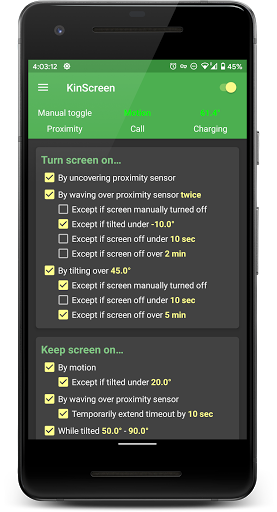
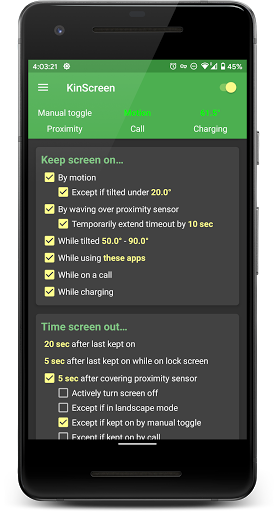
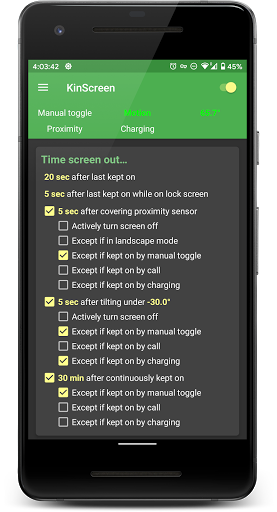
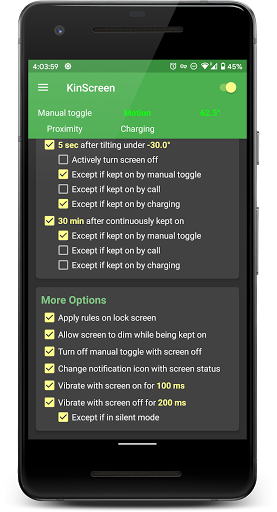
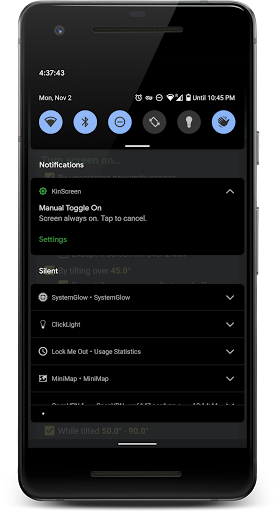
About KinScreen: Screen Control
The description on the store listing
<h4><b>Do you find yourself poking your screen to keep it from turning off? Want to turn your screen on without the power button? KinScreen automatically keeps your screen on while you're using your phone, but turns it off more quickly when you aren't to save battery power.</b>
Please check www.dontkillmyapp.com to make sure KinScreen is able to run in the background!</h4>
<b><u>Brief Overview</u></b>
• Turn screen on
- with a wave
- by tilting up
• Turn screen off
- by covering screen (pocket, face down)
- by tilting down
• Keep screen on
- while holding phone (motion or tilt)
- by waving over screen
- while using specific apps
- …
Read the full description
<h4><b>Do you find yourself poking your screen to keep it from turning off? Want to turn your screen on without the power button? KinScreen automatically keeps your screen on while you're using your phone, but turns it off more quickly when you aren't to save battery power.</b> Please check www.dontkillmyapp.com to make sure KinScreen is able to run in the background!</h4> <b><u>Brief Overview</u></b> • Turn screen on - with a wave - by tilting up • Turn screen off - by covering screen (pocket, face down) - by tilting down • Keep screen on - while holding phone (motion or tilt) - by waving over screen - while using specific apps - while on a call - while charging - manually via widget, QuickSettings, or notification toggle • Set a separate timeout for the lock screen • Set a maximum time to keep the screen on • Works in the dark unlike Samsung's Smart Stay • No ads Originally released in 2014, KinScreen is continually being improved based on user feedback and feature requests. <h4><b>Install now and forget about keeping your screen on! Once you understand its capabilities, you will immediately notice it missing on a new device!</b></h4> Customer service is a top priority at TEQTIC. If you experience an issue, <b>please use the "Contact support" menu option inside the app</b> or email [email protected] before leaving a negative review! We usually <b>reply to all emails within 48 hours</b>, and often much quicker. <b><u>Detailed Overview</u></b> <b>Turn screen on with gestures</b> Save the wear and tear on your power button by using gestures to turn the screen on. You can turn the screen on via the proximity sensor or by lifting the device up. Uncovering the proximity sensor lets you pull your phone out of your pocket and have the screen turn on automatically. Waving over the sensor works great when your hands are dirty! You may also set a tilt angle that turns the screen on when the phone is lifted up (tilt to wake). <b>Keep screen on automatically</b> Choose from various methods that detect use of the device and keep the display on. The motion method detects small movements from you just holding the device. Waving over the proximity sensor is another way to keep your screen on, and optionally extends the timeout. The tilt angle method allows the display to stay on when propped up, even when you aren't holding it. You can also choose to have the display stay on while using chosen apps, while charging, or while on a call (display still turns off when you put the phone to your ear). <b>Time screen out quickly to save battery</b> You can choose the screen timeout when there are no keep-on functions actively keeping the screen on. If the screen isn't being kept on, it should time out quickly to save battery power. The screen can turn off even quicker when the proximity sensor is covered (in-pocket or face down), or when the device is pointed down. You can also set a separate timeout for the lock screen. KinScreen will not turn the screen off when other apps are keeping the screen on, unless you have selected to actively turn the screen off. <b><u>Resource Use</u></b> KinScreen is designed to be as efficient and battery friendly as possible. It uses minimal CPU and memory, and sensor use is highly optimized. Some functions use more power than others. Turn-on-by-tilt-angle will use significant battery power because it needs to keep the device awake in order to work. <b><u>Premium Version</u></b> All functions are highly customizable to your taste. Fine-tuning of numerical parameters is locked in the free version. Please upgrade to premium to fully unlock all customization, and support future development! <b><u>Sensitive Permissions</u></b> The Accessibility Service permission is optional and only used to actively turn the screen off. Information provided by the Accessibility Service is not collected or shared in any way.
Installs since 20 Jul 2026 Measured
Exact Google Play install counts, collected daily
Ratings
8,472 ratings, 803 reviews
- 5 ★65%
- 4 ★8.4%
- 3 ★3.7%
- 2 ★2.8%
- 1 ★20%
Recent reviews
Latest public reviews from the store
- 27 Jul 2024
Prijs update?
- 23 Oct 2022
Good way to save some money. Please keep putting more products in the app.
- 12 Oct 2022
Awesome app that helps me make pricing comparisons for my groceries in a very easy way!!!!
Top chart positions
Latest Google Play chart ranks by country, last 10 days
Not in any tracked top chart in the last 10 days.
KinScreen: Screen Control history
Release, install milestones, listing and store changes
- Reached 1,000,000+ installs 28 Oct 2023
- Reached 500,000+ installs 28 Mar 2020
- Reached 100,000+ installs 20 Oct 2016
- First released on the store 18 Apr 2014
Update frequency
How often KinScreen: Screen Control ships a new version, month by month
0 updates in the last 12 months. Less often than most similar apps: they shipped a median of 3 updates in the same year.
Recent versions
Current version 6.1.2
- Version 6.1.27 Nov 2023
6.1.2 (2023.11.07) -Fixed notification not disappearing when one of the notification categories was disabled -Fixed no notification sound when toggling manual toggle -Please view the full changelog at www.teqtic.com/kinscreen-changelog or by going to Menu -> About KinScreen -> Changelog
- Version 6.1.130 Oct 2023
- Version 6.0.98 Mar 2022
- Version 6.0.821 Jul 2021
Listing keywords
Words and phrases KinScreen: Screen Control repeats most in its store listing
Top phrases: turn the screen (5), proximity sensor (4), screen off (4), turn screen (4), battery power (3).
Highlighted words also appear in the title. Counts cover the title, short description and description.
Business model and tech
From the store listing, the SDKs in the app package and its declared permissions
- Business model
- Free to downloadIn-app purchases
- Built with
- No cross-platform framework or game engine detected
- Ad networks (0)
- None detected
- Subscriptions and payments
- Google Play billing
- Sensitive access
- Phone and calls
0 ad, attribution and analytics SDKs detected. SDKs are read from the app package and permissions from the store listing, so code that loads later is not seen.
Technology
13 SDKs found in the app package
15 permissions
4 special access, 2 sensitive, 9 standard
- Change system settingsSpecial access
- See every installed appQUERY_ALL_PACKAGESSpecial access
- See which apps are usedPACKAGE_USAGE_STATSSpecial access
- Set exact alarmsSCHEDULE_EXACT_ALARMSpecial access
- Show notificationsPOST_NOTIFICATIONSSensitive
- Read phone status and identitySensitive
- Control vibrationStandard
- Foreground service (special use)FOREGROUND_SERVICE_SPECIAL_USEStandard
- Keep the phone awakeStandard
- Run a foreground serviceFOREGROUND_SERVICEStandard
- Start when the phone turns onStandard
- Full internet accessStandard
Compliance
What the listing and the app package show
- Store status
- Live
- Upkeep
- No update since 8 Nov 2023
- Registered in
- United States
- Privacy policy
- Linked on the listing
- Advertising
- No ads declared
- In-app purchases
- Offered
- Age rating
- Everyone
- Sensitive permissions
- 2 sensitive, 4 special access of 15
- Location access
- No
- Camera and microphone
- Neither
Apps like KinScreen: Screen Control
Galaxy 3G/4G Setting (ON/OFF)Naetmul2.1M installs★ 3.69
Chat Translator AI - LangLangBeyond Analytics Apps736K installs★ 4.27
Elixir 2Tamás Barta1.2M installs★ 4.15
Net Blocker - Firewall per appThe Simple Apps3.9M installs★ 3.81
Venabox Hub - Ani Planetwhite6657888K installs★ 4.52
Torrent Search EngineSoftwareIts425K installs★ 4.42
WASticker Love Rose Emoji GIFWAStickerApps moble studio app12M installs★ 4.21
FlashlightQuark Ltd2.5M installs★ 3.82
Video Volume Boosterfirisoft1.5M installs★ 2.94
KinScreen: Screen Control: questions and answers
How many downloads does KinScreen: Screen Control have?
KinScreen: Screen Control has 1,603,484 installs on Google Play, measured from the store's own count on 15 Nov 2026.
Who makes KinScreen: Screen Control?
KinScreen: Screen Control is published by TEQTIC Apps LLC, a developer based in US.
When was KinScreen: Screen Control last updated?
The latest version (6.1.2) was released on 8 Nov 2023.
Is KinScreen: Screen Control free?
Yes. KinScreen: Screen Control is free to download and offers in-app purchases.
Is KinScreen: Screen Control still available?
Yes. KinScreen: Screen Control is live on Google Play as of 15 Nov 2026.
Track KinScreen: Screen Control and its competitors
Watch any app for new versions, rating drops, chart moves and removals. Free plan, no card.