LCD Bitmap Converter
LCD Bitmap Converter tool converts from BMP to Code and Code to BMP
- Installs
- 3.53K
- Measured
- Rating
- —
- Ratings
- —
- Version
- Varies with device
- Updated 19 Sep 2025
- Released
- 2 May 2018
- Tracked since 13 May 2026
- Size
- 1 MB
- Needs 2.0
Also on App Store: LCD Bitmap Converter (1 ratings)
Screenshots



About LCD Bitmap Converter
The description on the store listing
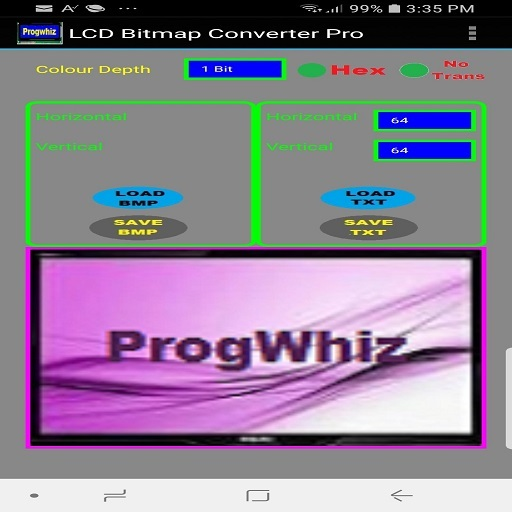
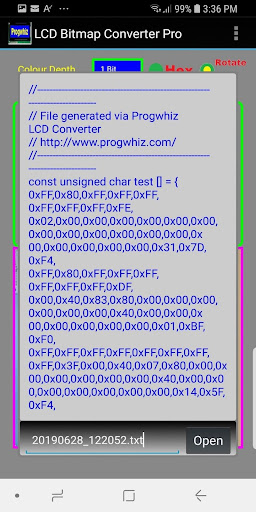
LCD Bitmap Converter tool allows developers to customise firmware display graphics. This is achieved by loading a 24bit image in BMP format and selecting the colour (1bit, 2bit or 4bit) and image dimensions (for eg: 96 x 96). The result is a text file representing the image bytes in textual hexidecimal format, this code is then included in a firmware source code or library for compilation. The resultant binary when uploaded will display the graphic at the desired time.
Feature Summary
1) Convert your .bmp/.gif/.jpg/.jpeg/ image file to embedded C/C++ code style array or string: {HEX: 0xFF,0xBA,0x12,0x08..} or {HEX: 0xFF,0xBA,0x12,0x8..}
2) Convert your embedded C/C++ code style …
Read the full description
LCD Bitmap Converter tool allows developers to customise firmware display graphics. This is achieved by loading a 24bit image in BMP format and selecting the colour (1bit, 2bit or 4bit) and image dimensions (for eg: 96 x 96). The result is a text file representing the image bytes in textual hexidecimal format, this code is then included in a firmware source code or library for compilation. The resultant binary when uploaded will display the graphic at the desired time. Feature Summary 1) Convert your .bmp/.gif/.jpg/.jpeg/ image file to embedded C/C++ code style array or string: {HEX: 0xFF,0xBA,0x12,0x08..} or {HEX: 0xFF,0xBA,0x12,0x8..} 2) Convert your embedded C/C++ code style array or string: {HEX:0xFF,0xBA,0x12,0x08..} or {HEX:0xFF,0xBA,0x12,0x8..} to .bmp/.gif/.jpg/.jpeg/ image file 3) Convert your embedded C/C++ code style Binary array or string: {BIN: B11011110, B10101011, ..} to .bmp/.gif/.jpg/.jpeg/ image file 4) Convert your .bmp/.gif/.jpg/.jpeg/ image file to embedded C/C++ code style array or string: {BIN: B11011110, B10101011, ..}
Installs since 13 Nov 2026 Measured
Exact Google Play install counts, collected daily
Daily history starts once this app is in our daily install sample.
Ratings
- 5 ★0.0%
- 4 ★0.0%
- 3 ★0.0%
- 2 ★0.0%
- 1 ★0.0%
Recent reviews
Latest public reviews from the store
- 24 Jan 2025
1mb. Cannot edit existing files, cannot save new files
- 19 Nov 2019
Iok
- 23 Mar 2019
good app, you can do better
- 4 Feb 2018
This thing is good, but I really dislike the UI. Not because of how it looks, but because it feels really clunky to me. Besides that, nice job!
What reviewers bring up
Topics mentioned in the latest 16 reviews, by how many reviews mention them
Liked in good reviews (6 reviews)
- edit 2
- job 2
Raised in bad reviews (10 reviews)
- files 2
- open 2
- demo 2
Top chart positions
Latest Google Play chart ranks by country, last 10 days
Not in any tracked top chart in the last 10 days.
LCD Bitmap Converter history
Release, install milestones, listing and store changes
- Reached 1,000+ installs 30 Mar 2020
- Reached 500+ installs 4 Jun 2019
- Reached 100+ installs 26 Sep 2018
- Reached 50+ installs 27 Jul 2018
- Reached 10+ installs 27 Jun 2018
- Reached 5+ installs 27 May 2018
- First released on the store 2 May 2018
Recent versions
Current version Varies with device
- Version 4119 Sep 2025
- Version 3910 Jul 2025
- Version 3619 Sep 2024
- Version 339 Jul 2024
Listing keywords
Words and phrases LCD Bitmap Converter repeats most in its store listing
Top phrases: 0xff 0xba 0x12 (4), array or string (4), bmp gif jpg (4), embedded code style (4), gif jpg jpeg (4).
Highlighted words also appear in the title. Counts cover the title, short description and description.
Business model and tech
From the store listing and declared permissions
- Business model
- Free to download
- Sensitive access
- Photos, videos and files
3 permissions
0 special access, 2 sensitive, 1 standard
- Change or delete shared storageSensitive
- Read shared storageSensitive
- Run a foreground serviceFOREGROUND_SERVICEStandard
Compliance
What the listing and the app package show
- Store status
- Live
- Upkeep
- Updated 19 Sep 2025
- Registered in
- Spain
- Privacy policy
- Linked on the listing
- Advertising
- No ads declared
- In-app purchases
- None declared
- Age rating
- Everyone
- Sensitive permissions
- 2 sensitive of 3
- Location access
- No
- Camera and microphone
- Neither
Apps like LCD Bitmap Converter
들어서 화면켜기Won3.5K installs★ 4.0
Height PredictionEcliptic App Ventures45.9K installs★ 2.4
Speicers`Pro VPNEldiablolucifer202021.2K installs★ 4.14
Lightning Tracker with AlertsYaksh Software4.3K installs★ 3.0
Mana Pathi (Unit Converter)Shirish Koirala2.2K installs★ 4.6
Multi-tab Calc - A simple app.Naoyuki Rikiji1.3K installs★ 5.0
Just Silence. Scheduled.Akid Soft1.6K installs★ 5.0
- WoWp AssistantВиталий Робиновский2K installs★ 4.2
LINKa: напишиLINKa7.9K installs★ 4.4
LCD Bitmap Converter: questions and answers
How many downloads does LCD Bitmap Converter have?
LCD Bitmap Converter has 3,530 installs on Google Play, measured from the store's own count on 13 Nov 2026.
Who makes LCD Bitmap Converter?
LCD Bitmap Converter is published by Progwhiz Solutions, a developer based in ES.
When was LCD Bitmap Converter last updated?
The latest version (Varies with device) was released on 19 Sep 2025.
Is LCD Bitmap Converter free?
Yes. LCD Bitmap Converter is free to download.
Is LCD Bitmap Converter still available?
Yes. LCD Bitmap Converter is live on Google Play as of 13 Nov 2026.
Track LCD Bitmap Converter and its competitors
Watch any app for new versions, rating drops, chart moves and removals. Free plan, no card.