
Let's split the bill!
Simple and easy-to-use calculator app for splitting the bill!
- Installs
- 85
- Measured
- Rating
- —
- Ratings
- —
- Version
- Varies with device
- Released
- 30 May 2023
- Tracked since 13 May 2026
- Size
- —
Screenshots



About Let's split the bill!
The description on the store listing
This app is a simple and easy-to-use calculator app for splitting the bill.
# What can this app do?
1. Calculate the split evenly among everyone's amounts
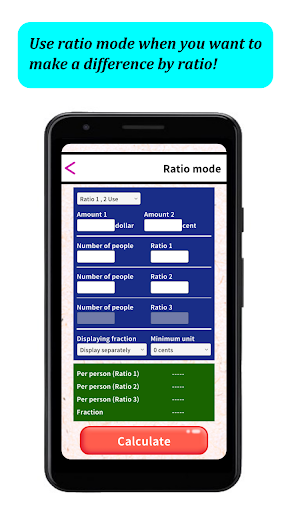
2. Calculate the split by specifying the ratio
3. Calculate the split by specifying the discount amount
# Screen Descriptions
[Title screen]
There are three buttons: "Mode Selection", "Use App" and "Currency selection.
Tap each button to move to [Mode selection screen], [How to use app screen] and [Currency selection screen].
# Mode selection screen
There are three buttons: "Equal mode", "Ratio mode" and "Discount mode".
Tap each button to move to [Equal mode screen], [Ratio mode screen] and [Discount mode screen].
# …
Read the full description
This app is a simple and easy-to-use calculator app for splitting the bill. # What can this app do? 1. Calculate the split evenly among everyone's amounts 2. Calculate the split by specifying the ratio 3. Calculate the split by specifying the discount amount # Screen Descriptions [Title screen] There are three buttons: "Mode Selection", "Use App" and "Currency selection. Tap each button to move to [Mode selection screen], [How to use app screen] and [Currency selection screen]. # Mode selection screen There are three buttons: "Equal mode", "Ratio mode" and "Discount mode". Tap each button to move to [Equal mode screen], [Ratio mode screen] and [Discount mode screen]. # Equal mode screen Enter the amount and number of people to calculate the amount per person. Use this mode when you want to split the same amount among all members. # Ratio mode screen Enter the amount, ratio, and number of people to calculate the amount per person for each ratio. Use this mode when you want to differentiate between groups by age, gender, etc. # Discount mode screen Enter the amount, the number of people in the group, the discount amount, and the number of people to whom the discount should be applied to calculate the amount per person. Use this mode when you want to specify and differentiate the discount amount between groups by age, gender, etc. In all modes, you can set how to display fraction and the minimum unit. # How to use the app screen This screen explains how to use the app. If you do not understand how to use the app, please refer to this screen. # Currency selection screen You can select the currency you wish to use. You can select "Dollar/Cent", "Euro/Cent", "Pound/Penny", and "Yen". You can also register a currency and an auxiliary currency. The auxiliary currency is 1/100 of the currency.
Installs since 3 Sep 2026 Measured
Exact Google Play install counts, collected daily
Ratings
- 5 ★0.0%
- 4 ★0.0%
- 3 ★0.0%
- 2 ★0.0%
- 1 ★0.0%
Recent reviews
Latest public reviews from the store
No reviews in our sample for this app yet.
Top chart positions
Latest Google Play chart ranks by country, last 10 days
Not in any tracked top chart in the last 10 days.
Let's split the bill! history
Release, install milestones, listing and store changes
- First released on the store 30 May 2023
Listing keywords
Words and phrases Let's split the bill! repeats most in its store listing
Top phrases: mode screen (6), number of people (4), selection screen (4), amount per person (3), calculate the amount (3).
Highlighted words also appear in the title. Counts cover the title, short description and description.
Business model and tech
From the store listing and declared permissions
- Business model
- Free to downloadShows ads
- Sensitive access
- Advertising ID
9 permissions
0 special access, 0 sensitive, 9 standard
- Ad attribution (Privacy Sandbox)ACCESS_ADSERVICES_ATTRIBUTIONStandard
- Ad topics (Privacy Sandbox)ACCESS_ADSERVICES_TOPICSStandard
- Read the advertising IDAD_IDStandard
- Read the advertising ID (Privacy Sandbox)ACCESS_ADSERVICES_AD_IDStandard
- Keep the phone awakeStandard
- Run a foreground serviceFOREGROUND_SERVICEStandard
- Full internet accessStandard
- See network connectionsStandard
- Google Play license checkStandard
Compliance
What the listing and the app package show
- Store status
- Live
- Privacy policy
- Linked on the listing
- Advertising
- Shows ads
- In-app purchases
- None declared
- Age rating
- Everyone
- Sensitive permissions
- 0 sensitive of 9
- Location access
- No
- Camera and microphone
- Neither
Apps like Let's split the bill!
들어서 화면켜기Won3.5K installs★ 4.0
Height PredictionEcliptic App Ventures45.9K installs★ 2.4
Speicers`Pro VPNEldiablolucifer202021.2K installs★ 4.14
Lightning Tracker with AlertsYaksh Software4.3K installs★ 3.0
Mana Pathi (Unit Converter)Shirish Koirala2.2K installs★ 4.6
Multi-tab Calc - A simple app.Naoyuki Rikiji1.3K installs★ 5.0
Photo Recovery PlusBillApps7.1K installs★ 4.53
Just Silence. Scheduled.Akid Soft1.6K installs★ 5.0
- WoWp AssistantВиталий Робиновский2K installs★ 4.2
Let's split the bill!: questions and answers
How many downloads does Let's split the bill! have?
Let's split the bill! has 85 installs on Google Play, measured from the store's own count on 12 Nov 2026.
Who makes Let's split the bill!?
Let's split the bill! is published by OneLightApplication.
Is Let's split the bill! free?
Yes. Let's split the bill! is free to download, and it shows ads.
Is Let's split the bill! still available?
Yes. Let's split the bill! is live on Google Play as of 12 Nov 2026.
Track Let's split the bill! and its competitors
Watch any app for new versions, rating drops, chart moves and removals. Free plan, no card.