Link to Windows
Access your phone's notifications, calls, apps, photos & texts on your PC
- Installs
- 3.35B
- Measured
- Rating
- 3.96
- Ratings
- 1.3M
- 62.4K reviews
- Version
- 1.26102.152.0
- Updated 10 Nov 2026
- Released
- 16 Dec 2015
- Tracked since 10 May 2026
- Size
- 42 MB
- Needs 4.4
Also on App Store: Link to Windows (13.2K ratings)
Screenshots




About Link to Windows
The description on the store listing
You love your phone. So does your PC. Get instant access to everything you love on your phone, right from your PC. To get started, install the Link to Windows app on your Android phone and connect it with the Phone Link on your Windows PC.
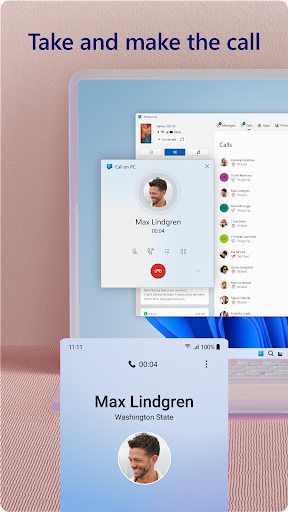
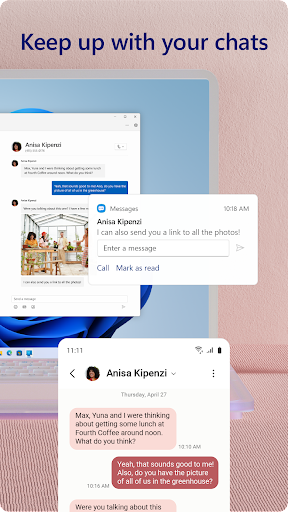
Link your Android phone and PC to view and reply to text messages, make and receive calls*, view your notifications, and more.
Make emailing yourself photos a thing of the past as you share your favorite images between your phone and PC. Copy, edit, and even drag and drop photos without ever touching your phone.
<b>Phone Link features:</b>
• Make and receive calls from your PC*
• Manage your Android phone's notifications on your PC
• Access …
Read the full description
You love your phone. So does your PC. Get instant access to everything you love on your phone, right from your PC. To get started, install the Link to Windows app on your Android phone and connect it with the Phone Link on your Windows PC. Link your Android phone and PC to view and reply to text messages, make and receive calls*, view your notifications, and more. Make emailing yourself photos a thing of the past as you share your favorite images between your phone and PC. Copy, edit, and even drag and drop photos without ever touching your phone. <b>Phone Link features:</b> • Make and receive calls from your PC* • Manage your Android phone's notifications on your PC • Access your favorite mobile apps** on your PC • Read and reply to text messages from your PC • Drag files between your PC and phone** • Copy and paste content between your PC and phone** • Instantly access the photos on your phone from your PC • Use your PC's bigger screen, keyboard, mouse, and touch screen to interact with your phone from your PC. <b>Integrated with select** Microsoft Duo, Samsung, and HONOR phones for an even better experience:</b> The Link to Windows app comes integrated so no additional apps need to be downloaded from the Play Store. Link to Windows is easy to find in the Quick Access tray (swipe down from the top of your screen to access it). Exclusive features like cross-device copy and paste, Phone screen, file drag-and-drop, and Apps. Let us know what features you'd like to see next by selecting “Send feedback” in the Phone Link settings. *Calls requires a Windows 10 PC with Bluetooth capability. **Drag and drop, Phone screen and Apps all require a compatible Microsoft Duo, Samsung or HONOR device (full list and breakdown of capabilities: aka.ms/phonelinkdevices). The multiple apps experience requires a Windows 10 PC running the May 2020 Update or later and has at least 8GB of RAM, and your Android device must be running Android 11.0. The Link to Windows accessibility service is for those using a screen reading tool on the PC. When the service is enabled, it lets you control all your phone’s apps from your PC using Android keyboard navigation while receiving spoken feedback from your PC speakers. No personal or sensitive data is collected via Accessibility Service. By installing this app, you agree to the Microsoft Terms of Use https://go.microsoft.com/fwlink/?LinkID=246338 and Privacy Statement https://go.microsoft.com/fwlink/?LinkID=248686.
Installs, last 30 days Measured
Exact Google Play install counts, collected daily
Ratings
1,335,481 ratings, 62,386 reviews
- 5 ★60%
- 4 ★6.7%
- 3 ★5.2%
- 2 ★4.4%
- 1 ★24%
Recent reviews
Latest public reviews from the store
- 18 May 2026
Decent :)
- 18 May 2026
So very useful. Awesome interconnect ability
- 18 May 2026
very uesfuly
- 18 May 2026
great, but needs more real time syncing to be fast.
What reviewers bring up
Topics mentioned in the latest 50 reviews, by how many reviews mention them
Liked in good reviews (25 reviews)
- link 3
- microsoft 2
- computer 2
- windows 2
- copying 2
- pasting 2
- easier 2
- laptop 2
Raised in bad reviews (19 reviews)
- sometimes 2
- getting 2
- despite 2
- having 2
- sucks 2
- won't 2
- send 2
Top chart positions
Latest Google Play chart ranks by country, last 10 days
- Countries ranked
- 11
- Best rank
- #38
- Top 10 placements
- 0
- of 11 chart placements
- Average rank
- #68.1
Best countries on Google Play
- 🇯🇵 Japan · Top free, Productivity#38
- 🇦🇺 Australia · Top free, Productivity#44
- 🇨🇦 Canada · Top free, Productivity#45
- 🇲🇽 Mexico · Top free, Productivity#45
- 🇬🇧 United Kingdom · Top free, Productivity#49
- 🇫🇷 France · Top free, Productivity#51
| Country | Chart | Category | Rank | Best (10 days) | Date |
|---|---|---|---|---|---|
| 🇯🇵 Japan | Top free | Productivity | #38 | #27 | 19 Nov 2026 |
| 🇦🇺 Australia | Top free | Productivity | #44 | #41 | 19 Nov 2026 |
| 🇨🇦 Canada | Top free | Productivity | #45 | #41 | 19 Nov 2026 |
| 🇲🇽 Mexico | Top free | Productivity | #45 | #45 | 19 Nov 2026 |
| 🇬🇧 United Kingdom | Top free | Productivity | #49 | #37 | 19 Nov 2026 |
| 🇫🇷 France | Top free | Productivity | #51 | #36 | 19 Nov 2026 |
| 🇺🇸 United States | Top free | Productivity | #63 | #51 | 19 Nov 2026 |
| 🇩🇪 Germany | Top free | Productivity | #69 | #54 | 19 Nov 2026 |
| 🇧🇷 Brazil | Top free | Productivity | #92 | #72 | 19 Nov 2026 |
| 🇮🇩 Indonesia | Top free | Productivity | #123 | #123 | 19 Nov 2026 |
Link to Windows history
Release, install milestones, listing and store changes
- First released on the store 16 Dec 2015
Update frequency
How often Link to Windows ships a new version, month by month
11 updates in the last 12 months. About as often as similar apps, which shipped a median of 11 updates in the same year.
Recent versions
Current version 1.26102.152.0
- Version 1.26101.106.026 Oct 2026
- Version 1.26071.104.05 Aug 2026
- Version 1.26071.102.030 Jul 2026
- Version 1.26062.131.020 Jul 2026
Listing keywords
Words and phrases Link to Windows repeats most in its store listing
Top phrases: link to windows (5), drag and drop (3), phone link (3), windows pc (3), between your pc (2).
Highlighted words also appear in the title. Counts cover the title, short description and description.
Business model and tech
From the store listing and declared permissions
- Business model
- Free to download
- Sensitive access
- No sensitive permission declared
Compliance
What the listing and the app package show
- Store status
- Live
- Upkeep
- Updated 10 Nov 2026
- Registered in
- United States
- Privacy policy
- Linked on the listing
- Advertising
- No ads declared
- In-app purchases
- None declared
- Age rating
- Everyone
Apps like Link to Windows
My Robi - Offers, Usage, MoreROBI AXIATA PLC.71.1M installs★ 4.66
Google AssistantGoogle LLC6.3B installs★ 3.75
Narrator's Voice - TTSEscolha Tecnologia34.7M installs★ 4.2
PDF Reader - PDF ViewerQR Code Scanner.437M installs★ 4.27
Alarm Clock Xtreme & TimerAVG Labs84M installs★ 4.49
ClevCalc - CalculatorCleveni Inc.194M installs★ 4.64
Chat AI: Ask Agent AnythingDeep Flow Apps47.7M installs★ 4.62
MEGAMega Ltd193M installs★ 4.62
My e&e& Egypt50.2M installs★ 3.53
Link to Windows: questions and answers
How many downloads does Link to Windows have?
Link to Windows has 3,349,654,856 installs on Google Play, measured from the store's own count on 19 Nov 2026.
Who makes Link to Windows?
Link to Windows is published by Microsoft Corporation, a developer based in US.
When was Link to Windows last updated?
The latest version (1.26102.152.0) was released on 10 Nov 2026.
Is Link to Windows free?
Yes. Link to Windows is free to download.
Is Link to Windows still available?
Yes. Link to Windows is live on Google Play as of 19 Nov 2026.
Track Link to Windows and its competitors
Watch any app for new versions, rating drops, chart moves and removals. Free plan, no card.