
Linux Cert. Exam Prep. - Lite
Linux Certification Exam Preparation - Lite Version
- Installs
- 1.50K
- Measured
- Rating
- —
- Ratings
- —
- Version
- Varies with device
- Updated 11 Jul 2025
- Released
- 16 Mar 2022
- Tracked since 12 May 2026
- Size
- —
Screenshots



About Linux Cert. Exam Prep. - Lite
The description on the store listing
<font color="#FF0000">
<b>Linux Cert Exam Prep. - LIte</b>
<b>Linux Certification Exam Preparation - Lite Version</b>
</font>
Linux Certification is required for anyone who's interested in having a carrier in System Administration and Linux Engineering. If you're preparing for Red Hat Certified Engineer (RHCE), Red Hat Certified System Administrator (RHCSA), Linux Foundation Certified Engineer (LFCE) or Linux Foundation Certified System Administrator (LFCS), this app is going to help you a lot preparing for your exams. This app covers complete material taught for Linux Certifications. The chapters included in the app are following.
<font color="#FF0000"><b>ENVIRONMENT</b></font> …
Read the full description
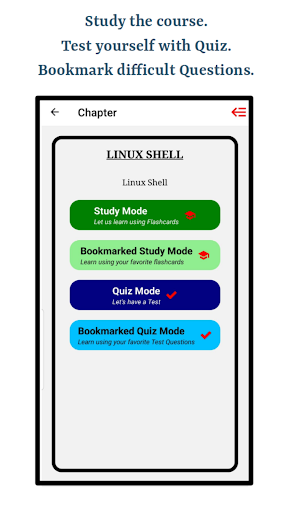
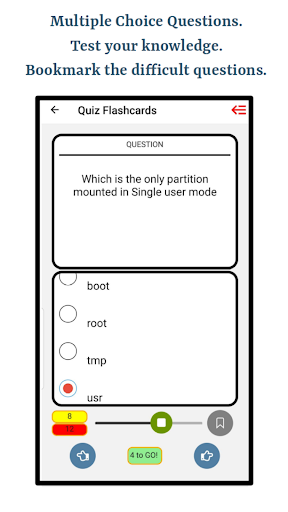
<font color="#FF0000"> <b>Linux Cert Exam Prep. - LIte</b> <b>Linux Certification Exam Preparation - Lite Version</b> </font> Linux Certification is required for anyone who's interested in having a carrier in System Administration and Linux Engineering. If you're preparing for Red Hat Certified Engineer (RHCE), Red Hat Certified System Administrator (RHCSA), Linux Foundation Certified Engineer (LFCE) or Linux Foundation Certified System Administrator (LFCS), this app is going to help you a lot preparing for your exams. This app covers complete material taught for Linux Certifications. The chapters included in the app are following. <font color="#FF0000"><b>ENVIRONMENT</b></font> 1. Linux Environment - Beginner 2. Linux Environment - Medium 3. Linux Environment - Advanced <font color="#FF0000"><b>COMMANDS</b></font> 4. Linux Commands - Beginner 5. Linux Commands - Medium 6. Linux Commands - Advanced 7. Linux Commands - Expert <font color="#FF0000"><b>FILE MANAGEMENT</b></font> 8. Linux File Management - Beginner 9. Linux File Management - Medium And Advanced <font color="#FF0000"><b>FILE TYPES</b></font> 10. Linux File Types <font color="#FF0000"><b>FILE PERMISSIONS</b></font> 11. Linux File Permissions - Beginner 12. Linux File Permissions - Medium And Advanced 13. Linux File System Overview <font color="#FF0000"><b>STARTUP AND SHUTDOWN</b></font> 14. Linux Startup & Shutdown <font color="#FF0000"><b>MANAGEMENT</b></font> 15. Linux Process Management 16. User Account Management <font color="#FF0000"><b>SHELL</b></font> 17. Linux Shell Programming 18. Linux Shell Environment - Beginner 19. Linux Shell Environment - Medium And Advanced 20. Linux Shell Redirection 21. Shell Special Symbols <font color="#FF0000"><b>SEARCH</b></font> 22. Linux Search Pattern <font color="#FF0000"><b>FUNCTIONS AND VARIABLES</b></font> 23. Linux Shell Functions 24. Linux Shell Variables <font color="#FF0000"><b>BASH</b></font> 25. Bash Arithmetic Expression ---------------------------------- This app uses the state of art methodology to prepare students for the exam. You start preparing using flashcards, where answers are provided on the back of the flashcards. Then you can bookmark flashcards which you feel difficult and think that you don't know the answer that well. You can access the bookmarked flashcards in a different section so that you don't have to go through the list of questions. You can test your knowledge using in-built quizzes. You can create your own quizzes by customizing it by bookmarking quiz questions. Once you submit the Quiz/Test you'll be provided with your result and you can take tests unlimited number of times. Other than telling your score, test results also show the list of problems with their answers which you answered wrong, that way you can perform better next time. This app is also equipped with creating your own course material and notes. Suppose your want to add some extra questions or if you are using another text book, this app will help you by creating custom flashcards. You are able to create custom chapters and flashcards with questions, answers and options. For custom flashcards, you are able to attach images to your flashcards. Following is the description how to attach images to your custom flashcards. ---------------------------------- <font color="#FF0000">LEARN HOW TO ATTACH IMAGES</font> You can attach up to 5 different images in a single custom flashcard using '[attach1]', '[attach2]', '[attach3]', '[attach4]' and '[attach5]' anywhere in question, answer or any of the wrong options. Once you write these keywords, upload attachment buttons will start enabling where you can upload an image from your phone. Uploading an attachment needs to be in sequence meaning you can't enable '[attach2]' before '[attach1]'. Example: Question: What is happening in the picture? [attach1]. ----------------------------------
Installs since 3 Sep 2026 Measured
Exact Google Play install counts, collected daily
Ratings
- 5 ★60%
- 4 ★0.0%
- 3 ★20%
- 2 ★0.0%
- 1 ★20%
Recent reviews
Latest public reviews from the store
No reviews in our sample for this app yet.
Top chart positions
Latest Google Play chart ranks by country, last 10 days
Not in any tracked top chart in the last 10 days.
Linux Cert. Exam Prep. - Lite history
Release, install milestones, listing and store changes
- Reached 1,000+ installs 11 Jul 2025
- Reached 500+ installs 13 Jun 2024
- Reached 100+ installs 1 Dec 2022
- Reached 50+ installs 2 Sep 2022
- Reached 10+ installs 4 Jun 2022
- Reached 5+ installs 5 May 2022
- First released on the store 16 Mar 2022
Recent versions
Current version Varies with device
- Version 3.227 Sep 2024
Default language - en-US Progress Indicators are added. Study Mode is added. Quiz Mode is added. Bookmarking is available. Ability to play the sound for text is available. Added All Bookmarks Tab in the Menu items. Bug Fix for Text To Speech issue. Fixed app name in About Us screen. Changed hamburger menu icon. Removed menu icon from all screens except Home.
- Version 1.318 Sep 2023
- Version 1.821 Apr 2022
Listing keywords
Words and phrases Linux Cert. Exam Prep. - Lite repeats most in its store listing
Top phrases: font color ff0000 (13), color ff0000 (13), font color (13), font linux (11), linux file (6).
Highlighted words also appear in the title. Counts cover the title, short description and description.
Business model and tech
From the store listing and declared permissions
- Business model
- Free to download
- Sensitive access
- No sensitive permission declared
Compliance
What the listing and the app package show
- Store status
- Live
- Upkeep
- Updated 11 Jul 2025
- Registered in
- United States
- Privacy policy
- Linked on the listing
- Advertising
- No ads declared
- In-app purchases
- None declared
- Age rating
- Everyone
Apps like Linux Cert. Exam Prep. - Lite
내공스터디 관리자IronTrain4.6K installs★ 4.9
수원대학교 수강신청수원대학교34.9K installs★ 3.1
تنزيلةTaha Ben Ashur13.6K installs★ 5.0
मध्यकालीन भारत का इतिहासSuren Tech Lab24K installs★ 3.4
365 Morning & Evening PrayersELEGANT X STUDIO™17.5K installs★ 3.71
Chitas GuideThe Saber Team3.7K installs★ 5.0
GradStar AppPlum systems33K installs★ 1.7
- Mars ViewTobias Thierer4K installs★ 3.67
Theo TabTheologetics2.5K installs★ 5.0
Linux Cert. Exam Prep. - Lite: questions and answers
How many downloads does Linux Cert. Exam Prep. - Lite have?
Linux Cert. Exam Prep. - Lite has 1,495 installs on Google Play, measured from the store's own count on 12 Nov 2026.
Who makes Linux Cert. Exam Prep. - Lite?
Linux Cert. Exam Prep. - Lite is published by Ghumman Tech, a developer based in US.
When was Linux Cert. Exam Prep. - Lite last updated?
The latest version (Varies with device) was released on 11 Jul 2025.
Is Linux Cert. Exam Prep. - Lite free?
Yes. Linux Cert. Exam Prep. - Lite is free to download.
Is Linux Cert. Exam Prep. - Lite still available?
Yes. Linux Cert. Exam Prep. - Lite is live on Google Play as of 12 Nov 2026.
Track Linux Cert. Exam Prep. - Lite and its competitors
Watch any app for new versions, rating drops, chart moves and removals. Free plan, no card.