どこでも印刷Lite
Is photographed in the smartphone camera, you must fill out a such as name and comment, I will print a voucher to mobile printer.
- Installs
- 120
- Measured
- Rating
- —
- Ratings
- —
- Version
- Varies with device
- Updated 7 Apr 2021
- Released
- 20 Feb 2015
- Tracked since 13 May 2026
- Size
- 2 MB
- Needs 2.3.3
Screenshots




About どこでも印刷Lite
The description on the store listing
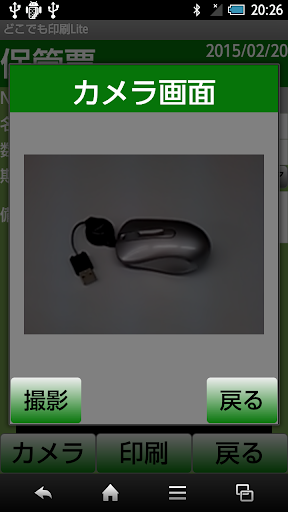
Is photographed in the smartphone camera, you must fill out a such as name and comment,
I will print a voucher to mobile printer.
For example, as a storage form,
Take what you will be housed in a box in the photo,
Such as Enter the name or comment, if put in a box by printing it,
So we know, things just by looking.
Also, Luggage vote and Lost vote as I can be applied to what you want to slip output.
It is assumed to be printed in the mobile printer MW-145BT Brother,
I have to adjust the slip size.
I can print directly on Bluetooth.
(You must be paired in advance.)
http://www.brother.co.jp/product/mwprinter/mw145bt/
If there is a smartphone and mobile printer,
Anywhere I …
Read the full description
Is photographed in the smartphone camera, you must fill out a such as name and comment, I will print a voucher to mobile printer. For example, as a storage form, Take what you will be housed in a box in the photo, Such as Enter the name or comment, if put in a box by printing it, So we know, things just by looking. Also, Luggage vote and Lost vote as I can be applied to what you want to slip output. It is assumed to be printed in the mobile printer MW-145BT Brother, I have to adjust the slip size. I can print directly on Bluetooth. (You must be paired in advance.) http://www.brother.co.jp/product/mwprinter/mw145bt/ If there is a smartphone and mobile printer, Anywhere I will be able to issue a voucher. How to use 1. I will take a picture. 2. title, I enter quantity, date, comments. Title only is required. 3. I will print or save. File called AnywherePrint.png is created in the SD card. A7 size is equivalent to image files. In the case of printing, you can print directly to create this file. 4. You can change the wording of the slip in the configuration screen. -Slip title character (initial value is "storage vote") - Item 1 of character (initial value is "No") · Item 2 of character (initial value is "name") - Item 3 of the letter (initial value is "Quantity") - Item 4 of the character (initial value is "deadline") -Item 5 of character (initial value is "Remarks") For example, you can change the slip title to "deposit slip", In addition, it is possible to change the character of item 4 in the "date of purchase". In addition, make the Internet access for ad display.
Installs since 28 Aug 2026 Measured
Exact Google Play install counts, collected daily
Ratings
- 5 ★0.0%
- 4 ★0.0%
- 3 ★0.0%
- 2 ★0.0%
- 1 ★0.0%
Recent reviews
Latest public reviews from the store
No reviews in our sample for this app yet.
Top chart positions
Latest Google Play chart ranks by country, last 10 days
Not in any tracked top chart in the last 10 days.
どこでも印刷Lite history
Release, install milestones, listing and store changes
- Reached 100+ installs 7 Apr 2021
- Reached 50+ installs 26 Aug 2017
- Reached 10+ installs 26 Oct 2016
- Reached 5+ installs 24 Sep 2016
- Reached 1+ installs 26 Jul 2016
- First released on the store 20 Feb 2015
Recent versions
Current version Varies with device
- Version 1.0.224 Sep 2016
Listing keywords
Words and phrases どこでも印刷Lite repeats most in its store listing
Top phrases: initial value (6), character initial value (5), character initial (5), mobile printer (4), item of character (3).
Highlighted words also appear in the title. Counts cover the title, short description and description.
Business model and tech
From the store listing and declared permissions
- Business model
- Free to downloadShows ads
- Sensitive access
- CameraPhotos, videos and filesNearby devices
7 permissions
0 special access, 3 sensitive, 4 standard
- Take photos and videosSensitive
- Change or delete shared storageSensitive
- Read shared storageSensitive
- Access Bluetooth settingsStandard
- Pair with Bluetooth devicesStandard
- Full internet accessStandard
- See network connectionsStandard
Compliance
What the listing and the app package show
- Store status
- Live
- Upkeep
- No update since 7 Apr 2021
- Privacy policy
- Linked on the listing
- Advertising
- Shows ads
- In-app purchases
- None declared
- Age rating
- Everyone
- Sensitive permissions
- 3 sensitive of 7
- Location access
- No
- Camera and microphone
- Camera
Apps like どこでも印刷Lite
영산강 안심 알림eICT융합소프트 & 스마트오더18.3K installs★ 4.0
JBLETRADOC Mobile10.3K installs★ 4.5
Two Point HeightOmega Centauri Software15.3K installs★ 2.22
Sheridan RecyclesCity of Sheridan634 installs★ 4.67
NAFNorges Automobil-Forbund200K installs★ 3.9
Ipsos Adria CAPIIpsos Serbia7.4K installs★ 3.9
Clock: Alarm Clock & TimerIntratech so36.1K installs★ 3.79
Süzme Sayaç HesaplamaNotsup30.3K installs★ 3.6
Cattle & Goat Record KeepingVetzKin10.3K installs★ 2.5
どこでも印刷Lite: questions and answers
How many downloads does どこでも印刷Lite have?
どこでも印刷Lite has 120 installs on Google Play, measured from the store's own count on 20 Nov 2026.
Who makes どこでも印刷Lite?
どこでも印刷Lite is published by office-une.
When was どこでも印刷Lite last updated?
The latest version (Varies with device) was released on 7 Apr 2021.
Is どこでも印刷Lite free?
Yes. どこでも印刷Lite is free to download, and it shows ads.
Is どこでも印刷Lite still available?
Yes. どこでも印刷Lite is live on Google Play as of 20 Nov 2026.
Track どこでも印刷Lite and its competitors
Watch any app for new versions, rating drops, chart moves and removals. Free plan, no card.