Lock Screen OS
Personalize Lock Screen with beautiful wallpapers, fonts, widgets
- Installs
- 11.55M
- Measured
- Rating
- 3.27
- Ratings
- 65.2K
- 374 reviews
- Version
- 4.0.10
- Updated 27 Jul 2026
- Released
- 16 Mar 2021
- Tracked since 11 May 2026
- Size
- 10 MB
- Needs 6.0
Screenshots



About Lock Screen OS
The description on the store listing
Lock Screen OS is a great replacement for system lock of Android.
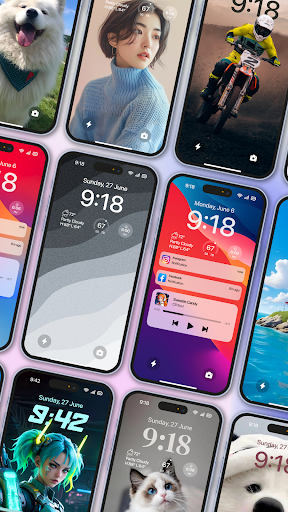
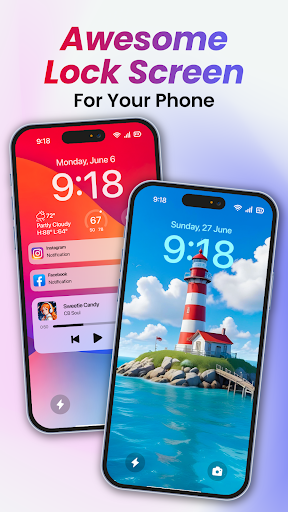
Lock Screen OS provides you with all-new ways to personalize your Lock Screen. Showcase favorite photos, customize font styles, and display a set of widgets to get information at a glance.
🔻 Reimagined Lock Screen OS
Change your phone into an OS with all-new ways to personalize your Lock Screen. Customize font styles, and display a set of widgets to get information at a glance.
🔻 Create multiple Lock Screens
You can now create different Lock Screens, each with a unique backdrop and style, and easily switch between them. Browse a gallery of wallpapers with suggested photos and themed collections for inspiration. …
Read the full description
Lock Screen OS is a great replacement for system lock of Android. Lock Screen OS provides you with all-new ways to personalize your Lock Screen. Showcase favorite photos, customize font styles, and display a set of widgets to get information at a glance. 🔻 Reimagined Lock Screen OS Change your phone into an OS with all-new ways to personalize your Lock Screen. Customize font styles, and display a set of widgets to get information at a glance. 🔻 Create multiple Lock Screens You can now create different Lock Screens, each with a unique backdrop and style, and easily switch between them. Browse a gallery of wallpapers with suggested photos and themed collections for inspiration. 🔻 Notifications View notifications on the Lock Screen in an expanded list view, stacked view, or hidden view. To make Lock Screen OS working most perfect. You must grant some special permissions like to: - CAMERA: Open camera in your phone when screen is locked. - READ_PHONE_STATE: Show phone call when screen is locked. - NOTIFICATION ACCESS: Show notification when screen is locked. - READ/WRITE_EXTERNAL_STORAGE: Support wallpaper set from your storage and our server save image. - DRAW OVER SCREEN: Show Lock Screen in over all application - ACCESSIBILITY PERMISSION: To enable Lock Screen OS, please allow Accessibility services. The service is only used to allow this app to draw on the phone's home screen and status bar. The application commits not to collect or share any user information about this accessibility right. Step setting in the first install can help Lock Screen OS applications work better. Step 1 : Grant all permission requirements. Step 2 : Setup pass code > click on Pass code option > create new or change pass code. Step 3 : Disable system notification > Click on Disable system lock option > Please note that , selected system lock is "None". Step 4 : If you need to hide content and show system notification > Please select Notification option and turn on switch if needed. You can quickly view with youtube video at : https://youtu.be/bpaan93yfCU Lock Screen OS is a perfect application and helps you have wonderful Android applications with beautiful interface. Disclaimers All product names, logos, brands, trademarks and registered trademarks, which are not owned by us, are property of their respective owners All company, product and service names used in this app are for identification purposes only. Use of these names, trademarks and brands does not imply endorsement. This app is owned by us. We are not affiliated, associated, authorized, endorsed by, or in any way officially connected with any 3rd party apps or companies. All of your opinion can be help us making more application and improving other in future, if you need help for using feature or have some suggestion, Please contact us via: [email protected] Ok, let's turn off and turn on the screen to enjoy it now!
Installs, last 30 days Measured
Exact Google Play install counts, collected daily
Ratings
65,178 ratings, 374 reviews
- 5 ★50%
- 4 ★8.1%
- 3 ★4.8%
- 2 ★5.7%
- 1 ★32%
Recent reviews
Latest public reviews from the store
No reviews in our sample for this app yet.
Top chart positions
Latest Google Play chart ranks by country, last 10 days
- Countries ranked
- 2
- Best rank
- #153
- Top 10 placements
- 0
- of 2 chart placements
- Average rank
- #175
Best countries on Google Play
- 🇧🇷 Brazil · Top free, Personalization#153
- 🇮🇩 Indonesia · Top free, Personalization#197
Lock Screen OS history
Release, install milestones, listing and store changes
- Reached 10,000,000+ installs 25 Mar 2026
- Reached 5,000,000+ installs 1 Aug 2024
- Reached 1,000,000+ installs 8 Dec 2022
- Reached 500,000+ installs 11 Nov 2021
- Reached 100,000+ installs 17 Jul 2021
- Reached 50,000+ installs 24 Jun 2021
- Reached 10,000+ installs 5 May 2021
- Reached 1,000+ installs 28 Mar 2021
Update frequency
How often Lock Screen OS ships a new version, month by month
4 updates in the last 12 months. More often than most similar apps: they shipped a median of 3 updates in the same year.
Recent versions
Current version 4.0.10
- Version 4.0.1027 Jul 2026
Lock Screen OS - New version 4.0.10 (85)
- Version 4.0.715 Jan 2026
Lock Screen OS - New Version 4.0.7 (81)
- Version 4.0.815 Jan 2026
Lock Screen OS - New version 4.0.8 (83)
- Version 4.0.620 Nov 2025
Listing keywords
Words and phrases Lock Screen OS repeats most in its store listing
Top phrases: lock screen (13), lock screen os (8), screen os (8), screen is locked (3), pass code (3).
Highlighted words also appear in the title. Counts cover the title, short description and description.
Business model and tech
From the store listing and declared permissions
- Business model
- Free to downloadIn-app purchasesShows ads
- Subscriptions and payments
- Google Play billing
- Sensitive access
- LocationCameraPhone and callsCalendarPhotos, videos and filesDraws over other appsAdvertising ID
34 permissions
2 special access, 9 sensitive, 23 standard
- Draw over other appsSpecial access
- See every installed appQUERY_ALL_PACKAGESSpecial access
- Read calendar eventsSensitive
- Take photos and videosSensitive
- Read photosREAD_MEDIA_IMAGESSensitive
- Read photos and videos the user picksREAD_MEDIA_VISUAL_USER_SELECTEDSensitive
- Read shared storageSensitive
- Approximate locationSensitive
- Precise locationSensitive
- Show notificationsPOST_NOTIFICATIONSSensitive
- Read phone status and identitySensitive
- Ad attribution (Privacy Sandbox)ACCESS_ADSERVICES_ATTRIBUTIONStandard
Compliance
What the listing and the app package show
- Store status
- Live
- Upkeep
- Updated 27 Jul 2026
- Registered in
- Vietnam
- Privacy policy
- Linked on the listing
- Advertising
- Shows ads
- In-app purchases
- Offered
- Age rating
- Everyone
- Sensitive permissions
- 9 sensitive, 2 special access of 34
- Location access
- Yes, while in use
- Camera and microphone
- Camera
Apps like Lock Screen OS
Rose Gold ThemeFunny Design Keyboard Themes12.4M installs★ 4.66
iPhone KeyboardKeyboard i8.2M installs★ 4.42
My Name Ringtone MakerMOBIHOME16.7M installs★ 4.61
I love you live wallpaperHOF live wallpapers19.6M installs★ 4.41
Love Launcher: lovely launcherNext edu12M installs★ 4.57
Hide Apps - Secret CalculatorZipoApps11.4M installs★ 4.04
Rose Heart Lock Screen ZipperPremium Lock Screen Apps6.6M installs★ 4.5
Cool text and symbolsDricodes23M installs★ 4.38
Dialer Vault Hide Photo VideoPhoto Video Vault Security5.2M installs★ 4.51
Lock Screen OS: questions and answers
How many downloads does Lock Screen OS have?
Lock Screen OS has 11,547,152 installs on Google Play, measured from the store's own count on 19 Nov 2026.
Who makes Lock Screen OS?
Lock Screen OS is published by Apps Genz, a developer based in VN.
When was Lock Screen OS last updated?
The latest version (4.0.10) was released on 27 Jul 2026.
Is Lock Screen OS free?
Yes. Lock Screen OS is free to download and offers in-app purchases, and it shows ads.
Is Lock Screen OS still available?
Yes. Lock Screen OS is live on Google Play as of 19 Nov 2026.
Track Lock Screen OS and its competitors
Watch any app for new versions, rating drops, chart moves and removals. Free plan, no card.