
LockScreen Schedule - Calendar
Manage schedules with calendars and lists. Use folders, alerts, daily reminders.
- Installs
- 1.23M
- Measured
- Rating
- 4.19
- Ratings
- 2.5K
- 168 reviews
- Version
- 2.2.8.1
- Updated 30 Sep 2026
- Released
- 30 Jul 2020
- Tracked since 13 May 2026
- Size
- 42 MB
- Needs 4.4
Screenshots


About LockScreen Schedule - Calendar
The description on the store listing
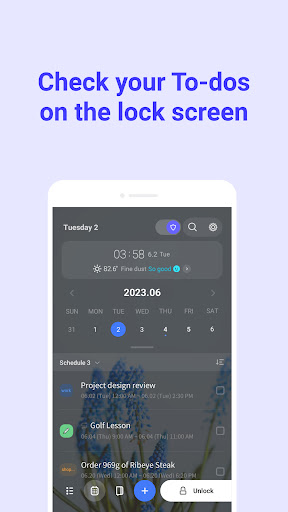
LockScreen Calendar is an ultimate to-do list app designed to help you manage your tasks effectively.
Create daily to-dos and tasks, and organize your schedule into folders for better categorization.
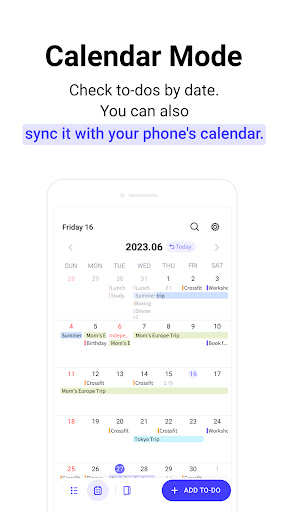
You can sync it with Google calendar, and view your to-dos and schedules in the form of calendars and lists.
Use the newest diary feature to jot down your thoughts, emotions, and memorable events, and reflect on your day.
<strong><font color="#be671a">✔</font> To-do management</strong>
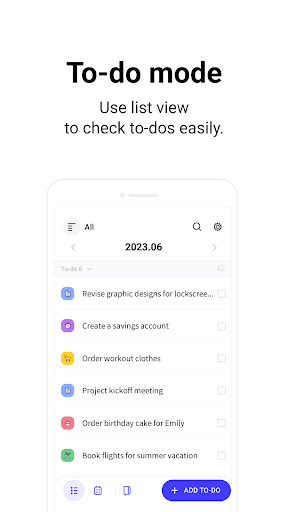
- Manage your to-dos in the form of simple memos
- Press and hold a to-do to edit (copy, share, delete) multiple tasks at once.
- Check off completed to-dos with a simple touch.
<strong><font …
Read the full description
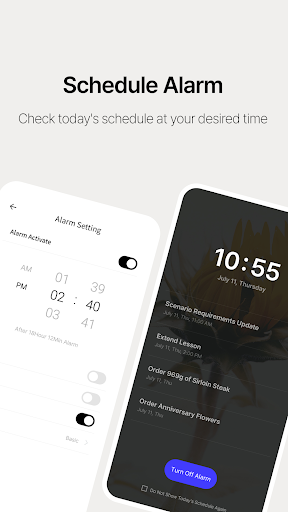
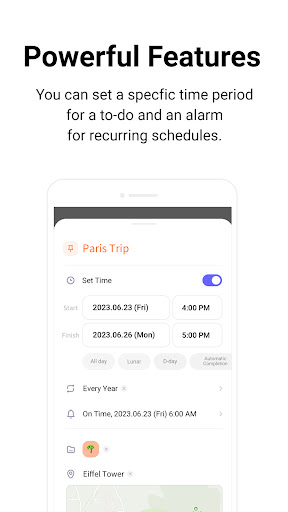
LockScreen Calendar is an ultimate to-do list app designed to help you manage your tasks effectively. Create daily to-dos and tasks, and organize your schedule into folders for better categorization. You can sync it with Google calendar, and view your to-dos and schedules in the form of calendars and lists. Use the newest diary feature to jot down your thoughts, emotions, and memorable events, and reflect on your day. <strong><font color="#be671a">✔</font> To-do management</strong> - Manage your to-dos in the form of simple memos - Press and hold a to-do to edit (copy, share, delete) multiple tasks at once. - Check off completed to-dos with a simple touch. <strong><font color="#be671a">✔</font> Schedule management</strong> -Set a specific date and time for a to-do and manage its schedule. -You can set an alarm for a desired time, and manage recurring schedules. <strong><font color="#be671a">✔</font> Folder management</strong> - Classify and manage complex to-dos and schedules by organizing them into folders. - You can edit default folders and add new customized folders. <strong><font color="#be671a">✔</font> List mode</strong> - Manage your to-dos and schedules in list view. <strong><font color="#be671a">✔</font> Calendar mode</strong> - Displays an overall view of daily/weekly/monthly schedules so that you can easily navigate through your tasks. - Calendar can be connected with another calendar account of your choice. - Calendar can be expanded to full screen for easier management. <strong><font color="#be671a">✔</font> Alarm feature</strong> - Set an alarm to receive reminders about important schedules. <strong><font color="#be671a">✔</font> Today's schedule alarm</strong> - Notify you of today's all schedule at once through an alarm. <strong><font color="#be671a">✔</font> Clipboard</strong> - Easily edit tasks and schedules by copying them to your clipboard. <strong><font color="#be671a">✔</font> Add participants</strong> - You can add participants from your contact list to a scheduled event. - Share the event link with participants via text message. <strong><font color="#be671a">✔</font> Add locations</strong> - You can add a location to a scheduled event. - You can share the location link of the scheduled event with participants. - Weather information for the chosen location will appear. <strong><font color="#be671a">✔</font> Diary feature</strong> - Write down any ideas, thoughts and emotions in the diary section. - Add emotion stickers to the calendar to keep track of your emotions. - Lock your diary with a passcode for privacy. <strong><font color="#be671a">✔</font> Other features</strong> - You can change the background and font size in settings. Purpose of app permission to obtain consent prior to installation - READ_PHONE_STATE: Permission to stop the app from running to avoid interrupting phone calls.(optional) - ACCESS_FINE_LOCATION: Permission to request your current location to use the weather service.(optional) - SYSTEM_ALERT_WINDOW: Permission to display tasks on the lock screen.(required) - POST_NOTIFICATION: Permission to receive alarms related to app services.(optional) - READ_CONTACTS : Permission in order to share your schedule with others.(optional) - READ_CALENDAR: Permission to synchronize tasks with external calendars (optional) * Notice: The only purpose of this app is to manage to-dos and schedules on the lock screen. * LockScreen Todo provides weather based on your location for your convenience. <strong><font color="#be671a">✔</font>Customer Service</strong> E-Mail: [email protected] Phone Number: 070-4336-1593
Installs, last 30 days Measured
Exact Google Play install counts, collected daily
Ratings
2,505 ratings, 168 reviews
- 5 ★60%
- 4 ★16%
- 3 ★11%
- 2 ★4.8%
- 1 ★7.8%
Recent reviews
Latest public reviews from the store
No reviews in our sample for this app yet.
Top chart positions
Latest Google Play chart ranks by country, last 10 days
Not in any tracked top chart in the last 10 days.
LockScreen Schedule - Calendar history
Release, install milestones, listing and store changes
- Reached 1,000,000+ installs 5 Jun 2025
- First released on the store 30 Jul 2020
Update frequency
How often LockScreen Schedule - Calendar ships a new version, month by month
16 updates in the last 12 months. More often than most similar apps: they shipped a median of 3 updates in the same year.
Recent versions
Current version 2.2.8.1
- Version 2.2.8.130 Sep 2026
- Stability improvements
- Version 2.2.427 Aug 2026
- Stability improvements
- Version 2.2.324 Aug 2026
- Fixed an issue where events would not be saved - Stability improvements
- Version 2.2.2.211 Aug 2026
- Stability improvements
Listing keywords
Words and phrases LockScreen Schedule - Calendar repeats most in its store listing
Top phrases: color be671a font (13), font color be671a (13), strong font color (13), be671a font (13), color be671a (13).
Highlighted words also appear in the title. Counts cover the title, short description and description.
Business model and tech
From the store listing, the SDKs in the app package and its declared permissions
- Business model
- Free to downloadIn-app purchasesShows ads
- Built with
- No cross-platform framework or game engine detected
- Ad networks (10)
- AdColonyAdLibAdMobAmazon Mobile AdsFacebook Audience NetworkInMobiMoPubOpenXPubNativeUnity Ads
- Subscriptions and payments
- Google Play billing
- Attribution and measurement
- Open Measurement
- Analytics and crash reports
- FirebaseGoogle AnalyticsSentry
- Sign-in and social
- Kakao
- Sensitive access
- LocationContactsPhone and callsCalendarDraws over other appsAdvertising ID
12 ad, attribution and analytics SDKs detected. SDKs are read from the app package and permissions from the store listing, so code that loads later is not seen.
Technology
39 SDKs found in the app package
Ad networks
Advertising and install-attribution SDKs found in the app package
- AdColony
- AdLib
- AdMob
- Amazon Mobile Ads
- Facebook Audience Network
- InMobi
- MoPub
- Open Measurement
- OpenX
- PubNative
- Unity Ads
38 permissions
3 special access, 7 sensitive, 28 standard
- Draw over other appsSpecial access
- Set exact alarmsSCHEDULE_EXACT_ALARMSpecial access
- Show full-screen alertsUSE_FULL_SCREEN_INTENTSpecial access
- Read calendar eventsSensitive
- Read contactsSensitive
- Approximate locationSensitive
- Precise locationSensitive
- Show notificationsPOST_NOTIFICATIONSSensitive
- Read phone numbersREAD_PHONE_NUMBERSSensitive
- Read phone status and identityREAD_PHONE_STATESensitive
- Ad attribution (Privacy Sandbox)ACCESS_ADSERVICES_ATTRIBUTIONStandard
- Ad topics (Privacy Sandbox)ACCESS_ADSERVICES_TOPICSStandard
Compliance
What the listing and the app package show
- Store status
- Live
- Upkeep
- Updated 30 Sep 2026
- Registered in
- South Korea
- Privacy policy
- Linked on the listing
- Advertising
- Shows ads
- In-app purchases
- Offered
- Age rating
- Everyone
- Sensitive permissions
- 7 sensitive, 3 special access of 38
- Location access
- Yes, while in use
- Camera and microphone
- Neither
Apps like LockScreen Schedule - Calendar
همیاب24 | ردیابی گوشی سرقتیشرکت ساینا پردازش گسترش شرق646K installs★ 4.49
Bangla Calendar চিরস্থায়ী হি:tech4stead165K installs★ 4.91
Denver Trash and RecyclingCity and County of Denver45.5K installs★ 4.38
BookScouter - sell & buy booksBOOKSCOUTER LLC732K installs★ 4.66
Screen Mirroring for Smart TVSONTUNG.APP2.4M installs★ 2.83
Photo Recover Pro-Recover Fileyaohuo441K installs★ 4.22
Capy NotesPintordenubes81.9K installs★ 4.8
2026 Calendar Business PlannerBharat Calendars685K installs★ 4.7
Customer App - Zoho AssistZoho Corporation745K installs★ 4.77
LockScreen Schedule - Calendar: questions and answers
How many downloads does LockScreen Schedule - Calendar have?
LockScreen Schedule - Calendar has 1,226,812 installs on Google Play, measured from the store's own count on 20 Nov 2026.
Who makes LockScreen Schedule - Calendar?
LockScreen Schedule - Calendar is published by Wafour Lock2, a developer based in KR.
When was LockScreen Schedule - Calendar last updated?
The latest version (2.2.8.1) was released on 30 Sep 2026.
Is LockScreen Schedule - Calendar free?
Yes. LockScreen Schedule - Calendar is free to download and offers in-app purchases, and it shows ads.
Is LockScreen Schedule - Calendar still available?
Yes. LockScreen Schedule - Calendar is live on Google Play as of 20 Nov 2026.
Track LockScreen Schedule - Calendar and its competitors
Watch any app for new versions, rating drops, chart moves and removals. Free plan, no card.