
LxMeter
Your smartphone becomes a professional light meter!
- Installs
- 30.62K
- Measured
- Rating
- 3.75
- Ratings
- 81
- 5 reviews
- Version
- 6.0
- Updated 14 May 2026
- Released
- 2 Oct 2014
- Tracked since 13 May 2026
- Size
- 3 MB
- Needs 2.3
Screenshots
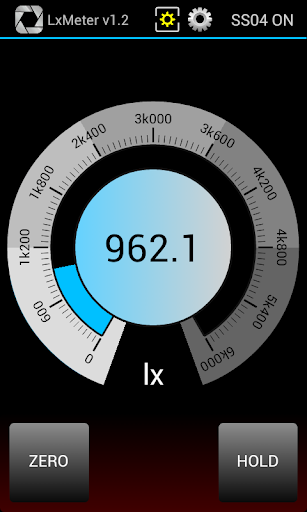
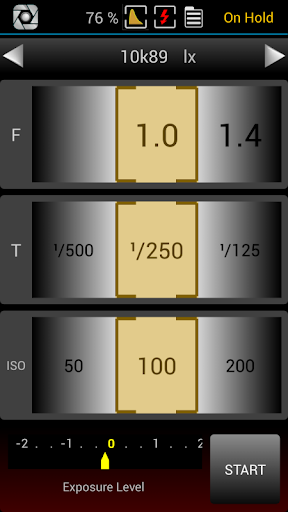


About LxMeter
The description on the store listing
Note: this is the trial version of <b>LxMeter Pro</b> (https://play.google.com/store/apps/details?id=com.optivelox.lxmeter2), some functions might be limited. For more details about LxMeter Pro please contact <a href="mailto:[email protected]">[email protected]</a>
This application turns your phone into a powerful instrument with the following functions:
★ LUX METER
★ EXPOSURE METER
★ FLASH METER
★ SPOT METER
★ COLOR METER
★ FLICKER METER
As a luxmeter you can measure illuminance (density of luminous flux incident on a surface) from 0.1 to 3000000 lx. By using the app in "exposure meter" mode you get an easy to use incident/reflected light meter and you can determine the …
Read the full description
Note: this is the trial version of <b>LxMeter Pro</b> (https://play.google.com/store/apps/details?id=com.optivelox.lxmeter2), some functions might be limited. For more details about LxMeter Pro please contact <a href="mailto:[email protected]">[email protected]</a> This application turns your phone into a powerful instrument with the following functions: ★ LUX METER ★ EXPOSURE METER ★ FLASH METER ★ SPOT METER ★ COLOR METER ★ FLICKER METER As a luxmeter you can measure illuminance (density of luminous flux incident on a surface) from 0.1 to 3000000 lx. By using the app in "exposure meter" mode you get an easy to use incident/reflected light meter and you can determine the proper exposure for a photograph. LxMeter supports measurements of flash lights and can display the percentage of flash in total exposure. LxMeter can also deal with landscapes or other distant objects by running its spot meter mode; you can measure luminance (cd/m2 or foot-lambert) and correlated color temperature (CCT). A powerful analysis tools has been added to LxMeter in order to evaluate flicker performance of a light source according to IEEE 1789. You can detect harmonics up to 30kHz, display the frequency spectrum and get all the parameters commonly found in professional flicker-meters. You can specify ISO speed and exposure time and let the app show in real time the optimal aperture value or set the aperture and read the exposure time. You can easily switch between shutter speed priority and aperture priority or just run the manual mode and take note of the exposure level indicator. LxMeter allows you to add some notes to your personal archive. Exposure and location information will be added automatically. You can save all the notes about a photographic project in the internal archive and use them as reference later at the time of the final shots. <b>Please, note that for maximum performance this app requires an external sensor of the SS04 product line.</b> As alternative you can use the internal light sensor of your phone (if it has one) but in this case the accuracy of measurements will vary depending on the phone. More details about SS04 are available at http://optivelox.50webs.com/DL_en/ss0x.htm <b>Main specs: </b> ★ Illuminance measurements (lux, foot-candle, EV @ISO=100) ★ Peak detector (only with SS04/SS04U) ★ Flash Meter (only with SS04/SS04U) ★ Flash shape capture (only with SS04U) ★ Luminous exposure graph (only with SS04U) ★ Flicker measurements: Flicker Index, Percent Flicker, NM, SVM (only with SS04U) ★ CIE chromaticity diagram with color temperature measurements (only with SS04UC/SS04B) ★ Color specification tester according to SAE J578 ★ Radio Triggered flash mode (via Bluetooth) ★ Spot metering (0.5°÷50° typ) ★ Luminance measurements (cd/m2, foot-lambert) ★ Color temperature measurements (CCT, Duv) ★ Exposure Level Indicator ★ F-stop, shutter speed, ISO speed resolution: 1, 1/2, 1/3 stop ★ Cine/video exposure (frame rate, shutter angle) ★ ND filter compensation ★ Autorange (only with SS04) ★ Light input selector (SS04, SS04U, SS04B, built-in light sensor, manual input value) ★ Archive management ★ Comments with location tag and maps support ★ User manual included ★ Supported languages: en,de,es,fr,it,ru
Installs since 29 Aug 2026 Measured
Exact Google Play install counts, collected daily
Ratings
81 ratings, 5 reviews
- 5 ★50%
- 4 ★25%
- 3 ★0.0%
- 2 ★0.0%
- 1 ★25%
Recent reviews
Latest public reviews from the store
- 20 May 2023
Tank you programmer
- 16 Dec 2020
Slow and unusable interface on Samsung A7.
- 15 Mar 2019
great app
- 8 Oct 2018
Works great very useful tool to have in your phone
What reviewers bring up
Topics mentioned in the latest 13 reviews, by how many reviews mention them
Liked in good reviews (10 reviews)
- sensor 2
- meter 2
- tool 2
Raised in bad reviews (2 reviews)
No topic comes up twice.
Top chart positions
Latest Google Play chart ranks by country, last 10 days
Not in any tracked top chart in the last 10 days.
LxMeter history
Release, install milestones, listing and store changes
- Reached 10,000+ installs 7 Mar 2017
- Reached 5,000+ installs 1 Feb 2016
- Reached 1,000+ installs 24 Mar 2015
- Reached 500+ installs 19 Jan 2015
- Reached 100+ installs 22 Oct 2014
- Reached 50+ installs 14 Oct 2014
- Reached 10+ installs 8 Oct 2014
- First released on the store 2 Oct 2014
Update frequency
How often LxMeter ships a new version, month by month
1 updates in the last 12 months. Less often than most similar apps: they shipped a median of 2 updates in the same year.
Recent versions
Current version 6.0
- Version 6.014 May 2026
- Updated to Android 15
- Version 5.014 Aug 2024
- Updated to Android 14
- Version 4.017 May 2023
- Version 3.16 Jun 2020
Listing keywords
Words and phrases LxMeter repeats most in its store listing
Top phrases: color temperature (3), ss04 ss04u (3), color temperature measurements (2), exposure level indicator (2), ss04 ss04u flash (2).
Highlighted words also appear in the title. Counts cover the title, short description and description.
Business model and tech
From the store listing, the SDKs in the app package and its declared permissions
- Business model
- Free to downloadShows ads
- Built with
- No cross-platform framework or game engine detected
- Ad networks (1)
- AdMob
- Analytics and crash reports
- Firebase
- Sensitive access
- LocationCameraMicrophoneNearby devicesAdvertising ID
2 ad, attribution and analytics SDKs detected. SDKs are read from the app package and permissions from the store listing, so code that loads later is not seen.
Technology
8 SDKs found in the app package
Ad network libraries
Ad networks
Advertising and install-attribution SDKs found in the app package
- AdMob
19 permissions
0 special access, 7 sensitive, 12 standard
- Record audioSensitive
- Take photos and videosSensitive
- Approximate locationSensitive
- Precise locationSensitive
- Advertise to nearby Bluetooth devicesBLUETOOTH_ADVERTISESensitive
- Connect to paired Bluetooth devicesBLUETOOTH_CONNECTSensitive
- Find nearby Bluetooth devicesBLUETOOTH_SCANSensitive
- Read the advertising IDAD_IDStandard
- Control vibrationStandard
- Keep the phone awakeStandard
- Run a foreground serviceFOREGROUND_SERVICEStandard
- Set the wallpaperStandard
Compliance
What the listing and the app package show
- Store status
- Live
- Upkeep
- Updated 14 May 2026
- Privacy policy
- Linked on the listing
- Advertising
- Shows ads
- In-app purchases
- None declared
- Age rating
- Everyone
- Sensitive permissions
- 7 sensitive of 19
- Location access
- Yes, while in use
- Camera and microphone
- Both
Apps like LxMeter
aDataConMonamazing-create13.6K installs★ 4.3
Universal TV Remote for All TVAlphard Solutions56K installs★ 3.17
Auto Scroll TTAbyssiniatech64.2K installs★ 2.67
Whistle SoundsInfinite_Apps64.4K installs★ 3.5
QR Barcode : Scanner & CreateScan Team320K installs★ 3.38
Calendario de Puerto Rico 2025FamilyAppsPro15.2K installs★ 4.57
Motion Detector: Security CamFabioDeveloper8.1K installs★ 4.1
Watt VA Amp Volt CalculationsElectroMission Co.53.2K installs★ 1.0
Zip Extractor–Unzip UnRARMS Apps Lab30.1K installs★ 3.5
LxMeter: questions and answers
How many downloads does LxMeter have?
LxMeter has 30,623 installs on Google Play, measured from the store's own count on 14 Nov 2026.
Who makes LxMeter?
LxMeter is published by Optivelox.
When was LxMeter last updated?
The latest version (6.0) was released on 14 May 2026.
Is LxMeter free?
Yes. LxMeter is free to download, and it shows ads.
Is LxMeter still available?
Yes. LxMeter is live on Google Play as of 14 Nov 2026.
Track LxMeter and its competitors
Watch any app for new versions, rating drops, chart moves and removals. Free plan, no card.