
아이나비M 택시호출앱 기사용
Navigation for drivers with local brand calls
- Installs
- 17.19K
- Measured
- Rating
- —
- Ratings
- —
- Version
- Varies with device
- Updated 10 Mar 2026
- Released
- 17 Jun 2025
- Tracked since 13 May 2026
- Size
- —
Screenshots


About 아이나비M 택시호출앱 기사용
The description on the store listing
Map and navigation are iNavi!
iNavi Mobility provides a taxi calling service with local brand call drivers.
Suncheon Beauty Call/Gyeongju Brand Call/Hanam Brand Call/Hongseong Naepo Call/Seongnam Call/Yeoju Integrated Call/Sangju Sambaek Call/Cheonan Call
[main function]
§Open the ride navigation app on the road
To eliminate the inconvenience of having to find and open a navigation app every time you pick up a customer on the road.
You can immediately launch a frequently used navigation app by pressing the ‘Open navigation app’ button.
§Receiving passenger phone calls and app calls
If a passenger phone call app call is received while in call waiting mode, you can press the …
Read the full description
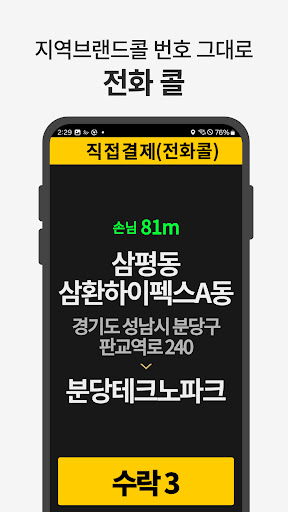
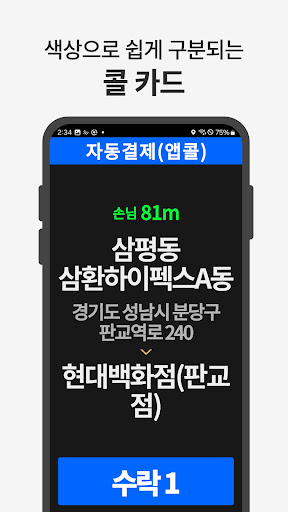
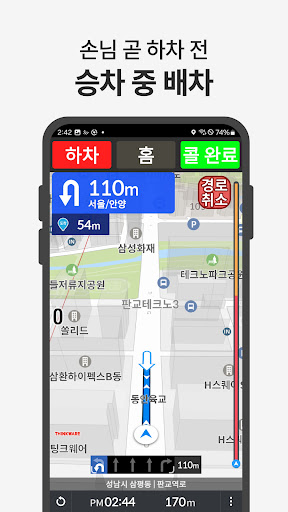
Map and navigation are iNavi! iNavi Mobility provides a taxi calling service with local brand call drivers. Suncheon Beauty Call/Gyeongju Brand Call/Hanam Brand Call/Hongseong Naepo Call/Seongnam Call/Yeoju Integrated Call/Sangju Sambaek Call/Cheonan Call [main function] §Open the ride navigation app on the road To eliminate the inconvenience of having to find and open a navigation app every time you pick up a customer on the road. You can immediately launch a frequently used navigation app by pressing the ‘Open navigation app’ button. §Receiving passenger phone calls and app calls If a passenger phone call app call is received while in call waiting mode, you can press the accept button to receive dispatch. Passengers will be dispatched to the vehicle closest to them. On the call reception screen, direct payment is colored yellow and automatic payment is colored blue. §Directions After successful dispatch, route guidance begins with iNavi Map. If you need directions on a familiar map, you can press the ‘Cancel route’ button to continue providing directions. §Automatic payment 200m before arriving at your destination, a voice will sound saying ‘Automatic payment is in progress’. Press the meter payment button and enter the meter operating fee, Drivers using meter-linked terminals can press the meter payment button. Rates will automatically appear in the app. (Additional fees such as toll fees and service fees must be entered manually.) §Check driving history If you press the menu button and select ‘Driving History’, you can check the history for today/7 days/this month/last month. If you select ‘Automatic Payment History’, you can check the history for today/7 days/this month/last month. §Volume adjustment By pressing the menu button, clicking ‘Settings’, and selecting ‘Volume’, you can adjust the article app volume separately from the phone sound. (Resolving the inconvenience of adjusting mobile phone volume) §Adjust font size You can set the font size in 4 steps by pressing the menu button, clicking ‘Settings’, and selecting ‘Font Size’. (Consideration for senior drivers) §education Educational videos can be viewed on the YouTube ‘iNavi M’ channel. https://youtube.com/@user-xp1nb3ug8l?si=uy7lntqig52K9tBH [App access permission information] Users can grant the access rights below to use iNavi M smoothly. 1. Required permissions -Location: Permission to collect location information necessary to determine the location of my vehicle and dispatch guests to nearby locations and provide directions. -Phone: Driver's phone number information required for member authentication and permission to call passengers -SMS: Permission to send text messages to passengers -Draw over other apps: Permission to receive calls and provide directions while using other apps -Storage device: Permission to save driving history to mobile phone -Draw over other apps: Permission to receive calls and provide directions while using other apps -Camera: Permission to select photos from albums 2. Permission to allow selection -Bluetooth: Permission to connect to meter [Developer contact information] Website: https://www.inavimobility.com/ Email: [email protected]
Installs since 13 Nov 2026 Measured
Exact Google Play install counts, collected daily
Daily history starts once this app is in our daily install sample.
Ratings
- 5 ★0.0%
- 4 ★0.0%
- 3 ★0.0%
- 2 ★0.0%
- 1 ★0.0%
Recent reviews
Latest public reviews from the store
No reviews in our sample for this app yet.
Top chart positions
Latest Google Play chart ranks by country, last 10 days
Not in any tracked top chart in the last 10 days.
아이나비M 택시호출앱 기사용 history
Release, install milestones, listing and store changes
- First released on the store 17 Jun 2025
- Reached 10,000+ installs 17 May 2025
- Reached 5,000+ installs 11 Jul 2023
Update frequency
How often 아이나비M 택시호출앱 기사용 ships a new version, month by month
2 updates in the last 12 months. More often than most similar apps: they shipped a median of 0 updates in the same year.
Recent versions
Current version Varies with device
- Version 1.0.1410 Mar 2026
- Version 1.0.824 Nov 2025
- Version 0.12.8.613 Oct 2025
- Version 0.12.8.57 Sep 2025
Listing keywords
Words and phrases 아이나비M 택시호출앱 기사용 repeats most in its store listing
Top phrases: automatic payment (4), brand call (3), driving history (3), font size (3), menu button (3).
Highlighted words also appear in the title. Counts cover the title, short description and description.
Business model and tech
From the store listing and declared permissions
- Business model
- Free to download
- Sensitive access
- LocationCameraPhone and callsPhotos, videos and filesNearby devicesDraws over other appsAdvertising ID
34 permissions
1 special access, 13 sensitive, 20 standard
- Draw over other appsSpecial access
- Take photos and videosSensitive
- Change or delete shared storageSensitive
- Read shared storageSensitive
- Approximate locationSensitive
- Location in the backgroundACCESS_BACKGROUND_LOCATIONSensitive
- Precise locationSensitive
- Advertise to nearby Bluetooth devicesBLUETOOTH_ADVERTISESensitive
- Connect to paired Bluetooth devicesBLUETOOTH_CONNECTSensitive
- Find nearby Bluetooth devicesBLUETOOTH_SCANSensitive
- Show notificationsPOST_NOTIFICATIONSSensitive
- Access extra location provider commandsSensitive
Compliance
What the listing and the app package show
- Store status
- Live
- Upkeep
- Updated 10 Mar 2026
- Registered in
- South Korea
- Privacy policy
- Linked on the listing
- Advertising
- No ads declared
- In-app purchases
- None declared
- Age rating
- Everyone
- Sensitive permissions
- 13 sensitive, 1 special access of 34
- Location access
- Yes, also in the background
- Camera and microphone
- Camera
Apps like 아이나비M 택시호출앱 기사용
Такси "Рус-авто"BIT Master5.2K installs★ 4.0
TCS GoSafe MobileTata Consultancy Services Limited11.4K installs★ 1.0
부산버스 스마트OU Apps36.4K installs★ 3.7
Train Tracker BD LiveMD. Marajul Haque1.7K installs★ 4.78
AP Transit - NYC Subway MapAlexander Pozharov1.9K installs★ 4.33
Zirak CaptainZIRAK LLC2K installs★ 4.33
Diground ~Create and Share MAPDiground Inc.15.6K installs★ 3.1
ORIZOTecelys73.8K installs★ 3.6
VocaBus Horaires en temps réelSTGA9.7K installs★ 4.0
아이나비M 택시호출앱 기사용: questions and answers
How many downloads does 아이나비M 택시호출앱 기사용 have?
아이나비M 택시호출앱 기사용 has 17,193 installs on Google Play, measured from the store's own count on 13 Nov 2026.
Who makes 아이나비M 택시호출앱 기사용?
아이나비M 택시호출앱 기사용 is published by 아이나비M, a developer based in KR.
When was 아이나비M 택시호출앱 기사용 last updated?
The latest version (Varies with device) was released on 10 Mar 2026.
Is 아이나비M 택시호출앱 기사용 free?
Yes. 아이나비M 택시호출앱 기사용 is free to download.
Is 아이나비M 택시호출앱 기사용 still available?
Yes. 아이나비M 택시호출앱 기사용 is live on Google Play as of 13 Nov 2026.
Track 아이나비M 택시호출앱 기사용 and its competitors
Watch any app for new versions, rating drops, chart moves and removals. Free plan, no card.