
MacroDroid - Device Automation
Number one automation app for Android - Over 20 million Downloads.
- Installs
- 32.32M
- Measured
- Rating
- 4.32
- Ratings
- 96.1K
- 4.2K reviews
- Version
- Varies with device
- Updated 28 Oct 2026
- Released
- 18 May 2012
- Tracked since 11 May 2026
- Size
- —
Screenshots
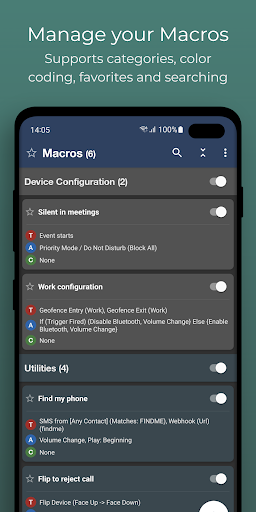
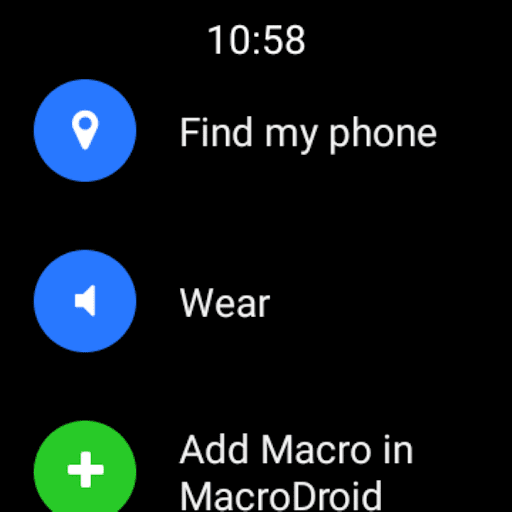
About MacroDroid - Device Automation
The description on the store listing
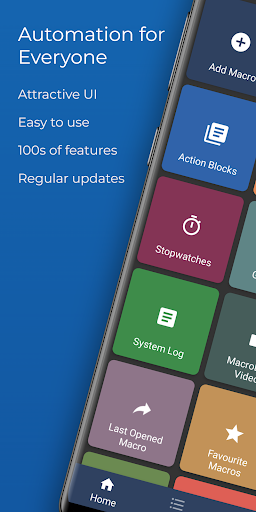
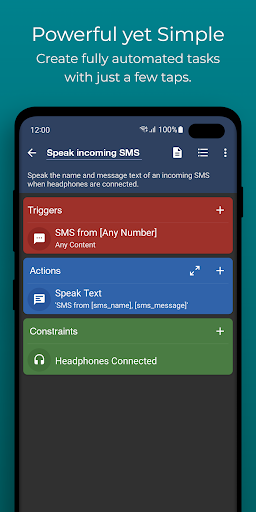
MacroDroid is the easiest way to automate tasks on your Android smartphone or tablet. Via the straightforward user interface MacroDroid makes it possible to build fully automated tasks in just a few taps.
A few examples of how MacroDroid can help you to get automated:
# Manage files on your device, for example automating file copying, moving and deleting to keep your file system clean.
# Auto reject incoming calls when in a meeting (as set in your calendar).
# Increase safety while commuting by reading your incoming notifications and messages (via Text to Speech) and send automated responses via email or SMS.
# Optimize your daily workflow on your phone; switch on bluetooth and …
Read the full description
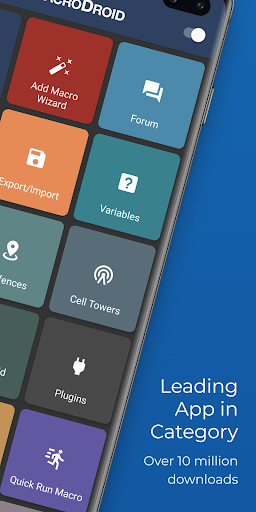
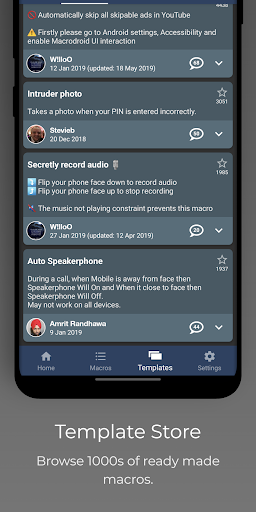
MacroDroid is the easiest way to automate tasks on your Android smartphone or tablet. Via the straightforward user interface MacroDroid makes it possible to build fully automated tasks in just a few taps. A few examples of how MacroDroid can help you to get automated: # Manage files on your device, for example automating file copying, moving and deleting to keep your file system clean. # Auto reject incoming calls when in a meeting (as set in your calendar). # Increase safety while commuting by reading your incoming notifications and messages (via Text to Speech) and send automated responses via email or SMS. # Optimize your daily workflow on your phone; switch on bluetooth and start playing music when you enter your car. Or switch on WiFi when near your house. # Reduce battery drain (e.g. dim screen and switch Wifi off) # Make custom sound and notification profiles. # Remind you to do certain tasks using timers and stopwatches. These are just a few examples out of limitless scenarios where MacroDroid can make your Android life a little easier. With only 3 simple steps this is how it works: 1. Select a Trigger. The trigger is the cue for the macro to start. MacroDroid offers over 80 triggers to start your macro, i.e. location based triggers (like GPS, cell towers, etc), device status triggers (like battery level, app starting/closing), sensor triggers (like shaking, light levels, etc) and connectivity triggers (like Bluetooth, Wifi and Notifications). You can also create a shortcut on the homescreen of your device or run using the unique and customizable Macrodroid sidebar. 2. Select the Actions you like to automate. MacroDroid can perform over 100 different actions, that you typically would do by hand. Connect to your Bluetooth or Wifi device, select volume levels, speak text (like your incoming notifications or current time), start a timer, dim your screen, run Tasker plugin and many more. 3. Optionally: Configure Constraints. Constraints help you to let the macro fire only when you want it to. Living near your work, but only want to connect to your company's Wifi during work days? With a constraint you can select specific times or days that the macro can be invoked. MacroDroid offers over 50 constraint types. MacroDroid is compatible with Tasker and Locale plugins to expand the range of possibilities even further. = For beginners = MacroDroid's unique interface offers a Wizard that guides step by step through the configuration of your first macros. It is also possible to use an existing template from the template section and customize it to your needs. The built-in forum allows you to get help from other users, allowing you to easy learn the ins and outs of MacroDroid. = For more experienced users = MacroDroid offers more comprehensive solutions like the use of Tasker and Locale plugins, system/user defined variables, scripts, intents, advance logic like IF, THEN, ELSE clauses, use of AND/OR The free version of MacroDroid is ad-supported and allows up to 5 macros. The Pro version (a small one time fee) removes all adverts and allows an unlimited amount of macros. = Support = Please use the in-app forum for all usage questions and feature requests, or access via www.macrodroidforum.com. To report bugs please use the built in 'Report a bug' option available via the troubleshooting section. = Accessibility Services = MacroDroid makes use of accessibility services for certain features like automating UI Interactions. use of accessibility services is entirely at the users discretion. No user data is ever obtained or logged from any accessibility service. = Wear OS = This app contains a Wear OS companion app for interaction with MacroDroid. This is not a standalone app and requires the phone application installed. The Wear OS app supports complications populated by MacroDroid to use along with your watch face of choice.
Installs, last 30 days Measured
Exact Google Play install counts, collected daily
Ratings
96,057 ratings, 4,190 reviews
- 5 ★78%
- 4 ★4.2%
- 3 ★2.4%
- 2 ★3.4%
- 1 ★12%
Recent reviews
Latest public reviews from the store
- 5 May 2026
Video and live are clear. Don't know what you did but I cannot get the old videos to delete in a block like I did when it was in the feed. I also changed settings of what I want the camera to record. I have it marked for person, animal and vehicle. I do not have motion but that is all it picks up. I really wish you would get the bugs out and put it back the way it was.
- 24 Apr 2026
We've had these cameras about 15yrs & most of the time they work beautifully. But we have times when they loose connections and I have taken the batteries out the put the SAME batteries back in & then they start working again. The problem with that is I must drag out a ladder to reach the camera, take the camera down, remove batteries, re-install, then play around putting them back in correct position for the best viewing. This is annoying and time consuming especially the winter.
What reviewers bring up
Topics mentioned in the latest 10 reviews, by how many reviews mention them
Liked in good reviews (1 reviews)
No topic comes up twice.
Raised in bad reviews (8 reviews)
- cameras 6
- subscription 4
- devices 2
- company 2
- options 2
- online 2
- trying 2
- alerts 2
Top chart positions
Latest Google Play chart ranks by country, last 10 days
- Countries ranked
- 11
- Best rank
- #40
- Top 10 placements
- 0
- of 14 chart placements
- Average rank
- #108.1
Best countries on Google Play
- 🇰🇷 South Korea · Top grossing, Tools#40
- 🇯🇵 Japan · Top grossing, Tools#42
- 🇫🇷 France · Top grossing, Tools#53
- 🇩🇪 Germany · Top grossing, Tools#60
- 🇧🇷 Brazil · Top grossing, Tools#86
- 🇨🇦 Canada · Top grossing, Tools#103
| Country | Chart | Category | Rank | Best (10 days) | Date |
|---|---|---|---|---|---|
| 🇰🇷 South Korea | Top grossing | Tools | #40 | #40 | 20 Nov 2026 |
| 🇯🇵 Japan | Top grossing | Tools | #42 | #40 | 20 Nov 2026 |
| 🇫🇷 France | Top grossing | Tools | #53 | #53 | 20 Nov 2026 |
| 🇩🇪 Germany | Top grossing | Tools | #60 | #60 | 20 Nov 2026 |
| 🇯🇵 Japan | Top free | Tools | #85 | #82 | 20 Nov 2026 |
| 🇧🇷 Brazil | Top grossing | Tools | #86 | #86 | 20 Nov 2026 |
| 🇨🇦 Canada | Top grossing | Tools | #103 | #98 | 20 Nov 2026 |
| 🇬🇧 United Kingdom | Top grossing | Tools | #125 | #120 | 20 Nov 2026 |
| 🇲🇽 Mexico | Top grossing | Tools | #142 | #132 | 20 Nov 2026 |
| 🇮🇳 India | Top grossing | Tools | #146 | #136 | 20 Nov 2026 |
MacroDroid - Device Automation history
Release, install milestones, listing and store changes
- First released on the store 18 May 2012
Update frequency
How often MacroDroid - Device Automation ships a new version, month by month
9 updates in the last 12 months. More often than most similar apps: they shipped a median of 1 updates in the same year.
Recent versions
Current version Varies with device
- Version 5.63.157 May 2026
- Version 5.63.1128 Apr 2026
- Version 5.62.1127 Mar 2026
- Version 5.62.1025 Mar 2026
Listing keywords
Words and phrases MacroDroid - Device Automation repeats most in its store listing
Top phrases: accessibility services (3), macrodroid offers (3), wear os (3), tasker and locale (2), incoming notifications (2).
Highlighted words also appear in the title. Counts cover the title, short description and description.
Business model and tech
From the store listing, the SDKs in the app package and its declared permissions
- Business model
- Free to downloadIn-app purchasesShows ads
- Built with
- No cross-platform framework or game engine detected
- Ad networks (3)
- AdMobFacebook Audience NetworkInMobi
- Subscriptions and payments
- Google Play billing
- Attribution and measurement
- Open Measurement
- Analytics and crash reports
- Firebase
- Sensitive access
- LocationCameraMicrophoneContactsPhone and callsText messagesCalendarPhotos, videos and filesBody sensors and activityAccounts on the deviceNearby devicesDraws over other appsAdvertising ID
4 ad, attribution and analytics SDKs detected. SDKs are read from the app package and permissions from the store listing, so code that loads later is not seen.
Technology
72 SDKs found in the app package
Ad networks
Advertising and install-attribution SDKs found in the app package
- AdMob
- Facebook Audience Network
- InMobi
- Open Measurement
112 permissions
10 special access, 26 sensitive, 76 standard
- Act as an accessibility serviceBIND_ACCESSIBILITY_SERVICESpecial access
- Ask to uninstall appsREQUEST_DELETE_PACKAGESSpecial access
- Change Do Not DisturbACCESS_NOTIFICATION_POLICYSpecial access
- Change system settingsSpecial access
- Draw over other appsSpecial access
- Manage all filesMANAGE_EXTERNAL_STORAGESpecial access
- Read sensitive log dataSpecial access
- See every installed appQUERY_ALL_PACKAGESSpecial access
- See which apps are usedPACKAGE_USAGE_STATSSpecial access
- Set exact alarmsSCHEDULE_EXACT_ALARMSpecial access
- Read calendar eventsSensitive
- Record audioSensitive
Compliance
What the listing and the app package show
- Store status
- Live
- Upkeep
- Updated 28 Oct 2026
- Registered in
- United Kingdom
- Privacy policy
- Linked on the listing
- Advertising
- Shows ads
- In-app purchases
- Offered
- Age rating
- Everyone
- Sensitive permissions
- 26 sensitive, 10 special access of 112
- Location access
- Yes, also in the background
- Camera and microphone
- Both
Apps like MacroDroid - Device Automation
HTTP Custom - AIO Tunnel VPNePro Dev. Team27.3M installs★ 4.11
vConnectVodafone Idea Ltd.6.8M installs★ 4.0
Clickmate - Auto Clicker MacroBattery Stats Saver17.7M installs★ 4.22
VirusBuster MobileTrend Micro Inc. / トレンドマイクロ株式会社13.1M installs★ 4.0
Send files to TVYablio43.7M installs★ 4.2
My FilesColorOS1.4B installs★ 3.75
Tube Video Downloader & Videovideo download.11.2M installs★ 3.49
Skins for Minecraft PERemoro Studios22.3M installs★ 4.26
Satoshi App: Get AirdropsAimee Han9.3M installs★ 3.3
MacroDroid - Device Automation: questions and answers
How many downloads does MacroDroid - Device Automation have?
MacroDroid - Device Automation has 32,319,133 installs on Google Play, measured from the store's own count on 20 Nov 2026.
Who makes MacroDroid - Device Automation?
MacroDroid - Device Automation is published by ArloSoft, a developer based in GB.
When was MacroDroid - Device Automation last updated?
The latest version (Varies with device) was released on 28 Oct 2026.
Is MacroDroid - Device Automation free?
Yes. MacroDroid - Device Automation is free to download and offers in-app purchases, and it shows ads.
Is MacroDroid - Device Automation still available?
Yes. MacroDroid - Device Automation is live on Google Play as of 20 Nov 2026.
Track MacroDroid - Device Automation and its competitors
Watch any app for new versions, rating drops, chart moves and removals. Free plan, no card.