
Magicblocks.io - IoT | MQTT
This app send values of sensor in your phone to a specific MQTT client.
- Installs
- 1.17K
- Measured
- Rating
- —
- Ratings
- —
- Version
- Varies with device
- Updated 4 Jan 2021
- Released
- 4 Jan 2021
- Tracked since 13 May 2026
- Size
- 6 MB
- Needs 7.0
Screenshots


About Magicblocks.io - IoT | MQTT
The description on the store listing
This app is used to send sensor values obtained from the sensors in your phone to a specific MQTT client. It is important to note that although there are many sensors in the app there should be specific sensors in your phone.
The type of sensors in your phone varies from the brand and version of your phone. It is important to first identify the sensors inbuilt in your phone first.
Getting Started
To get started go to the app and click settings (Upper Left hand corner). Enter the necessary details in the given spaces.
If you want to publish data to a specific MQTT broker enter the hostname and the port of it. It is also important to specify the publish and subscribe topic.
There are …
Read the full description
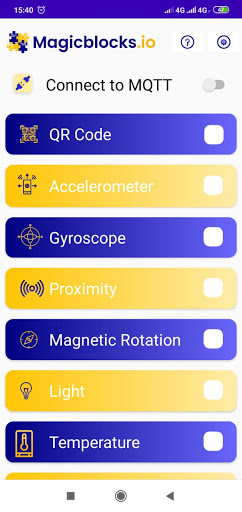
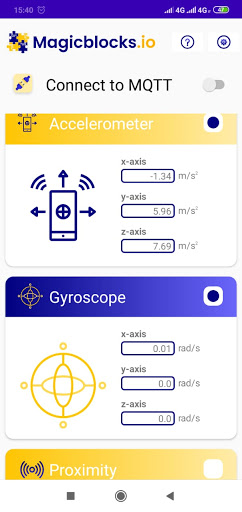
This app is used to send sensor values obtained from the sensors in your phone to a specific MQTT client. It is important to note that although there are many sensors in the app there should be specific sensors in your phone. The type of sensors in your phone varies from the brand and version of your phone. It is important to first identify the sensors inbuilt in your phone first. Getting Started To get started go to the app and click settings (Upper Left hand corner). Enter the necessary details in the given spaces. If you want to publish data to a specific MQTT broker enter the hostname and the port of it. It is also important to specify the publish and subscribe topic. There are also other options that you can try out according to your needs. When operating this app the phone should have a stable internet connection at all times. Sensors QR/Bar Code Scanner Scans a QR code with your camera and send the data. It is important to give the app access to your camera The format the data is sent- {"qr":{"format":"QR_CODE","content":""}} Accelerometer An accelerometer is an electromechanical sensor used to measure acceleration forces. Units – X-axis ,Y-axis, Z-axis values measured in m/s2 The format the data is sent- {"accelerometer":{"x":"2.84","y":"0.44","z":"10.02"}} Gyroscope Gyro sensors, also known as angular rate sensors or angular velocity sensors, are devices that sense angular velocity. Units – X-axis ,Y-axis, Z-axis values measured in rad/s The format the data is sent- {"gyroscope":{"x":"0.0","y":"0.0","z":"0.0"}} Proximity Sensor A proximity sensor is a non-contact sensor that detects the presence of an object (often referred to as the “target”) when the target enters the sensor's field. Units – distance measured in cm The format the data is sent- {"proximity":{"x":"5.0"}} Light This sensor gives the brightness of the area Units in lx The format the data is sent- {{"light":{"illuminance":"7.0"}} Temperature Provides the temperature in the room. Units in celcius The format the data is sent- {"temperature":{"temperature":"7.0"}} Pressure Measures the room pressure Units in hPa The format the data is sent- {"pressure":{"pressure":"1009.56"}} Location Give access to the app to access location. It gives the latitude and longitude location of the device in degrees and also the altitude of the current location in meters The format the data is sent- {"gps":{"alt":"0.0","lon":"80.06","lat":"6.72"}} Settings Go to settings on the top right corner. These are the settings that you should change to make your custom application. There are some required fields as well as optional fields that you should fill to get the app working. Hostname – You should enter the name of your broker in this field. There are some free MQTT brokers we recommend you to use. They are, broker.hivemq.com mqtt.eclipse.org This is a required field. Port- This is also a required field. It is best practice for you to leave the port default (1883) Username- This is an optional requirement. It is good to add username for more security. Password – This is an optional requirement. It is good to add username for more security. ClientID - This is an optional requirement. If left blank the application will generate a clientID for the user. Publish Topic – The user should specify the topic to which he/she is sending data to. Subscribe Topic – The user should specify the topic to which the application should listen to receive data. Data Push Interval – The rate at which data should be published. QoS – For more information on MQTT QoS visit the official website of your MQTT broker. After specifying the required field click save and go to the home page. Slide the slider to connect to the MQTT broker. If all goes well you will see ‘connected’ on the screen
Installs since 27 Aug 2026 Measured
Exact Google Play install counts, collected daily
Ratings
- 5 ★0.0%
- 4 ★0.0%
- 3 ★0.0%
- 2 ★0.0%
- 1 ★0.0%
Recent reviews
Latest public reviews from the store
- 29 Jun 2025
love games like this
- 11 Mar 2025
Nice
- 28 Feb 2025
Nice game
- 28 Feb 2025
Nice App 💥
Top chart positions
Latest Google Play chart ranks by country, last 10 days
Not in any tracked top chart in the last 10 days.
Magicblocks.io - IoT | MQTT history
Release, install milestones, listing and store changes
- First released on the store 4 Jan 2021
Listing keywords
Words and phrases Magicblocks.io - IoT | MQTT repeats most in its store listing
Top phrases: data is sent (8), format the data (8), axis axis (4), mqtt broker (3), optional requirement (3).
Highlighted words also appear in the title. Counts cover the title, short description and description.
Business model and tech
From the store listing and declared permissions
- Business model
- Free to download
- Sensitive access
- No sensitive permission declared
Compliance
What the listing and the app package show
- Store status
- Live
- Upkeep
- No update since 4 Jan 2021
- Registered in
- Sri Lanka
- Privacy policy
- Linked on the listing
- Advertising
- No ads declared
- In-app purchases
- None declared
- Age rating
- Everyone
Apps like Magicblocks.io - IoT | MQTT
Workbook Maker PDF Pluginaidiary16.9K installs★ 3.3
내공스터디 관리자IronTrain4.6K installs★ 4.9
수원대학교 수강신청수원대학교34.9K installs★ 3.1
تنزيلةTaha Ben Ashur13.6K installs★ 5.0
मध्यकालीन भारत का इतिहासSuren Tech Lab24K installs★ 3.4
365 Morning & Evening PrayersELEGANT X STUDIO™17.5K installs★ 3.71
Chitas GuideThe Saber Team3.7K installs★ 5.0
GradStar AppPlum systems33K installs★ 1.7
- Mars ViewTobias Thierer4K installs★ 3.67
Magicblocks.io - IoT | MQTT: questions and answers
How many downloads does Magicblocks.io - IoT | MQTT have?
Magicblocks.io - IoT | MQTT has 1,169 installs on Google Play, measured from the store's own count on 19 Nov 2026.
Who makes Magicblocks.io - IoT | MQTT?
Magicblocks.io - IoT | MQTT is published by Thingsnode, a developer based in LK.
When was Magicblocks.io - IoT | MQTT last updated?
The latest version (Varies with device) was released on 4 Jan 2021.
Is Magicblocks.io - IoT | MQTT free?
Yes. Magicblocks.io - IoT | MQTT is free to download.
Is Magicblocks.io - IoT | MQTT still available?
Yes. Magicblocks.io - IoT | MQTT is live on Google Play as of 19 Nov 2026.
Track Magicblocks.io - IoT | MQTT and its competitors
Watch any app for new versions, rating drops, chart moves and removals. Free plan, no card.