
Maps Ruler
Measure the distances by touching on map. Distance and area calculation on map.
- Installs
- 921K
- Measured
- Rating
- 4.21
- Ratings
- 7.7K
- 420 reviews
- Version
- 4.2.4.GMS
- Updated 19 Sep 2026
- Released
- —
- Tracked since 13 May 2026
- Size
- 4 MB
- Needs 4.4
Screenshots

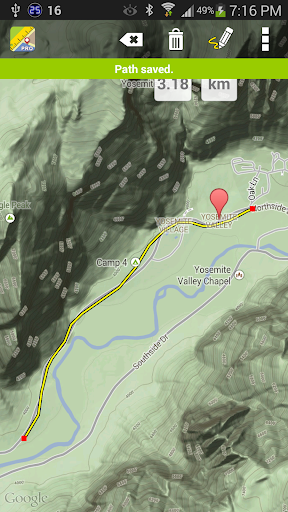
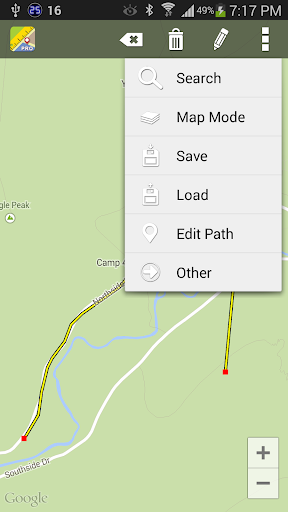


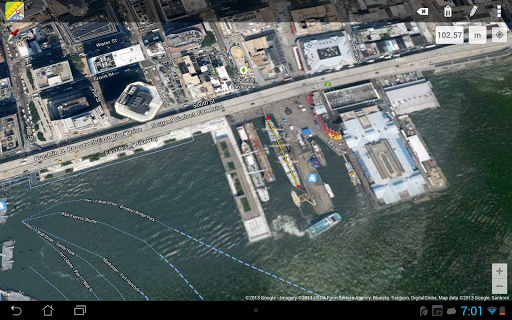
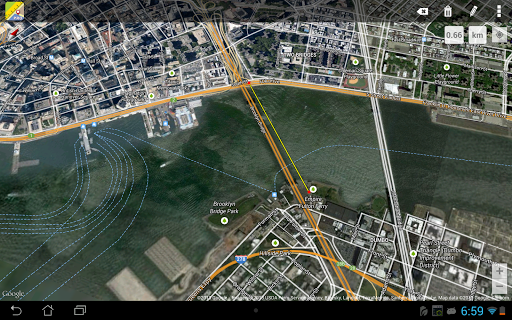
About Maps Ruler
The description on the store listing
Maps Ruler is a distance calculator on map. It is helping you to calculate distance between selected points.
You can also use it as an area calculator, you can measure meter square or kilometer square of the selected areas on map.
Also you can find shortest way and save energy or use it as a golf distance(yard) calculator.
Good for;
-Calculate area field measure
-Boat trip calculation
-Calculate distance after or before trekking, walking
-Real Estate area measurement
You can save and load calculated distances and areas, you can put labels to calculated paths.
You can view the result in different conversions such as meter, km ,mile and etc.
Continuous path calculation like …
Read the full description
Maps Ruler is a distance calculator on map. It is helping you to calculate distance between selected points. You can also use it as an area calculator, you can measure meter square or kilometer square of the selected areas on map. Also you can find shortest way and save energy or use it as a golf distance(yard) calculator. Good for; -Calculate area field measure -Boat trip calculation -Calculate distance after or before trekking, walking -Real Estate area measurement You can save and load calculated distances and areas, you can put labels to calculated paths. You can view the result in different conversions such as meter, km ,mile and etc. Continuous path calculation like drawing mode, you can move your finger and it calculates the distance or area when you are drawing on the map. How to use to app as an distance calculator? For distance measurements; you need to put at least 2 point on map. How to use to app as a land area calculator? Select area mode from the menu then you need to put at least 3 point on map for mesaruing the area. For using our distance calculator you should enable gps, so you can easily see your current location. Our distance calculation app supports Satellite maps, normal maps and terrain maps. You can search a location with autocomplete feature on our map distance measurement app.
Installs, last 30 days Measured
Exact Google Play install counts, collected daily
Ratings
7,713 ratings, 420 reviews
- 5 ★66%
- 4 ★12%
- 3 ★5.0%
- 2 ★2.9%
- 1 ★14%
Recent reviews
Latest public reviews from the store
- 25 Apr 2026
hometown easy going well stocked and wonderful employees
- 17 Apr 2026
i like the coupons I receive online
- 17 Apr 2026
I had a hard time getting it to work
- 3 Apr 2026
Each trip to the store is a pleasure. The employees are stellar.
What reviewers bring up
Topics mentioned in the latest 50 reviews, by how many reviews mention them
Liked in good reviews (26 reviews)
- bashas 7
- store 5
- employees 3
- service 3
- shop 3
- pleasant 2
- friendly 2
- produce 2
Raised in bad reviews (21 reviews)
- actually 4
- search 4
- items 4
- list 4
- see 4
- supposed 3
- product 3
- find 3
Top chart positions
Latest Google Play chart ranks by country, last 10 days
Not in any tracked top chart in the last 10 days.
Maps Ruler history
Release, install milestones, listing and store changes
- Reached 500,000+ installs 11 Apr 2020
- Reached 100,000+ installs 27 Nov 2012
- Reached 50,000+ installs 3 Sep 2011
- Moved from Tools to Unknown (Transportation) 23 Dec 2010
- Reached 10,000+ installs 6 Feb 2010
Update frequency
How often Maps Ruler ships a new version, month by month
3 updates in the last 12 months. Less often than most similar apps: they shipped a median of 5 updates in the same year.
Recent versions
Current version 4.2.4.GMS
- Version 4.2.4.GMS19 Sep 2026
What's new: • Onboarding screens added • Fixed the “Buy Pro” link • Bug fixes
- Version 4.0.6.GMS1 Jul 2026
v406 now total 49 languages. Maps Ruler turns 17 and gets a major renewal with version 400. • Redesigned, cleaner measurement interface • Improved distance and area workflow • More accurate and flexible area calculation • Better gallery and recent sessions • Improved map modes and segment labels • Backup and export improvements • Performance improvements and bug fixes
- Version 4.0.2.GMS14 May 2026
Maps Ruler turns 17 and gets a major renewal with version 400. • Redesigned, cleaner measurement interface • Improved distance and area workflow • More accurate and flexible area calculation • Better gallery and recent sessions • Improved map modes and segment labels • Backup and export improvements • Performance improvements and bug fixes
- Version 3.8.3.GMS5 Aug 2025
Listing keywords
Words and phrases Maps Ruler repeats most in its store listing
Top phrases: distance calculator (3), need to put (2), point on map (2), put at least (2), area calculator (2).
Highlighted words also appear in the title. Counts cover the title, short description and description.
Business model and tech
From the store listing, the SDKs in the app package and its declared permissions
- Business model
- Free to downloadShows ads
- Built with
- No cross-platform framework or game engine detected
- Ad networks (1)
- AdMob
- Analytics and crash reports
- Firebase
- Sensitive access
- LocationPhone and callsPhotos, videos and filesAdvertising ID
2 ad, attribution and analytics SDKs detected. SDKs are read from the app package and permissions from the store listing, so code that loads later is not seen.
Technology
22 SDKs found in the app package
Ad networks
Advertising and install-attribution SDKs found in the app package
- AdMob
19 permissions
0 special access, 6 sensitive, 13 standard
- Change or delete shared storageSensitive
- Read shared storageSensitive
- Approximate locationSensitive
- Precise locationSensitive
- Show notificationsPOST_NOTIFICATIONSSensitive
- Read phone status and identitySensitive
- Ad attribution (Privacy Sandbox)ACCESS_ADSERVICES_ATTRIBUTIONStandard
- Ad topics (Privacy Sandbox)ACCESS_ADSERVICES_TOPICSStandard
- Read how it was installed (install referrer)BIND_GET_INSTALL_REFERRER_SERVICEStandard
- Read the advertising IDAD_IDStandard
- Read the advertising ID (Privacy Sandbox)ACCESS_ADSERVICES_AD_IDStandard
- Keep the phone awakeStandard
Compliance
What the listing and the app package show
- Store status
- Live
- Upkeep
- Updated 19 Sep 2026
- Registered in
- Türkiye
- Privacy policy
- Linked on the listing
- Advertising
- Shows ads
- In-app purchases
- None declared
- Age rating
- Everyone
- Sensitive permissions
- 6 sensitive of 19
- Location access
- Yes, while in use
- Camera and microphone
- Neither
Apps like Maps Ruler
CompassAmez Products1.2M installs★ 4.55
MawgifNational Parking Co. Ltd.1.5M installs★ 1.35
LandGlide: Land & Parcel DataReal Estate Portal USA1.9M installs★ 4.3
Navier HUD 3Whiles App1.5M installs★ 3.47
MTM Link MemberMTM, Inc319K installs★ 4.44
Book Parking Spaces - ParclickParclick S.L.782K installs★ 4.65
Cestovné poriadky CPCHAPS spol. s r.o.1.2M installs★ 4.93
Hot spring spa information MapFARBEYOND LLC682K installs★ 3.67
GPX Viewer PRO: Hike & BikeVectura Games OÜ192K installs★ 4.63
Maps Ruler: questions and answers
How many downloads does Maps Ruler have?
Maps Ruler has 921,082 installs on Google Play, measured from the store's own count on 20 Nov 2026.
Who makes Maps Ruler?
Maps Ruler is published by MobileRise, a developer based in TR.
When was Maps Ruler last updated?
The latest version (4.2.4.GMS) was released on 19 Sep 2026.
Is Maps Ruler free?
Yes. Maps Ruler is free to download, and it shows ads.
Is Maps Ruler still available?
Yes. Maps Ruler is live on Google Play as of 20 Nov 2026.
Track Maps Ruler and its competitors
Watch any app for new versions, rating drops, chart moves and removals. Free plan, no card.