
McLeod Driver Sidekick
Driver Sidekick connects drivers to the home office for better collaboration.
- Installs
- 13.85K
- Measured
- Rating
- 4.15
- Ratings
- 1.1K
- 84 reviews
- Version
- 27.1.9
- Updated 21 Oct 2026
- Released
- 17 Aug 2023
- Tracked since 13 May 2026
- Size
- —
Also on App Store: McLeod Driver Sidekick (1.9K ratings)
Screenshots



About McLeod Driver Sidekick
The description on the store listing
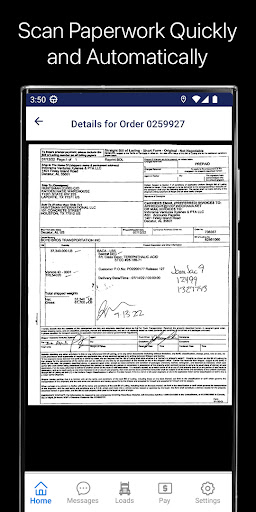
Driver Sidekick is an all-new app connecting drivers to the back office, expediting billing, and enhancing driver satisfaction. It features an updated, intuitive look and feel, a home screen “dashboard” view, and a dedicated set of permissions to ease implementation. Driver Sidekick is designed for drivers. They can easily see their current assignment and can use the filterable list views to quickly locate the information they desire.
<b>Home Screen</b>
On the Home Screen, the Current Assignment card welcomes the driver and provides load details, stop information, and appointment details and mileage to the next stop. The buttons visible beneath the card allow drivers to scan a …
Read the full description
Driver Sidekick is an all-new app connecting drivers to the back office, expediting billing, and enhancing driver satisfaction. It features an updated, intuitive look and feel, a home screen “dashboard” view, and a dedicated set of permissions to ease implementation. Driver Sidekick is designed for drivers. They can easily see their current assignment and can use the filterable list views to quickly locate the information they desire. <b>Home Screen</b> On the Home Screen, the Current Assignment card welcomes the driver and provides load details, stop information, and appointment details and mileage to the next stop. The buttons visible beneath the card allow drivers to scan a document, create a new message, request time off, or run a Driver History Report. Drivers can review their most recent settlement details. Custom links allow the home office to curate employee communications, safety videos, links to vendor partners, benefit providers, and more. <b>Messages</b> Sidekick’s Messages center makes it easy to filter messages sent and received, read and unread. The app sends confirmation messages with tappable thumbnails to review scanned images for easy reference. <b>Loads</b> In the Loads section, Sidekick allows you to filter loads based on whether they’re available, in progress, or delivered. Each load type is color coded for consistency. The detail view for each load includes the following tabs: Stops, Map, Freight, and Images. The Stops tab displays key information about each stop on the load along with the load’s total miles. Drivers can see the stop’s average location rating and review the location after a visit, answering your custom questions. If freight is damaged, they can submit an OS&D claim, capturing photos of damaged freight and providing details as needed. The Map tab allows drivers to see plotted commercial routes. The Freight tab displays weights, measures, and commodity information, along with safety training links for that commodity. The Images tab displays a badge with a count of missing required images and allows drivers to review previously scanned documents. This way, drivers can easily see if a load is missing a required image from Rendition Customer because that missing document’s icon will be red. Drivers can also capture signatures, scan documents, and either take freight photos or upload them from the device’s photo library. <b>Pay</b> The Pay screen makes it easy for drivers to see their pay history and pending settlements. The list of paid settlements includes the check number, date and amount and is linked to the Settlement Summary PDF from LoadMaster. The Pay section is configurable. You can disable paid settlements, pending settlements, or the Current Check Card on the Home Screen. <b>Settings</b> Drivers can view their profile, which includes important dates like the driver’s work anniversary and the expiration of the driver’s physical and other certifications. You can enable automatic reminders to renew these credentials in LoadMaster. These reminders are sent to the driver as “push” notifications even when the app is not running on the driver’s device. If necessary, drivers can create a Motor Accident report that includes details and photos from the accident scene. The Support tab contains critical device and app data and a convenient button to request McLeod Support. <b>Administration</b> We’ve made Driver Sidekick customizable to fit your business needs. To enable or disable Driver Sidekick’s features, open Permissions Manager and scroll to Driver Sidekick. These granular permissions provide a great deal of flexibility for your implementation of Driver Sidekick. Driver Sidekick requires McLeod LoadMaster version 22.2 or newer.
Installs since 29 Aug 2026 Measured
Exact Google Play install counts, collected daily
Ratings
1,113 ratings, 84 reviews
- 5 ★68%
- 4 ★8.8%
- 3 ★3.9%
- 2 ★3.9%
- 1 ★16%
Recent reviews
Latest public reviews from the store
- 23 Mar 2026
okay
Top chart positions
Latest Google Play chart ranks by country, last 10 days
Not in any tracked top chart in the last 10 days.
McLeod Driver Sidekick history
Release, install milestones, listing and store changes
- Reached 5,000+ installs 27 Sep 2025
- Reached 1,000+ installs 3 May 2024
- Reached 500+ installs 3 Feb 2024
- Reached 100+ installs 5 Dec 2023
- Reached 50+ installs 6 Oct 2023
- First released on the store 17 Aug 2023
Update frequency
How often McLeod Driver Sidekick ships a new version, month by month
10 updates in the last 12 months. More often than most similar apps: they shipped a median of 0 updates in the same year.
Recent versions
Current version 27.1.9
- Version 27.1.921 Oct 2026
* Updates to support Android 16 * Stability improvements and bug fixes
- Version 27.1.526 Aug 2026
* Reframed our Document Capture camera view so page framing is clearer * Added Hammer GPS integration for routing and navigation * Added Samsara Commercial Navigation integration for routing and navigation * Updated the link to our User Guide to keep pace with our documentation platform * Stability improvements and bug fixes
- Version 27.1.12 Jul 2026
* Working on a Manifest? The Freight tab on your Load Details now shows information about every order including commodities, temperatures, weights, and more. * Stability improvements and bug fixes.
- Version 26.2.1311 Jun 2026
* When your stop has a confirmed appointment time, we now bring that to your attention. * Pending settlements can now be filtered by date, if available. * Stability improvements and bug fixes.
Listing keywords
Words and phrases McLeod Driver Sidekick repeats most in its store listing
Top phrases: driver sidekick (8), home screen (4), tab displays (3), drivers to see (2), allows drivers (2).
Highlighted words also appear in the title. Counts cover the title, short description and description.
Business model and tech
From the store listing and declared permissions
- Business model
- Free to download
- Sensitive access
- LocationCameraPhotos, videos and files
21 permissions
0 special access, 8 sensitive, 13 standard
- Take photos and videosSensitive
- Change or delete shared storageSensitive
- Read photos and videos the user picksREAD_MEDIA_VISUAL_USER_SELECTEDSensitive
- Read shared storageSensitive
- Approximate locationSensitive
- Location in the backgroundACCESS_BACKGROUND_LOCATIONSensitive
- Precise locationSensitive
- Show notificationsPOST_NOTIFICATIONSSensitive
- Read how it was installed (install referrer)BIND_GET_INSTALL_REFERRER_SERVICEStandard
- Ask to skip battery optimisationREQUEST_IGNORE_BATTERY_OPTIMIZATIONSStandard
- Foreground service (location)FOREGROUND_SERVICE_LOCATIONStandard
- Keep the phone awakeStandard
Compliance
What the listing and the app package show
- Store status
- Live
- Upkeep
- Updated 21 Oct 2026
- Registered in
- United States
- Privacy policy
- Linked on the listing
- Advertising
- No ads declared
- In-app purchases
- None declared
- Age rating
- Everyone
- Sensitive permissions
- 8 sensitive of 21
- Location access
- Yes, also in the background
- Camera and microphone
- Camera
Apps like McLeod Driver Sidekick
Appointments Planner SchedulerLaurentiu Popa395K installs★ 3.99
PDF Editor: Remove Page & PassSmartapps store109K installs★ 4.38
PDF Scanner & Doc Scanner AppWdream Limited480K installs★ 4.64
Hindi Thoughts (Suvichar)Arvind Chand Katoch116K installs★ 3.5
note book - daily writingLixi LLC112K installs★ 4.42
Pdf Studio: Reader & ListenerSAT One Plus150K installs★ 3.51
Direct Messages, Delete ChatSuper Ludo™ Games430K installs★ 3.88
All Document Reader & ViewerApp Bulls Inc - Office Suite330K installs★ 4.05
Breeding WheelEmbrapa168K installs★ 4.32
McLeod Driver Sidekick: questions and answers
How many downloads does McLeod Driver Sidekick have?
McLeod Driver Sidekick has 13,851 installs on Google Play, measured from the store's own count on 14 Nov 2026.
Who makes McLeod Driver Sidekick?
McLeod Driver Sidekick is published by Tom McLeod Software, a developer based in US.
When was McLeod Driver Sidekick last updated?
The latest version (27.1.9) was released on 21 Oct 2026.
Is McLeod Driver Sidekick free?
Yes. McLeod Driver Sidekick is free to download.
Is McLeod Driver Sidekick still available?
Yes. McLeod Driver Sidekick is live on Google Play as of 14 Nov 2026.
Track McLeod Driver Sidekick and its competitors
Watch any app for new versions, rating drops, chart moves and removals. Free plan, no card.