
Microprocessor 8086: Simulator
This is the 8086 Simulator for Assembly Code to Machine code.Microprocessor 8086
- Installs
- 31.42K
- Measured
- Rating
- —
- Ratings
- —
- Version
- Varies with device
- Updated 22 Sep 2025
- Released
- 10 Aug 2022
- Tracked since 13 May 2026
- Size
- —
Screenshots
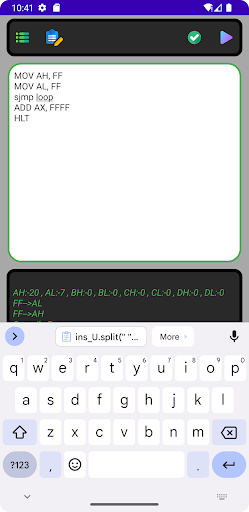
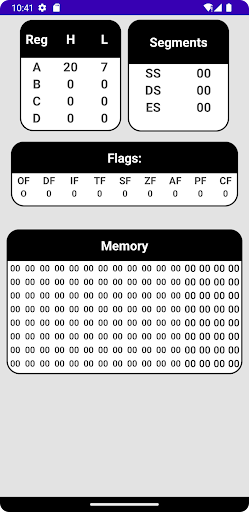
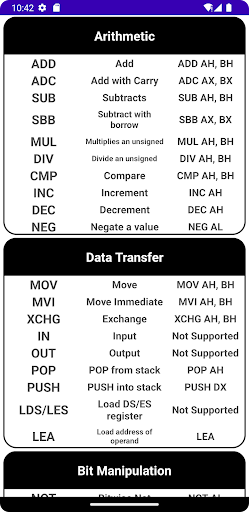
About Microprocessor 8086: Simulator
The description on the store listing
The Microprocessor 8086 Simulator App is a comprehensive tool designed for students, educators, and enthusiasts to learn and experiment with the 8086 microprocessor architecture. This app offers an interactive and user-friendly environment to simulate the functioning of the 8086 microprocessor, enabling users to write, test, and debug assembly language programs.
Key Features
Interactive Simulation Environment:
Simulate the 8086 microprocessor with an intuitive interface.
Visualize the execution of instructions in real-time.
Step through code to see how the microprocessor executes each instruction.
Assembly Language Editor:
Integrated editor to write and edit assembly language …
Read the full description
The Microprocessor 8086 Simulator App is a comprehensive tool designed for students, educators, and enthusiasts to learn and experiment with the 8086 microprocessor architecture. This app offers an interactive and user-friendly environment to simulate the functioning of the 8086 microprocessor, enabling users to write, test, and debug assembly language programs. Key Features Interactive Simulation Environment: Simulate the 8086 microprocessor with an intuitive interface. Visualize the execution of instructions in real-time. Step through code to see how the microprocessor executes each instruction. Assembly Language Editor: Integrated editor to write and edit assembly language programs. Syntax highlighting for better readability and error identification. Auto-complete and code suggestion features to aid in programming. Instruction Set Support: Full support for the 8086 instruction set. Detailed documentation and examples for each instruction. Immediate feedback on syntax and instruction usage. Registers and Memory Visualization: Real-time display of register contents (AX, BX, CX, DX, SI, DI, BP, SP, IP, FLAGS). Memory inspection and modification capabilities. Visual representation of the stack and its operations. Debugging Tools: Breakpoints to halt execution at specific points in the code. Step-by-step execution to analyze program flow and logic. Watch variables and memory locations to monitor changes during execution. Educational Resources: Tutorials and guided exercises to help users understand basic to advanced concepts of 8086 assembly language programming. Sample programs demonstrating various features and techniques. Quizzes and challenges to test knowledge and improve skills. Performance Analysis: Execution time analysis to measure the performance of your code. Cycle-accurate simulation for precise understanding of instruction timing. Reports on resource utilization to optimize code efficiency. Cross-Platform Compatibility: Available on multiple platforms including Windows, macOS, and Linux. Consistent experience across desktop and mobile devices. User Community and Support: Active user community for sharing knowledge, tips, and code snippets. Access to forums and discussion boards. Regular updates and support from the development team. Benefits For Students: Gain hands-on experience with microprocessor programming, bridging theoretical concepts with practical application. For Educators: Use the simulator as a teaching aid to demonstrate the intricacies of microprocessor operations and assembly language programming. For Hobbyists and Professionals: Experiment with microprocessor programming in a risk-free environment, sharpening skills or exploring new ideas. Getting Started Download and Install: Obtain the app from the official website or app store and follow the installation instructions. Explore Tutorials: Begin with the included tutorials to familiarize yourself with the interface and basic functionalities. Write Your First Program: Use the assembly language editor to write and simulate your first 8086 program. Debug and Optimize: Utilize the debugging tools and performance analysis features to refine your code. Join the Community: Engage with other users to share experiences, ask questions, and find inspiration. Conclusion The Microprocessor 8086 Simulator App is an invaluable tool for anyone interested in learning or teaching microprocessor programming. Its rich feature set, combined with a user-friendly interface, makes it an ideal platform for both beginners and experienced programmers to explore the fascinating world of the 8086 microprocessor. Download the Microprocessor 8086 Simulator App today and embark on your journey into the world of assembly language programming!
Installs since 17 Nov 2026 Measured
Exact Google Play install counts, collected daily
Daily history starts once this app is in our daily install sample.
Ratings
- 5 ★0.0%
- 4 ★0.0%
- 3 ★0.0%
- 2 ★0.0%
- 1 ★0.0%
Recent reviews
Latest public reviews from the store
- 3 Oct 2025
old version was better,it's not that intuitive now and also the output idk why says what every line does ,I think we just need a simple one that outputs only from print syscalls and show registers and that support input syscalls
- 12 Jan 2025
Nice app👍
- 30 Jun 2023
Best microprocessor app ever
- 14 Nov 2022
Bast microprocessor application.
What reviewers bring up
Topics mentioned in the latest 22 reviews, by how many reviews mention them
Liked in good reviews (5 reviews)
- microprocessor 3
- bast 2
Raised in bad reviews (16 reviews)
- running 2
- write 2
- waste 2
- code 2
- see 2
Top chart positions
Latest Google Play chart ranks by country, last 10 days
Not in any tracked top chart in the last 10 days.
Microprocessor 8086: Simulator history
Release, install milestones, listing and store changes
- Reached 10,000+ installs 2 May 2024
- Reached 5,000+ installs 24 Aug 2023
- Reached 1,000+ installs 13 Dec 2022
- Reached 500+ installs 13 Nov 2022
- Reached 100+ installs 14 Oct 2022
- Reached 50+ installs 14 Sep 2022
- First released on the store 10 Aug 2022
Recent versions
Current version Varies with device
- Version 23.022 Sep 2025
- Version 21.014 Aug 2025
- Version 20.014 Aug 2024
- Version 19.029 May 2024
Listing keywords
Words and phrases Microprocessor 8086: Simulator repeats most in its store listing
Top phrases: assembly language (7), microprocessor simulator (4), assembly language programming (3), language programming (3), microprocessor programming (3).
Highlighted words also appear in the title. Counts cover the title, short description and description.
Business model and tech
From the store listing, the SDKs in the app package and its declared permissions
- Business model
- Free to downloadShows ads
- Built with
- No cross-platform framework or game engine detected
- Ad networks (0)
- None detected
- Sensitive access
- Advertising ID
0 ad, attribution and analytics SDKs detected. SDKs are read from the app package and permissions from the store listing, so code that loads later is not seen.
Technology
19 SDKs found in the app package
10 permissions
0 special access, 0 sensitive, 10 standard
- Ad attribution (Privacy Sandbox)ACCESS_ADSERVICES_ATTRIBUTIONStandard
- Ad topics (Privacy Sandbox)ACCESS_ADSERVICES_TOPICSStandard
- Read how it was installed (install referrer)BIND_GET_INSTALL_REFERRER_SERVICEStandard
- Read the advertising IDAD_IDStandard
- Read the advertising ID (Privacy Sandbox)ACCESS_ADSERVICES_AD_IDStandard
- Keep the phone awakeStandard
- Run a foreground serviceFOREGROUND_SERVICEStandard
- Full internet accessStandard
- See network connectionsStandard
- Internal app permissionDYNAMIC_RECEIVER_NOT_EXPORTED_PERMISSIONStandard
Compliance
What the listing and the app package show
- Store status
- Live
- Upkeep
- Updated 22 Sep 2025
- Privacy policy
- Linked on the listing
- Advertising
- Shows ads
- In-app purchases
- None declared
- Age rating
- Everyone
- Sensitive permissions
- 0 sensitive of 10
- Location access
- No
- Camera and microphone
- Neither
Apps like Microprocessor 8086: Simulator
내공스터디 관리자IronTrain4.6K installs★ 4.9
수원대학교 수강신청수원대학교34.9K installs★ 3.1
تنزيلةTaha Ben Ashur13.6K installs★ 5.0
मध्यकालीन भारत का इतिहासSuren Tech Lab24K installs★ 3.4
365 Morning & Evening PrayersELEGANT X STUDIO™17.5K installs★ 3.71
Chitas GuideThe Saber Team3.7K installs★ 5.0
GradStar AppPlum systems33K installs★ 1.7
- Mars ViewTobias Thierer4K installs★ 3.67
Theo TabTheologetics2.5K installs★ 5.0
Microprocessor 8086: Simulator: questions and answers
How many downloads does Microprocessor 8086: Simulator have?
Microprocessor 8086: Simulator has 31,423 installs on Google Play, measured from the store's own count on 17 Nov 2026.
Who makes Microprocessor 8086: Simulator?
Microprocessor 8086: Simulator is published by STDI STUDIO.
When was Microprocessor 8086: Simulator last updated?
The latest version (Varies with device) was released on 22 Sep 2025.
Is Microprocessor 8086: Simulator free?
Yes. Microprocessor 8086: Simulator is free to download, and it shows ads.
Is Microprocessor 8086: Simulator still available?
Yes. Microprocessor 8086: Simulator is live on Google Play as of 17 Nov 2026.
Track Microprocessor 8086: Simulator and its competitors
Watch any app for new versions, rating drops, chart moves and removals. Free plan, no card.