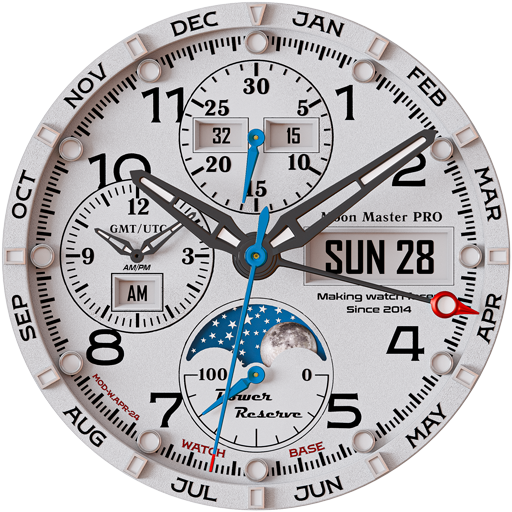
Moon Master PRO
A classic look with beautiful Moon phases and GMT clock!
- Installs
- 9.06K
- Measured
- Rating
- 3.83
- Ratings
- 198
- 11 reviews
- Version
- Varies with device
- Updated 28 Oct 2026
- Released
- 17 Apr 2024
- Tracked since 14 May 2026
- Size
- —
Screenshots



About Moon Master PRO
The description on the store listing
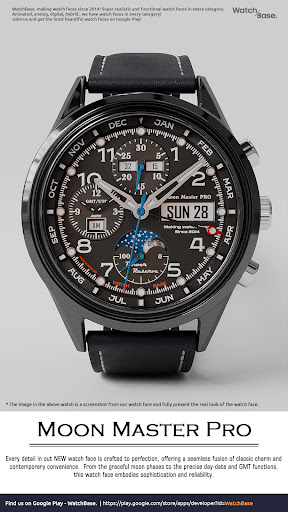
Amazing classic look, BIG Moon phases + PHOTO moon phases, GMT clock and super realistic and detailed design!
A must-have analog watch face for Wear OS enthusiasts.
NOTE: Please read the how to section and installation section and check out the images !!!
ⓘ Features:
- Classic design.
- Moon phases.
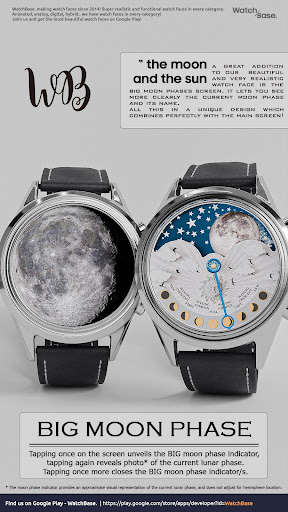
- BIG Moon phases.
- Photo moon phases.
- Day, Date, Month.
- Battery Indicator.
- GMT Clock.
- 30 Sec. indicator.
- 6 different color themes.
- SUPER Realistic!
- Moon-phase indicator.
- Always On Display.
ⓘ How to:
- To open the BIG Moon phase screen, tap once on the screen, tap once again to reveal photo of the Moon phase, tap once more to close the BIG Moon …
Read the full description
Amazing classic look, BIG Moon phases + PHOTO moon phases, GMT clock and super realistic and detailed design! A must-have analog watch face for Wear OS enthusiasts. NOTE: Please read the how to section and installation section and check out the images !!! ⓘ Features: - Classic design. - Moon phases. - BIG Moon phases. - Photo moon phases. - Day, Date, Month. - Battery Indicator. - GMT Clock. - 30 Sec. indicator. - 6 different color themes. - SUPER Realistic! - Moon-phase indicator. - Always On Display. ⓘ How to: - To open the BIG Moon phase screen, tap once on the screen, tap once again to reveal photo of the Moon phase, tap once more to close the BIG Moon phases screen. - To customize your watch face, touch and hold on the screen, then tap on customize. Don't miss out our top REALISTIC watch faces: Milirary ZULU Tactical - https://play.google.com/store/apps/details?id=wb.military.zulu Tourbillon Aquamarine - https://play.google.com/store/apps/details?id=wb.tourbillon.aquamarine LUNA BENEDICTA - https://play.google.com/store/apps/details?id=wb.luna.benedicta Harmony GT Premium - https://play.google.com/store/apps/details?id=wb.harmony.gt Classic GMT President - https://play.google.com/store/apps/details?id=wb.classic.gmt VOYAGER WorldTimer - https://play.google.com/store/apps/details?id=wb.voyager.automatic Analog Master - https://play.google.com/store/apps/details?id=wb.analog.master ⓘ Installation How to install: https://watchbase.store/static/ai/ After installation: https://watchbase.store/static/ai/ai.html * Luna Benedicta watch face shown in "How to install" and "After installation". The same installation process is valid for all of our watch faces. If you have any issues installing the watch face, please note that we have no control over the installation process or any other Google Play / Watch processes. The most common issue that people face is after they buy the watch face and install it, they can't see/find it. In order to apply the watch face after you install it, touch and hold on the main screen (your current watch face) the swipe left to look for it. If you can't see it, tap on the " + " sign at the end (add a watch face) and find our watch face there. We use a companion app for the phone to make the installation process easier. If you buy our watch face, tap on the install button (on the phone app) you must check your watch.. a screen will appear with the watch face.. tap install again and wait for the installation to finish. If you already bought the watch face and it still asks you to buy it again on the watch, don't worry you will not be charged twice. This is a common synchronization issue, just wait a little or try to restart your watch. Another solution for installing the watch face is to try to install it from a browser, logged with your account (google play account that you use on the watch). ⓘ Note: If you encounter any issues during installation, please refer to our comprehensive guide or contact our support team for assistance. We're here to ensure your experience with our watch faces is seamless and enjoyable. ⓘ 30 seconds indicator (top subdial): - The 30-second subdial indicator counts 30-second intervals (rotates twice per minute) with additional left/right digital counting for 0-30/30-60 seconds. ⓘ Moon phases: * The moon phase indicator provides an approximate visual representation of the current lunar phase, and does not adjust for hemisphere location. JOIN WatchBase. Facebook group (General watch faces group): https://www.facebook.com/groups/1170256566402887/ Facebook page: https://www.facebook.com/WatchBase Instagram: https://www.instagram.com/watch.base/ SUBSCRIBE to our YouTube channel: https://www.youtube.com/c/WATCHBASE?sub_confirmation=1 https://www.youtube.com/c/WATCHBASE
Installs since 29 Aug 2026 Measured
Exact Google Play install counts, collected daily
Ratings
198 ratings, 11 reviews
- 5 ★44%
- 4 ★29%
- 3 ★5.9%
- 2 ★2.7%
- 1 ★18%
Recent reviews
Latest public reviews from the store
- 21 Nov 2025
Very nice watch face and one of the few that shows the moon phase as shown in Southern Hemeishere. The developer has revised this watch moon phases to reflect the view from our part of the world, bar the photo of the moon, but is due to some limitations, otherwise the phase shown by the hand is now correct
- 31 Oct 2025
After the update, it is no longer visible Big Moon face. What happened? It was the best option among other watch faces.
- 8 Sep 2025
Very nice watch face. But i have found a "bug" that I hope can be fixed. The white and black faces are OK. However, the other colors have the "Dec" tab highlighted in red. This should not be the case as the month is designated by the pointer and not by a color change. The black and white faces are correct. I really like this face, and I really like the alternate colors. But this little "bug" bugs me!! I hope it can be corrected.
- 6 Sep 2025
nice watch face! installation was easy!
What reviewers bring up
Topics mentioned in the latest 24 reviews, by how many reviews mention them
Liked in good reviews (14 reviews)
- face 7
- watch 6
- moon 4
- beautiful 3
- correct 2
- colors 2
- change 2
- other 2
Raised in bad reviews (8 reviews)
- install 3
- thought 2
- modify 2
- that's 2
- money 2
- once 2
Top chart positions
Latest Google Play chart ranks by country, last 10 days
Not in any tracked top chart in the last 10 days.
Moon Master PRO history
Release, install milestones, listing and store changes
- Reached 5,000+ installs 26 Apr 2025
- Reached 1,000+ installs 21 May 2024
- Reached 500+ installs 7 May 2024
- First released on the store 17 Apr 2024
Recent versions
Current version Varies with device
- Version 6.029 Oct 2025
- Version 5.029 Mar 2025
Listing keywords
Words and phrases Moon Master PRO repeats most in its store listing
Top phrases: watch face (13), moon phases (8), big moon (4), moon phase (4), watch faces (4).
Highlighted words also appear in the title. Counts cover the title, short description and description.
Business model and tech
From the store listing and declared permissions
- Business model
- Paid, $1.99
- Sensitive access
- No sensitive permission declared
Compliance
What the listing and the app package show
- Store status
- Live
- Upkeep
- Updated 28 Oct 2026
- Registered in
- Bulgaria
- Privacy policy
- Linked on the listing
- Advertising
- No ads declared
- In-app purchases
- None declared
- Age rating
- Everyone
Apps like Moon Master PRO
NBA Basketball WallpaperAngga Developer12.3K installs★ 4.75
Black Live WallpaperMy Live Wallpapers19.9K installs★ 4.33
Wallpapers for Asus 4K7Fon Wallpapers Apps32K installs★ 4.0
Hebrew Keyboard: Easy TypingMultilingual Keyboard Apps9.5K installs★ 4.36
Live Lion Wallpapers - 4KSoko Apps5K installs★ 4.83
Shimeji:My Desktop Pet FriendkevinAI43K installs★ 2.91
Anime Live Wallpapers HD - 4KJunior Z Apps19.5K installs★ 3.91
Flowers Transparent ThemeTheme Design Apps for Android29.6K installs★ 5.0
Doodle Neon Hearts Keyboard ThStylish Emoji keyboard Theme22.4K installs★ 4.54
Moon Master PRO: questions and answers
How many downloads does Moon Master PRO have?
Moon Master PRO has 9,056 installs on Google Play, measured from the store's own count on 14 Nov 2026.
Who makes Moon Master PRO?
Moon Master PRO is published by WatchBase, a developer based in BG.
When was Moon Master PRO last updated?
The latest version (Varies with device) was released on 28 Oct 2026.
Is Moon Master PRO free?
No. Moon Master PRO is a paid app priced at $1.99.
Is Moon Master PRO still available?
Yes. Moon Master PRO is live on Google Play as of 14 Nov 2026.
Track Moon Master PRO and its competitors
Watch any app for new versions, rating drops, chart moves and removals. Free plan, no card.