
Mouse & Screen Cursor Touchpad
Customize cursor on screen touchpad to use big screen by one hand
- Installs
- 122K
- Measured
- Rating
- 3.79
- Ratings
- 812
- 16 reviews
- Version
- 2.0.2
- Updated 27 Aug 2026
- Released
- 17 Aug 2023
- Tracked since 13 May 2026
- Size
- —
Screenshots
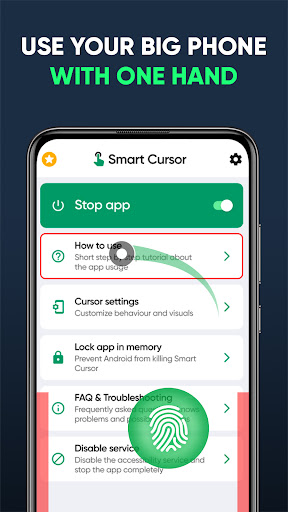


About Mouse & Screen Cursor Touchpad
The description on the store listing
Introducing our innovative application designed to enhance your smartphone experience like never before. Say goodbye to the hassle of juggling your large device with both hands – our app brings you unparalleled convenience by enabling effortless one-handed control of your smartphone by putting mouse cursor for android phone on your screen. Upgrade your smartphone experience with the convenience of a computer-like cursor/pointer. Effortlessly navigate through your device, all while holding it securely in one hand. No more struggling to reach every corner of the screen - this user-friendly interface allows for seamless control and enhanced usability. Simplify your mobile tasks with a single …
Read the full description
Introducing our innovative application designed to enhance your smartphone experience like never before. Say goodbye to the hassle of juggling your large device with both hands – our app brings you unparalleled convenience by enabling effortless one-handed control of your smartphone by putting mouse cursor for android phone on your screen. Upgrade your smartphone experience with the convenience of a computer-like cursor/pointer. Effortlessly navigate through your device, all while holding it securely in one hand. No more struggling to reach every corner of the screen - this user-friendly interface allows for seamless control and enhanced usability. Simplify your mobile tasks with a single hand, without compromising on efficiency or precision. Just put a cursor on a touchscreen. Navigating your big screen will be much easier with touchpad for big phone and tab. Our app's intuitive interface empowers you to access all your favorite features and apps using just one hand, making multitasking on the go a breeze. Whether you're sending messages, browsing the web, or enjoying multimedia content, you'll experience newfound freedom and comfort. Cursor for android phone is a must for every big screen nowadays. How to use on screen cursor for android: 📱 Initiate seamless actions by swiping along the left or right edge of the lower half of your screen. 📱 Effortlessly access the upper screen region with a single hand by smoothly moving the cursor using the tracker located in the lower half. 📱 Easily click using the cursor by tapping on the tracker. The tracker will vanish either when clicked outside or after a set duration. Key Features of Touchpad Mouse app: 📱 Seamless One-Handed Control - userful mouse cursor for android phone: Effortlessly reach all corners of your screen without straining your fingers or compromising your grip. 👆 Snap-to-Click Functionality: As you maneuver the cursor, noticeable highlighting will identify clickable buttons. The intelligent cursor also discerns your intended button selection. Once the button is highlighted, a simple tap on the tracker executes a click action. This feature significantly enhances accuracy when interacting with diminutive buttons. 📌 Instant Settings Tile: For the utmost convenience in activating or deactivating the cursor, you have the option to include the Smart Cursor tile within your Quick Settings panel. 🌐 Intuitive Gesture Navigation: Swiftly navigate through your device using intuitive swipe and tap gestures, revolutionizing the way you interact with your smartphone. Touchpad for big phone and tab is easy to use and install. 🔒 Secure and Customizable: Tailor the app to your preferences with customizable gesture settings, ensuring your personal data and interactions remain secure and tailored to your unique needs. Cursor for android phone does not require any of your personal data. 🎨 Sleek Design: Smart Cursor on screen app seamlessly integrates into your device's interface, preserving the aesthetics you love while enhancing usability. Accessibility Service Requirement: Prior to utilizing Smart Cursor, it is necessary to activate its Accessibility Service. This application solely employs this service to enable its core functions. The ensuing permissions are requisite: 🔒 Screen Observation and Control: To accentuate buttons available for interaction To identify the active application window (utilized for blacklist feature) 🔒 Visual Monitoring and Action Execution: To execute cursor-based click and swipe gestures
Installs since 29 Aug 2026 Measured
Exact Google Play install counts, collected daily
Ratings
812 ratings, 16 reviews
- 5 ★66%
- 4 ★14%
- 3 ★10%
- 2 ★6.9%
- 1 ★3.4%
Recent reviews
Latest public reviews from the store
- 26 Sep 2025
Opl
- 14 Jul 2025
this is worst app in the world
- 30 Dec 2024
SvMSUNG
- 4 Jul 2024
it helps and save me from stressing to see things on phone and make it bold on screen TV
What reviewers bring up
Topics mentioned in the latest 50 reviews, by how many reviews mention them
Liked in good reviews (13 reviews)
No topic comes up twice.
Raised in bad reviews (35 reviews)
- pay 5
- cancel 4
- garbage 3
- hisense 3
- avoid 3
- subscription 2
- mistake 2
- bother 2
Top chart positions
Latest Google Play chart ranks by country, last 10 days
Not in any tracked top chart in the last 10 days.
Mouse & Screen Cursor Touchpad history
Release, install milestones, listing and store changes
- Reached 100,000+ installs 28 Apr 2026
- Reached 50,000+ installs 21 Apr 2025
- Reached 10,000+ installs 12 Feb 2024
- Reached 5,000+ installs 29 Jan 2024
- Reached 1,000+ installs 6 Nov 2023
- Reached 500+ installs 23 Oct 2023
- Reached 100+ installs 14 Sep 2023
- First released on the store 17 Aug 2023
Update frequency
How often Mouse & Screen Cursor Touchpad ships a new version, month by month
2 updates in the last 12 months. More often than most similar apps: they shipped a median of 1 updates in the same year.
Recent versions
Current version 2.0.2
- Version 2.0.227 Aug 2026
sdk, billing and ads update
- Version 2.0.01 Jun 2026
push + billing + ads update
- Version 1.730 Oct 2025
app update
- Version 1.614 Aug 2024
Listing keywords
Words and phrases Mouse & Screen Cursor Touchpad repeats most in its store listing
Top phrases: cursor for android (5), android phone (4), big screen (3), smart cursor (3), cursor on screen (2).
Highlighted words also appear in the title. Counts cover the title, short description and description.
Business model and tech
From the store listing and declared permissions
- Business model
- Free to downloadIn-app purchasesShows ads
- Subscriptions and payments
- Google Play billing
- Sensitive access
- Draws over other appsAdvertising ID
17 permissions
1 special access, 1 sensitive, 15 standard
- Draw over other appsSpecial access
- Show notificationsPOST_NOTIFICATIONSSensitive
- Ad attribution (Privacy Sandbox)ACCESS_ADSERVICES_ATTRIBUTIONStandard
- Ad topics (Privacy Sandbox)ACCESS_ADSERVICES_TOPICSStandard
- Read how it was installed (install referrer)BIND_GET_INSTALL_REFERRER_SERVICEStandard
- Read the advertising IDAD_IDStandard
- Read the advertising ID (Privacy Sandbox)ACCESS_ADSERVICES_AD_IDStandard
- Control vibrationStandard
- Keep the phone awakeStandard
- Run a foreground serviceFOREGROUND_SERVICEStandard
- Full internet accessStandard
- See network connectionsStandard
Compliance
What the listing and the app package show
- Store status
- Live
- Upkeep
- Updated 27 Aug 2026
- Registered in
- Australia
- Privacy policy
- Linked on the listing
- Advertising
- Shows ads
- In-app purchases
- Offered
- Age rating
- Everyone
- Sensitive permissions
- 1 sensitive, 1 special access of 17
- Location access
- No
- Camera and microphone
- Neither
Apps like Mouse & Screen Cursor Touchpad
Graffiti Battery Meter [WidgetTomoyuki Ono135K installs★ 4.46
Authenticator App - 2FAHoniry Xidoa799K installs★ 1.77
EasyBattery - Battery Managersteven he188K installs★ 4.44
Plant Identifier AI - CareAI Identifier Apps133K installs★ 4.32
How Long Widget - Time CounterRubén Mayayo195K installs★ 3.68
Aranet HomeSAF Tehnika A/S68.8K installs★ 4.79
RF Signal Tracker & DetectorMove More Solutions328K installs★ 2.68
LED Text ScrollerBlue Wave203K installs★ 3.5
Check VIN Number Lookup SearchCriminal Search Background4.6K installs★ 5.0
Mouse & Screen Cursor Touchpad: questions and answers
How many downloads does Mouse & Screen Cursor Touchpad have?
Mouse & Screen Cursor Touchpad has 121,893 installs on Google Play, measured from the store's own count on 15 Nov 2026.
Who makes Mouse & Screen Cursor Touchpad?
Mouse & Screen Cursor Touchpad is published by GREEN TECH SOLUTIONS, a developer based in AU.
When was Mouse & Screen Cursor Touchpad last updated?
The latest version (2.0.2) was released on 27 Aug 2026.
Is Mouse & Screen Cursor Touchpad free?
Yes. Mouse & Screen Cursor Touchpad is free to download and offers in-app purchases, and it shows ads.
Is Mouse & Screen Cursor Touchpad still available?
Yes. Mouse & Screen Cursor Touchpad is live on Google Play as of 15 Nov 2026.
Track Mouse & Screen Cursor Touchpad and its competitors
Watch any app for new versions, rating drops, chart moves and removals. Free plan, no card.