
My Computer Mobile Explorer
My Computer Theme Mobile File Explorer for Mobiles.It's a Advanced File Manager.
- Installs
- 4.14M
- Measured
- Rating
- 3.91
- Ratings
- 12.7K
- 79 reviews
- Version
- 2.0
- Updated 30 Aug 2019
- Released
- 27 Oct 2015
- Tracked since 13 May 2026
- Size
- 8 MB
- Needs 4.1
Screenshots




About My Computer Mobile Explorer
The description on the store listing
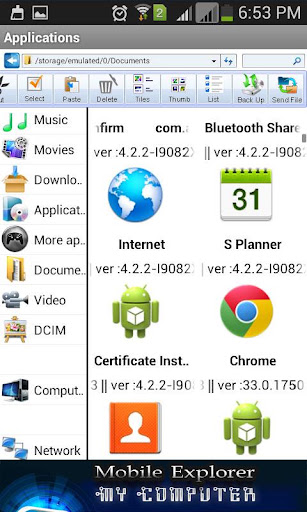
My Computer Theme Mobile File Explorer for your Mobiles.It's amazing feature like browse, cut, copy, paste, delete, send files.The File manger while browsing feels like your computer file explorer.You have an option for application manager and you can launch from this explorer,app search feature is there and also one touch to take all apps backup to the mobile.
So many feature are there in this Mobile Explorer.
* Quick to open Music, Picture, Videos, Documents, Download files by folder wise.
* Application Launcher with search fields.
* Net Work information from this app.
* Set different type of themes for "My Computer Mobile Explorer" with different type of text colors
* Create New …
Read the full description
My Computer Theme Mobile File Explorer for your Mobiles.It's amazing feature like browse, cut, copy, paste, delete, send files.The File manger while browsing feels like your computer file explorer.You have an option for application manager and you can launch from this explorer,app search feature is there and also one touch to take all apps backup to the mobile. So many feature are there in this Mobile Explorer. * Quick to open Music, Picture, Videos, Documents, Download files by folder wise. * Application Launcher with search fields. * Net Work information from this app. * Set different type of themes for "My Computer Mobile Explorer" with different type of text colors * Create New Folder/Directory, Search file option for your files. * Display Memory Space,available Space and also Shows number of file item.folder in folder including date of created folder. * Different type of explorer view like tiles,Thumbs,List like desktop folder view. * Cut, Copy, Paste, Delete, Info of all files. * Access to show hidden file explorer for this need to enable "Show Hidden Files/Folder".find this on menu and settings button * Different types of sorting for files browse. find this on menu and settings button. Additional Use Full Tools : * Scientific Calculator * Colors Wallpaper * Mobile Screen Recorder ( Video Capture) *3D Photo Cube * Hands Free Crop/Background Changer Tool for your photos * Text on Photo: 30 types of font styles and colors to add text on photo. * Crop Shapes: Now you can custom shapes crop for your pics.15 different types shapes to crop images. * Photo College & Photo editor for selected images, & also you can add stickers and text. * Dairy Note Pad : To create notes on dairy and easy to access dairy by date. * Text File Editor: You have an option to create text file from this create text tool. * Type in Indian Languages: Type in Telugu, Oriya, Bangla, Gujarati, Kannada, Malayalam, Tamil, Hindi, Punjabi, English. And also option to send your local language text. * PDF-Scanner: Convert your documents into high-quality PDF document. PDF Scanner Convert images to premium quality PDF & option to save, share and open Pdf.Its very easy to create your own book with your own pages. You can Scan documents with your mobile gallery images to PDF. * App Backup, Restore and Share: By using this feature you can take backup Apk and retrieve or restore when ever you want and also option to share app link or send Apk through email or Bluetooth. * Speed Dailer: You want quick dial selected contacts by using this you can create dailer shortcut on home screen with selected image and click shortcut to call. * Speed SMS :You want quick message selected contacts by using this you can create SMS shortcut on home screen with selected image and click shortcut to SMS. * Speak Time: You want to notify current time then you can activate this, by using this you will get alert by speaks current time, you have an option to selected interval to speaks time like every 15, 30 min's or 1 Hours & also you can activate day-mode to speaks time in day time only. * Quick Resumes: You can prepare or make bio-data or resumes by using this with very quick.3 types of formats are there Basic,Experienced, Professional type.This one is very important and useful, every time you want carry your PC by using this you can make it. * Gif Maker: Create Gif animation file from selected Images.option to crop different shape your selected images to make gif and also option to share, open gif files. * Image Blur: Blur Selected image with finger touch on photo, Option to select photo . * Doodle Paint: Glow paint on canvas with doodle effects with different colours and also option to save, share and easy to open your creation. * Compass: Compass tool for your mobile. * Video/Audio/Mp3/Movies Shortcut for Home screen * Text to Speak, Speak Reminder, Text to Audio/Mp3 Tool So many feature are please find while using this mobile explorer.
Installs, last 30 days Measured
Exact Google Play install counts, collected daily
Ratings
12,678 ratings, 79 reviews
- 5 ★60%
- 4 ★11%
- 3 ★6.0%
- 2 ★6.0%
- 1 ★17%
Recent reviews
Latest public reviews from the store
- 7 Jan 2024
Very nice
- 1 Mar 2021
Wonderful application
- 10 Feb 2021
Nice application to use..
- 11 Oct 2015
how can I get 2016 calender in advance?
What reviewers bring up
Topics mentioned in the latest 50 reviews, by how many reviews mention them
Liked in good reviews (39 reviews)
- application 2
- photo 2
Raised in bad reviews (10 reviews)
- pic 2
Top chart positions
Latest Google Play chart ranks by country, last 10 days
Not in any tracked top chart in the last 10 days.
My Computer Mobile Explorer history
Release, install milestones, listing and store changes
- Reached 1,000,000+ installs 11 Jan 2017
- Reached 500,000+ installs 27 Sep 2016
- Reached 100,000+ installs 28 Jan 2016
- Reached 50,000+ installs 16 Dec 2015
- Reached 10,000+ installs 22 Nov 2015
- First released on the store 27 Oct 2015
Update frequency
How often My Computer Mobile Explorer ships a new version, month by month
0 updates in the last 12 months. Less often than most similar apps: they shipped a median of 2 updates in the same year.
Recent versions
Current version 2.0
- Version 2.026 Nov 2016
New Option * Screen Recorder * Scientific Calculator * 3D Photo Cube * Colors Wallpaper * Video/Audio/MP3/Movies File Shortcuts to home screen * Hands Free Crop Toll / Background Changer * Text to MP3 Audio Maker * My Name Ringtone maker Updated Options: * Text to speak * Speak Reminder * Blur Photo Editor * Gif Maker * Speak Reminder by your text * Pdf Scanner * SMS/Dial Shortcut * App Backup/Restore/Share * Text on Photo * Bugs Resolved
- Version 1.024 Jun 2016
Listing keywords
Words and phrases My Computer Mobile Explorer repeats most in its store listing
Top phrases: file explorer (4), mobile explorer (4), different type (3), home screen (3), selected image (3).
Highlighted words also appear in the title. Counts cover the title, short description and description.
Business model and tech
From the store listing, the SDKs in the app package and its declared permissions
- Business model
- Free to downloadShows ads
- Built with
- No cross-platform framework or game engine detected
- Ad networks (1)
- AdMob
- Sensitive access
- MicrophoneContactsPhotos, videos and files
1 ad, attribution and analytics SDKs detected. SDKs are read from the app package and permissions from the store listing, so code that loads later is not seen.
Technology
5 SDKs found in the app package
Ad network libraries
Development tools
Ad networks
Advertising and install-attribution SDKs found in the app package
- AdMob
17 permissions
1 special access, 4 sensitive, 12 standard
- Change system settingsSpecial access
- Record audioSensitive
- Read contactsSensitive
- Change or delete shared storageSensitive
- Read shared storageSensitive
- Add home screen shortcutsStandard
- Change audio settingsStandard
- Close other appsStandard
- Keep the phone awakeStandard
- Measure app storageStandard
- Open the status barStandard
- See running appsStandard
Compliance
What the listing and the app package show
- Store status
- Live
- Upkeep
- No update since 30 Aug 2019
- Registered in
- India
- Privacy policy
- Linked on the listing
- Advertising
- Shows ads
- In-app purchases
- None declared
- Age rating
- Everyone
- Sensitive permissions
- 4 sensitive, 1 special access of 17
- Location access
- No
- Camera and microphone
- Microphone
Apps like My Computer Mobile Explorer
Dish Install, Pointer & AlignInfoSofty251.5M installs★ 4.16
Tree Capitator ModMaps Mods Addons1M installs★ 3.46
智生活智生活科技股份有限公司1.3M installs★ 3.29
5G 4G FORCE LTE MODERK AppZia4.1M installs★ 3.84
USB OTG CHECKERbubble shooter game2.2M installs★ 4.38
ALFAISAL vpnALFAISALVPN2.1M installs★ 3.45
Simple Auto ClickerXIAOYANG3.7M installs★ 4.04
zFont Tool - Android Font ToolKhun Htetz Naing9.3M installs★ 3.04
Carrier Air ConditionerCentury Carrier Residential Air-conditioning1.9M installs★ 4.52
My Computer Mobile Explorer: questions and answers
How many downloads does My Computer Mobile Explorer have?
My Computer Mobile Explorer has 4,140,503 installs on Google Play, measured from the store's own count on 20 Nov 2026.
Who makes My Computer Mobile Explorer?
My Computer Mobile Explorer is published by ForU Naveen, a developer based in IN.
When was My Computer Mobile Explorer last updated?
The latest version (2.0) was released on 30 Aug 2019.
Is My Computer Mobile Explorer free?
Yes. My Computer Mobile Explorer is free to download, and it shows ads.
Is My Computer Mobile Explorer still available?
Yes. My Computer Mobile Explorer is live on Google Play as of 20 Nov 2026.
Track My Computer Mobile Explorer and its competitors
Watch any app for new versions, rating drops, chart moves and removals. Free plan, no card.